Acer Aspire 5920g

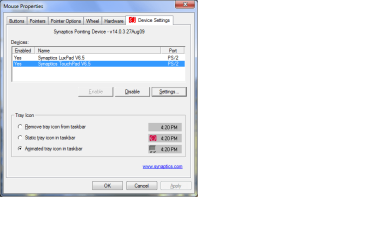
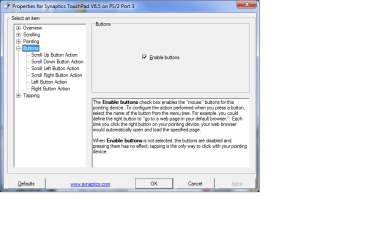
Ok installed that and still no joy. you say i need to configure the buttons. Where can i do that because there is no option for that in the synaptics settings, does your settings look like mine or do you have a tab called Acer Media Touch? Sorry to be a pain but this is just one of those silly things that is really annoying me that I can't figure out :mad:
 

Attachments

  • media key settings2.png
    media key settings2.png
    64.4 KB · Views: 627
  • media key settings3.png
    media key settings3.png
    74.9 KB · Views: 577

My Computer

Computer Manufacturer/Model Number
Acer aspire 5920g
OS
windows 7 ultimate 64 bit
CPU
T5750
Motherboard
?
Memory
4 GB DDR2
Graphics Card(s)
ati HD3470
Sound Card
Realtek on board
Launch manager is the software that handles the media keys ;)
 

My Computer

Computer Manufacturer/Model Number
Acer 6935G
OS
Windows 7 Ultimate 64-bit
CPU
Core 2 duo T6400 2.0ghz
Memory
3GB DDR3
Graphics Card(s)
Nvidia geforce 9600m (1791mb)
Sound Card
Realtek onboard
Internet Speed
10MB
Launch manager controls the www,email keys etc, but the play pause keys are controlled by the Synapics driver. I managed to get it working by installing the Windows 7 driver for the Aspire 5738 from here Acer Support - Drivers & Download and the Launch manager v2.0.02 and its working now. So thanks everyone for your ideas
 

My Computer

Computer Manufacturer/Model Number
Acer aspire 5920g
OS
windows 7 ultimate 64 bit
CPU
T5750
Motherboard
?
Memory
4 GB DDR2
Graphics Card(s)
ati HD3470
Sound Card
Realtek on board
Can somebody mark this solved?
 

My Computer

Computer Manufacturer/Model Number
Acer aspire 5920g
OS
windows 7 ultimate 64 bit
CPU
T5750
Motherboard
?
Memory
4 GB DDR2
Graphics Card(s)
ati HD3470
Sound Card
Realtek on board
Launch manager controls the www,email keys etc, but the play pause keys are controlled by the Synapics driver. I managed to get it working by installing the Windows 7 driver for the Aspire 5738 from here Acer Support - Drivers & Download and the Launch manager v2.0.02 and its working now. So thanks everyone for your ideas


Well Launch Manager handles all my media keys..volume/play etc i dont even have synapics driver installed yet.
 

My Computer

Computer Manufacturer/Model Number
Acer 6935G
OS
Windows 7 Ultimate 64-bit
CPU
Core 2 duo T6400 2.0ghz
Memory
3GB DDR3
Graphics Card(s)
Nvidia geforce 9600m (1791mb)
Sound Card
Realtek onboard
Internet Speed
10MB
Launch manager controls the www,email keys etc, but the play pause keys are controlled by the Synapics driver. I managed to get it working by installing the Windows 7 driver for the Aspire 5738 from here Acer Support - Drivers & Download and the Launch manager v2.0.02 and its working now. So thanks everyone for your ideas

FYI, it looks like a new "launch manager" (version 3.0.04) is available specifically for the 5920G and windows 7 64. (I haven't tried it yet.)
 

My Computer

OS
7
CPU
AMD Phenom II X4 920
Motherboard
DFI LANPARTY JR 790GX-M2RS
Memory
G.Skill PK 4GB (2x2GB) DDR2 PC2-8500C5
Graphics Card(s)
ASUS Radeon HD 3450
Screen Resolution
1680 x 1050 @ 60 Hz
Hard Drives
Hitachi Deskstar 750GB SATA-II
PSU
Enermax PRO82+ 525W
Case
Antec 3480
Keyboard
Logitech Cordless Desktop EX 110
Mouse
Logitech Cordless Desktop EX 110
Back
Top