Solved Acer Aspire thermal paste

Quick Grey Fox

New member
Local time
1:33 AM
Messages
12
Location
CT
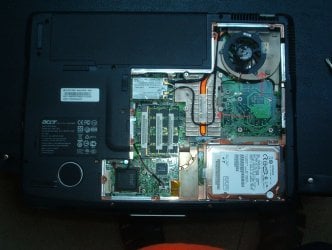
Recently I took my fan and heat sink out. After cleaning them I put them back. I am a novice (obviously) and never heard of heat paste until I was warned that I should have used it. I never saw any traces of any when I dismantled it so that thought never occurred to me.

I do have "CORE TEMP" installed and my laptop is running well well within the cool range. Should I go back in after purchasing some heat paste and apply it?
 

My Computer

Computer Manufacturer/Model Number
ACER ASPIRE 5920
OS
Windows 7
hello quick, welcome to the forums

Did you remove the CPU fan and heatsink or the chassis fan?

CoreTemp is measuring the processor temps so I doubt you pulled that apart. If you notice the laptop getting hotter than normal on your lap then you might take a second look at what you did have apart; it could have had a thermal pad instead of the paste.
 

My Computer

Computer Manufacturer/Model Number
My Build
OS
win7 Ult 64
CPU
i7 3930K & 3960X
Motherboard
ASUS P9X79 Deluxe
Memory
16GB G-Skill 2133MHz
Graphics Card(s)
Sapphire HD 7970
Sound Card
On-board
Monitor(s) Displays
ASUS 27 inch
Screen Resolution
1920X1080
Hard Drives
Crucial M4 256GB, 1.5TB WD Black for Data/Images
PSU
Corsair AX1200
Case
NZXT 810
Cooling
Custom Loop, Swiftech HDBlock
Keyboard
Mionix
Mouse
Mionix
Internet Speed
Cable
Should I go back in after purchasing some heat paste and apply it?
Yes
You can use a different brand but have a look here (Artic Silver is a good product)
Arctic Silver, Inc. - Intel® Application Methods
Don't apply too much!!!

You will need to clean the top of your CPU and heatsink Cooler. Use an Artic Silver type cleaner or high purity isopropyl alcohol (I think drug stores in the US sell it). ~99.5%+ purity. Paper coffee filters are excellent lint free cleaners.
 
Last edited:

My Computer

Computer type
PC/Desktop
Computer Manufacturer/Model Number
Own build
OS
Windows 7x64 Home Premium SP1
CPU
Intel i7 2600k
Motherboard
ASUS P8Z68 Deluxe
Memory
G.Skill Ripjaws (DDR3-1600) 2x4GB
Graphics Card(s)
Nvidia GeForce GTS 450; Intel HD Graphics 3000(GT2+)
Monitor(s) Displays
Dell Ultrasharp IPS panel U2311H, Samsung SyncMaster P2350
Screen Resolution
1920x1080
Hard Drives
Samsung 850 Pro SSD 256GB, Samsung SSD 840 120GB, Seagates 1TB Barracuda ST31000528AS x2
PSU
Seasonic M12II 520W
Case
Lian Li Lancool PC-K60
Cooling
Case: 1x120mm, 3x140mm CPU: Hyper 212+
Keyboard
Logitech MK520 (wireless)
Mouse
Logitech MK520
Internet Speed
6-7 Mbps
Antivirus
Norton Security Premium, Malwarebytes on 2 (MSE on 3rd PC)
Browser
FireFox
Other Info
Audio: Logitech Z523 2.1
Thanks guys...I know as much about hardware as I do my 3 exwives ...
that's why I'm divorced 3 times LOL

all I know is I took out a small fan and an "L" shaped heat sink with fins.

It was only a matter of a dozen or so screws altogether, so I guess I'll take
a better look. If I send u a pic will it help?
 

My Computer

Computer Manufacturer/Model Number
ACER ASPIRE 5920
OS
Windows 7
OK I didn't realize it was a laptop so I have not actually performed the exercise of reapplying thermal paste to the laptop just the Acer Aspire desktop. This service manual may assist:
tim.id.au/laptops/acer/aspire%205920g.pdf

I think the basic principles apply but a dozen screws seems on the high side. I would have thought the heatsink and fan assembly would come out as one piece.

Send a pic.
 

My Computer

Computer type
PC/Desktop
Computer Manufacturer/Model Number
Own build
OS
Windows 7x64 Home Premium SP1
CPU
Intel i7 2600k
Motherboard
ASUS P8Z68 Deluxe
Memory
G.Skill Ripjaws (DDR3-1600) 2x4GB
Graphics Card(s)
Nvidia GeForce GTS 450; Intel HD Graphics 3000(GT2+)
Monitor(s) Displays
Dell Ultrasharp IPS panel U2311H, Samsung SyncMaster P2350
Screen Resolution
1920x1080
Hard Drives
Samsung 850 Pro SSD 256GB, Samsung SSD 840 120GB, Seagates 1TB Barracuda ST31000528AS x2
PSU
Seasonic M12II 520W
Case
Lian Li Lancool PC-K60
Cooling
Case: 1x120mm, 3x140mm CPU: Hyper 212+
Keyboard
Logitech MK520 (wireless)
Mouse
Logitech MK520
Internet Speed
6-7 Mbps
Antivirus
Norton Security Premium, Malwarebytes on 2 (MSE on 3rd PC)
Browser
FireFox
Other Info
Audio: Logitech Z523 2.1
a dozen included those holding the back cover on LOL there were 3 for the fan and 5 for the "heat sink"...how do I send you a pic? I looked quickly thru the service manual but it doesn't seem to put any emphasis on the fan and heat sink.
 

My Computer

Computer Manufacturer/Model Number
ACER ASPIRE 5920
OS
Windows 7
Last edited:

My Computer

Computer type
PC/Desktop
Computer Manufacturer/Model Number
Home made Desktop
OS
Windows 10 Pro. 64/ version 1709 Windows 7 Pro/64
CPU
Intel i7-6800K @ 4.3
Motherboard
ASUS X-99 Deluxe II
Memory
Corsair Platinum 16 gig @2400
Graphics Card(s)
EVGA GTX 1070 OC
Monitor(s) Displays
Asus 27" LED LCD/VE278Q
Screen Resolution
1920-1080 or 1280-720 HDMI
Hard Drives
INTEL SSD 730-240 Gb Sata 3.0/
PSU
EVGA Platium 1200W
Case
Phanteks Luxe Tempered Glass 8 fans/ one radiator
Cooling
XSPC/ Water Cooled CPU
Keyboard
Das 4 Professional
Mouse
Logitech M705/MX Anywhere 2-S
Internet Speed
100 mbits
Antivirus
Microsoft Security Essentials/ Malwarebytes Premium 3.0/ SAS
Browser
I.E. 11 default/Firefox/ ISP Time Warner Cable/Spectrum
Other Info
LG BluRay Burner/
Sound system-KLipsch-THX/
Icy Dock ssd Hot Swap bays.
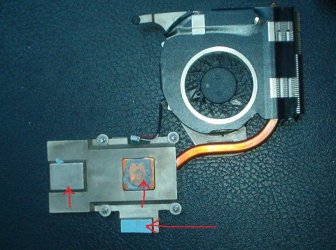
Thank you. Thanks to you and others the job is now complete.

Quite a little education for me.

Chet
 

My Computer

Computer Manufacturer/Model Number
ACER ASPIRE 5920
OS
Windows 7
Glad to hear it's a success Chet. I'm about to do an older Compaq laptop myself. You've given me motivation.
 
and special thanks to Greg who made me aware this stuff was even a consideration !

YOU'RE THE BEST !!!
 

Attachments

  • 001.JPG
    001.JPG
    252.9 KB · Views: 17
  • 003.JPG
    003.JPG
    107.6 KB · Views: 16

My Computer

Computer Manufacturer/Model Number
ACER ASPIRE 5920
OS
Windows 7
I posted a couple pics from where I needed to apply it. Once I knew to look for it, it was really fairly simple.
 

My Computer

Computer Manufacturer/Model Number
ACER ASPIRE 5920
OS
Windows 7
and I still have a long way to go...was just thinking today that computer hardware might be a thing I'd really enjoy...any advice?
 

My Computer

Computer Manufacturer/Model Number
ACER ASPIRE 5920
OS
Windows 7
Good, I can bring my hardware to you then. I avoid it whenever possible. I am a Win7 man.
 
LOL deal!
 

My Computer

Computer Manufacturer/Model Number
ACER ASPIRE 5920
OS
Windows 7
Glad to hear it's a success Chet. I'm about to do an older Compaq laptop myself. You've given me motivation.
Stand back folks. gregrocker with motivation could be dangerous.
 

My Computer

Computer type
PC/Desktop
Computer Manufacturer/Model Number
Home made Desktop
OS
Windows 10 Pro. 64/ version 1709 Windows 7 Pro/64
CPU
Intel i7-6800K @ 4.3
Motherboard
ASUS X-99 Deluxe II
Memory
Corsair Platinum 16 gig @2400
Graphics Card(s)
EVGA GTX 1070 OC
Monitor(s) Displays
Asus 27" LED LCD/VE278Q
Screen Resolution
1920-1080 or 1280-720 HDMI
Hard Drives
INTEL SSD 730-240 Gb Sata 3.0/
PSU
EVGA Platium 1200W
Case
Phanteks Luxe Tempered Glass 8 fans/ one radiator
Cooling
XSPC/ Water Cooled CPU
Keyboard
Das 4 Professional
Mouse
Logitech M705/MX Anywhere 2-S
Internet Speed
100 mbits
Antivirus
Microsoft Security Essentials/ Malwarebytes Premium 3.0/ SAS
Browser
I.E. 11 default/Firefox/ ISP Time Warner Cable/Spectrum
Other Info
LG BluRay Burner/
Sound system-KLipsch-THX/
Icy Dock ssd Hot Swap bays.
Naw, I feel right at home with the video tutorial I found where the guy gets frustrated and starts ranting while tearing the parts out.
 
Last edited:

My Computer

Computer type
PC/Desktop
Computer Manufacturer/Model Number
Own build
OS
Windows 7x64 Home Premium SP1
CPU
Intel i7 2600k
Motherboard
ASUS P8Z68 Deluxe
Memory
G.Skill Ripjaws (DDR3-1600) 2x4GB
Graphics Card(s)
Nvidia GeForce GTS 450; Intel HD Graphics 3000(GT2+)
Monitor(s) Displays
Dell Ultrasharp IPS panel U2311H, Samsung SyncMaster P2350
Screen Resolution
1920x1080
Hard Drives
Samsung 850 Pro SSD 256GB, Samsung SSD 840 120GB, Seagates 1TB Barracuda ST31000528AS x2
PSU
Seasonic M12II 520W
Case
Lian Li Lancool PC-K60
Cooling
Case: 1x120mm, 3x140mm CPU: Hyper 212+
Keyboard
Logitech MK520 (wireless)
Mouse
Logitech MK520
Internet Speed
6-7 Mbps
Antivirus
Norton Security Premium, Malwarebytes on 2 (MSE on 3rd PC)
Browser
FireFox
Other Info
Audio: Logitech Z523 2.1
Thank you. The paste I got was much much more fluid and I used it sparingly. I didn't have a lot of faith in that "instructor's" teachings
 

My Computer

Computer Manufacturer/Model Number
ACER ASPIRE 5920
OS
Windows 7
Back
Top