
Hi,
I have an Acer 5942G and recently had to reinstall Windows 7 Home Premium. This of course meant reinstalling all the drivers. All of them so far have installed without a hitch, except for one.
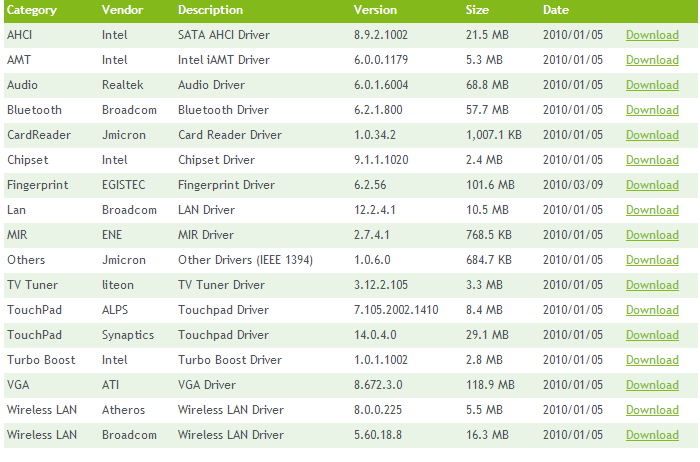
My laptop has a fingerprint reader, so I downloaded the drivers from here
Acer | Download
However when I go to install it the installsheild wizard just seems to hang on the "Acer Bio Protection is configuring your new software installation" part. It just stays like that forever, I even left it for just over an hour and nothing.

It is extremely frustrating and I cant seem to fix it no matter what I do. My "FingerPrinter Reader" does go from an unregognized device in Device Manager to "Secure Biometric Device", but that is all it seems to do.
Can anyone offer a solution?
Thanks
I have an Acer 5942G and recently had to reinstall Windows 7 Home Premium. This of course meant reinstalling all the drivers. All of them so far have installed without a hitch, except for one.
My laptop has a fingerprint reader, so I downloaded the drivers from here
Acer | Download
However when I go to install it the installsheild wizard just seems to hang on the "Acer Bio Protection is configuring your new software installation" part. It just stays like that forever, I even left it for just over an hour and nothing.
It is extremely frustrating and I cant seem to fix it no matter what I do. My "FingerPrinter Reader" does go from an unregognized device in Device Manager to "Secure Biometric Device", but that is all it seems to do.
Can anyone offer a solution?
Thanks
My Computer
At a glance
Windows 7 Home Premium x64
- Computer type
- Laptop
- OS
- Windows 7 Home Premium x64

 No idea how that worked but it did so that is all that matters

