Solved Acer HDD password. Cannot access HDD.

Leonfagan71

New member
Local time
10:15 PM
Messages
9
Hello Lovely people on the SevenForums,

I have an Acer laptop,
I set a HDD password for the laptop to stop family from accessing the laptop.
Now it was working fine until my Laptop died the other day (motherboard problem).
So, I brought the laptop drive to my work and plugged it in using a USB caddy,
this did not allow the disk to be read, now, the HDD password was in the headers of the drive so I would need to plug it into a SATA port on my computer for the drive to be read.
BUT, my work PC is not an Acer PC, the correct HDD password kept being marked as incorrect.

just incase someone states this: I've checked caps, the password always gets marked as incorrect.

This makes me think that my computer hashes my password in some way and then checks if the password unlocks the drive.

Now, I really need the data on the drive, or the HDD to work in HBCD just so I can do a disk copy to another drive.

Any help is massively appreciated.
 

My Computer

Computer type
PC/Desktop
Computer Manufacturer/Model Number
Unbranded
OS
windows 7 ultimate x64
CPU
3.2ghz
Motherboard
unknown
Memory
8GB
Graphics Card(s)
unknown
Hard Drives
2x1TB
2x250GB
Antivirus
ESET
Browser
Chrome, Firefox, Internet explorer
What model laptop and is it and was it the supervisor password in the bios that you set or something else?
 

My Computer

Computer type
PC/Desktop
Computer Manufacturer/Model Number
Custom
OS
10 Pro x64
CPU
Ryzen 9 3900X
Motherboard
Asrock x370 Tachi
Memory
64GB(4x16GB) DDR4
Graphics Card(s)
EVGA 1080ti FTW3
Sound Card
ASUS Xonar Essence STX (V4 Bursons), ODAC rev B, NFB-11, O2
Monitor(s) Displays
3xASUS PB278Q/R, Optoma HD142X
Screen Resolution
3x1440p, 1080p
Hard Drives
512GB 850 EVO(OS, Programs)
4TB (Movies)
3TB (Downloads)
3TB (Programs)
1TB HDD (Games)
2x6TB R1 (videos)
PSU
AX760
Case
Fractal Define R5
Cooling
NH-D15S
Keyboard
Massdrop Ctrl with Box Navy's
Mouse
G903, Alioth XXL Mat
Internet Speed
280/40
Antivirus
MBAM, ESET
Browser
Canary 64 Bit
Other Info
I also own a Thinkpad P50 Xeon 4K, X220T, X1C5
It was a Acer Aspire 5720.

Not the BIOS password, it was set in the BIOS but was the HDD password.

Cheers,
Leonfagan71
 

My Computer

Computer type
PC/Desktop
Computer Manufacturer/Model Number
Unbranded
OS
windows 7 ultimate x64
CPU
3.2ghz
Motherboard
unknown
Memory
8GB
Graphics Card(s)
unknown
Hard Drives
2x1TB
2x250GB
Antivirus
ESET
Browser
Chrome, Firefox, Internet explorer
It looks like the password is indeed saved in a header and you might only be able unlock it buy replacing your motherboard. It has to be done in same board type it was made. EDIT: when you put it in another pc does it actually show you a screen to put in a code?
 

My Computer

Computer type
PC/Desktop
Computer Manufacturer/Model Number
Custom
OS
10 Pro x64
CPU
Ryzen 9 3900X
Motherboard
Asrock x370 Tachi
Memory
64GB(4x16GB) DDR4
Graphics Card(s)
EVGA 1080ti FTW3
Sound Card
ASUS Xonar Essence STX (V4 Bursons), ODAC rev B, NFB-11, O2
Monitor(s) Displays
3xASUS PB278Q/R, Optoma HD142X
Screen Resolution
3x1440p, 1080p
Hard Drives
512GB 850 EVO(OS, Programs)
4TB (Movies)
3TB (Downloads)
3TB (Programs)
1TB HDD (Games)
2x6TB R1 (videos)
PSU
AX760
Case
Fractal Define R5
Cooling
NH-D15S
Keyboard
Massdrop Ctrl with Box Navy's
Mouse
G903, Alioth XXL Mat
Internet Speed
280/40
Antivirus
MBAM, ESET
Browser
Canary 64 Bit
Other Info
I also own a Thinkpad P50 Xeon 4K, X220T, X1C5
Okay, is there no way to remove the password from the drive without the motherboard.
 

My Computer

Computer type
PC/Desktop
Computer Manufacturer/Model Number
Unbranded
OS
windows 7 ultimate x64
CPU
3.2ghz
Motherboard
unknown
Memory
8GB
Graphics Card(s)
unknown
Hard Drives
2x1TB
2x250GB
Antivirus
ESET
Browser
Chrome, Firefox, Internet explorer
Okay, is there no way to remove the password from the drive without the motherboard.

There is a tool that does it, it is talked about in the service manual of many acer laptops, but you need the orginal hardware to finally unlock it I think. You don't have it locked now do you? when you put it in the pc at work you tried to boot off it and it asked you for the password then?
 

My Computer

Computer type
PC/Desktop
Computer Manufacturer/Model Number
Custom
OS
10 Pro x64
CPU
Ryzen 9 3900X
Motherboard
Asrock x370 Tachi
Memory
64GB(4x16GB) DDR4
Graphics Card(s)
EVGA 1080ti FTW3
Sound Card
ASUS Xonar Essence STX (V4 Bursons), ODAC rev B, NFB-11, O2
Monitor(s) Displays
3xASUS PB278Q/R, Optoma HD142X
Screen Resolution
3x1440p, 1080p
Hard Drives
512GB 850 EVO(OS, Programs)
4TB (Movies)
3TB (Downloads)
3TB (Programs)
1TB HDD (Games)
2x6TB R1 (videos)
PSU
AX760
Case
Fractal Define R5
Cooling
NH-D15S
Keyboard
Massdrop Ctrl with Box Navy's
Mouse
G903, Alioth XXL Mat
Internet Speed
280/40
Antivirus
MBAM, ESET
Browser
Canary 64 Bit
Other Info
I also own a Thinkpad P50 Xeon 4K, X220T, X1C5
Okay, is there no way to remove the password from the drive without the motherboard.

There is a tool that does it, it is talked about in the service manual of many acer laptops, but you need the orginal hardware to finally unlock it I think. You don't have it locked now do you? when you put it in the pc at work you tried to boot off it and it asked you for the password then?

Yep, I had it in my work PC and it asked for the password when trying to access the drive.
It is currently locked unfortunately.
 

My Computer

Computer type
PC/Desktop
Computer Manufacturer/Model Number
Unbranded
OS
windows 7 ultimate x64
CPU
3.2ghz
Motherboard
unknown
Memory
8GB
Graphics Card(s)
unknown
Hard Drives
2x1TB
2x250GB
Antivirus
ESET
Browser
Chrome, Firefox, Internet explorer
Okay, is there no way to remove the password from the drive without the motherboard.

There is a tool that does it, it is talked about in the service manual of many acer laptops, but you need the orginal hardware to finally unlock it I think. You don't have it locked now do you? when you put it in the pc at work you tried to boot off it and it asked you for the password then?

Yep, I had it in my work PC and it asked for the password when trying to access the drive.
It is currently locked unfortunately.

it gives you an error code with the lock out yes?
 

My Computer

Computer type
PC/Desktop
Computer Manufacturer/Model Number
Custom
OS
10 Pro x64
CPU
Ryzen 9 3900X
Motherboard
Asrock x370 Tachi
Memory
64GB(4x16GB) DDR4
Graphics Card(s)
EVGA 1080ti FTW3
Sound Card
ASUS Xonar Essence STX (V4 Bursons), ODAC rev B, NFB-11, O2
Monitor(s) Displays
3xASUS PB278Q/R, Optoma HD142X
Screen Resolution
3x1440p, 1080p
Hard Drives
512GB 850 EVO(OS, Programs)
4TB (Movies)
3TB (Downloads)
3TB (Programs)
1TB HDD (Games)
2x6TB R1 (videos)
PSU
AX760
Case
Fractal Define R5
Cooling
NH-D15S
Keyboard
Massdrop Ctrl with Box Navy's
Mouse
G903, Alioth XXL Mat
Internet Speed
280/40
Antivirus
MBAM, ESET
Browser
Canary 64 Bit
Other Info
I also own a Thinkpad P50 Xeon 4K, X220T, X1C5
There is a tool that does it, it is talked about in the service manual of many acer laptops, but you need the orginal hardware to finally unlock it I think. You don't have it locked now do you? when you put it in the pc at work you tried to boot off it and it asked you for the password then?

Yep, I had it in my work PC and it asked for the password when trying to access the drive.
It is currently locked unfortunately.

it gives you an error code with the lock out yes?
Yes,
It produces the Incorrect Password and after 5 times locks out
 

My Computer

Computer type
PC/Desktop
Computer Manufacturer/Model Number
Unbranded
OS
windows 7 ultimate x64
CPU
3.2ghz
Motherboard
unknown
Memory
8GB
Graphics Card(s)
unknown
Hard Drives
2x1TB
2x250GB
Antivirus
ESET
Browser
Chrome, Firefox, Internet explorer
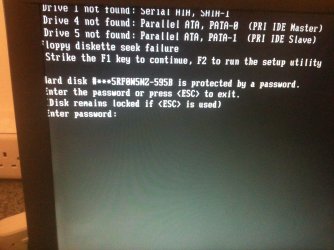
Can you post a picture of the unlock box that comes up and what it also shows once it locks you out please?
 

My Computer

Computer type
PC/Desktop
Computer Manufacturer/Model Number
Custom
OS
10 Pro x64
CPU
Ryzen 9 3900X
Motherboard
Asrock x370 Tachi
Memory
64GB(4x16GB) DDR4
Graphics Card(s)
EVGA 1080ti FTW3
Sound Card
ASUS Xonar Essence STX (V4 Bursons), ODAC rev B, NFB-11, O2
Monitor(s) Displays
3xASUS PB278Q/R, Optoma HD142X
Screen Resolution
3x1440p, 1080p
Hard Drives
512GB 850 EVO(OS, Programs)
4TB (Movies)
3TB (Downloads)
3TB (Programs)
1TB HDD (Games)
2x6TB R1 (videos)
PSU
AX760
Case
Fractal Define R5
Cooling
NH-D15S
Keyboard
Massdrop Ctrl with Box Navy's
Mouse
G903, Alioth XXL Mat
Internet Speed
280/40
Antivirus
MBAM, ESET
Browser
Canary 64 Bit
Other Info
I also own a Thinkpad P50 Xeon 4K, X220T, X1C5
As requested.
 

Attachments

  • asks for password.jpg
    asks for password.jpg
    1.3 MB · Views: 1
  • correct password states it's wrong.jpg
    correct password states it's wrong.jpg
    1.3 MB · Views: 1
  • lockout.jpg
    lockout.jpg
    1.2 MB · Views: 1

My Computer

Computer type
PC/Desktop
Computer Manufacturer/Model Number
Unbranded
OS
windows 7 ultimate x64
CPU
3.2ghz
Motherboard
unknown
Memory
8GB
Graphics Card(s)
unknown
Hard Drives
2x1TB
2x250GB
Antivirus
ESET
Browser
Chrome, Firefox, Internet explorer
Does this do anything if you use it as the code? Normally you need to use the code as shown below that the original motherboard generates.
du4fh8f

hdd+password+error+code.bmp
 

My Computer

Computer type
PC/Desktop
Computer Manufacturer/Model Number
Custom
OS
10 Pro x64
CPU
Ryzen 9 3900X
Motherboard
Asrock x370 Tachi
Memory
64GB(4x16GB) DDR4
Graphics Card(s)
EVGA 1080ti FTW3
Sound Card
ASUS Xonar Essence STX (V4 Bursons), ODAC rev B, NFB-11, O2
Monitor(s) Displays
3xASUS PB278Q/R, Optoma HD142X
Screen Resolution
3x1440p, 1080p
Hard Drives
512GB 850 EVO(OS, Programs)
4TB (Movies)
3TB (Downloads)
3TB (Programs)
1TB HDD (Games)
2x6TB R1 (videos)
PSU
AX760
Case
Fractal Define R5
Cooling
NH-D15S
Keyboard
Massdrop Ctrl with Box Navy's
Mouse
G903, Alioth XXL Mat
Internet Speed
280/40
Antivirus
MBAM, ESET
Browser
Canary 64 Bit
Other Info
I also own a Thinkpad P50 Xeon 4K, X220T, X1C5
Does this do anything if you use it as the code? Normally you need to use the code as shown below that the original motherboard generates.
du4fh8f

hdd+password+error+code.bmp

Nope, that was not coming up.
I did manage to fix it in the end,
I work in an IT repair shop so we had an acer in.
I tried it on there and it seemed to work. straight into the BIOS and security tab and removed the password.
I think the way Acer Aspire models check passwords must be the same and not motherboard specific.

Thank you for your help.

Cheers,
Leon
 

My Computer

Computer type
PC/Desktop
Computer Manufacturer/Model Number
Unbranded
OS
windows 7 ultimate x64
CPU
3.2ghz
Motherboard
unknown
Memory
8GB
Graphics Card(s)
unknown
Hard Drives
2x1TB
2x250GB
Antivirus
ESET
Browser
Chrome, Firefox, Internet explorer
No that would have worked but I was using your serial number of the drive and not the code the normal bios would give as it was the only thing in your picture, if you had another issue and had to get it unlocked in the same machine it would work if you use the right code.
Glad you got it all sorted though, i'v been down that route and it sucks.
 

My Computer

Computer type
PC/Desktop
Computer Manufacturer/Model Number
Custom
OS
10 Pro x64
CPU
Ryzen 9 3900X
Motherboard
Asrock x370 Tachi
Memory
64GB(4x16GB) DDR4
Graphics Card(s)
EVGA 1080ti FTW3
Sound Card
ASUS Xonar Essence STX (V4 Bursons), ODAC rev B, NFB-11, O2
Monitor(s) Displays
3xASUS PB278Q/R, Optoma HD142X
Screen Resolution
3x1440p, 1080p
Hard Drives
512GB 850 EVO(OS, Programs)
4TB (Movies)
3TB (Downloads)
3TB (Programs)
1TB HDD (Games)
2x6TB R1 (videos)
PSU
AX760
Case
Fractal Define R5
Cooling
NH-D15S
Keyboard
Massdrop Ctrl with Box Navy's
Mouse
G903, Alioth XXL Mat
Internet Speed
280/40
Antivirus
MBAM, ESET
Browser
Canary 64 Bit
Other Info
I also own a Thinkpad P50 Xeon 4K, X220T, X1C5
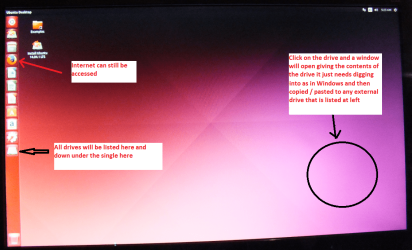
Just my two cents worth mate if you get stuck again use this to get data back if nothing else.

BOOTABLE UBUNTU

Make a bootable Ubuntu disk http://www.ubuntu.com/download

Set the BIOS to boot from the optical when themachine boots it will show you a screen with TRY or INSTALL >select TRY not INSTALL

When it is finished - it takes very little time youwill get a screen like in the pic .

Open the drive you want > User and dig downuntil you get to the data / settings you may be able to copy / paste thematerial you want to an external source or other installed drive doing this.

I am not sure if it will but I have recovered tonsof data etc using this method both on "dead" or just plain drivesthat you cannot get data from using Windows.
There is a Linux Mint MATE version but I use this one because I find it a tad quicker
 

Attachments

  • UBUNTU SCREEN X2.PNG
    UBUNTU SCREEN X2.PNG
    1.1 MB · Views: 2

My Computer

Computer type
PC/Desktop
Computer Manufacturer/Model Number
Own build (new) Desk1 / Asus ROG Win 7 / Desk2 1st build
OS
Desk1 7 Home Prem / Desk2 10 Pro / Main lap Asus ROG 10 Pro 2 laptop Toshiba 7 Pro Asus P2520 7 & 10
CPU
Desk1 i5 3750K / Laptop i7 GTX 860M / Desk2 i5 2500
Motherboard
Desk1 Asus P877-V / Desk2 Gigabyte H67 UD3H / Laptop ?
Memory
Desk1 8GB (1866) / Desk2 16GB (1333) / Laptop 8Gb DDR3
Graphics Card(s)
Desk 1& 2NVidia GTX 650 & Laptops on board Intel
Sound Card
Desk 1 & 2 -XONAR DG Realtek High Def audio Laptop
Monitor(s) Displays
Desk 1 Benq HD 2450 / Desk2 Philips 24" / Laptop 17.5"
Screen Resolution
1920x1080 D1 & D2 & Laptop 1
Hard Drives
Desk1 Samsung 120GB 830 SSD
Asus ROG 256GB 850 Pro SSD
Desk2 Samsung 840 256 SSD
Toshiba 120GB EVO
PSU
Desk 1 Corsair HX 1050/ Laptop ? / Desk 2 Corsair HX 650
Case
Desk 1 Cooler HAF XM ? Toshiba laptop / Desk2 Coolermaster
Cooling
Fans on all Desk1 -2 Desk2 - all Coolermasters 5 Laptop ?
Keyboard
Desk 1 MS Sidewinder X6 Desk 2 MS Sidewinder X 4
Mouse
Desk 1&2 - Gigabyte MS 900 gamer - laptop - Logitec wireless
Internet Speed
ADSL2+
Other Info
One other Desktop (tester) and spare Toshba laptop both with SSD's
Running Kaspersky 2016 ISS on all machines config'd identically
Logitec audio stereo systems on each machine (x3)
Canon MG5250MFC
Router/modem TP-Link running WPA2SK
Back
Top