Acer laptop sound not working

hanna1994

New member
Local time
12:42 PM
Messages
1
Hi there, I am a novice computer users, i dont know know much about the hardware etc. I have an ACER ASPIRE 5742 laptop and recently the sound has stopped working. It still works when i plug headphones, i think there is something wrong with the speakers. Can anyone advise me on what to do please? I am a student so i cant afford to get it repaired.
Thanks
 

My Computer My Computer

At a glance

windows 7 32bit
Computer type
PC/Desktop
OS
windows 7 32bit
Did the speaker just all of a sudden stop working? If so, this is rare as speakers are a relatively simple electromagnetic device. They usually just don't just break somehow and stop all of a sudden. This is probably another issue like hardware or driver related. Check the Device manager and see if there is anything amiss there ans see if you can restore the driver. I am guessing driver and not MB' hardware malfunction like the realtek audio chip or whatever audio manufacturer is on-board. since you said the headphones still work.
 

My Computer My Computer

At a glance

Windows 7 Ultimate x64AMD Phenom B55 3200MHz4GBOn Board
Computer type
PC/Desktop
Computer Manufacturer/Model Number
CUSTOM BUILD
OS
Windows 7 Ultimate x64
CPU
AMD Phenom B55 3200MHz
Motherboard
Gigabyte MA785GM-US2H
Memory
4GB
Graphics Card(s)
On Board
Sound Card
On Board 8.1 HD
Monitor(s) Displays
(1) Samsung 713N, (2) IBM Thinkvision
Screen Resolution
1280x1024
Hard Drives
Hitachi, Seagate, Maxtor
PSU
CoolerMaster
Case
CoolerMaster
Cooling
CoolerMaster Hyper 212+
Keyboard
Dell QuietKey
Mouse
Logitech
Internet Speed
20-40Mb/s
Antivirus
Kapersky
Browser
Waterfox, Chrome, Opera
I have a similar kind of situation

Hi Friends,

Today when i turned on my laptop all of a sudden there was No Windows Default sound. I just ignored it. After playing a couple of videos i realized that something is amiss.

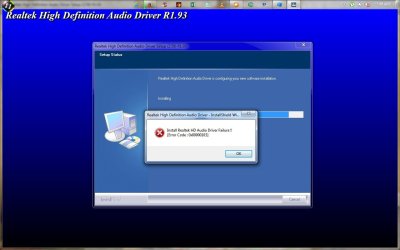
All of sudden the type of Device changed from the regular icon to DSF (something i can't see it now). So I did the usual thing that is reinstalling the drivers and keep getting the below error:

Audio.jpg

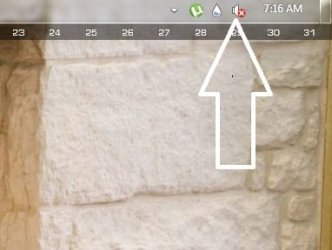
Now the sound icon looks like this:

Audio 1.jpg

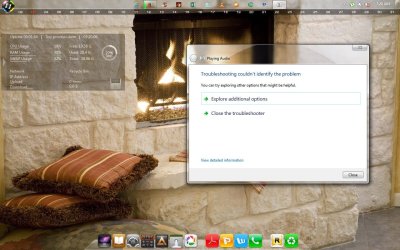
After trying the Windows Troubleshooter this is what I get:

Audio 2.jpg

So, i don't know now HOW TO FIX THIS SOUND PROBLEM.

System details:
Acer Aspire 4530
Windows 7 Business Edition x86
 

My Computer My Computer

At a glance

Windows 7 Ultimate
Computer type
Laptop
OS
Windows 7 Ultimate
Back
Top