

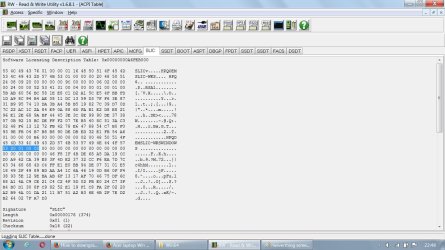
Ok I downloaded the portable version of rweverything and ran it. Then went to the Access drop down menu and selected ACPI Table. Then clicked the SLIC tab.
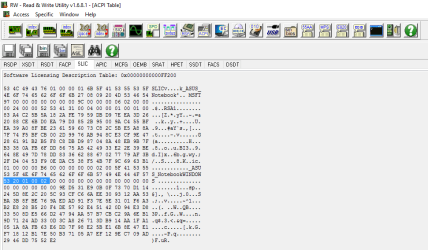
You can see mine lists ASUS Notebook. The 20 01 00 02 in blue means mine is version OA 2.1 which supports Windows 7. If it's 20 00 00 00 it's only version OA 2.0 which does not support Windows 7
You can see mine lists ASUS Notebook. The 20 01 00 02 in blue means mine is version OA 2.1 which supports Windows 7. If it's 20 00 00 00 it's only version OA 2.0 which does not support Windows 7
My Computer
At a glance
Windows 10 Education 64 bitAMD Phenom II X4 980 Black Edition Deneb 3.7GHz8GB 4GBx2 Kingston PC10600 DDR3 1333 MemoryZotac NVIDIA Geforce GT640 2 Gig DDR3 PCIe
- Computer type
- PC/Desktop
- Computer Manufacturer/Model Number
- Home Built
- OS
- Windows 10 Education 64 bit
- CPU
- AMD Phenom II X4 980 Black Edition Deneb 3.7GHz
- Motherboard
- Asus M4N68T-M V2 µATX Motherboard
- Memory
- 8GB 4GBx2 Kingston PC10600 DDR3 1333 Memory
- Graphics Card(s)
- Zotac NVIDIA Geforce GT640 2 Gig DDR3 PCIe
- Sound Card
- VIA VT1708s High Definition Audio 8-channel Onboard
- Monitor(s) Displays
- 22" LG E2242 1080p and 2 19" I-INC AG191D
- Screen Resolution
- 1280x1024 - 1920x1080 - 1280x1024
- Hard Drives
- Crucial M100 256 GB SSD and 500 GB WD Blue SATA
- PSU
- Thermaltake TR 620
- Case
- Power Up Black ATX Mid-Tower Case
- Cooling
- Stock heatsink and fan
- Keyboard
- Logitech Wireless K350 Wave
- Mouse
- Logitech Wireless M570 Trackman Wheel
- Internet Speed
- 80 Mbps Down 30 Mbps Up
- Antivirus
- Windows Defender
- Browser
- Internet Explorer 11
- Other Info
- HP DVD1040e Lightscribe - External USB2



 No other disadvantages are there? Besides eventually, we'll all have to upgrade anway when they stop supporting 7, won't we?


