
How do I reapply the failed updates upon Win 7 clean Install?

MDRI

New member
Member
VIP
Local time
9:23 AM
Messages
163
How do I reapply the failed updates upon Win 7 clean Install?
=============================================

Thanks for looking into my issue. I did clean install on my Lenovo Z580 using recovery CD. It is a long story.
You are welcome to review Win 7: Black screen on boot up, before login screen (Clean Install)?

Diagnostic Report (1.9.0027.0):
-----------------------------------------
Windows Validation Data-->

Validation Code: 0
Cached Online Validation Code: N/A, hr = 0xc004f012
Windows Product Key: *****-*****-JKHXW-D9W83-FJQKD
Windows Product Key Hash: AYaBykmfTHUVW5whGaYMeVJn0/U=
Windows Product ID: 00359-OEM-8992687-00249
Windows Product ID Type: 2
Windows License Type: OEM SLP
Windows OS version: 6.1.7601.2.00010300.1.0.003
ID: {C3FD13AC-68DD-4B39-AAA5-EB606E6C03AE}(1)
Is Admin: Yes
TestCab: 0x0
LegitcheckControl ActiveX: N/A, hr = 0x80070002
Signed By: N/A, hr = 0x80070002
Product Name: Windows 7 Home Premium
Architecture: 0x00000009
Build lab: 7601.win7sp1_gdr.150715-0600
TTS Error:
Validation Diagnostic:
Resolution Status: N/A

Vista WgaER Data-->
ThreatID(s): N/A, hr = 0x80070002
Version: N/A, hr = 0x80070002

Windows XP Notifications Data-->
Cached Result: N/A, hr = 0x80070002
File Exists: No
Version: N/A, hr = 0x80070002
WgaTray.exe Signed By: N/A, hr = 0x80070002
WgaLogon.dll Signed By: N/A, hr = 0x80070002

OGA Notifications Data-->
Cached Result: N/A, hr = 0x80070002
Version: N/A, hr = 0x80070002
OGAExec.exe Signed By: N/A, hr = 0x80070002
OGAAddin.dll Signed By: N/A, hr = 0x80070002

OGA Data-->
Office Status: 109 N/A
OGA Version: N/A, 0x80070002
Signed By: N/A, hr = 0x80070002
Office Diagnostics: 025D1FF3-364-80041010_025D1FF3-229-80041010_025D1FF3-230-1_025D1FF3-517-80040154_025D1FF3-237-80040154_025D1FF3-238-2_025D1FF3-244-80070002_025D1FF3-258-3

Browser Data-->
Proxy settings: N/A
User Agent: Mozilla/4.0 (compatible; MSIE 8.0; Win32)
Default Browser: C:\Program Files (x86)\Mozilla Firefox\firefox.exe
Download signed ActiveX controls: Prompt
Download unsigned ActiveX controls: Disabled
Run ActiveX controls and plug-ins: Allowed
Initialize and script ActiveX controls not marked as safe: Disabled
Allow scripting of Internet Explorer Webbrowser control: Disabled
Active scripting: Allowed
Script ActiveX controls marked as safe for scripting: Allowed

File Scan Data-->

Other data-->
Office Details: <GenuineResults><MachineData><UGUID>{C3FD13AC-68DD-4B39-AAA5-EB606E6C03AE}</UGUID><Version>1.9.0027.0</Version><OS>6.1.7601.2.00010300.1.0.003</OS><Architecture>x64</Architecture><PKey>*****-*****-*****-*****-FJQKD</PKey><PID>00359-OEM-8992687-00249</PID><PIDType>2</PIDType><SID>S-1-5-21-1612527054-2319589171-3008974643</SID><SYSTEM><Manufacturer>LENOVO</Manufacturer><Model>IdeaPad Z580 </Model></SYSTEM><BIOS><Manufacturer>LENOVO</Manufacturer><Version>5FCN27WW</Version><SMBIOSVersion major="2" minor="7"/><Date>20120326000000.000000+000</Date></BIOS><HWID>E6B53907018400FE</HWID><UserLCID>0409</UserLCID><SystemLCID>0409</SystemLCID><TimeZone>Eastern Standard Time(GMT-05:00)</TimeZone><iJoin>0</iJoin><SBID><stat>3</stat><msppid></msppid><name></name><model></model></SBID><OEM><OEMID>LENOVO</OEMID><OEMTableID>CB-01 </OEMTableID></OEM><GANotification/></MachineData><Software><Office><Result>109</Result><Products/><Applications/></Office></Software></GenuineResults>

Spsys.log Content: 0x80070002

Licensing Data-->
Software licensing service version: 6.1.7601.17514

Name: Windows(R) 7, HomePremium edition
Description: Windows Operating System - Windows(R) 7, OEM_SLP channel
Activation ID: d2c04e90-c3dd-4260-b0f3-f845f5d27d64
Application ID: 55c92734-d682-4d71-983e-d6ec3f16059f
Extended PID: 00359-00178-926-800249-02-1033-7601.0000-2482015
Installation ID: 021935552361135790118971334043300222156040351573372731
Processor Certificate URL: SpcService Web Service
Machine Certificate URL: RacService Web Service
Use License URL: UseLicenseService Web Service
Product Key Certificate URL: PkcService Web Service
Partial Product Key: FJQKD
License Status: Licensed
Remaining Windows rearm count: 2
Trusted time: 9/7/2015 12:07:50 PM

Windows Activation Technologies-->
HrOffline: 0x00000000
HrOnline: N/A
HealthStatus: 0x0000000000000000
Event Time Stamp: N/A
ActiveX: Registered, Version: 7.1.7600.16395
Admin Service: Registered, Version: 7.1.7600.16395
HealthStatus Bitmask Output:


HWID Data-->
HWID Hash Current: MAAAAAEAAQABAAEAAAABAAAABAABAAEAln1GSrIDLvLs/fSNzEKm5RxdVGpu+JZj

OEM Activation 1.0 Data-->
N/A

OEM Activation 2.0 Data-->
BIOS valid for OA 2.0: yes
Windows marker version: 0x20001
OEMID and OEMTableID Consistent: yes
BIOS Information:
ACPI Table Name OEMID Value OEMTableID Value
APIC LENOVO CB-01
FACP LENOVO CB-01
HPET LENOVO CB-01
MCFG LENOVO CB-01
SLIC LENOVO CB-01
SSDT LENOVO PtidDevc
ASF! LENOVO CB-01
SSDT LENOVO PtidDevc
UEFI LENOVO CB-01
UEFI LENOVO CB-01
POAT LENOVO CB-01
UEFI LENOVO CB-01
I was asked to post in this forum to resolve my win 7 update issues. Here is what I did so far.

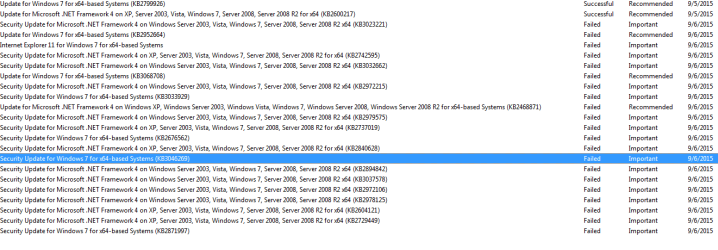
I find around 231 windows 7 updates failed. Here are some.

Update for Windows 7 for x64-based Systems (KB2952664) (Error details: Code 80246001)

Update for Windows 7 for x64-based Systems (KB3068708) ( Error details: Code 80246001)

Security Update for Windows 7 for x64-based Systems (KB3033929) ( Error details: Code 80246001)

Security Update for Windows 7 for x64-based Systems (KB2676562) ( Error details: Code 80246001)

Security Update for Windows 7 for x64-based Systems (KB3046269) (Error details: Code 80246001 )

Security Update for Microsoft .NET Framework 4 on XP, Server 2003, Vista, Windows 7, Server 2008, Server 2008 R2 for x64 (KB2742595) ( Error details: Code 80246001 )

..... list goes on

Screenshot attached.

I used the (To run a Windows Update troubleshooter) FIXED IT link from MSFT. It did not work.

As per GokAy, I did
First try few updates: See screenshot of Option 1 - Step 3 Windows Update - Hide or Restore Hidden Updates. Un-tick the box left of "Name" column. Then tick a few ones, click OK, and install.

Then try Option 2 - Windows Update - Reset, but best is to ask in http://www.sevenforums.com/windows-updates-activation/.
I am not able to get Copy Details/Hide Update options for Failed updates.

Option 2 ==> Restore update ==> Did not bring anything.

7. If this still does not help, then run the Microsoft Fix it tool here:

How do I reset Windows Update components? ===> Fixed some.

I am not able to restore/reapply the failed updates .

What to do? :geek:

Thanks for helping.

UPDATE:

As per posting instruction.

1) I installed System Update Readiness Tool (SURT) (Hotfix for Windows (KB947821))

2) C:\Windows\Logs\CBS>sfc /scannow

Beginning system scan. This process will take some time.
Beginning verification phase of system scan.
Verification 100% complete.
Windows Resource Protection did not find any integrity violations.

I am not able to attach Zipped CBS.log , because it is 21.4 MB in size. Let me know, how to get this one here.

3) I listed the error codes for failed update

I hope this helps.


Attachments
  • winupdate.png
    winupdate.png
    18.7 KB · Views: 1
Last edited:

My Computer My Computer

Computer type
Laptop
Computer Manufacturer/Model Number
Lenovo IdeaPad Z580, x64-based PC
OS
Win 7 64 bit, 6.1.7601 Service Pack 1 Build 7601
CPU
1 Processor(s) Installed. [01]: Intel64 Family 6 Model 58 St
Memory
8,056 MB
Graphics Card(s)
Intel HD 4000
Antivirus
Windows Security Essential
Browser
FireFox, Chrome
If the file is too large (8MB compressed), remove the older CBSPersist cab files until the final file is below the limit - you can always post them separately after zipping them. (the forum doesn't allow the upload of bare CAB files, for a number of reasons)

Please also post the C:\Windows\windowsudpate.log file
 

My Computer My Computer

Computer type
Laptop
Computer Manufacturer/Model Number
Asus K52F or Lenovo B51-80
OS
Win 7 x64 Home Premium (and x86 VirtualBox VM)/Win10
CPU
i3 370M/i7 6500U
Motherboard
Asus/Lenovo
Memory
8GB - finally :)/8GB
Graphics Card(s)
it's an i3, dude!/dual Intel&nVidia
Sound Card
onboard
Monitor(s) Displays
15.6" built-in
Screen Resolution
1366x768/1920x1080
Hard Drives
750GB Seagate internal
Sundry external drives attached to other computers on the local network
1TB SSD on the Lenovo
PSU
n/a
Internet Speed
as much as I can get - usually on a dongle/phone, so <1MB/s
Antivirus
MSE/Defender
Browser
IE11/12/Edge/Chrome/FF(if I must)
Thanks for your suggestion. I did follow your direction . I deleted all CBSPersist cab files. I ran sfc /scannow. I got
Code:
C:\Windows\Logs\CBS>sfc /scannow

Beginning system scan.  This process will take some time.

Beginning verification phase of system scan.
Verification 100% complete.

Windows Resource Protection did not find any integrity violations.

I still find a large CBS.log file (uncompressed 146 MB) compressed (8.94 MB) . I am attaching the windowsupdate log.

I uploaded the CBS file in onedrive. Here is the url

Let me know, whether that url worked :p

Thanks for helping.
 

Attachments

My Computer My Computer

Computer type
Laptop
Computer Manufacturer/Model Number
Lenovo IdeaPad Z580, x64-based PC
OS
Win 7 64 bit, 6.1.7601 Service Pack 1 Build 7601
CPU
1 Processor(s) Installed. [01]: Intel64 Family 6 Model 58 St
Memory
8,056 MB
Graphics Card(s)
Intel HD 4000
Antivirus
Windows Security Essential
Browser
FireFox, Chrome
Interesting... I tried accessing your url earlier using an iPhone - and it said it was a dead link! It works fine from a PC ;)
The windowsupdate log looks a bit of a mess, unfortunately - let's see if there's any problems obvious in the CBS data... simple answer is 'not a lot! :(

I don't see any results from the CheckSUR/SURT scan? please post the CheckSUR.log file from the CBS folder.
 

My Computer My Computer

Computer type
Laptop
Computer Manufacturer/Model Number
Asus K52F or Lenovo B51-80
OS
Win 7 x64 Home Premium (and x86 VirtualBox VM)/Win10
CPU
i3 370M/i7 6500U
Motherboard
Asus/Lenovo
Memory
8GB - finally :)/8GB
Graphics Card(s)
it's an i3, dude!/dual Intel&nVidia
Sound Card
onboard
Monitor(s) Displays
15.6" built-in
Screen Resolution
1366x768/1920x1080
Hard Drives
750GB Seagate internal
Sundry external drives attached to other computers on the local network
1TB SSD on the Lenovo
PSU
n/a
Internet Speed
as much as I can get - usually on a dongle/phone, so <1MB/s
Antivirus
MSE/Defender
Browser
IE11/12/Edge/Chrome/FF(if I must)
That is interesting. I am not sure, why mobile access to onedrive mislead you :( Here you go.

Code:
CheckSur.log

=================================
Checking System Update Readiness.
Binary Version 6.1.7601.22471
Package Version 26.0
2015-09-07 12:22

Checking Windows Servicing Packages

Checking Package Manifests and Catalogs

Checking Package Watchlist

Checking Component Watchlist

Checking Packages

Checking Component Store

Summary:
Seconds executed: 705
 No errors detected

Code:
CheckSUR.persist

=================================
Checking System Update Readiness.
Binary Version 6.1.7601.22471
Package Version 26.0
2015-09-07 12:22

Checking Windows Servicing Packages

Checking Package Manifests and Catalogs

Checking Package Watchlist

Checking Component Watchlist

Checking Packages

Checking Component Store

Summary:
Seconds executed: 705
 No errors detected

Code:
FilterList

 MpFilter               7               0
                                   luafv               1               0
                                FileInfo               7               0

I hope this helps.Let me know, if you have any questions. :geek:

Thanks for helping.
 

My Computer My Computer

Computer type
Laptop
Computer Manufacturer/Model Number
Lenovo IdeaPad Z580, x64-based PC
OS
Win 7 64 bit, 6.1.7601 Service Pack 1 Build 7601
CPU
1 Processor(s) Installed. [01]: Intel64 Family 6 Model 58 St
Memory
8,056 MB
Graphics Card(s)
Intel HD 4000
Antivirus
Windows Security Essential
Browser
FireFox, Chrome
There's nothing amiss there - which leaves me a little in the dark :(
PLease post the Event logs...

Open Event Viewer
click on the Windows logs entry in the left pane to expand it.
Now click on the Application entry - wait while it loads.
Click on 'File' in the menu bar and select Save...
Save the file as Appevt.evtx
Repeat for the System log
then zip both, and upload them.
 

My Computer My Computer

Computer type
Laptop
Computer Manufacturer/Model Number
Asus K52F or Lenovo B51-80
OS
Win 7 x64 Home Premium (and x86 VirtualBox VM)/Win10
CPU
i3 370M/i7 6500U
Motherboard
Asus/Lenovo
Memory
8GB - finally :)/8GB
Graphics Card(s)
it's an i3, dude!/dual Intel&nVidia
Sound Card
onboard
Monitor(s) Displays
15.6" built-in
Screen Resolution
1366x768/1920x1080
Hard Drives
750GB Seagate internal
Sundry external drives attached to other computers on the local network
1TB SSD on the Lenovo
PSU
n/a
Internet Speed
as much as I can get - usually on a dongle/phone, so <1MB/s
Antivirus
MSE/Defender
Browser
IE11/12/Edge/Chrome/FF(if I must)
Thanks. It looks weird. I downloaded the one of the failed update - Security Update for Windows 7 for x64-based Systems (KB3075226) (Error details: Code 80070308) manually. I run this update upon download.

It was successful. I am not sure why it failed earlier:confused:

As per your request, logs are attached as zipped folder for your diagnosis.

I hope this helps. Awaiting for next steps.

Thanks for helping.
 

Attachments

My Computer My Computer

Computer type
Laptop
Computer Manufacturer/Model Number
Lenovo IdeaPad Z580, x64-based PC
OS
Win 7 64 bit, 6.1.7601 Service Pack 1 Build 7601
CPU
1 Processor(s) Installed. [01]: Intel64 Family 6 Model 58 St
Memory
8,056 MB
Graphics Card(s)
Intel HD 4000
Antivirus
Windows Security Essential
Browser
FireFox, Chrome
You appear to be having what appears to be a common problem with Lenovo's - the NSDSvc is failing - this is part of Lenovo's Fast Boot Service.
The only cure appears to be to uninstall it.

It could be that this problem is inhibiting the System Restore service and blocking updates.
Lets see what effect uninstalling has, before we try anything else.
 

My Computer My Computer

Computer type
Laptop
Computer Manufacturer/Model Number
Asus K52F or Lenovo B51-80
OS
Win 7 x64 Home Premium (and x86 VirtualBox VM)/Win10
CPU
i3 370M/i7 6500U
Motherboard
Asus/Lenovo
Memory
8GB - finally :)/8GB
Graphics Card(s)
it's an i3, dude!/dual Intel&nVidia
Sound Card
onboard
Monitor(s) Displays
15.6" built-in
Screen Resolution
1366x768/1920x1080
Hard Drives
750GB Seagate internal
Sundry external drives attached to other computers on the local network
1TB SSD on the Lenovo
PSU
n/a
Internet Speed
as much as I can get - usually on a dongle/phone, so <1MB/s
Antivirus
MSE/Defender
Browser
IE11/12/Edge/Chrome/FF(if I must)
Thanks Noel, That is interesting.

what appears to be a common problem with Lenovo's - the NSDSvc is failing -
this is part of Lenovo's Fast Boot Service. The only cure appears to be to
uninstall it.

Are you suggesting uninstalling NSDSvc?

If it is failing, is it due to flaw in NSDSvc code/dll?

How do I get fixed NSDSvc code?

Did NSDSvc flaw contribute to my original issue (Black screen)?

Thanks for helping.
 

My Computer My Computer

Computer type
Laptop
Computer Manufacturer/Model Number
Lenovo IdeaPad Z580, x64-based PC
OS
Win 7 64 bit, 6.1.7601 Service Pack 1 Build 7601
CPU
1 Processor(s) Installed. [01]: Intel64 Family 6 Model 58 St
Memory
8,056 MB
Graphics Card(s)
Intel HD 4000
Antivirus
Windows Security Essential
Browser
FireFox, Chrome
You need to uninstall the Lenovo Fast Boot service
As I understand it, you *may* find an improved version in a download from the Lenovo site - but don't hold your breath!
Anything that produces errors with the sort of frequency that this has done is going to cause knock-on effects as it ties up process, HD and RAM significantly.

Are you running an a spindle hard drive, or an SSD?
 

My Computer My Computer

Computer type
Laptop
Computer Manufacturer/Model Number
Asus K52F or Lenovo B51-80
OS
Win 7 x64 Home Premium (and x86 VirtualBox VM)/Win10
CPU
i3 370M/i7 6500U
Motherboard
Asus/Lenovo
Memory
8GB - finally :)/8GB
Graphics Card(s)
it's an i3, dude!/dual Intel&nVidia
Sound Card
onboard
Monitor(s) Displays
15.6" built-in
Screen Resolution
1366x768/1920x1080
Hard Drives
750GB Seagate internal
Sundry external drives attached to other computers on the local network
1TB SSD on the Lenovo
PSU
n/a
Internet Speed
as much as I can get - usually on a dongle/phone, so <1MB/s
Antivirus
MSE/Defender
Browser
IE11/12/Edge/Chrome/FF(if I must)
Thanks Noel,

You need to uninstall the Lenovo Fast Boot service
As I understand it, you
*may* find an improved version in a download from the Lenovo site - but don't
hold your breath!
Anything that produces errors with the sort of frequency
that this has done is going to cause knock-on effects as it ties up process, HD
and RAM significantly.

My Z580 has a spindle hard drive.

I did search for "Lenovo Fast Boot service" in Lenovo site download area. I did not find any.

Is there any other names to look for?

How do I uninstall the Lenovo Fast Boot service?

Thanks for helping.
 

My Computer My Computer

Computer type
Laptop
Computer Manufacturer/Model Number
Lenovo IdeaPad Z580, x64-based PC
OS
Win 7 64 bit, 6.1.7601 Service Pack 1 Build 7601
CPU
1 Processor(s) Installed. [01]: Intel64 Family 6 Model 58 St
Memory
8,056 MB
Graphics Card(s)
Intel HD 4000
Antivirus
Windows Security Essential
Browser
FireFox, Chrome
Have a look in Programs & Features - look through the list there. I hope I got the name exactly right, but anything close to that should work.
 

My Computer My Computer

Computer type
Laptop
Computer Manufacturer/Model Number
Asus K52F or Lenovo B51-80
OS
Win 7 x64 Home Premium (and x86 VirtualBox VM)/Win10
CPU
i3 370M/i7 6500U
Motherboard
Asus/Lenovo
Memory
8GB - finally :)/8GB
Graphics Card(s)
it's an i3, dude!/dual Intel&nVidia
Sound Card
onboard
Monitor(s) Displays
15.6" built-in
Screen Resolution
1366x768/1920x1080
Hard Drives
750GB Seagate internal
Sundry external drives attached to other computers on the local network
1TB SSD on the Lenovo
PSU
n/a
Internet Speed
as much as I can get - usually on a dongle/phone, so <1MB/s
Antivirus
MSE/Defender
Browser
IE11/12/Edge/Chrome/FF(if I must)
Lenovo Fast Boot service might be a setting in the bios. I know nothing about Lenovo bios but doesn't cost nothing to look
if Lenovo doesn't have the bios locked.
 

My Computer My Computer

Computer type
PC/Desktop
Computer Manufacturer/Model Number
Home made Desktop
OS
Windows 10 Pro. 64/ version 1709 Windows 7 Pro/64
CPU
Intel i7-6800K @ 4.3
Motherboard
ASUS X-99 Deluxe II
Memory
Corsair Platinum 16 gig @2400
Graphics Card(s)
EVGA GTX 1070 OC
Monitor(s) Displays
Asus 27" LED LCD/VE278Q
Screen Resolution
1920-1080 or 1280-720 HDMI
Hard Drives
INTEL SSD 730-240 Gb Sata 3.0/
PSU
EVGA Platium 1200W
Case
Phanteks Luxe Tempered Glass 8 fans/ one radiator
Cooling
XSPC/ Water Cooled CPU
Keyboard
Das 4 Professional
Mouse
Logitech M705/MX Anywhere 2-S
Internet Speed
100 mbits
Antivirus
Microsoft Security Essentials/ Malwarebytes Premium 3.0/ SAS
Browser
I.E. 11 default/Firefox/ ISP Time Warner Cable/Spectrum
Other Info
LG BluRay Burner/
Sound system-KLipsch-THX/
Icy Dock ssd Hot Swap bays.

My Computer My Computer

Computer type
PC/Desktop
Computer Manufacturer/Model Number
Self Built
OS
Win 10 Pro x64
CPU
Intel I5-2500K @3.3GHz
Motherboard
Asrock P67 Extreme4
Memory
16GB G.Skill Ripjaws X (4x4GB)
Graphics Card(s)
EVGA GeForce 750 Ti SC 2GB
Sound Card
ASUS Xonar DG 5.1 Channels 24-bit 96KHz PCI Interface Sound
Monitor(s) Displays
auria eq2367
Screen Resolution
1920 x 1080
Hard Drives
250GB Samsung 850 EVO SSD
1TB WD Blue
1TB Hitachi
PSU
SeaSonic X 650W 80 Plus Gold
Case
Corsair Obsidian 750D
Cooling
Corsair H60, Three 140mm case fans
Keyboard
Logitech Wireless Keyboard K520
Mouse
Logitech Wireless Mouse M310
Internet Speed
Wave Broadband ~ 100 dn 5 up
Antivirus
Windows Defender, Malwarebytes Premium
Browser
Edge, IE11, Chrome
Other Info
Laptop specs: HP g7-1365dx /
CPU: AMD A6-3420M APU with Radeon(tm) HD Graphics /
RAM: Crucial 8Gb (2x4Gb) /
SSD: Crucial M4-CT128M4SSD2 ATA Device/ FW 000F /
GFX: AMD Radeon HD 6520G /
OS: Windows 10 Pro x64
Thanks for suggestions/help.


I find nsd 1.0.1.7 in my program & features list. I did search for latest download for NSD in lenovo site. I did not find any. There were couple of posts related to NSDSvc error in Lenovo forum. There is no solution to this issue in the posting either.


I did not see Lenovo Fast Boot service in bios. It list only boot drive order/priority. Where/how should it show up bios tab?

I did not find RapidBoot Shield in my program & features list.

Thanks for helping.
 

My Computer My Computer

Computer type
Laptop
Computer Manufacturer/Model Number
Lenovo IdeaPad Z580, x64-based PC
OS
Win 7 64 bit, 6.1.7601 Service Pack 1 Build 7601
CPU
1 Processor(s) Installed. [01]: Intel64 Family 6 Model 58 St
Memory
8,056 MB
Graphics Card(s)
Intel HD 4000
Antivirus
Windows Security Essential
Browser
FireFox, Chrome

My Computer My Computer

Computer type
Laptop
Computer Manufacturer/Model Number
Asus K52F or Lenovo B51-80
OS
Win 7 x64 Home Premium (and x86 VirtualBox VM)/Win10
CPU
i3 370M/i7 6500U
Motherboard
Asus/Lenovo
Memory
8GB - finally :)/8GB
Graphics Card(s)
it's an i3, dude!/dual Intel&nVidia
Sound Card
onboard
Monitor(s) Displays
15.6" built-in
Screen Resolution
1366x768/1920x1080
Hard Drives
750GB Seagate internal
Sundry external drives attached to other computers on the local network
1TB SSD on the Lenovo
PSU
n/a
Internet Speed
as much as I can get - usually on a dongle/phone, so <1MB/s
Antivirus
MSE/Defender
Browser
IE11/12/Edge/Chrome/FF(if I must)
Thanks Noel,

As per your suggestion, I open a thread in BSOD support. BSOD - upon Win 7 clean Install ?

I followed BSOD guidelines. If any thing missing, let me know.
 
Last edited:

My Computer My Computer

Computer type
Laptop
Computer Manufacturer/Model Number
Lenovo IdeaPad Z580, x64-based PC
OS
Win 7 64 bit, 6.1.7601 Service Pack 1 Build 7601
CPU
1 Processor(s) Installed. [01]: Intel64 Family 6 Model 58 St
Memory
8,056 MB
Graphics Card(s)
Intel HD 4000
Antivirus
Windows Security Essential
Browser
FireFox, Chrome
Back
Top