Solved Acer netbook-windows 7 and partitioning.

stephennity

Banned
Local time
3:07 AM
Messages
90
hi,

I have finally managed to set up an Acer netbook and have installed a new hard drive (160gb) and installed windows 7 on it...the thing I am wondering is if I need to partition the hard drive so that the operating system is in a different place...I tried to do this at the beginning of the install but it wouldn`t let me do that so at the moment I have everything on the same drive...does this matter ?

Hope somebody can help with this,

Thanks,
 

My Computer My Computer

At a glance

Windows 7 32 bit Home premium
OS
Windows 7 32 bit Home premium
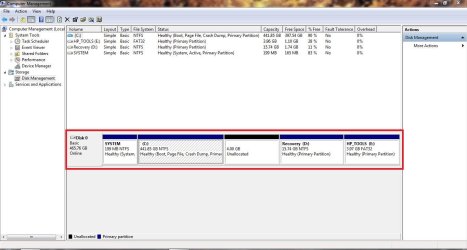
It will be fine having the operating system and your data on one disk, here is an example of my partitioning of my hard-drive (almost default partitioning from OEM) - see attachment

Could you please upload a screenshot of your maximised Disk Management window?
 

Attachments

  • Hard-Drive Partition Layout.JPG
    Hard-Drive Partition Layout.JPG
    94.8 KB · Views: 10

My Computer My Computer

Computer type
Laptop
Thanks for the reply...Yes of course, I will take and post a screen shot but it will be a little later on as I am using another computer right now and will need to go and open up the netbook...this thing I am using at the moment is very old.
 

My Computer My Computer

At a glance

Windows 7 32 bit Home premium
OS
Windows 7 32 bit Home premium
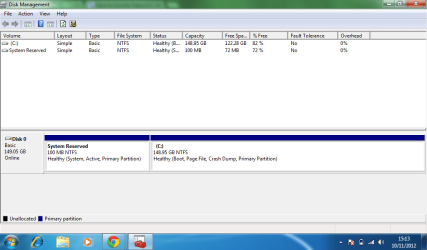
I hope I have managed to upload this correctly
 

Attachments

  • Capture.PNG
    Capture.PNG
    27.5 KB · Views: 7

My Computer My Computer

At a glance

Windows 7 32 bit Home premium
OS
Windows 7 32 bit Home premium
The partitioning of your hard-drive is fine, you have one root directory (partition where operating system is installed) and a System Reserved partition (Windows uses this to boot from).

The partitioning of your hard-drive is completely normal and you won't have any problems with your operating system and files being on one partition.
 

My Computer My Computer

Computer type
Laptop
Hi and thanks for taking the time to check this out for me...i appreciate it.
 

My Computer My Computer

At a glance

Windows 7 32 bit Home premium
OS
Windows 7 32 bit Home premium
If you missed it, it shows in steps 7/8 here when you should have gotten the chance to partition the drive as you wish during a booted install. Clean Install Windows 7

Absent doing this yourself, the installer will do it for you however.
 
Yes I recall this step but there was only the one drive and so i just left it alone...wisely !

thanks.
 

My Computer My Computer

At a glance

Windows 7 32 bit Home premium
OS
Windows 7 32 bit Home premium
Please mark this thread as solved.
Thanks!
 

My Computer My Computer

At a glance

N/A
OS
N/A
Yes...solved thanks.
 

My Computer My Computer

At a glance

Windows 7 32 bit Home premium
OS
Windows 7 32 bit Home premium
Back
Top