Acer Recovery

flawless

New member
Local time
7:34 AM
Messages
99
Hi. I used to have vista and when ever i wanted to restore to manufactorers settings i restarted my computer and then pressed alt+f10. Now i have installed windows 7 i am unable to do that as it does not bring up the screen it used to when i pressed alt + f10. Does anyone know how to get the previous screen back?

P.S I do not have the vista disc so i am unable to reinstall that and then do it.
the old screen said 'Restore to manufactorer settings' and 'restore from backup discs'
 

My Computer

Computer Manufacturer/Model Number
Acer
OS
Windows 7
CPU
Intel(R) Core(TM)2 Quad CPU Q9300 @ 2.50GHz 2.50 GHz
Memory
4 GB
Graphics Card(s)
GeForce GTX 470
Sound Card
Realtek Digital Output (Realtek High Definition Audio)
Monitor(s) Displays
24" samsung
Screen Resolution
1920 x 1080
Case
Aspire M7711
Keyboard
Razer Lycosa
Mouse
Logitech G9
Internet Speed
20 MB
When you installed Windows 7, it probably nuked your restore partition. I don't know of any way to get that back. Have you contacted Acer?
 

My Computer

Computer Manufacturer/Model Number
Dell XPS 15 L502x
OS
Windows 7 Ultimate x64 SP1
CPU
Core i7-2670QM
Memory
8GB DDR3 PC3-10600
Graphics Card(s)
Intel HD Graphics 3000 + GeForce GT 540M
Screen Resolution
1920x1080
Hard Drives
1TB 5400RPM Seagate
No, i only tryed to do it tonight (UK) so i can't call them atm.
 

My Computer

Computer Manufacturer/Model Number
Acer
OS
Windows 7
CPU
Intel(R) Core(TM)2 Quad CPU Q9300 @ 2.50GHz 2.50 GHz
Memory
4 GB
Graphics Card(s)
GeForce GTX 470
Sound Card
Realtek Digital Output (Realtek High Definition Audio)
Monitor(s) Displays
24" samsung
Screen Resolution
1920 x 1080
Case
Aspire M7711
Keyboard
Razer Lycosa
Mouse
Logitech G9
Internet Speed
20 MB
Acer will send you a free Recovery Disk set within 90 days of purchase, otherwise it is only shipping cost.

If you will go to Control Panel>Folder Options>View and unhide System FIles and Hidden Files, then browse the Recovery partition, you should be able to find the image file which can be mounted to install to another partition. If you want to post back the folder contents we can help you find it.

A better approach is to find a clean-copy DVD of Win7 to clean reinstall without the factory bloatware, using the Product Key on the COA stickered to your computer. We can help you unlock all version in any Win7 installer, and do the clean reinstall: http://www.sevenforums.com/tutorials/1649-clean-install-windows-7-a.html
 
Acer will send you a free Recovery Disk set within 90 days of purchase, otherwise it is only shipping cost.

If you will go to Control Panel>Folder Options>View and unhide System FIles and Hidden Files, then browse the Recovery partition, you should be able to find the image file which can be mounted to install to another partition. If you want to post back the folder contents we can help you find it.

A better approach is to find a clean-copy DVD of Win7 to clean reinstall without the factory bloatware, using the Product Key on the COA stickered to your computer. We can help you unlock all version in any Win7 installer, and do the clean reinstall: http://www.sevenforums.com/tutorials/1649-clean-install-windows-7-a.html

Where can i find the recovery partition?
 

My Computer

Computer Manufacturer/Model Number
Acer
OS
Windows 7
CPU
Intel(R) Core(TM)2 Quad CPU Q9300 @ 2.50GHz 2.50 GHz
Memory
4 GB
Graphics Card(s)
GeForce GTX 470
Sound Card
Realtek Digital Output (Realtek High Definition Audio)
Monitor(s) Displays
24" samsung
Screen Resolution
1920 x 1080
Case
Aspire M7711
Keyboard
Razer Lycosa
Mouse
Logitech G9
Internet Speed
20 MB
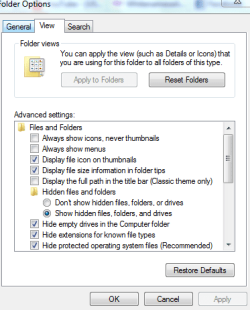
Unhide System Files and Hidden files at Control Panel>Folder Options:
Capture.PNG

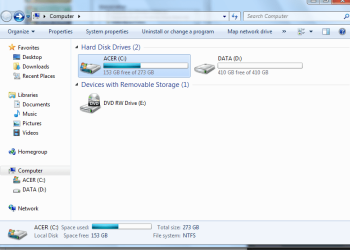
Now go Start orb>Computer and see if a Recovery partition shows up, or which partitions other than C:Win7 show up, post back a screenshot of their contents. If not a partition then you are looking for a folder named Recovery, so you can type that in Start Search box to start.

Use SNipping Tool in Start Menu to post back contents
 
Acer will send you a free Recovery Disk set within 90 days of purchase, otherwise it is only shipping cost.

If you will go to Control Panel>Folder Options>View and unhide System FIles and Hidden Files, then browse the Recovery partition, you should be able to find the image file which can be mounted to install to another partition. If you want to post back the folder contents we can help you find it.

A better approach is to find a clean-copy DVD of Win7 to clean reinstall without the factory bloatware, using the Product Key on the COA stickered to your computer. We can help you unlock all version in any Win7 installer, and do the clean reinstall: http://www.sevenforums.com/tutorials/1649-clean-install-windows-7-a.html

Where can i find the recovery partition?

It should in C:\Recovery

correct me if i'm wrong.
 

My Computer

Computer type
PC/Desktop
Computer Manufacturer/Model Number
Custom Build
OS
Windows 7 Professional SP1 - x64 [Non-UEFI Boot]
CPU
Ivy Bridge Core i5 3570K (Delidded)
Motherboard
Asus P8Z77-V LE PLUS
Memory
G.Skill "Ares" DDR3 PC3-12800 - 1600MHz (16Gb)
Graphics Card(s)
Asus Dual-RX480-O4G
Sound Card
Creative Sound Blaster Z w/5.1 sound system
Monitor(s) Displays
Asus IPS 23"
Screen Resolution
16/9
Hard Drives
Internal:
500Go Sata 6Gb/s (x2)
500Go Sata 3Gb/s (x2)
SSD 60Go Sata 6Gb/s
PSU
In Win C 900W Series 80+ Platinum
Case
Thermaltake Chaser A71
Cooling
Custom Water Cooling Loop
Keyboard
Cooler Master QuickFire XTi
Mouse
Razer Imperator 2012 (4G)
Antivirus
MSE
Browser
IE 11.0.xxx Rtm
Other Info
"Raid0" with Intel Smart Response Technology (HDD/SSD)
computer.PNG

That is all i have.
 

My Computer

Computer Manufacturer/Model Number
Acer
OS
Windows 7
CPU
Intel(R) Core(TM)2 Quad CPU Q9300 @ 2.50GHz 2.50 GHz
Memory
4 GB
Graphics Card(s)
GeForce GTX 470
Sound Card
Realtek Digital Output (Realtek High Definition Audio)
Monitor(s) Displays
24" samsung
Screen Resolution
1920 x 1080
Case
Aspire M7711
Keyboard
Razer Lycosa
Mouse
Logitech G9
Internet Speed
20 MB
Browse C to see if you have a Recovery folder and post back its contents.

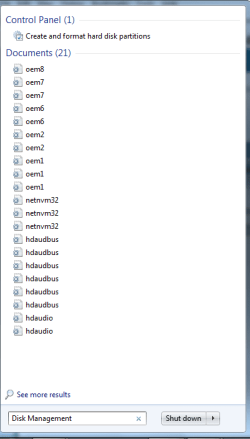
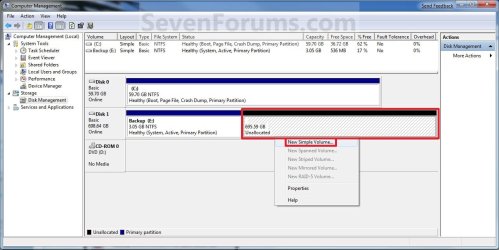
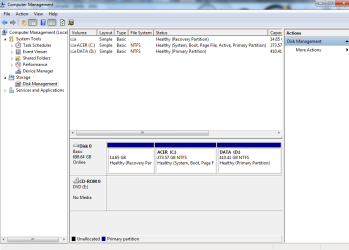
Also, type Disk Management in Start Search box and see if any hidden partitions are revealed on Drive Map. Post a screenshot.
 
files.PNGdisc mana.png
 

My Computer

Computer Manufacturer/Model Number
Acer
OS
Windows 7
CPU
Intel(R) Core(TM)2 Quad CPU Q9300 @ 2.50GHz 2.50 GHz
Memory
4 GB
Graphics Card(s)
GeForce GTX 470
Sound Card
Realtek Digital Output (Realtek High Definition Audio)
Monitor(s) Displays
24" samsung
Screen Resolution
1920 x 1080
Case
Aspire M7711
Keyboard
Razer Lycosa
Mouse
Logitech G9
Internet Speed
20 MB

My Computer

Computer Manufacturer/Model Number
Dell XPS 15 L502x
OS
Windows 7 Ultimate x64 SP1
CPU
Core i7-2670QM
Memory
8GB DDR3 PC3-10600
Graphics Card(s)
Intel HD Graphics 3000 + GeForce GT 540M
Screen Resolution
1920x1080
Hard Drives
1TB 5400RPM Seagate

My Computer

Computer type
PC/Desktop
Computer Manufacturer/Model Number
Custom Build
OS
Windows 7 Professional SP1 - x64 [Non-UEFI Boot]
CPU
Ivy Bridge Core i5 3570K (Delidded)
Motherboard
Asus P8Z77-V LE PLUS
Memory
G.Skill "Ares" DDR3 PC3-12800 - 1600MHz (16Gb)
Graphics Card(s)
Asus Dual-RX480-O4G
Sound Card
Creative Sound Blaster Z w/5.1 sound system
Monitor(s) Displays
Asus IPS 23"
Screen Resolution
16/9
Hard Drives
Internal:
500Go Sata 6Gb/s (x2)
500Go Sata 3Gb/s (x2)
SSD 60Go Sata 6Gb/s
PSU
In Win C 900W Series 80+ Platinum
Case
Thermaltake Chaser A71
Cooling
Custom Water Cooling Loop
Keyboard
Cooler Master QuickFire XTi
Mouse
Razer Imperator 2012 (4G)
Antivirus
MSE
Browser
IE 11.0.xxx Rtm
Other Info
"Raid0" with Intel Smart Response Technology (HDD/SSD)

My Computer

Computer Manufacturer/Model Number
Acer
OS
Windows 7
CPU
Intel(R) Core(TM)2 Quad CPU Q9300 @ 2.50GHz 2.50 GHz
Memory
4 GB
Graphics Card(s)
GeForce GTX 470
Sound Card
Realtek Digital Output (Realtek High Definition Audio)
Monitor(s) Displays
24" samsung
Screen Resolution
1920 x 1080
Case
Aspire M7711
Keyboard
Razer Lycosa
Mouse
Logitech G9
Internet Speed
20 MB
disk.PNG
 

My Computer

Computer Manufacturer/Model Number
Acer
OS
Windows 7
CPU
Intel(R) Core(TM)2 Quad CPU Q9300 @ 2.50GHz 2.50 GHz
Memory
4 GB
Graphics Card(s)
GeForce GTX 470
Sound Card
Realtek Digital Output (Realtek High Definition Audio)
Monitor(s) Displays
24" samsung
Screen Resolution
1920 x 1080
Case
Aspire M7711
Keyboard
Razer Lycosa
Mouse
Logitech G9
Internet Speed
20 MB
First: Why are you wanting to return to Factory Condition? Do you simply want to reinstall an Upgrade WIn7 because yours will not start?

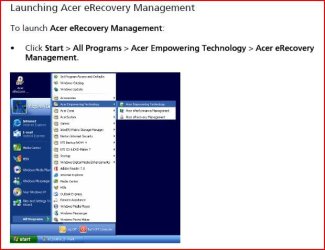
At this point we can give you steps to try running your Recovery partition shown in screenshot, or we can start up your Win7.
 
Back
Top