Solved Acer UEFI mode will not resume Hibernation

ps1000

New member
Local time
7:13 AM
Messages
10
I recently replaced my computers hard drive due to the old one failing. I decided to try and use GPT on the new disk because I want to use more than 4 partitions, unfortunately however, the old BIOS did not support UEFI booting. After much research, I discovered that it is able to boot in UEFI mode with an unlocked BIOS, so I flashed the modified BIOS and was able to set it to boot in UEFI mode. Windows installed without problems and everything is working fine, apart from one thing.

When putting the computer into Hibernation, it will display the error message "No boot device found - Please insert boot media and press any key" when attempting to wake it. Restarting the computer will make it boot and resume successfully, however.

I assume that this is a problem with the BIOS not booting EFI devices first when bringing the computer out of Hibernation.

Is this problem fixable? Should I perhaps stick with MBR in case more problems arise down the line?

PS. Sorry for my bad English, it is a second language.
 

My Computer My Computer

At a glance

Windows 7 Ultimate x64i5 2430m Sandy Bridge 2.4ghz8gb KingstonNvidia Geforce GT 520m
Computer Manufacturer/Model Number
Acer Aspire 5750g
OS
Windows 7 Ultimate x64
CPU
i5 2430m Sandy Bridge 2.4ghz
Memory
8gb Kingston
Graphics Card(s)
Nvidia Geforce GT 520m
Hard Drives
Seagate 500gb
How do you know you installed UEFI, although I doubt it has anything to do with this issue? Did you boot the installer as a UEFI device, then delete all partitions to clear the formatting, watch it create an EFI System partition?

Is Windows Boot Manager set first device to boot in BIOS setup? Make sure now.

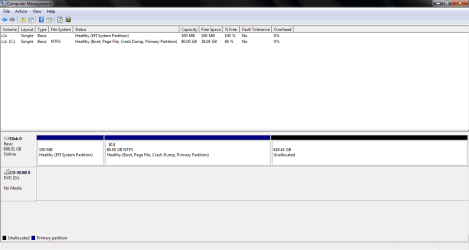
Can we see a screenshot of Disk Management - Post a Screen Capture Image ?

Work through the steps given here for most Sleep Mode Problems - Vista Forums .
 
I do not believe I have installed UEFI, I believe that the current BIOS was able to boot from EFI devices, however the option to do so was not in the BIOS until I flashed the unlocked one.

The two options I changed after the BIOS flash were:

"Boot in UEFI mode: TRUE"
"Boot from EFI devices first: TRUE"

The installer was booted as a UEFI device and Windows created the required partitions fine.

The Hard Drive was new, so it was not partitioned until I created one in the installer.

Attached is a screenshot of Windows Disk Management, and one from Partition wizard. Partition wizard shows a partition that Windows Disk Management does not.


Maybe I am misunderstanding, but I do not think you can set Windows Boot Manager as first device in the BIOS? The Hard Drive is set as first device.

I read through "sleep mode problems - vista forums", but unfortunately nothing helped.

Thank you for your help.
 

Attachments

  • Disk Management.PNG
    Disk Management.PNG
    16.9 KB · Views: 2
  • Partition Wizard.PNG
    Partition Wizard.PNG
    223.2 KB · Views: 2

My Computer My Computer

At a glance

Windows 7 Ultimate x64i5 2430m Sandy Bridge 2.4ghz8gb KingstonNvidia Geforce GT 520m
Computer Manufacturer/Model Number
Acer Aspire 5750g
OS
Windows 7 Ultimate x64
CPU
i5 2430m Sandy Bridge 2.4ghz
Memory
8gb Kingston
Graphics Card(s)
Nvidia Geforce GT 520m
Hard Drives
Seagate 500gb
That partition is hidden in Disk Mgmt.

You have an EFI install, for which Windows Boot Manager is normally set first to boot and not HDD.
 
Ah, I understand. You were correct, after checking through the BIOS again, there was an option to set "Windows Boot Manager" as first device and once that was set, Hibernation mode worked.

Thank you for your assistance!
 

My Computer My Computer

At a glance

Windows 7 Ultimate x64i5 2430m Sandy Bridge 2.4ghz8gb KingstonNvidia Geforce GT 520m
Computer Manufacturer/Model Number
Acer Aspire 5750g
OS
Windows 7 Ultimate x64
CPU
i5 2430m Sandy Bridge 2.4ghz
Memory
8gb Kingston
Graphics Card(s)
Nvidia Geforce GT 520m
Hard Drives
Seagate 500gb
Back
Top