
ACPI Problems upgrading to windows 7

LMSSML

New member
Local time
3:25 PM
Messages
5
Hi there,


I've got the following config:

CPU P4 2.4
MSI PM8M-VH
Ati 9200
Seagate 1TB
Hitachi 1TB
PSU Corsair TX650


And when upgrade to windows 7 I've attached the error that stops me to install windows 7.

I even do the bios update.

But the same problem


Anyone to help ?
 

Attachments
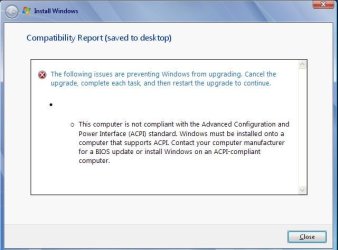
  • windows7.JPG
    windows7.JPG
    32.8 KB · Views: 38

My Computer

Computer Manufacturer/Model Number
MSI PM8M-VH
OS
Windows XP Sp3
CPU
P4 skt 478 2.4
Motherboard
MSI
Memory
1Gb
Graphics Card(s)
Ati 9200
Sound Card
Realtek
Monitor(s) Displays
Viewsonic
Hard Drives
1Tb Seagate
1 Tb Hitachi
PSU
corsair Tx650
Are you trying to upgrade a Windows XP system to Windows 7?
Are to attempting to do a upgrade from inside Windows XP?

You must do a clean install to go from Windows XP to Windows 7.
 

My Computer

Computer type
PC/Desktop
Computer Manufacturer/Model Number
Custom Built
OS
Windows 10 Pro x64, Windows 8.1 Pro x64, Windows 7 Ultimate x64 SP1,
CPU
INTEL i9-7920X LGA 2066
Motherboard
Gigabyte X299-WU8 F3
Memory
64 GB (4 X 16 GB) G-Skill V Series DDR4 3200 Quad Channel
Graphics Card(s)
EVGA GTX 1060 SC 3 GB
Sound Card
Realtek Onboard ALC1220
Monitor(s) Displays
2 x Samsung S27E310
Screen Resolution
1920x1080
Hard Drives
Samsung 2 x 970 EVO Plus 500 GB NVMe
1 x 6TB WD 6003FZBX SATA
1 x 6TB WD 60EFRX SATA
12 x 3TB WD 30EFRX SATA
PSU
Seasonic X-1050
Case
Thermaltake Armor+
Cooling
Corsair H80i V2 Liquid AOI Cooler
Keyboard
Logitech G510s
Mouse
Logitech MX Master 2S
Internet Speed
200 Mb/s
Antivirus
ESET NOD32 13.1
Browser
EDGE (Dev, Canary, Beta), Chrome
Other Info
ASUS RT-AC68U router
Malwarebytes 4.0.4
Welcome to the Seven Forums! LMSSML

Even when moving up from XP's successor Vista the advice would also be the same for the newer or any other newer version to follow being a clean install works best.

As for any bios settings that would to be sure the Plug'n'Play support and OS2 options are enabled there. One MS solution for this type of problem goes as follows.

To resolve this problem, restart your computer.


If the problem persists, start the computer by using the Windows CD or by using an emergency startup disk, and then delete the Hiberfil.sys file. To do this, follow these steps:
  1. Insert your Windows XP CD-ROM into the computer's CD-ROM drive or DVD-ROM drive, and then restart your computer from the CD-ROM. Note Some computers may require that you modify the basic input/output system (BIOS) settings before you can start the computer from a CD-ROM. For information about how to modify BIOS, see your computer documentation.
  2. When the "Welcome to Setup" screen appears, press R to start Recovery Console.
  3. If your computer is configured for dual booting or multiple booting, select the relevant Windows XP installation.
  4. When you are prompted to do so, type the administrator password, and then press ENTER. Note By default, the administrator password is blank in Windows XP Home Edition.
  5. By default, Hiberfil.sys is typically located in the root directory (C:\). At the command prompt, type del hiberfil.sys, and then press ENTER.
  6. Restart the computer.
Refer to "Stop 0x000000A5 the ACPI BIOS in the system is not fully compliant with the ACPI specification" error message when the computer resumes from hibernation
 

My Computers

System One System Two

  • Computer type
    PC/Desktop
    Computer Manufacturer/Model Number
    Custom builds = 2
    OS
    W7 Ultimate x64/W10 Pro x64/W11 Pro Triple Boot - Main PC W7 Remote PC Micro ATX W7 Pro x64/W11 Pro
    CPU
    AMD Phenom II X4 975 Deneb 3.6ghz - 965 2nd remote pc
    Motherboard
    Gigabyte GA-790XTA-UD4-Gigabyte GA-880GM-D2H remote pc
    Memory
    Kingston Hyper X DDR3 1600 1.5v 16gb - Hyper X Fury 8gb 2nd
    Graphics Card(s)
    MSI HD Radeon 5750 1gb - MSI HD Radeon 6450 on mini tower
    Sound Card
    Creative Labs X-Fi Xtreme Audio P - Realtek onooard 2nd case
    Monitor(s) Displays
    ASUS VW199T-P 19" HP 2082a Main-HP 2082a 20" remote pc
    Screen Resolution
    Asus 1440x900 - HP 1600x900
    Hard Drives
    WD Black 1TB HD per OS W7, W10, and pending W11 presently on 500gb OS Drive - Pending Triple 1TB HDs for Spanned Storage/backup volume
    Single 2TB external USB enclosure, single 1TB System 7 Host/Boot drive, Pending 8TB external HD for system image b
    PSU
    Corsair 750TX - primary / Corsair CX600 - second
    Case
    Antec 900-2 - SSD compatible / NZXT Vulcan mini tower
    Cooling
    Zalman CNPS9900A
    Keyboard
    AZIO L70 Backlit Letters Gaming - ONN Cordless/USB
    Mouse
    MSI DS200 Programmable, Logitech Cordless
    Internet Speed
    30mbps upgrade - primary hard wired - mini tower usb WiFi
    Antivirus
    GFI VIPRE Internet Security 2014 on W7 2016 beta on W10,
    Browser
    Cyberfox, WaterFox 64bit FF variants, FireFox x64, Pale Moon
    Other Info
    Accomdata fan cooled usb 2.0 PIDE/Sata II, III external enclosure.
    Sambient usb/eSata PATA/Sata II, III external enclosure.
  • Computer type
    PC/Desktop
    System Manufacturer/Model Number
    CUSTOM ASSEMBLY
    OS
    W7 Pro x64/W11 Pro
    CPU
    AMD Deneb 3.6ghz - 965
    Motherboard
    Gigabyte GA-880GM-D2H remote pc
    Memory
    Kingston Hyper X Fury 8gb
    Graphics Card(s)
    MSI HD Radeon 6450 DVI Output
    Sound Card
    Realtek onooard Creative or Other separate PENDING
    Monitor(s) Displays
    VIZIO 32" LCD TV Separate LCD Pending
    Screen Resolution
    1600x1080
    Hard Drives
    WD 500GB OS Host/Boot WD Green 1TB Storage/Backup
    PSU
    Corsair 600W - THERMALTAKE 600W spare case
    Case
    NZXT Vulcan mini tower
    Cooling
    Twin 120mm Top Fans - 240mm Side Cover
    Keyboard
    ONN Cordless/USB Logitech Cordless
    Mouse
    ONN USB/Cordless - Logitech Cordless
    Internet Speed
    DSL 5G
    Browser
    MS Edge, FireFox, WaterFox x64, FireFox Nightly
    Other Info
    OS Testing-Remote Access to Main TeamViewer

My Computer

Computer Manufacturer/Model Number
MSI PM8M-VH
OS
Windows XP Sp3
CPU
P4 skt 478 2.4
Motherboard
MSI
Memory
1Gb
Graphics Card(s)
Ati 9200
Sound Card
Realtek
Monitor(s) Displays
Viewsonic
Hard Drives
1Tb Seagate
1 Tb Hitachi
PSU
corsair Tx650
Thanks Nightwalk

HI nightwalk


I will try your solutions


Then I will post again for success or not.

Thanks
 

My Computer

Computer Manufacturer/Model Number
MSI PM8M-VH
OS
Windows XP Sp3
CPU
P4 skt 478 2.4
Motherboard
MSI
Memory
1Gb
Graphics Card(s)
Ati 9200
Sound Card
Realtek
Monitor(s) Displays
Viewsonic
Hard Drives
1Tb Seagate
1 Tb Hitachi
PSU
corsair Tx650
Hello LMSSML, welcome to Seven Forums!


This from the article at the link you posted.
This time situation is slightly different as compared to Windows Vista Release. Windows 7 has gained lot of popularity due to Customer Preview program and many Windows Xp users are in favor of Windows 7. So a big chunk of Windows XP users will be expecting to upgrade to Windows 7 unfortunately there is no direct upgrade option is available from Windows XP to Windows 7.
Hi pbcopter


If the only solution to you is the new installation why microsoft puts this as refered link to upgrade xp ?

How to Upgrade Windows XP To Windows 7
 

My Computer

Computer Manufacturer/Model Number
* BFK Customs *
OS
W 7 64-bit Ultimate
CPU
Intel Q9550 Yorkfield
Motherboard
ASUS P5Q Pro
Memory
8GB Dominator 8500C5D
Graphics Card(s)
ATI : XFX 5870
Sound Card
Realtek HD Audio 7-1
Monitor(s) Displays
1x 47" LCD HDMI & 3x 26" LCD HDMI
Screen Resolution
1920x1080P & 1920x1200
Hard Drives
1x 80GB Intel X25-M G2 SSD : 1x 500GB & 1x 640GB WD Caviar Black(s)
PSU
Corsair 620HX
Case
Cooler Master RC-690
Cooling
Tuniq Tower 120, 2x 140mm and 3x 120mm case fans
Keyboard
Microsoft 500
Mouse
Razer Diamondback 3G
Internet Speed
14 Mb/s
Other Info
1x Koutech 3Gb/s SATA HDD Hot Swap Rack
Also, that link is not to a Microsoft site and it was written at the RC1 time frame.
 

My Computer

Computer type
PC/Desktop
Computer Manufacturer/Model Number
Lenovo IdeaCenter 450
OS
Windows 10 Pro X64
CPU
Intel Quad Core i7-4770 @ 3.4Ghz
Memory
16.0GB PC3-12800 DDR3 SDRAM 1600 MHz
Graphics Card(s)
Intel Integrated HD Graphics
Sound Card
Realtek HD Audio
Monitor(s) Displays
HP 22" LCD
Screen Resolution
1680 x 1050
Hard Drives
250GB Samsung EVO SATA-3 SSD
2TB Seagate ST2000DM001 SATA-2
1.5TB Seagate ST3150041AS SATA
Keyboard
Dell USB
Mouse
Lenovo USB
Internet Speed
Cable via Road Runner 3MB Upload, 30MB Download
Antivirus
Windows Defender, MBAM Pro, MBAE
Browser
Seamonkey
Other Info
UEFI/GPT
PLDS DVD-RW DH16AERSH

My Computer

Computer Manufacturer/Model Number
MSI PM8M-VH
OS
Windows XP Sp3
CPU
P4 skt 478 2.4
Motherboard
MSI
Memory
1Gb
Graphics Card(s)
Ati 9200
Sound Card
Realtek
Monitor(s) Displays
Viewsonic
Hard Drives
1Tb Seagate
1 Tb Hitachi
PSU
corsair Tx650
Night Hawk

Hi Night Hawk,


I've made as you said

Boot from windows xp and removed hiberfil.sys

So when boot up the file was created but hten when I made the upgrade the problem was the same.

Any more ideias.
 

My Computer

Computer Manufacturer/Model Number
MSI PM8M-VH
OS
Windows XP Sp3
CPU
P4 skt 478 2.4
Motherboard
MSI
Memory
1Gb
Graphics Card(s)
Ati 9200
Sound Card
Realtek
Monitor(s) Displays
Viewsonic
Hard Drives
1Tb Seagate
1 Tb Hitachi
PSU
corsair Tx650
You'll notice in the first reply there that this had been a problem seen with XP not 7 when running into that type of error. For running the 7 installer while booted in the older version that simply isn't supported not seeing any upgrade paths to follow there.

A full clean install of 7 on a fresh primary whether reformatted or entirely new would be the method to see 7 go right on without any fuss. If you are trying to upgrade over XP wih an upgrade not full version disk you will want to review the guide for performing a clean install with upgrade media. http://www.sevenforums.com/tutorials/31402-clean-install-upgrade-windows-7-version.html
 

My Computers

System One System Two

  • Computer type
    PC/Desktop
    Computer Manufacturer/Model Number
    Custom builds = 2
    OS
    W7 Ultimate x64/W10 Pro x64/W11 Pro Triple Boot - Main PC W7 Remote PC Micro ATX W7 Pro x64/W11 Pro
    CPU
    AMD Phenom II X4 975 Deneb 3.6ghz - 965 2nd remote pc
    Motherboard
    Gigabyte GA-790XTA-UD4-Gigabyte GA-880GM-D2H remote pc
    Memory
    Kingston Hyper X DDR3 1600 1.5v 16gb - Hyper X Fury 8gb 2nd
    Graphics Card(s)
    MSI HD Radeon 5750 1gb - MSI HD Radeon 6450 on mini tower
    Sound Card
    Creative Labs X-Fi Xtreme Audio P - Realtek onooard 2nd case
    Monitor(s) Displays
    ASUS VW199T-P 19" HP 2082a Main-HP 2082a 20" remote pc
    Screen Resolution
    Asus 1440x900 - HP 1600x900
    Hard Drives
    WD Black 1TB HD per OS W7, W10, and pending W11 presently on 500gb OS Drive - Pending Triple 1TB HDs for Spanned Storage/backup volume
    Single 2TB external USB enclosure, single 1TB System 7 Host/Boot drive, Pending 8TB external HD for system image b
    PSU
    Corsair 750TX - primary / Corsair CX600 - second
    Case
    Antec 900-2 - SSD compatible / NZXT Vulcan mini tower
    Cooling
    Zalman CNPS9900A
    Keyboard
    AZIO L70 Backlit Letters Gaming - ONN Cordless/USB
    Mouse
    MSI DS200 Programmable, Logitech Cordless
    Internet Speed
    30mbps upgrade - primary hard wired - mini tower usb WiFi
    Antivirus
    GFI VIPRE Internet Security 2014 on W7 2016 beta on W10,
    Browser
    Cyberfox, WaterFox 64bit FF variants, FireFox x64, Pale Moon
    Other Info
    Accomdata fan cooled usb 2.0 PIDE/Sata II, III external enclosure.
    Sambient usb/eSata PATA/Sata II, III external enclosure.
  • Computer type
    PC/Desktop
    System Manufacturer/Model Number
    CUSTOM ASSEMBLY
    OS
    W7 Pro x64/W11 Pro
    CPU
    AMD Deneb 3.6ghz - 965
    Motherboard
    Gigabyte GA-880GM-D2H remote pc
    Memory
    Kingston Hyper X Fury 8gb
    Graphics Card(s)
    MSI HD Radeon 6450 DVI Output
    Sound Card
    Realtek onooard Creative or Other separate PENDING
    Monitor(s) Displays
    VIZIO 32" LCD TV Separate LCD Pending
    Screen Resolution
    1600x1080
    Hard Drives
    WD 500GB OS Host/Boot WD Green 1TB Storage/Backup
    PSU
    Corsair 600W - THERMALTAKE 600W spare case
    Case
    NZXT Vulcan mini tower
    Cooling
    Twin 120mm Top Fans - 240mm Side Cover
    Keyboard
    ONN Cordless/USB Logitech Cordless
    Mouse
    ONN USB/Cordless - Logitech Cordless
    Internet Speed
    DSL 5G
    Browser
    MS Edge, FireFox, WaterFox x64, FireFox Nightly
    Other Info
    OS Testing-Remote Access to Main TeamViewer
That BIOS is technically ACPI compliant, so if you're having issues, have you reduced the hardware to test again? I mean, remove everything non-essential that you can from the system like additional sticks of RAM, additional hard disks other than the primary disk, etc - I've seen that error many times with Vista on machines based on older BIOSes (that board is from late 2004, latest BIOS is 2.2 from August 2005!) when mismatched memory is installed, for instance.
 

My Computer

Computer type
PC/Desktop
Computer Manufacturer/Model Number
Custom
OS
Windows 10 Pro x64
CPU
Intel Core i7 4790K @ 4.5GHz
Motherboard
Asus Maximus Hero VII
Memory
32GB DDR3
Graphics Card(s)
Nvidia GeForce GTX970
Sound Card
Realtek HD Audio
Screen Resolution
1920x1200
Hard Drives
1x Samsung 250GB SSD
4x WD RE 2TB (RAIDZ)
PSU
Corsair AX760i
Case
Fractal Design Define R4
Cooling
Noctua NH-D15
Back
Top