Acrobat 11 : Change temporary files folder/drive?

unko

New member
Member
VIP
Local time
2:52 PM
Messages
289
Hello,

I installed this application to use the "website to pdf" function, however it takes hugeeeee disk space to create (like 4gb to end up in a 16mb pdf..!!) and i don't have too many gb left on c: drive. I searched the option to change temp folder location but didn't find anything. Same for google search, no results. Isn't there a way?

Thanks.
 

My Computer

Computer type
PC/Desktop
OS
Win7x64
Bump :)
 

My Computer

Computer type
PC/Desktop
OS
Win7x64
bump
 

My Computer

Computer type
PC/Desktop
OS
Win7x64
It appears that no one knows the answer to your question.

What does Acrobat 11 do that PDFCreator (or the like) does not do?
 

My Computer

Computer type
Laptop
Computer Manufacturer/Model Number
Employer provided Dell Latitude
OS
W7 Pro SP1 64bit
CPU
i7
Memory
8GB
Graphics Card(s)
Intel HD Graphics
Hard Drives
crappy SSD
Antivirus
Employer mandated Symantec Endpoint Protection
Browser
Pale Moon 64bit, IE11 64bit & Chrome 64bit
Answer : advanced web2pdf creation.
 

My Computer

Computer type
PC/Desktop
OS
Win7x64
I tried to install Acrobat XI pro (which offers a trial) to look around the app, but I could not get the app to start. It kept hanging at the sign in screen. I tried 3 times :-(

If I ever do get it to install/run what website would be a good test? What site would show the cache issue that you mentioned? And maybe a website that needs these advanced features that you mentioned.
 

My Computer

Computer type
Laptop
Computer Manufacturer/Model Number
Employer provided Dell Latitude
OS
W7 Pro SP1 64bit
CPU
i7
Memory
8GB
Graphics Card(s)
Intel HD Graphics
Hard Drives
crappy SSD
Antivirus
Employer mandated Symantec Endpoint Protection
Browser
Pale Moon 64bit, IE11 64bit & Chrome 64bit
Just turn on the option "download full website" and any website will do as long as there are lots of images. Of if you really need an exemple : ign.com
 

My Computer

Computer type
PC/Desktop
OS
Win7x64
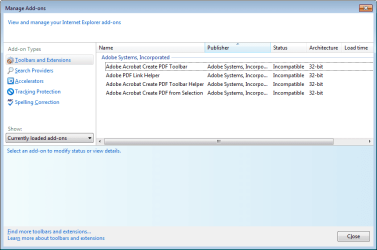
Unfortunately, I see this in IE11:

acrobat.png

Maybe other forum members have got this working and can test for you.
 

My Computer

Computer type
Laptop
Computer Manufacturer/Model Number
Employer provided Dell Latitude
OS
W7 Pro SP1 64bit
CPU
i7
Memory
8GB
Graphics Card(s)
Intel HD Graphics
Hard Drives
crappy SSD
Antivirus
Employer mandated Symantec Endpoint Protection
Browser
Pale Moon 64bit, IE11 64bit & Chrome 64bit
..?? You can uninstall all after test done anyways. Isn't it?
 

My Computer

Computer type
PC/Desktop
OS
Win7x64
..?? You can uninstall all after test done anyways. Isn't it?
I don't have to uninstall - I just exit the virtual machine (VM) and all is gone :-)

I'm not testing this stuff on a live computer :-)

I thought that you were using a browser toolbar to create this PDF. I used to have Acrobat Pro many years ago (courtesy of my employer), but I uninstalled it because PDFCreator did a better job for what I needed. When I had Acrobat, I used a toolbar to create the PDFs from a webpage... hence my attempting to go there to make this test PDF. But no tool bar showed up in IE11 due to the incompatibility (way to go Adobe).

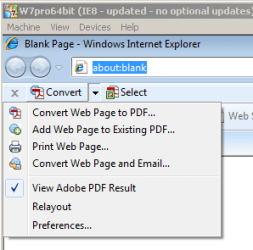
I moved to a VM that had IE8 installed and the toolbars/plug-ins worked:
acrobat-IE8.png

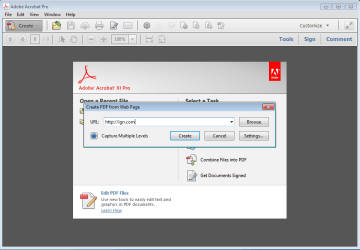
Using the Adobe Acrobat XI Pro app...
acrobat.png
...to make a PDF from a website only stored about 5MB of temp files. Process Monitor showed these temp files to be in the Windows user account temp folder (C:\Users\username\AppData\Local\Temp). If that is where you are seeing them, then you can tell Windows to redirect that folder. Let us know if you need help doing that.
 

My Computer

Computer type
Laptop
Computer Manufacturer/Model Number
Employer provided Dell Latitude
OS
W7 Pro SP1 64bit
CPU
i7
Memory
8GB
Graphics Card(s)
Intel HD Graphics
Hard Drives
crappy SSD
Antivirus
Employer mandated Symantec Endpoint Protection
Browser
Pale Moon 64bit, IE11 64bit & Chrome 64bit
See the "capture multiple level" button? Tap it, then DOWNOAD FULL WEBSITE. You only download one page, that's why it took 5mb only.
 

My Computer

Computer type
PC/Desktop
OS
Win7x64
I've already dumped the VM because I wanted to test something for another thread.

I doubt that the temp files will be stored in a different location just because of the option to download the entire website (and my VM could not handle that much disk space either). You don't need to change anything within Acrobat to move these files - you just need to redirect the Windows user temp folder. Do you need help doing that?
 

My Computer

Computer type
Laptop
Computer Manufacturer/Model Number
Employer provided Dell Latitude
OS
W7 Pro SP1 64bit
CPU
i7
Memory
8GB
Graphics Card(s)
Intel HD Graphics
Hard Drives
crappy SSD
Antivirus
Employer mandated Symantec Endpoint Protection
Browser
Pale Moon 64bit, IE11 64bit & Chrome 64bit
Hmm i think i found how to. Should i change only "TEMP" or "TMP" too? Same directory shown..
 

My Computer

Computer type
PC/Desktop
OS
Win7x64
Sure - change them both :-)

Let us know if this solved the issue for you.
 

My Computer

Computer type
Laptop
Computer Manufacturer/Model Number
Employer provided Dell Latitude
OS
W7 Pro SP1 64bit
CPU
i7
Memory
8GB
Graphics Card(s)
Intel HD Graphics
Hard Drives
crappy SSD
Antivirus
Employer mandated Symantec Endpoint Protection
Browser
Pale Moon 64bit, IE11 64bit & Chrome 64bit
Reboot before changes take place i guess?

No risk for any app/system feature to get mad?
 

My Computer

Computer type
PC/Desktop
OS
Win7x64
Yes - reboot.

Well written apps will make use of the environment variables...
...thus using your new location.

Microsoft Security Essentials used to ignore the OS variable for the system temp folder...
...I've not tested that lately to see if MS fixed that.
Issue with Microsoft Security Essentials - can someone try to - Microsoft Community

Not that you are changing the system temp folder - I'm just pointing out what might happen with a poorly written app. You can leave the user temp folders in place in case some app wants to use them.
 

My Computer

Computer type
Laptop
Computer Manufacturer/Model Number
Employer provided Dell Latitude
OS
W7 Pro SP1 64bit
CPU
i7
Memory
8GB
Graphics Card(s)
Intel HD Graphics
Hard Drives
crappy SSD
Antivirus
Employer mandated Symantec Endpoint Protection
Browser
Pale Moon 64bit, IE11 64bit & Chrome 64bit
Back
Top