Acronis email fails-->Use Win messaging popup?

markg2

New member
Member
VIP
Local time
2:42 PM
Messages
477
Between my wife's XP machine running Acronis True Image Home 09 and my Win7 running Acronis TIH 2010 I've had it with the software's finicky, mostly not, ability to send completion status emails to me.

I just noticed that her machine has the option to use something called Windows messenger popup.

Several things:

1. I remember years back Windows had a native LAN message thing that was the source of all manner of security issues and folks recommended turning it off. Is this the same thing?

2. There are 3rd party apps that do this--do they fill a gap that Windows no longer supplies or do they just do same better?

3. If this is indeed a valid option and I should be using a 3rd party app, are there 1 or 2 reliable freeware apps?

Mark
 

My Computer My Computer

At a glance

Windows 7 & Windows 10
Computer type
PC/Desktop
OS
Windows 7 & Windows 10
Markg2, I use Acronis version 2010 and above, they have the option of sending you an email when the backup is complete. You have to have a valid sending email with smtp server settings proper to be able to do this.
I use port 2525 for my smtp port and it works fine. Not sure about 2009.

Rich
 

My Computer My Computer

At a glance

Windows 7 Pro x64 SP1Intel Core I716 GigsNVIDIA GeForce GTX 670M
Computer type
Laptop
Computer Manufacturer/Model Number
Toshiba Laptop Qosimo X870
OS
Windows 7 Pro x64 SP1
CPU
Intel Core I7
Motherboard
Toshiba Qosmio
Memory
16 Gigs
Graphics Card(s)
NVIDIA GeForce GTX 670M
Monitor(s) Displays
17.7" laptop
Screen Resolution
1600 x 900
Hard Drives
256 Gig SanDisk SSD for C
256 Gig Intel SSD for D
Internet Speed
50/25 FIOS
Antivirus
Vipre (all you can eat for 10 machines)
Browser
IE and FF
Other Info
I have dos 6.22, wfwg 3.11, win98, 2000 and xp VHD's available for testing. MS's Virtual PC works great.
For whatever reason I cannot get the damn thing to successfully send email. I have in the past I have but for the last year or so no. This is (most recently) trying 2 different domains--a Gmail IMAP account and a POP3 account. I've used the port settings on both computers that both computers use with Outlook. So being burnt out on email + my Acronis + my setup I jumped at the thought of an alternative messaging method?

Mark
 

My Computer My Computer

At a glance

Windows 7 & Windows 10
Computer type
PC/Desktop
OS
Windows 7 & Windows 10
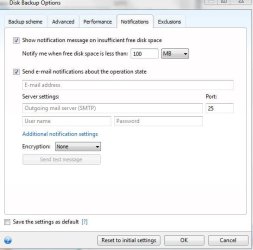
Mark, have you gotten to this screen?
rich
 

Attachments

  • acronis-email-screen.JPG
    acronis-email-screen.JPG
    37 KB · Views: 4

My Computer My Computer

At a glance

Windows 7 Pro x64 SP1Intel Core I716 GigsNVIDIA GeForce GTX 670M
Computer type
Laptop
Computer Manufacturer/Model Number
Toshiba Laptop Qosimo X870
OS
Windows 7 Pro x64 SP1
CPU
Intel Core I7
Motherboard
Toshiba Qosmio
Memory
16 Gigs
Graphics Card(s)
NVIDIA GeForce GTX 670M
Monitor(s) Displays
17.7" laptop
Screen Resolution
1600 x 900
Hard Drives
256 Gig SanDisk SSD for C
256 Gig Intel SSD for D
Internet Speed
50/25 FIOS
Antivirus
Vipre (all you can eat for 10 machines)
Browser
IE and FF
Other Info
I have dos 6.22, wfwg 3.11, win98, 2000 and xp VHD's available for testing. MS's Virtual PC works great.
Rich, I've gotten to that screen + all the succeeding related notification screens on both the XP and Win7 computers with both versions of Acronis and have gotten the 'test email send' error on all attempts on all configs this past year.

Mark
 

My Computer My Computer

At a glance

Windows 7 & Windows 10
Computer type
PC/Desktop
OS
Windows 7 & Windows 10
Mark, and you use POP mail on the account that your using?
Did it give you anything but a errror, like an error code?

Rich
 

My Computer My Computer

At a glance

Windows 7 Pro x64 SP1Intel Core I716 GigsNVIDIA GeForce GTX 670M
Computer type
Laptop
Computer Manufacturer/Model Number
Toshiba Laptop Qosimo X870
OS
Windows 7 Pro x64 SP1
CPU
Intel Core I7
Motherboard
Toshiba Qosmio
Memory
16 Gigs
Graphics Card(s)
NVIDIA GeForce GTX 670M
Monitor(s) Displays
17.7" laptop
Screen Resolution
1600 x 900
Hard Drives
256 Gig SanDisk SSD for C
256 Gig Intel SSD for D
Internet Speed
50/25 FIOS
Antivirus
Vipre (all you can eat for 10 machines)
Browser
IE and FF
Other Info
I have dos 6.22, wfwg 3.11, win98, 2000 and xp VHD's available for testing. MS's Virtual PC works great.
Unfortunately not--when you test the email within the Acronis notification setup, if it fails you get the identical, unhelpful statement to the effect 'it failed'.
 

My Computer My Computer

At a glance

Windows 7 & Windows 10
Computer type
PC/Desktop
OS
Windows 7 & Windows 10
Mark, it looks to me that the email address your using won't allow sending of email.
What ISP are you using?

Either that or your userid and password and maybe the smtp port are incorrect.

Rich
 

My Computer My Computer

At a glance

Windows 7 Pro x64 SP1Intel Core I716 GigsNVIDIA GeForce GTX 670M
Computer type
Laptop
Computer Manufacturer/Model Number
Toshiba Laptop Qosimo X870
OS
Windows 7 Pro x64 SP1
CPU
Intel Core I7
Motherboard
Toshiba Qosmio
Memory
16 Gigs
Graphics Card(s)
NVIDIA GeForce GTX 670M
Monitor(s) Displays
17.7" laptop
Screen Resolution
1600 x 900
Hard Drives
256 Gig SanDisk SSD for C
256 Gig Intel SSD for D
Internet Speed
50/25 FIOS
Antivirus
Vipre (all you can eat for 10 machines)
Browser
IE and FF
Other Info
I have dos 6.22, wfwg 3.11, win98, 2000 and xp VHD's available for testing. MS's Virtual PC works great.
Rich,

One address uses eStreet in Denver and at some previous time Acronis was successfully issuing alerts on that account. Although the mail server has since changed--which should make no difference.

The other account is Gmail so Google is the ISP.

As I mentioned before, the ports and security match that of Outlook. With all the problems I was infinitely triple careful entering and checking the values.

Further, we're talking 2 computers, 2 versions of Acronis and 2 addresses per computer. I'm not a math whiz but the odds of at least 1 alert functioning should be fairly high.

I posted this problem on the Acronis forum a long time ago to no avail.

Mark
 

My Computer My Computer

At a glance

Windows 7 & Windows 10
Computer type
PC/Desktop
OS
Windows 7 & Windows 10
Can I assume that you have setup gmail for pop service?

Rich
 

My Computer My Computer

At a glance

Windows 7 Pro x64 SP1Intel Core I716 GigsNVIDIA GeForce GTX 670M
Computer type
Laptop
Computer Manufacturer/Model Number
Toshiba Laptop Qosimo X870
OS
Windows 7 Pro x64 SP1
CPU
Intel Core I7
Motherboard
Toshiba Qosmio
Memory
16 Gigs
Graphics Card(s)
NVIDIA GeForce GTX 670M
Monitor(s) Displays
17.7" laptop
Screen Resolution
1600 x 900
Hard Drives
256 Gig SanDisk SSD for C
256 Gig Intel SSD for D
Internet Speed
50/25 FIOS
Antivirus
Vipre (all you can eat for 10 machines)
Browser
IE and FF
Other Info
I have dos 6.22, wfwg 3.11, win98, 2000 and xp VHD's available for testing. MS's Virtual PC works great.
Yes and no.

My Gmail account is IMAP and my wife's is POP3. Nonetheless, my wife's Gmail POP3 account fails with all the rest.

Mark
 

My Computer My Computer

At a glance

Windows 7 & Windows 10
Computer type
PC/Desktop
OS
Windows 7 & Windows 10
Mysterious email errors

Strange situation:

I have two computers on the same network, for one the Acronis messages email works*, for the other it doesn't. Both only have the native windows firewall (windows 7 pro and ultimate), and the one for which email works is enabled; for the PC not working disabling the windows firewall doesn't help.

Can't figure out why it would work in one PC but not the other.. even uninstalled and reinstalled ADM

(*) with gmail settings [email protected] port 465, SSL encryption enabled.
 

My Computer My Computer

At a glance

Windows XP, 7Pro, 7Ultimate, 10 Pro
Computer type
PC/Desktop
Computer Manufacturer/Model Number
Asus LG5, Toshiba M3, Dell, HP Compaq 57xx, 58xx, Thinkpad R51 T60 T61 T410 T500 W510 X220 T431
OS
Windows XP, 7Pro, 7Ultimate, 10 Pro
Hard Drives
WD blck - Hitachi - Intel SSD - Kingston SSD - Samsung SSD
Mouse
Logitech
Back
Top