Acronis & Port 587

markg2

New member
Member
VIP
Local time
1:36 PM
Messages
477
I posted this question on Acronis' forum and haven't had a response.

If someone's familiar with Acronis (Home 2010)--

Previously when using port 25 for our send email Acronis had no problem emailing image completion information.

Now however, after (having to) changing to port 587 the email attempt fails. Shouldn't the port number make no difference to Acronis since it's just passing on (presumably) the information to the email client?

Mark
 

My Computer

Computer type
PC/Desktop
OS
Windows 7 & Windows 10
I posted this question on Acronis' forum and haven't had a response.

If someone's familiar with Acronis (Home 2010)--

Previously when using port 25 for our send email Acronis had no problem emailing image completion information.

Now however, after (having to) changing to port 587 the email attempt fails. Shouldn't the port number make no difference to Acronis since it's just passing on (presumably) the information to the email client?

Mark

Mark, not really, acronis uses an internal sendmail function to send email, not your default email client. I also use port 587 oro 2525 for the smtp port and it works fine.

rich
 

My Computer

Computer type
Laptop
Computer Manufacturer/Model Number
Toshiba Laptop Qosimo X870
OS
Windows 7 Pro x64 SP1
CPU
Intel Core I7
Motherboard
Toshiba Qosmio
Memory
16 Gigs
Graphics Card(s)
NVIDIA GeForce GTX 670M
Monitor(s) Displays
17.7" laptop
Screen Resolution
1600 x 900
Hard Drives
256 Gig SanDisk SSD for C
256 Gig Intel SSD for D
Internet Speed
50/25 FIOS
Antivirus
Vipre (all you can eat for 10 machines)
Browser
IE and FF
Other Info
I have dos 6.22, wfwg 3.11, win98, 2000 and xp VHD's available for testing. MS's Virtual PC works great.
Beats me. I just tried another account + a gmail account and they failed. They all have in common SMTP port 587.

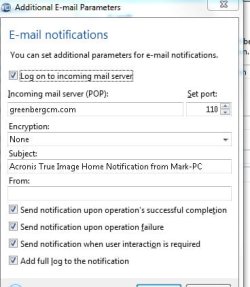
Are you setting the 'additional setting' to log onto the incoming POP3 port 110?

Mark
 

My Computer

Computer type
PC/Desktop
OS
Windows 7 & Windows 10
Beats me. I just tried another account + a gmail account and they failed. They all have in common SMTP port 587.

Are you setting the 'additional setting' to log onto the incoming POP3 port 110?

Mark

Mark, I believe that acronis just does a send to the port that you specify. I use port 2525 instead of 587. It might just test the pop port as some require a login to the pop prior to send. Some ISP's will not accept port 25 (which is the default smtp port) so I use 2525 and it works for me.
I use my own domain at network solutions and never had a problem. Also some require the full email address as the login id.

Give 2525 a shot.

Rich
 

My Computer

Computer type
Laptop
Computer Manufacturer/Model Number
Toshiba Laptop Qosimo X870
OS
Windows 7 Pro x64 SP1
CPU
Intel Core I7
Motherboard
Toshiba Qosmio
Memory
16 Gigs
Graphics Card(s)
NVIDIA GeForce GTX 670M
Monitor(s) Displays
17.7" laptop
Screen Resolution
1600 x 900
Hard Drives
256 Gig SanDisk SSD for C
256 Gig Intel SSD for D
Internet Speed
50/25 FIOS
Antivirus
Vipre (all you can eat for 10 machines)
Browser
IE and FF
Other Info
I have dos 6.22, wfwg 3.11, win98, 2000 and xp VHD's available for testing. MS's Virtual PC works great.
But the SMTP port I stipulate whether in the Outlook setup or Acronis it must be the port that the ISP is using and wants for one's account. If I'm told Century Link wants port 587 and that port works with Outlook's 3 email accounts, then how could I 'dream up' a port (2525) and expect Century Link to accept it? Or am I missing something big here.

Mark
 

My Computer

Computer type
PC/Desktop
OS
Windows 7 & Windows 10
But the SMTP port I stipulate whether in the Outlook setup or Acronis it must be the port that the ISP is using and wants for one's account. If I'm told Century Link wants port 587 and that port works with Outlook's 3 email accounts, then how could I 'dream up' a port (2525) and expect Century Link to accept it? Or am I missing something big here.

Mark

First, outlook uses the smtp server at your isp while Acronis uses it's own
send mail smtp server called sendmail.

port 2525 is a sendmail port that has been used for years.

Many people who have multiple email services have to use an alternate port as most ISP's won't accept mail on port 25 for other servers. I have verizon as an ISP and they won't accept other email address's on port 25 except their own [email protected].

Rich
 

My Computer

Computer type
Laptop
Computer Manufacturer/Model Number
Toshiba Laptop Qosimo X870
OS
Windows 7 Pro x64 SP1
CPU
Intel Core I7
Motherboard
Toshiba Qosmio
Memory
16 Gigs
Graphics Card(s)
NVIDIA GeForce GTX 670M
Monitor(s) Displays
17.7" laptop
Screen Resolution
1600 x 900
Hard Drives
256 Gig SanDisk SSD for C
256 Gig Intel SSD for D
Internet Speed
50/25 FIOS
Antivirus
Vipre (all you can eat for 10 machines)
Browser
IE and FF
Other Info
I have dos 6.22, wfwg 3.11, win98, 2000 and xp VHD's available for testing. MS's Virtual PC works great.
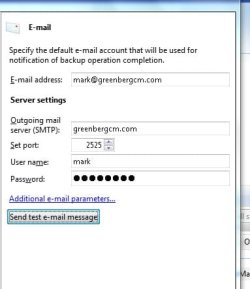
Rich,

The Test Send took double the time to fail as previously, but still failed.

Do you see anything I'm not seeing on the two setup screens?

Mark
 

Attachments

  • AcronisSend_1.jpg
    AcronisSend_1.jpg
    18.7 KB · Views: 4
  • AcronisSend_2.jpg
    AcronisSend_2.jpg
    25.8 KB · Views: 3

My Computer

Computer type
PC/Desktop
OS
Windows 7 & Windows 10
Markg2, it could be that your smtp server requires the full email address as the username, I know that mine does and that makes a difference.
give that a shot to put your full email address as the username. also some require the mail.servername.xxx for
the outgoing smtp server.

Rich
 

My Computer

Computer type
Laptop
Computer Manufacturer/Model Number
Toshiba Laptop Qosimo X870
OS
Windows 7 Pro x64 SP1
CPU
Intel Core I7
Motherboard
Toshiba Qosmio
Memory
16 Gigs
Graphics Card(s)
NVIDIA GeForce GTX 670M
Monitor(s) Displays
17.7" laptop
Screen Resolution
1600 x 900
Hard Drives
256 Gig SanDisk SSD for C
256 Gig Intel SSD for D
Internet Speed
50/25 FIOS
Antivirus
Vipre (all you can eat for 10 machines)
Browser
IE and FF
Other Info
I have dos 6.22, wfwg 3.11, win98, 2000 and xp VHD's available for testing. MS's Virtual PC works great.
Rich,

The Test Send took double the time to fail as previously, but still failed.

Do you see anything I'm not seeing on the two setup screens?

Mark

Just a thought. My settings for pop are mail.domainname.com Not just the domain
name.

for both smtp and pop.

Rich
 

My Computer

Computer type
Laptop
Computer Manufacturer/Model Number
Toshiba Laptop Qosimo X870
OS
Windows 7 Pro x64 SP1
CPU
Intel Core I7
Motherboard
Toshiba Qosmio
Memory
16 Gigs
Graphics Card(s)
NVIDIA GeForce GTX 670M
Monitor(s) Displays
17.7" laptop
Screen Resolution
1600 x 900
Hard Drives
256 Gig SanDisk SSD for C
256 Gig Intel SSD for D
Internet Speed
50/25 FIOS
Antivirus
Vipre (all you can eat for 10 machines)
Browser
IE and FF
Other Info
I have dos 6.22, wfwg 3.11, win98, 2000 and xp VHD's available for testing. MS's Virtual PC works great.
Back
Top