
Hi folks
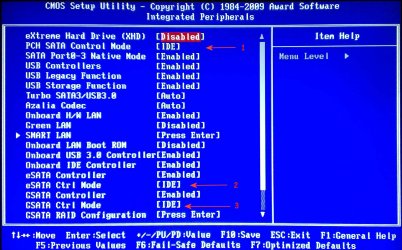
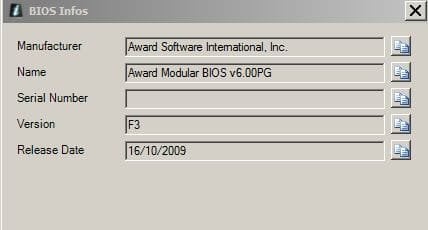
I recently bought an SSD drive (ADATA SP900) and I want to migrate my original HDD to the new SSD. Acronis True Image (which comes as a free download from ADATA) has a detailed description of this job, see Acronis True Image 2014 Help. Everything seems to go well until I reach step 11 in which the program doesn't see any SSD attached, either I connect it to a SATA2 port (as it was the old HDD) or to a SATA3 port (MArvell controller). I guess it has to do with the IDE/AHCI configuration of my MB (Gigabyte GA-P55Α-UD3R). Here is a screenshot of the BIOS configuration page. Which of the 3 settings (marked with arrows 1,2,3 on the image) do I change (IDE-AHCI) ????
Many thx in advance
I recently bought an SSD drive (ADATA SP900) and I want to migrate my original HDD to the new SSD. Acronis True Image (which comes as a free download from ADATA) has a detailed description of this job, see Acronis True Image 2014 Help. Everything seems to go well until I reach step 11 in which the program doesn't see any SSD attached, either I connect it to a SATA2 port (as it was the old HDD) or to a SATA3 port (MArvell controller). I guess it has to do with the IDE/AHCI configuration of my MB (Gigabyte GA-P55Α-UD3R). Here is a screenshot of the BIOS configuration page. Which of the 3 settings (marked with arrows 1,2,3 on the image) do I change (IDE-AHCI) ????
Many thx in advance
Attachments


My Computer
At a glance
Windows 7 Pro 64Intel i7-3770 3.4 GHzCorsair RAM DDR3 8GB (2x4)Kit 2000MHz XMS3MSI Nvidia GTX 770
- Computer type
- PC/Desktop
- OS
- Windows 7 Pro 64
- CPU
- Intel i7-3770 3.4 GHz
- Motherboard
- Gigabyte GA-Z77X-UD3H
- Memory
- Corsair RAM DDR3 8GB (2x4)Kit 2000MHz XMS3
- Graphics Card(s)
- MSI Nvidia GTX 770
- Monitor(s) Displays
- Samsung PX2370
- Screen Resolution
- 1920 x 1080
- Hard Drives
- OCZ SSD Vertex 4 240 Gb
- PSU
- Corsair 1000 W
- Case
- Coolermaster
- Keyboard
- Microsoft Multimedia Keyboard
- Mouse
- Microsoft Wireless mouse 2.0
- Internet Speed
- 1.2 Mbs
- Antivirus
- Norton Internet Security 2014
- Browser
- Chrome


