Solved Action Bars Small

Nucca

New member
Local time
5:39 AM
Messages
18
Hello there, For some reason I had this theme. It was nice, But I wanted to reverse
back to the default theme. But now my action bar is like small. I liked the old one,
Here's a screenshot: http://puu.sh/11DRs

You know how the [X] was a bit longer.
 

My Computer

OS
Windows 7, Ultimate, 64bit

My Computer

Computer Manufacturer/Model Number
acer aspire 5935g
OS
Windows 7 Home Premium x64 SP1
CPU
intel(R)core(TM)2 duo CPU T6600 @ 2.20GHz
Motherboard
intel gm45/gm47 revision 07
Memory
3 gb ddr3
Graphics Card(s)
ati radeon hd4570/512mb
Monitor(s) Displays
lop156wh2-tle1 15.3 flat
Screen Resolution
1366x768
Hard Drives
OCZ-Agility3 60gig ssd
320gig external hdd
500gig external hdd
Mouse
Optical
Internet Speed
30Mbps Down/30Mbps Up
Hello Nucca and welcome

Firstly run this to reset all your system files that the theme may have altered back to default. Run up to 3 times with reboots between or until it reports "No Integrity Violations" - http://www.sevenforums.com/tutorials/1538-sfc-scannow-command-system-file-checker.html

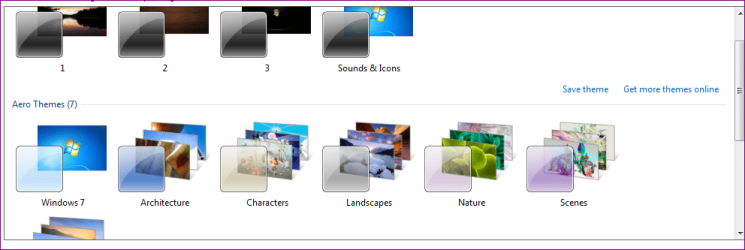
Then right click the desktop/Personalize and select one of the windows 7 default Aero themes.

View attachment 229722

Regards Danny
I'll try this right now, Thanks for the suggestion.
Will reply back if it works.
 

My Computer

OS
Windows 7, Ultimate, 64bit
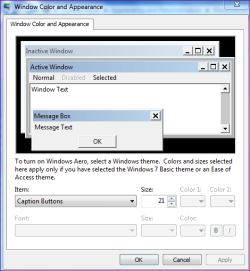
After that check the advanced appearance settings under "Caption Buttons" The default size is 21 as below

Capture.PNG

Danny
 

My Computer

Computer Manufacturer/Model Number
acer aspire 5935g
OS
Windows 7 Home Premium x64 SP1
CPU
intel(R)core(TM)2 duo CPU T6600 @ 2.20GHz
Motherboard
intel gm45/gm47 revision 07
Memory
3 gb ddr3
Graphics Card(s)
ati radeon hd4570/512mb
Monitor(s) Displays
lop156wh2-tle1 15.3 flat
Screen Resolution
1366x768
Hard Drives
OCZ-Agility3 60gig ssd
320gig external hdd
500gig external hdd
Mouse
Optical
Internet Speed
30Mbps Down/30Mbps Up
After that check the advanced appearance settings under "Caption Buttons" The default size is 21 as below

View attachment 229725

Danny

Right after all that, It says nothing is wrong with it. Then I re-booted just to be sure.
It was alright for like 3 minutes, Then it just switches back to the small one. And it's currently on 21.
 

My Computer

OS
Windows 7, Ultimate, 64bit
Just try increasing it from 21 to a size that suits you. 21 is the default size, and from your image it looks about right to be honest. Have you selected one of the Default themes and not one you may have saved.

Danny
 

My Computer

Computer Manufacturer/Model Number
acer aspire 5935g
OS
Windows 7 Home Premium x64 SP1
CPU
intel(R)core(TM)2 duo CPU T6600 @ 2.20GHz
Motherboard
intel gm45/gm47 revision 07
Memory
3 gb ddr3
Graphics Card(s)
ati radeon hd4570/512mb
Monitor(s) Displays
lop156wh2-tle1 15.3 flat
Screen Resolution
1366x768
Hard Drives
OCZ-Agility3 60gig ssd
320gig external hdd
500gig external hdd
Mouse
Optical
Internet Speed
30Mbps Down/30Mbps Up
Just try increasing it from 21 to a size that suits you. 21 is the default size, and from your image it looks about right to be honest. Have you selected one of the Default themes and not one you may have saved.

Danny

It changed straight after I changed my background.
 

My Computer

OS
Windows 7, Ultimate, 64bit
How did you change the background, did you just choose one of your saved themes, if so those will be saved with the smaller caption buttons.

Choose the default Aero theme then right click the desktop/Personalize/Desktop Background and choose your background. What happens then.

All the themes you have saved under "My Themes" since installing the custom theme will likely contain additions from your custom installed theme so are now likely no good to you.

Danny
 

My Computer

Computer Manufacturer/Model Number
acer aspire 5935g
OS
Windows 7 Home Premium x64 SP1
CPU
intel(R)core(TM)2 duo CPU T6600 @ 2.20GHz
Motherboard
intel gm45/gm47 revision 07
Memory
3 gb ddr3
Graphics Card(s)
ati radeon hd4570/512mb
Monitor(s) Displays
lop156wh2-tle1 15.3 flat
Screen Resolution
1366x768
Hard Drives
OCZ-Agility3 60gig ssd
320gig external hdd
500gig external hdd
Mouse
Optical
Internet Speed
30Mbps Down/30Mbps Up
How did you change the background, did you just choose one of your saved themes, if so those will be saved with the smaller caption buttons.

Choose the default Aero theme then right click the desktop/Personalize/Desktop Background and choose your background. What happens then.

All the themes you have saved under "My Themes" since installing the custom theme will likely contain additions from your custom installed theme so are now likely no good to you.

Danny

I didn't click any of my old themes, Just clicked "Personalize" > "Desktop Background".
 

My Computer

OS
Windows 7, Ultimate, 64bit
Just for comparison this is my custom size 17

Capture.PNG

And the default 21

Capture1 1.PNG

Doesn't look much different to yours apart from the width
 

My Computer

Computer Manufacturer/Model Number
acer aspire 5935g
OS
Windows 7 Home Premium x64 SP1
CPU
intel(R)core(TM)2 duo CPU T6600 @ 2.20GHz
Motherboard
intel gm45/gm47 revision 07
Memory
3 gb ddr3
Graphics Card(s)
ati radeon hd4570/512mb
Monitor(s) Displays
lop156wh2-tle1 15.3 flat
Screen Resolution
1366x768
Hard Drives
OCZ-Agility3 60gig ssd
320gig external hdd
500gig external hdd
Mouse
Optical
Internet Speed
30Mbps Down/30Mbps Up
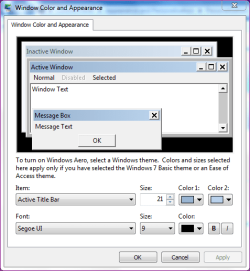
In advanced appearance settings what are the numbers for active title bar just to check, they should be default but thats the only way I can re create the thinner buttons

This is default
Capture.PNG
 

My Computer

Computer Manufacturer/Model Number
acer aspire 5935g
OS
Windows 7 Home Premium x64 SP1
CPU
intel(R)core(TM)2 duo CPU T6600 @ 2.20GHz
Motherboard
intel gm45/gm47 revision 07
Memory
3 gb ddr3
Graphics Card(s)
ati radeon hd4570/512mb
Monitor(s) Displays
lop156wh2-tle1 15.3 flat
Screen Resolution
1366x768
Hard Drives
OCZ-Agility3 60gig ssd
320gig external hdd
500gig external hdd
Mouse
Optical
Internet Speed
30Mbps Down/30Mbps Up
Here: http://puu.sh/11GSe
It's exactly the same. I honestly don't know what's wrong, I deleted my old themes going to restart now.
Wish me luck!
 

My Computer

OS
Windows 7, Ultimate, 64bit
The only way I can re create it is by using a basic theme
Capture.PNG

Just to be sure you are using the first Window 7 Aero theme

Capture 2.PNG

And the SFC/SCANNOW scan was clear

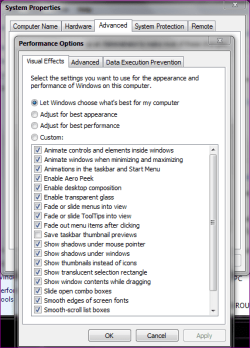
And performance options are as below

Capturen.PNG
 

My Computer

Computer Manufacturer/Model Number
acer aspire 5935g
OS
Windows 7 Home Premium x64 SP1
CPU
intel(R)core(TM)2 duo CPU T6600 @ 2.20GHz
Motherboard
intel gm45/gm47 revision 07
Memory
3 gb ddr3
Graphics Card(s)
ati radeon hd4570/512mb
Monitor(s) Displays
lop156wh2-tle1 15.3 flat
Screen Resolution
1366x768
Hard Drives
OCZ-Agility3 60gig ssd
320gig external hdd
500gig external hdd
Mouse
Optical
Internet Speed
30Mbps Down/30Mbps Up
I've fixed it, I was looking through my start up programs and saw a program called "Close Button Changer".
So I now disabled it, It's all good now!

Thanks for all your support.
 

My Computer

OS
Windows 7, Ultimate, 64bit
I've fixed it, I was looking through my start up programs and saw a program called "Close Button Changer".
So I now disabled it, It's all good now!

Thanks for all your support.

Thank goodness for that was beginning to think I had lost the plot totally. Glad you got there in the end :D

Danny
 

My Computer

Computer Manufacturer/Model Number
acer aspire 5935g
OS
Windows 7 Home Premium x64 SP1
CPU
intel(R)core(TM)2 duo CPU T6600 @ 2.20GHz
Motherboard
intel gm45/gm47 revision 07
Memory
3 gb ddr3
Graphics Card(s)
ati radeon hd4570/512mb
Monitor(s) Displays
lop156wh2-tle1 15.3 flat
Screen Resolution
1366x768
Hard Drives
OCZ-Agility3 60gig ssd
320gig external hdd
500gig external hdd
Mouse
Optical
Internet Speed
30Mbps Down/30Mbps Up
I've fixed it, I was looking through my start up programs and saw a program called "Close Button Changer".
So I now disabled it, It's all good now!

Thanks for all your support.

Thank goodness for that was beginning to think I had lost the plot totally. Glad you got there in the end :D

Danny

I would give you rep, But I honestly don't know how to do it!
Argh!
 

My Computer

OS
Windows 7, Ultimate, 64bit
Don't worry I'm just glad I still have my sanity:D
But for future reference Its the scales icon at the top of each post Capture.PNG

Take Care Danny
 

My Computer

Computer Manufacturer/Model Number
acer aspire 5935g
OS
Windows 7 Home Premium x64 SP1
CPU
intel(R)core(TM)2 duo CPU T6600 @ 2.20GHz
Motherboard
intel gm45/gm47 revision 07
Memory
3 gb ddr3
Graphics Card(s)
ati radeon hd4570/512mb
Monitor(s) Displays
lop156wh2-tle1 15.3 flat
Screen Resolution
1366x768
Hard Drives
OCZ-Agility3 60gig ssd
320gig external hdd
500gig external hdd
Mouse
Optical
Internet Speed
30Mbps Down/30Mbps Up
Back
Top