Action Center Notification

crispyclot

New member
Local time
8:01 AM
Messages
53
I had a backup fail due to drive space . I stopped it , rebooted and put on drive with enough space , finished successfully . Now even after many reboots and a week , the action center notification is still telling me its in progress ( its not ) .

Is there a way to reset or clear it ?
 

My Computer My Computer

OS
Window 7 Home Premium 64Bit
Last edited by a moderator:

My Computer My Computer

OS
Win7U 64 RTM
CPU
Q9550
Motherboard
GA-EP45-UD3R
Memory
8GB Gskill
Graphics Card(s)
ASUS|EAH4850/HTDI/1GD3/A
Sound Card
xfi Plat
Monitor(s) Displays
Dell 2405fpw
Screen Resolution
1920x1200
Hard Drives
Seagate & WD sata Drives
PSU
Antec
Case
Antec
Keyboard
MS Natural Ergonomic 4000
Mouse
Logitech MX610 USB Cordless
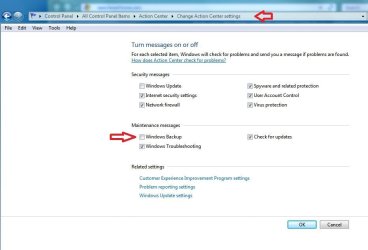
James , i nuked the messages for AC backup , rebooted . Still there showing same thing .

Oaken , couldnt see backup in the problems report , nuked them all , rebooted ( with message removal for AC notifications ) like above , still there haunting me ....

thanks guys ill keep trying ...:)
 

My Computer My Computer

OS
Window 7 Home Premium 64Bit
I had a backup fail due to drive space . I stopped it , rebooted and put on drive with enough space , finished successfully . Now even after many reboots and a week , the action center notification is still telling me its in progress ( its not ) .

Is there a way to reset or clear it ?


I had the same problem about a year ago with the constant progress. Didn't get any error codes or anything, just the progress looping. Finally found what the problem was for me.

At least in my case using Windows Backup. Not sure if you're using that, or third party.

My issue was I had made a custom Library with folders in it, in addition to the regular default libraries in Libraries and the backup had a problem with it. :rolleyes:
Soon as I deleted the custom library, it stopped. Seems to be a rare issue I guess.

Maybe not the same for you, but the issue sounds the same as mine was.

Backup and Restore cannot back up folders inside custom libraries
RC backup error 0x80070002
Error code 0x8100002F and or error code 0x80070002 when you back up files in Windows 7
 

My Computer My Computer

Computer type
PC/Desktop
Computer Manufacturer/Model Number
Airbot 2.0
OS
Windows 7 Ultimate x64 SP1
CPU
Core i7 920 (D0) @ 4Ghz, *26c idle *65c full load on air
Motherboard
Asus P6X58D Premium - Sata 6Gb/s - USB 3.0
Memory
12GB DDR3 Corsair Dominator -CMD12GX3M6A1600C8 at 1600MHz
Graphics Card(s)
Zotac Geforce GTX 770
Sound Card
ASUS Xonar D2X
Monitor(s) Displays
1 LG 24" Flatron W2453V-PF 1 Samsung 24" P2450H both 2ms RT
Screen Resolution
1920x1080@60hz
Hard Drives
1 Samsung 250GB 840 Evo SSD
1 OCZ Vertex2 180GB SSD
1 TB Samsung Spinpoint F1 7200RPM 32MB cache
2 500GB WD Caviar Blacks 7200RPM 32MB cache (WD5001AALS)

Pioneer DVD Burner DVR-S18M
PSU
Corsair HX1000W
Case
Cooler Master HAF 932
Cooling
Case Fans *3 230mm, *1 140mm/CPU - *Tuniq Tower 120 Extreme
Keyboard
Logitech Wireless MK700
Mouse
Logitech Wireless MK700
Internet Speed
DL 15 Mbps UL 0.98 Mbps
Antivirus
None
Browser
Firefox Nightly
Other Info
Processor-7.7 *RAM- 7.9 *Graphics-7.9 *Gaming Graphics- 7.9 *SSD- 7.8 W.E.I final score= 7.7
*Phone- LG Nexus 5
Airbot ( thanks ) mine was a failed backup due to space on drive on same pute , not external . I didnt create any folders/destinations , just stopped because of space and now cant get rid of notification .... even nuking option for messages in AC !
 

My Computer My Computer

OS
Window 7 Home Premium 64Bit

My Computer My Computer

Computer type
PC/Desktop
Computer Manufacturer/Model Number
Airbot 2.0
OS
Windows 7 Ultimate x64 SP1
CPU
Core i7 920 (D0) @ 4Ghz, *26c idle *65c full load on air
Motherboard
Asus P6X58D Premium - Sata 6Gb/s - USB 3.0
Memory
12GB DDR3 Corsair Dominator -CMD12GX3M6A1600C8 at 1600MHz
Graphics Card(s)
Zotac Geforce GTX 770
Sound Card
ASUS Xonar D2X
Monitor(s) Displays
1 LG 24" Flatron W2453V-PF 1 Samsung 24" P2450H both 2ms RT
Screen Resolution
1920x1080@60hz
Hard Drives
1 Samsung 250GB 840 Evo SSD
1 OCZ Vertex2 180GB SSD
1 TB Samsung Spinpoint F1 7200RPM 32MB cache
2 500GB WD Caviar Blacks 7200RPM 32MB cache (WD5001AALS)

Pioneer DVD Burner DVR-S18M
PSU
Corsair HX1000W
Case
Cooler Master HAF 932
Cooling
Case Fans *3 230mm, *1 140mm/CPU - *Tuniq Tower 120 Extreme
Keyboard
Logitech Wireless MK700
Mouse
Logitech Wireless MK700
Internet Speed
DL 15 Mbps UL 0.98 Mbps
Antivirus
None
Browser
Firefox Nightly
Other Info
Processor-7.7 *RAM- 7.9 *Graphics-7.9 *Gaming Graphics- 7.9 *SSD- 7.8 W.E.I final score= 7.7
*Phone- LG Nexus 5
Ill give this a try after work , thanks :)
 

My Computer My Computer

OS
Window 7 Home Premium 64Bit
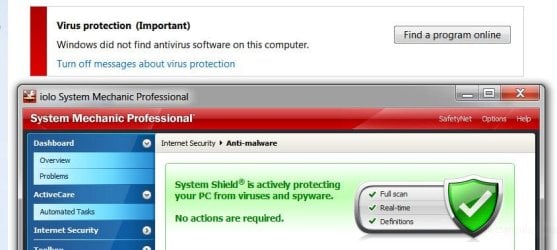
Is Win 7 seriously unstable/vista like . Everytime i boot its something new . Now AC besides NEVER getting rid of backup notification , says theres isnt any virus protection installed ....christ i had less problems with XP . Random things wont load in taskbar , settings not saved , getting real tired fast of this .
 

Attachments

  • ac virus alert.JPG
    ac virus alert.JPG
    53.7 KB · Views: 15

My Computer My Computer

OS
Window 7 Home Premium 64Bit
Back
Top