Action Center

Scolidion

New member
Local time
8:11 AM
Messages
9
Windows Action Center icon is always visible in the system tray. In the beta versions it was visible only when there were some messages in it and used to go off when all the problems were solved / no probs.

In the RC builds I can see the icon always visible even when there are no messages. Any idea how to change this behaviour?
 

My Computer

Computer Manufacturer/Model Number
Assembled
OS
Windows 7 Ultimate RTM 7600 x64
CPU
Intel Core 2 Duo E4500 2.2GHz
Motherboard
Intel 965RY
Memory
4 x 1GB Transcend
Graphics Card(s)
Gigabyte 8600GT 512 MB DDR3
Sound Card
On Board
Monitor(s) Displays
Samsung SyncMaster 940N (19")
Screen Resolution
1280 x 1024
Hard Drives
SATA WD 320 GB,
IDE WD 250 GB
PSU
PowerSafe 450W
Keyboard
Logitech
Mouse
Microsoft Basic
Internet Speed
400 Kbps
Last edited by a moderator:

My Computer

Computer Manufacturer/Model Number
Compaq Desktop
OS
Windows 7 Ultimate x64
CPU
AMD Sempron Dual Core
Memory
3GB
Graphics Card(s)
NVIDIA GeForce 6150SE nForce 430
Screen Resolution
1024x768
Hard Drives
150GB Sata
Hi Jeff,
Thanks for your reply.

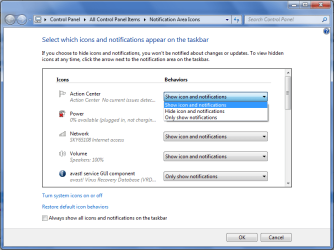
The Customize thingy can just hide or show the Action Center notifications. If you click "Hide Icon and Notifications" all the notifications from the Action Center wont be visible in future. "Show only Notifications" will just move the Icon from the main system tray to the up arrow window.

What I m looking for is another solution. The Action Center icon should be visible(in system tray and/or in the up button) only if there are any alerts, else the icon shouldnt show anywhere.
 

My Computer

Computer Manufacturer/Model Number
Assembled
OS
Windows 7 Ultimate RTM 7600 x64
CPU
Intel Core 2 Duo E4500 2.2GHz
Motherboard
Intel 965RY
Memory
4 x 1GB Transcend
Graphics Card(s)
Gigabyte 8600GT 512 MB DDR3
Sound Card
On Board
Monitor(s) Displays
Samsung SyncMaster 940N (19")
Screen Resolution
1280 x 1024
Hard Drives
SATA WD 320 GB,
IDE WD 250 GB
PSU
PowerSafe 450W
Keyboard
Logitech
Mouse
Microsoft Basic
Internet Speed
400 Kbps
Sorry for the late reply,

There is the 'Show only notifications' option which will only show the Action Center icon when it's trying to tell you something.
 

My Computer

Computer Manufacturer/Model Number
Compaq Desktop
OS
Windows 7 Ultimate x64
CPU
AMD Sempron Dual Core
Memory
3GB
Graphics Card(s)
NVIDIA GeForce 6150SE nForce 430
Screen Resolution
1024x768
Hard Drives
150GB Sata
Back
Top