
Activation Key: Upgrading Only?

websquad

New member
Member
Local time
12:19 AM
Messages
78
Had an XP/Pro machine; am upgrading to Win 7/Pro. Got the software from Amazon.com back when MS was having their pre-ship sale. At the same time allso got a Win 7/Home upgrade and applied it directly to my Netbook with no problems.

I wanted to clean my Boot sectors, and I did; however, when I try to activate I get code 0xC004F061 (ya gotta love those codes) .... "The Software Licensing Service determined that this specified product key can only be used for upgrading, not for clean installations."

Does this mean that I have to install XP/Pro again, and then install Windows 7/Pro over it?

Bummer !!
 

My Computer

Computer type
PC/Desktop
Computer Manufacturer/Model Number
Homebrew Intel 6600-based
OS
Win 7/Pro 64-bit
CPU
Intel 6600 Quad
Motherboard
eVGA 780i
Memory
8 GB DDR2
Graphics Card(s)
EVGA 512 9500 GT + nVidia GT
Monitor(s) Displays
4: (1) HP 22"W + (2) 19" + (1) 15" (pgm. icons only)
Hard Drives
SanDisk 120GB SSD (sys+pgms);WD Raptor 150GB (sys/pgm backup). Also, two of Seagate Barracuda ES.2's (data + backup)) and WD Raptor 150GB (spare)
Case
Cooler Master CM Cosmose 1000 (tower)
Keyboard
MS Natural (desktop)
Mouse
Logitech Performance Lase Wireless Mouse
Internet Speed
17 Mbs download (cable)
Antivirus
MS Defender
Other Info
Windows Experience Index on tower system: 7.1/7.1/6.9/6.9/7.0
Last edited:

My Computer

Computer type
PC/Desktop
Computer Manufacturer/Model Number
Dell XPS 420
OS
Windows 10, Home Clean Install
CPU
Intel Core2 processsor Q8200(2.33Ghz 1333FSB) Quad Core Tech
Motherboard
Dell
Memory
6 gb
Graphics Card(s)
ATI Radeon 256MB HD3650
Sound Card
Intergrated 7.1 Channel Audio
Monitor(s) Displays
Dell SP2009W 20"
Hard Drives
640 GB Serial ATA Hard drive
Cooling
Fan
Keyboard
Dell USB Keyboard
Mouse
Dell Premium Optical USB
Internet Speed
DSL 2.85
Richard, thanks for your help.

(1) I don't remember if I checked or left open "activate automaically, when on line"

(2) I used Control Panel > System > Change product key (at the bottom of the system panel) in my failed attempt to activate.

(3) I went to your first reference, and didn't find anything there.

(4) I called the MS Activation hot line and got someone who barely spoke English. He was no help, and sent me to someone who spoke US English. She advised me that I needed to reinstall XP/Pro, and then install Win 7/Pro over it. I "think" I got her to acknowledge that this was an administrative issue and not a technical issue; however, she couldn't help me.

So, is there any way I can avoid having to reinstall Windows XP/Pro?
 

My Computer

Computer type
PC/Desktop
Computer Manufacturer/Model Number
Homebrew Intel 6600-based
OS
Win 7/Pro 64-bit
CPU
Intel 6600 Quad
Motherboard
eVGA 780i
Memory
8 GB DDR2
Graphics Card(s)
EVGA 512 9500 GT + nVidia GT
Monitor(s) Displays
4: (1) HP 22"W + (2) 19" + (1) 15" (pgm. icons only)
Hard Drives
SanDisk 120GB SSD (sys+pgms);WD Raptor 150GB (sys/pgm backup). Also, two of Seagate Barracuda ES.2's (data + backup)) and WD Raptor 150GB (spare)
Case
Cooler Master CM Cosmose 1000 (tower)
Keyboard
MS Natural (desktop)
Mouse
Logitech Performance Lase Wireless Mouse
Internet Speed
17 Mbs download (cable)
Antivirus
MS Defender
Other Info
Windows Experience Index on tower system: 7.1/7.1/6.9/6.9/7.0
Richard, thanks for your help.

(1) I don't remember if I checked or left open "activate automaically, when on line"

Try again, according to the tutorial that I gave you and make sure that you uncheck. The default is checked.


(2) I used Control Panel > System > Change product key (at the bottom of the system panel) in my failed attempt to activate.

Product key is not correct, you need the Key that came with the DVD

(3) I went to your first reference, and didn't find anything there.

Make sure you do it exactly the way it is shown

(4) I called the MS Activation hot line and got someone who barely spoke English. He was no help, and sent me to someone who spoke US English. She advised me that I needed to reinstall XP/Pro, and then install Win 7/Pro over it. I "think" I got her to acknowledge that this was an administrative issue and not a technical issue; however, she couldn't help me.

Common problem call again. Trick is call later in the day or very early. Even try at night. You will eventually get a local person due to time zone difference. You are actually talking to a person in another Country when there are language problems.

So, is there any way I can avoid having to reinstall Windows XP/Pro?

Try everything again, let me know the results. Probably you will have to reinstall if it does not work this time. But it really should. Your key or the upgrade should not be rejected until you give the key.
 

My Computer

Computer type
PC/Desktop
Computer Manufacturer/Model Number
Dell XPS 420
OS
Windows 10, Home Clean Install
CPU
Intel Core2 processsor Q8200(2.33Ghz 1333FSB) Quad Core Tech
Motherboard
Dell
Memory
6 gb
Graphics Card(s)
ATI Radeon 256MB HD3650
Sound Card
Intergrated 7.1 Channel Audio
Monitor(s) Displays
Dell SP2009W 20"
Hard Drives
640 GB Serial ATA Hard drive
Cooling
Fan
Keyboard
Dell USB Keyboard
Mouse
Dell Premium Optical USB
Internet Speed
DSL 2.85
When you did your reinstall, did you delete the System Reserved, as MS updates etc add ref info there.
 

My Computer

OS
ME/XP/Vista/Win7
That is a good point, be sure to look into that possible problem.
 

My Computer

Computer type
PC/Desktop
Computer Manufacturer/Model Number
Dell XPS 420
OS
Windows 10, Home Clean Install
CPU
Intel Core2 processsor Q8200(2.33Ghz 1333FSB) Quad Core Tech
Motherboard
Dell
Memory
6 gb
Graphics Card(s)
ATI Radeon 256MB HD3650
Sound Card
Intergrated 7.1 Channel Audio
Monitor(s) Displays
Dell SP2009W 20"
Hard Drives
640 GB Serial ATA Hard drive
Cooling
Fan
Keyboard
Dell USB Keyboard
Mouse
Dell Premium Optical USB
Internet Speed
DSL 2.85
I've thrown in the towel ....

Well, fatigue set in so I thought I'd take the easy way out. After all, I have my laptop with Win 7/Pro (64) installed on it with a second monitor, so I can "suffer" a little while longer without my main machine.

Since I had only installed Norton Internet Security 2010 on the desktop and really have not invested much time with it, I decided to just reinstalled XP/Pro as suggested by MS. And, for what it is worth, I WAS using the correct Win 7 activation code for my Win 7 pro upgrade.

Alas, XP was my undoing.

I now keep getting the following message: PAGE_FAULT_IN_NONPAGED_AREA in white letters on a pretty blue screen (LOL). Says the problem seems to be caused by the following file: setupdd.sys.

Now I took care to "break" by RAID-1 array for drive "C" so the loader should have seen just a normal disk drive.

Any ideas? I know I'm way off topic on a Win 7 forum ...
 

My Computer

Computer type
PC/Desktop
Computer Manufacturer/Model Number
Homebrew Intel 6600-based
OS
Win 7/Pro 64-bit
CPU
Intel 6600 Quad
Motherboard
eVGA 780i
Memory
8 GB DDR2
Graphics Card(s)
EVGA 512 9500 GT + nVidia GT
Monitor(s) Displays
4: (1) HP 22"W + (2) 19" + (1) 15" (pgm. icons only)
Hard Drives
SanDisk 120GB SSD (sys+pgms);WD Raptor 150GB (sys/pgm backup). Also, two of Seagate Barracuda ES.2's (data + backup)) and WD Raptor 150GB (spare)
Case
Cooler Master CM Cosmose 1000 (tower)
Keyboard
MS Natural (desktop)
Mouse
Logitech Performance Lase Wireless Mouse
Internet Speed
17 Mbs download (cable)
Antivirus
MS Defender
Other Info
Windows Experience Index on tower system: 7.1/7.1/6.9/6.9/7.0
Update

A colleague advises that since the motherboard (eVGA 780i) is much newer the Windows XP, XP is unlikely to have the device drivers for the RAID controller on the motherboard. And those drivers are required even though I've "broken" the RAID (i.e., separated "C:" into to volumes).

So, I've found the CD-ROM with the drivers on it, and I'm off to find a computer with a floppy disk drive that I can copy the drivers to. Alas, XP is set-up assuming everyone has their device drivers on floppy disks. Sigh.
 

My Computer

Computer type
PC/Desktop
Computer Manufacturer/Model Number
Homebrew Intel 6600-based
OS
Win 7/Pro 64-bit
CPU
Intel 6600 Quad
Motherboard
eVGA 780i
Memory
8 GB DDR2
Graphics Card(s)
EVGA 512 9500 GT + nVidia GT
Monitor(s) Displays
4: (1) HP 22"W + (2) 19" + (1) 15" (pgm. icons only)
Hard Drives
SanDisk 120GB SSD (sys+pgms);WD Raptor 150GB (sys/pgm backup). Also, two of Seagate Barracuda ES.2's (data + backup)) and WD Raptor 150GB (spare)
Case
Cooler Master CM Cosmose 1000 (tower)
Keyboard
MS Natural (desktop)
Mouse
Logitech Performance Lase Wireless Mouse
Internet Speed
17 Mbs download (cable)
Antivirus
MS Defender
Other Info
Windows Experience Index on tower system: 7.1/7.1/6.9/6.9/7.0
A colleague advises that since the motherboard (eVGA 780i) is much newer the Windows XP, XP is unlikely to have the device drivers for the RAID controller on the motherboard. And those drivers are required even though I've "broken" the RAID (i.e., separated "C:" into to volumes).

So, I've found the CD-ROM with the drivers on it, and I'm off to find a computer with a floppy disk drive that I can copy the drivers to. Alas, XP is set-up assuming everyone has their device drivers on floppy disks. Sigh.

This may be of help.

http://www.sevenforums.com/tutorials/66010-sata-drivers-load-windows-xp-setup-dual-boot.html
 

My Computer

OS
ME/XP/Vista/Win7
Making some progress ... maybe ??

I took the CD-ROM to a machine that had a floppy disk drive. The CD-ROM had an automated utility for setting up the floppy (apparently, all it did was unzip some drivers and load them in the root directory of the floppy). When I got back to the office, the XP/Pro installation procedure would not recognize the floppy disk. I even burned two of these to make sure. Nothing worked.

So, I tried to do an image restore from my Macrium Reflect image backup I made last night. Alas, the Linux program that is the heart of the restore program (on a bootable CD-ROM) would not recognize my USB 3.0 attached hard drive (which stores the backup image). I burned another CD-ROM, this time specifying the "compatibility mode" ... that didn't work either. (In retrospect, I could have copied the USB 3.0-based image file to a USB 2.0 hard drive, and it likely would have worked. I suspect the problem is that Windows XP does not recognize USB 3.0 as the software was originally distributed ... support was probably added with some later service packs).

I've heard said that an early sign of mental incapacity is when we try the same thing over and over and expect different results. Being in such a state, I again tried to boot from the XP/Pro CD-ROM and read the floppy with the device drivers -- and this time I met with success.

I'm now one happy idiot: XP is formatting my drive "C" ... except, it has labeled it drive "H:" I'm not sure what that's all about. After the XP install, I'll immediately install Windows 7 over it as an Upgrade.

WINDOWS 7 UPGRADE: As I recall, there are two options that pop up for the Windows 7 upgrade. I don't remember the exact wording, but can you refresh my memory? Which one should I use coming from XP?

Regarding Drive H: Can I re-designate that as drive "C"?
 

My Computer

Computer type
PC/Desktop
Computer Manufacturer/Model Number
Homebrew Intel 6600-based
OS
Win 7/Pro 64-bit
CPU
Intel 6600 Quad
Motherboard
eVGA 780i
Memory
8 GB DDR2
Graphics Card(s)
EVGA 512 9500 GT + nVidia GT
Monitor(s) Displays
4: (1) HP 22"W + (2) 19" + (1) 15" (pgm. icons only)
Hard Drives
SanDisk 120GB SSD (sys+pgms);WD Raptor 150GB (sys/pgm backup). Also, two of Seagate Barracuda ES.2's (data + backup)) and WD Raptor 150GB (spare)
Case
Cooler Master CM Cosmose 1000 (tower)
Keyboard
MS Natural (desktop)
Mouse
Logitech Performance Lase Wireless Mouse
Internet Speed
17 Mbs download (cable)
Antivirus
MS Defender
Other Info
Windows Experience Index on tower system: 7.1/7.1/6.9/6.9/7.0
Screen Shot

When you have installed XP,
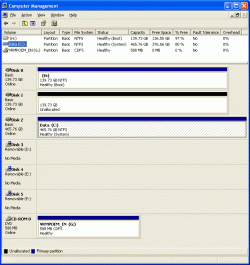
Can you post a screen shot Disk management?
See the attachment. Here was my old configuration:

  • Drive "C" was a RAID-1 array (150GB each) for Windows & Programs: this was the boot drive
  • Drive "D" was a RAID-1 array (500GB each) for data
Now,

  • Drive H is half of a broken RAID-1 array and is the Boot drive: it has Windows and Programs
  • Drive C is a RAID-1 array and has data
  • Disk 1 would normally be the second half of the Sys/Programs array, but it has not be rejoined to the array.
  • If need be, I can erase and even "break" what is now the drive "C" array (the two 500s) ... I have it backed up on my laptop, on two external drives, and on Mozy.
Objective:

  • Drive C as a two-member RAID-1 array for Sys/Programs
  • Drive D as a two-member RAID-1 array for Programs
Physically I have two 150GB drives spinning at 10,000 RPM, and two 500GB drives spinning at 7,200 RPM. I want the 150's back as Sys/Programs and the 500's to remain the data drive(s).

Your thoughts?

PS: tried to rename C to something else, but it would not let me ... said it was a "boot" drive (when, of course, H is the boot drive).
 

Attachments

  • DiskMgr.gif
    DiskMgr.gif
    21.1 KB · Views: 8
Last edited:

My Computer

Computer type
PC/Desktop
Computer Manufacturer/Model Number
Homebrew Intel 6600-based
OS
Win 7/Pro 64-bit
CPU
Intel 6600 Quad
Motherboard
eVGA 780i
Memory
8 GB DDR2
Graphics Card(s)
EVGA 512 9500 GT + nVidia GT
Monitor(s) Displays
4: (1) HP 22"W + (2) 19" + (1) 15" (pgm. icons only)
Hard Drives
SanDisk 120GB SSD (sys+pgms);WD Raptor 150GB (sys/pgm backup). Also, two of Seagate Barracuda ES.2's (data + backup)) and WD Raptor 150GB (spare)
Case
Cooler Master CM Cosmose 1000 (tower)
Keyboard
MS Natural (desktop)
Mouse
Logitech Performance Lase Wireless Mouse
Internet Speed
17 Mbs download (cable)
Antivirus
MS Defender
Other Info
Windows Experience Index on tower system: 7.1/7.1/6.9/6.9/7.0
If you had install Win XP with only one HD install, Win would have marked Disk 0 C:.
Are going reinstall Win 7?
 

My Computer

OS
ME/XP/Vista/Win7
If you had install Win XP with only one HD install, Win would have marked Disk 0 C:. Are going reinstall Win 7?
I'll install Windows 7 eventually. Things are so messed up know I think I'll take my data array off-line (currently, drive C), wipe the boot record of the current boot disk (currently H) clean, and try with a clean start, hoping that my Win XP boot disk will be (a) one of my 150s and (b) drive C.

This think has really gotten messy. Fortunately, I still have a good backup of the data array.
 

My Computer

Computer type
PC/Desktop
Computer Manufacturer/Model Number
Homebrew Intel 6600-based
OS
Win 7/Pro 64-bit
CPU
Intel 6600 Quad
Motherboard
eVGA 780i
Memory
8 GB DDR2
Graphics Card(s)
EVGA 512 9500 GT + nVidia GT
Monitor(s) Displays
4: (1) HP 22"W + (2) 19" + (1) 15" (pgm. icons only)
Hard Drives
SanDisk 120GB SSD (sys+pgms);WD Raptor 150GB (sys/pgm backup). Also, two of Seagate Barracuda ES.2's (data + backup)) and WD Raptor 150GB (spare)
Case
Cooler Master CM Cosmose 1000 (tower)
Keyboard
MS Natural (desktop)
Mouse
Logitech Performance Lase Wireless Mouse
Internet Speed
17 Mbs download (cable)
Antivirus
MS Defender
Other Info
Windows Experience Index on tower system: 7.1/7.1/6.9/6.9/7.0
Back
Top