Activation Problem

in progress

yes - in fact I'm on hold as I type. he's escalating... this is the fourth human I've dealt with over the span of 3 hours or so. at least he's persistent... escalating, escalating. so far he can't figure out why it doesn't just fly through. the real license key is a volume type, but that shouldn't befuddle the activation. he claims that if I had installed on new hard drive "from scratch" it would have worked. I have a hard time believing that...
Something very odd: he asked me to 'admin out' to a command prompt and manually change the product license key [which really wasn't a change...the right one was in the registry, faithfully copied over encryption & all]. It went through with flying colors. but on the reboot, the system went through "chkdsk" and removed/cleaned a bunch of security files.... what's that about? hactivate prevention?

Anyone still following this, let me ask a question: I have a Dell Optiplex, but the Windows 7 install was done at a corporate site [big dell client]. These machines rolled off-lease and were sold. Mine was activated, validated, goldplated, all that good stuff, but on a teenie hard drive. Upgraded to a 500g drive, cloned over the system, but it will not activate auto. It will not activate if I manually punch in my COA license number [which is still in its registry, btw]. I've combed all over the web trying to find a fix and can't, other than reading that the issue is likely the result of a server-spray install [with a group or serialized license scheme]. Do I need to change the license key TYPE? how???

Have you tried this method?

http://www.sevenforums.com/tutorials/18715-activate-windows-7-phone.html?ltr=A
 

My Computer

Computer Manufacturer/Model Number
HP DC7600, HP DC7600[2], HP DC7100, Samsung NC10
OS
Windows XP Pro SP3, Windows 7 Pro 32-bit, Windows 7 Ultimate 64bit, Windows XP Home SP3
CPU
Pentium 4 3.2GHz, Pentium 4 3.4GHz 64bit, Atom,
Motherboard
Dunno
Memory
4GB matched, 1GB, 2.5GB, 4.0 GB
Graphics Card(s)
Geforce 8400 GS and others
Sound Card
RealteK ALC260 and others
Monitor(s) Displays
Asus HD
Screen Resolution
1920x1080
Hard Drives
WD Caviar 640gb SATA
Cooling
We Be Cool
You need a clean install on any new drive being a new hardware! The OEM Install was still tied to the first hard drive by make, model, and most importantly "serial number" on the drive itself!
 

My Computers

System One System Two

  • Computer type
    PC/Desktop
    Computer Manufacturer/Model Number
    Custom builds = 2
    OS
    W7 Ultimate x64/W10 Pro x64/W11 Pro Triple Boot - Main PC W7 Remote PC Micro ATX W7 Pro x64/W11 Pro
    CPU
    AMD Phenom II X4 975 Deneb 3.6ghz - 965 2nd remote pc
    Motherboard
    Gigabyte GA-790XTA-UD4-Gigabyte GA-880GM-D2H remote pc
    Memory
    Kingston Hyper X DDR3 1600 1.5v 16gb - Hyper X Fury 8gb 2nd
    Graphics Card(s)
    MSI HD Radeon 5750 1gb - MSI HD Radeon 6450 on mini tower
    Sound Card
    Creative Labs X-Fi Xtreme Audio P - Realtek onooard 2nd case
    Monitor(s) Displays
    ASUS VW199T-P 19" HP 2082a Main-HP 2082a 20" remote pc
    Screen Resolution
    Asus 1440x900 - HP 1600x900
    Hard Drives
    WD Black 1TB HD per OS W7, W10, and pending W11 presently on 500gb OS Drive - Pending Triple 1TB HDs for Spanned Storage/backup volume
    Single 2TB external USB enclosure, single 1TB System 7 Host/Boot drive, Pending 8TB external HD for system image b
    PSU
    Corsair 750TX - primary / Corsair CX600 - second
    Case
    Antec 900-2 - SSD compatible / NZXT Vulcan mini tower
    Cooling
    Zalman CNPS9900A
    Keyboard
    AZIO L70 Backlit Letters Gaming - ONN Cordless/USB
    Mouse
    MSI DS200 Programmable, Logitech Cordless
    Internet Speed
    30mbps upgrade - primary hard wired - mini tower usb WiFi
    Antivirus
    GFI VIPRE Internet Security 2014 on W7 2016 beta on W10,
    Browser
    Cyberfox, WaterFox 64bit FF variants, FireFox x64, Pale Moon
    Other Info
    Accomdata fan cooled usb 2.0 PIDE/Sata II, III external enclosure.
    Sambient usb/eSata PATA/Sata II, III external enclosure.
  • Computer type
    PC/Desktop
    System Manufacturer/Model Number
    CUSTOM ASSEMBLY
    OS
    W7 Pro x64/W11 Pro
    CPU
    AMD Deneb 3.6ghz - 965
    Motherboard
    Gigabyte GA-880GM-D2H remote pc
    Memory
    Kingston Hyper X Fury 8gb
    Graphics Card(s)
    MSI HD Radeon 6450 DVI Output
    Sound Card
    Realtek onooard Creative or Other separate PENDING
    Monitor(s) Displays
    VIZIO 32" LCD TV Separate LCD Pending
    Screen Resolution
    1600x1080
    Hard Drives
    WD 500GB OS Host/Boot WD Green 1TB Storage/Backup
    PSU
    Corsair 600W - THERMALTAKE 600W spare case
    Case
    NZXT Vulcan mini tower
    Cooling
    Twin 120mm Top Fans - 240mm Side Cover
    Keyboard
    ONN Cordless/USB Logitech Cordless
    Mouse
    ONN USB/Cordless - Logitech Cordless
    Internet Speed
    DSL 5G
    Browser
    MS Edge, FireFox, WaterFox x64, FireFox Nightly
    Other Info
    OS Testing-Remote Access to Main TeamViewer
you and MS....

NH, you deserve a gold star.
this is the literal truth: in total I was on the Telephone for 4 hours with Microsoft folk today and 8 persons later, the 8th guy finally told me the truth, that some hardware changes will get the install in a state where it cannot generate the "install key" [9 fields, 5 characters per field], which is the case here... it cannot get to that stage.
The final guy "threw in the towel", admitting that it should validate [they checked my license key over and over... its a Volume License type, and the thing is looking for its original "parent" server].

This is a reason to stay with Windows XP in a working business environment. you do not want to waste time reinstalling from scratch and fooling with address books, exhange imports, reinstalls and re-updating of numerous applications and applets, reinstalling of personal files, etc etc, when you can simply clone a Win XP image and it will boot right up. [i've done it many times and so have a lot of peeps here].

Being stubborn, I'd like to fix the issue. Somehow need to trick the system.
What about mounting the original [activated/validated/blessed/updated] teenie drive on a usb port, leave new drive as "C:", but removing it from boot order. Force a boot from something other than "C:", then forcing an Activation???

the last guy was quite contrite....

You need a clean install on any new drive being a new hardware! The OEM Install was still tied to the first hard drive by make, model, and most importantly "serial number" on the drive itself!
 

My Computer

Computer Manufacturer/Model Number
HP DC7600, HP DC7600[2], HP DC7100, Samsung NC10
OS
Windows XP Pro SP3, Windows 7 Pro 32-bit, Windows 7 Ultimate 64bit, Windows XP Home SP3
CPU
Pentium 4 3.2GHz, Pentium 4 3.4GHz 64bit, Atom,
Motherboard
Dunno
Memory
4GB matched, 1GB, 2.5GB, 4.0 GB
Graphics Card(s)
Geforce 8400 GS and others
Sound Card
RealteK ALC260 and others
Monitor(s) Displays
Asus HD
Screen Resolution
1920x1080
Hard Drives
WD Caviar 640gb SATA
Cooling
We Be Cool
for the record

the summary sent by microsoft, with a few judicious omissions:

"This is XYZA with Microsoft Windows Technical Support.

It was my pleasure to work with you on your Windows service request 11296524##. Unfortunately, we were unable to resolve your issue. However, I hope that you were happy with the service provided to you.

I will archive the service request as Not-Resolved. If you are not happy with the support we've provided please let us know as soon as possible. My goal is to ensure that your experience with Microsoft Windows Technical Support leaves you pleased with our products and services.

Here is a summary of the key points of the service request for your records:

ACTION : ABCS, you were trying to activate Windows 7 Professional.
RESULT : You were getting "0x8007232B" error.
CAUSE : Activation files were corrupt.
RESOLUTION : ABCS, we suggested you to perform a clean installation of Windows 7 on your computer. If you need further assistance then please contact Volume License department...."

The thing is... What is the point of volume licensing? its to allow a large client [mftr or Fed Government, or DOD, or whatever/whoever] to spray installs from a server, assigning its own licenses. One of the points is to deliberately NOT HAVE a multitude of "install discs" laying around the premises. So this issue defeats the idea of having "hot ready" images on hard drives, unless they are "generic"
 

My Computer

Computer Manufacturer/Model Number
HP DC7600, HP DC7600[2], HP DC7100, Samsung NC10
OS
Windows XP Pro SP3, Windows 7 Pro 32-bit, Windows 7 Ultimate 64bit, Windows XP Home SP3
CPU
Pentium 4 3.2GHz, Pentium 4 3.4GHz 64bit, Atom,
Motherboard
Dunno
Memory
4GB matched, 1GB, 2.5GB, 4.0 GB
Graphics Card(s)
Geforce 8400 GS and others
Sound Card
RealteK ALC260 and others
Monitor(s) Displays
Asus HD
Screen Resolution
1920x1080
Hard Drives
WD Caviar 640gb SATA
Cooling
We Be Cool
zapp22,

1) VLK keys were massively misused in XP. As a rule, VL editions of XP should not be sold to individual consumers. Businesses, schools and govts normally use VL editions for flexibility in installing many computers. But in the times of xp it was a simple matter to download a vl disk and use a leaked vl key (they were leaked by the dozens). Such keys were /are blocked by Microsoft at the request of the original keyholder for reasons such as the key was lost, stolen, compromised, misused, or expired. Also, MS may block the key if it notices a pattern of misuse, ie, more installations of XP using that key than authorized.

2) Consequently, MS changed the VL activation process in Vista and Win7. Now, KMS (Key management service) keys are the default. In this system, the KMS key is installed on only one computer on the network called the KMS host. All other network users activate their system through the host. This is convenient for businesses because only one computer i.e. the host needs to contact MS for activation.

The other model is MAK (Multiple activation keys). In this one time activation with MS's activation services is required. This may be setup either to be done independently for each computer (like standard vlk) or through a MAK proxy.

3) You can try a clean install, but my guess would be that unless its the MAK independent method, you wont be able to activate without contacting the company/ organization, where your computer was originally setup. Only they can activate the system by properly authorizing you.
 

My Computer

Computer Manufacturer/Model Number
Too many to describe...
OS
Windows 7 x64 pro/ Windows 7 x86 Pro/ XP SP3 x86
Bill, at least you have a thorough understanding of what's going on.
you realize what the net/net of this is for the "mere mortal". i had this long intense chat with the 8th and last rep at MS yesterday:
like this: "ok... hang on, let me rewind to the very frontend of this exercise and ask you [mr. microsoft] a simple question. I have a perfectly legitimate license, and you agree that I do. I have a system that is activated/validated/keyed/updated/solid-gold, right? The system is out of disk space and I want a big fat hard drive. Can you please tell me how to safely image-over my entire system environment to the new hard drive, have it activated/validated/updated/sanctified?".
His answer was "maybe not".

Like you, he said the only answer he could give was "TRY a clean install".
And he admitted it might fail, and admitted this was the only answer he could give me. he was "done".
that sounds like lawsuit material... petty as it is, Microsoft is denying a legitimate licensee the right to their license [in effect]

Volume keys usually don't ship with nice clean install discs. That in fact is one of the GOOD security points about that approach... you don't have a bunch of physical discs floating about

I don't think a clean install will work either.

Stepping back a few paces, how do I get this done?
Are there any 3rd party imaging programs that will work? I think the answer is "no" because as soon as the first boot occurs [if it does] W7 will pickup the hardware changes and force an activation which will fail.

right?

I note that the MS tech reps guess their way through this issue - they really do not understand the activation cobweb and they guess at ramifications. several of them misspoke to wit: "any major changes of hardware will cause this condition" and I would interrupt and tell them they're giving incorrect counsel.
I had already changed:
- Old DVD to modern DVD drive
- Old ATI vid card to new Gforce card
- Exchanged limited RAM for full-up 4GB
none of those changes triggered a reactivate.
Only the HD change.

there's a way...

What if I mount the original/good/activated HD as a USB device? Will it boot? [probably not]. How would I force it to boot... make it bootable? I'm trying to think of a way to leave the new drive as C: but not boot from it, then go through activation or if not triggered, manually "change" the license key.
??


zapp22,

1) VLK keys were massively misused in XP. As a rule, VL editions of XP should not be sold to individual consumers. Businesses, schools and govts normally use VL editions for flexibility in installing many computers. But in the times of xp it was a simple matter to download a vl disk and use a leaked vl key (they were leaked by the dozens). Such keys were /are blocked by Microsoft at the request of the original keyholder for reasons such as the key was lost, stolen, compromised, misused, or expired. Also, MS may block the key if it notices a pattern of misuse, ie, more installations of XP using that key than authorized.

2) Consequently, MS changed the VL activation process in Vista and Win7. Now, KMS (Key management service) keys are the default. In this system, the KMS key is installed on only one computer on the network called the KMS host. All other network users activate their system through the host. This is convenient for businesses because only one computer i.e. the host needs to contact MS for activation.

The other model is MAK (Multiple activation keys). In this one time activation with MS's activation services is required. This may be setup either to be done independently for each computer (like standard vlk) or through a MAK proxy.

3) You can try a clean install, but my guess would be that unless its the MAK independent method, you wont be able to activate without contacting the company/ organization, where your computer was originally setup. Only they can activate the system by properly authorizing you.
 

My Computer

Computer Manufacturer/Model Number
HP DC7600, HP DC7600[2], HP DC7100, Samsung NC10
OS
Windows XP Pro SP3, Windows 7 Pro 32-bit, Windows 7 Ultimate 64bit, Windows XP Home SP3
CPU
Pentium 4 3.2GHz, Pentium 4 3.4GHz 64bit, Atom,
Motherboard
Dunno
Memory
4GB matched, 1GB, 2.5GB, 4.0 GB
Graphics Card(s)
Geforce 8400 GS and others
Sound Card
RealteK ALC260 and others
Monitor(s) Displays
Asus HD
Screen Resolution
1920x1080
Hard Drives
WD Caviar 640gb SATA
Cooling
We Be Cool
zapp22,

Do you have a COA sticker on your machine? It's a rainbow sticker with a product key and other details on it. It may be on the front of tha machine or at the bottom or behind the battery.
 

My Computer

Computer Manufacturer/Model Number
Too many to describe...
OS
Windows 7 x64 pro/ Windows 7 x86 Pro/ XP SP3 x86
No, this is a Dell Optiplex that was part of a big volume that were converted over to Windows 7 downstream at either the customer's shop or via contractor [IT contractor]. My current understanding is that some unit of HP provided the licensing/install service, which is quite plausible. As you know, in a big shop you'll have an installed base of several vendors/vintages. I would hazard a guess that this was an early-adopter trial and when the hardware rolled off its lease they go into the secondary market.

The System originally has a Windows XP Pro COA. It still has the original hard drive [an 80gb sata] that was nuked and remapped with Windows 7 Professional.
The license is good. The system activated/validated perfectly in its original form.
Only upon confg'ing the new drive did the error appear.

There is an endless supply of such items in the pipeline, just as there was/is for corporate-lease Win XP rigs.

zapp22,

Do you have a COA sticker on your machine? It's a rainbow sticker with a product key and other details on it. It may be on the front of tha machine or at the bottom or behind the battery.
 

My Computer

Computer Manufacturer/Model Number
HP DC7600, HP DC7600[2], HP DC7100, Samsung NC10
OS
Windows XP Pro SP3, Windows 7 Pro 32-bit, Windows 7 Ultimate 64bit, Windows XP Home SP3
CPU
Pentium 4 3.2GHz, Pentium 4 3.4GHz 64bit, Atom,
Motherboard
Dunno
Memory
4GB matched, 1GB, 2.5GB, 4.0 GB
Graphics Card(s)
Geforce 8400 GS and others
Sound Card
RealteK ALC260 and others
Monitor(s) Displays
Asus HD
Screen Resolution
1920x1080
Hard Drives
WD Caviar 640gb SATA
Cooling
We Be Cool
Here's a worthy question:
In a system that is successfully activated AND validated, isn't there something in the registry or elsewhere physically on the drive that reflects the successful activation? There must be, elsewise the system would be 'stuck' at the activation stage. Whatever that widget is, it would be 'Exhibit A' in the discussion.
Essentially, Microsoft is unintentionally in the position of authorizing a piece of hardware, and not authorizing a change of hardware. [denying licensability].

Anyone know where such a marker is stashed?

Secondary to that question: the "Install Key" that is randomly generated during the process: is it also saved in some fashion on the drive? The Install Key essentially, in such cases, is the "token" that buys the customer transit from a Tech Support issue to a 'Volume Licensing' issue. That is precisely what the assembled folk yesterday told me. No "Install Key", no re-up. Since the system SHOULD generate an install key, but is not capable of doing so, then it becomes a "Tech Support" Issue, lands in their shop, and goes unresolved.

If these two items are on the drive somewhere, I would want to fetch and decrypt them.
 

My Computer

Computer Manufacturer/Model Number
HP DC7600, HP DC7600[2], HP DC7100, Samsung NC10
OS
Windows XP Pro SP3, Windows 7 Pro 32-bit, Windows 7 Ultimate 64bit, Windows XP Home SP3
CPU
Pentium 4 3.2GHz, Pentium 4 3.4GHz 64bit, Atom,
Motherboard
Dunno
Memory
4GB matched, 1GB, 2.5GB, 4.0 GB
Graphics Card(s)
Geforce 8400 GS and others
Sound Card
RealteK ALC260 and others
Monitor(s) Displays
Asus HD
Screen Resolution
1920x1080
Hard Drives
WD Caviar 640gb SATA
Cooling
We Be Cool
zapp22,

FYI, for MAK activations, theres something called "Activation Hardware Tolerance". What this does is to assign a weighted score for each hardware change, the score varying with how significant the change is. E.g. a CD drive change would be very minor while a hard drive change would be very major. Windows adds up this score and once a particular cumulative score is reached, the MAK key needs to be renewed. Now you mentioned having swapped out other parts earlier, so i was wondering whether you are out of tolerance. See this thread.

Volume Activation 2.0 at UW-Madison
 

My Computer

Computer Manufacturer/Model Number
Too many to describe...
OS
Windows 7 x64 pro/ Windows 7 x86 Pro/ XP SP3 x86
I'll check that link Bill.

For anyone reading my posts, let me add right here in bold that I really want to find a technical way to solve this, so that either a Re-Activation is not triggered, or that one is triggered correctly and goes through automatically. End users do not need to be stuck with this issue. Microsoft has the best intentions in all this and does need to eliminate grayware leaks. At the same time, they need to look out for the "little guy" at the end of the rope. This is one of those things that perpetually causes people to say "I wish I had bought A$%$%." If there is a better way to clone, I want to find it TODAY. I get paid by my customers by the hour for helping them with issues, and they do not need to be paying me to go out and "upgrade" their Win 7 hard drives the long and tedious way. The right way to do it is to clone it, hit the switch, and move on. This was a 20 minute job under Windows XP.
 

My Computer

Computer Manufacturer/Model Number
HP DC7600, HP DC7600[2], HP DC7100, Samsung NC10
OS
Windows XP Pro SP3, Windows 7 Pro 32-bit, Windows 7 Ultimate 64bit, Windows XP Home SP3
CPU
Pentium 4 3.2GHz, Pentium 4 3.4GHz 64bit, Atom,
Motherboard
Dunno
Memory
4GB matched, 1GB, 2.5GB, 4.0 GB
Graphics Card(s)
Geforce 8400 GS and others
Sound Card
RealteK ALC260 and others
Monitor(s) Displays
Asus HD
Screen Resolution
1920x1080
Hard Drives
WD Caviar 640gb SATA
Cooling
We Be Cool
@zapp22

Bill2 has given you some great information but there is a part that is missing.

Run down: You have a Dell Optiplex with a COA for Windows XP the machine was in the corporate world and was upgraded to Windows 7 Professional with a VLP Key. If that is all correct we have several problems.

First: The Company should have never sold/given/rented/leased/auctioned or otherwise let that system out of their possession without completely wiping the hard drive. A VLP Key is NOT under any circumstances to be let out to the public.

Second: Microsoft made the change from VLK to VLP Keys as Bill2 states but also to help protect the Key that the company paid a lot of money for. When a computer is stolen (laptop/notebook/desktop) it is lost with that VLK (Windows XP); it will never expire and the computer will run forever. This is fine but it would be better if the company would not have to worry about that. So Microsoft setup the VLP to use KMS and re-validate every 180 days. This way if you have a laptop/notebook/desktop stolen the key will expire after 180 days. Giving the Company piece of mind. Plus this makes stealing KMS keys hard, if you steal mine and try to use it on your KMS server it will not work stating it is already used, so the Key is useless to you.

Third: So even if you get this machine working with the VLP key it will still need to validate to the KMS server in 180 days; once it cannot find the server because you have the machine and it is not on the network with the KMS server the key will become invalid.

Your best bet is to buy an OEM copy of Windows 7 Professional and install it on this machine. It will work until the machine dies and you can install it on as huge drive as you see fit.

If you don’t want to do that the Windows XP key is still good and you can install it on a large hard drive.

-WS
 

My Computer

Computer type
PC/Desktop
Computer Manufacturer/Model Number
Dell OP7010
OS
Windows 7 Enterprise (x64); Windows Server 2008 R2 (x64)
Memory
16GB
Monitor(s) Displays
4 Dell 24" LCD
Screen Resolution
1280x1024
Keyboard
Dell
Mouse
Dell Optical
Internet Speed
40meg
I'll check that link Bill.

For anyone reading my posts, let me add right here in bold that I really want to find a technical way to solve this, so that either a Re-Activation is not triggered, or that one is triggered correctly and goes through automatically. End users do not need to be stuck with this issue. Microsoft has the best intentions in all this and does need to eliminate grayware leaks. At the same time, they need to look out for the "little guy" at the end of the rope. This is one of those things that perpetually causes people to say "I wish I had bought A$%$%." If there is a better way to clone, I want to find it TODAY. I get paid by my customers by the hour for helping them with issues, and they do not need to be paying me to go out and "upgrade" their Win 7 hard drives the long and tedious way. The right way to do it is to clone it, hit the switch, and move on. This was a 20 minute job under Windows XP.

With Windows 7 you do not need to install it the long hard way. You can create images and use sysprep. Microsoft has given you the tools to do it, it just takes a bit to learn them.
 

My Computer

Computer type
PC/Desktop
Computer Manufacturer/Model Number
Dell OP7010
OS
Windows 7 Enterprise (x64); Windows Server 2008 R2 (x64)
Memory
16GB
Monitor(s) Displays
4 Dell 24" LCD
Screen Resolution
1280x1024
Keyboard
Dell
Mouse
Dell Optical
Internet Speed
40meg
@Bill2: FYI I wanted to REP you but I guess I had already given you REP and could not give it again.
 

My Computer

Computer type
PC/Desktop
Computer Manufacturer/Model Number
Dell OP7010
OS
Windows 7 Enterprise (x64); Windows Server 2008 R2 (x64)
Memory
16GB
Monitor(s) Displays
4 Dell 24" LCD
Screen Resolution
1280x1024
Keyboard
Dell
Mouse
Dell Optical
Internet Speed
40meg
WS - you give a good summary. But your bottom line is typical of a big IT vendor [is that your pedigree? it is mine]: in the final analysis the answer is "its your fault Mr. Customer, and you should pay twice, then everything will be fine".

Can you tell me how to absolutely without question identify the license type I have? Apparently microsoft could not, or did not care to share such info [which is rather counterproductive if you're trying to actually solve a problem - an open case]. If your answer is correct, why wouldn't it close the issue?

Secondly, I don't doubt your explanation of VLK vs VLP, but do you have a link to the contract? I would like to read for myself the clause about non-transferability. There are more people involved here than just me. Disposing of hundreds, thousands of off-lease machines is a serious business with serious organizations involved. If I can trace this back, for example, to Dell Financial Services, then I think I could get the practice stopped. That is, if you are correct, ergo it is illegitimate to represent these lot-sales as being for Windows 7 Equipped, and double-licensed systems that are transferable [completely]. Government Liquidators are huge - the financial firms that arrange the lease instruments are on the hook for both sides of the transaction. Once it goes downstream, I guess they would say its not their issue, but it certainly is. Whoever represents the systems in an illegitimate manner as it leaves the back dock of the original purchaser is culpable of violating the agreement between Microsoft and that Company or Entity, if the language of the license reads as you have paraphrased it.
 

My Computer

Computer Manufacturer/Model Number
HP DC7600, HP DC7600[2], HP DC7100, Samsung NC10
OS
Windows XP Pro SP3, Windows 7 Pro 32-bit, Windows 7 Ultimate 64bit, Windows XP Home SP3
CPU
Pentium 4 3.2GHz, Pentium 4 3.4GHz 64bit, Atom,
Motherboard
Dunno
Memory
4GB matched, 1GB, 2.5GB, 4.0 GB
Graphics Card(s)
Geforce 8400 GS and others
Sound Card
RealteK ALC260 and others
Monitor(s) Displays
Asus HD
Screen Resolution
1920x1080
Hard Drives
WD Caviar 640gb SATA
Cooling
We Be Cool
Secondly, I don't doubt your explanation of VLK vs VLP, but do you have a link to the contract? I would like to read for myself the clause about non-transferability. There are more people involved here than just me. Disposing of hundreds, thousands of off-lease machines is a serious business with serious organizations involved. If I can trace this back, for example, to Dell Financial Services, then I think I could get the practice stopped. That is, if you are correct, ergo it is illegitimate to represent these lot-sales as being for Windows 7 Equipped, and double-licensed systems that are transferable [completely]. Government Liquidators are huge - the financial firms that arrange the lease instruments are on the hook for both sides of the transaction. Once it goes downstream, I guess they would say its not their issue, but it certainly is. Whoever represents the systems in an illegitimate manner as it leaves the back dock of the original purchaser is culpable of violating the agreement between Microsoft and that Company or Entity, if the language of the license reads as you have paraphrased it.

I don't deal with contracts those are handled by an entire different agency that I don't typically have access to. However I would like to see the information myself. I will put a request for it and see what happens.
 

My Computer

Computer type
PC/Desktop
Computer Manufacturer/Model Number
Dell OP7010
OS
Windows 7 Enterprise (x64); Windows Server 2008 R2 (x64)
Memory
16GB
Monitor(s) Displays
4 Dell 24" LCD
Screen Resolution
1280x1024
Keyboard
Dell
Mouse
Dell Optical
Internet Speed
40meg
hi all, Ive just upgraded my laptop from vista to 7 and I am trying to activate it but the problem is I was having overheating problems at the time and as I was downloading 7 it crashed and I lost the product key supplied by the microsoft website.
Now I also got a backup DVD sent but the activation wont work because as Im trying to put the product key in it keeps on saying "unacceptable character".
Any Ideas?
 

My Computer

OS
Windows 7
hi all, Ive just upgraded my laptop from vista to 7 and I am trying to activate it but the problem is I was having overheating problems at the time and as I was downloading 7 it crashed and I lost the product key supplied by the microsoft website.
Now I also got a backup DVD sent but the activation wont work because as Im trying to put the product key in it keeps on saying "unacceptable character".
Any Ideas?

Don't hijack an old thread to get an answer to your problem. You need to start a new thread of your own.
 

My Computer

Computer Manufacturer/Model Number
Custom
OS
Windows 7 Ultimate RTM (Technet)
CPU
3.00 gigahertz Intel Core2 Duo E8400
Motherboard
ASUSTeK Computer INC. P5K/EPU Rev 1.xx
Memory
4GB
Graphics Card(s)
ATI Radeon X1950 Pro
Sound Card
Built in HD Audio
Monitor(s) Displays
22" Gateway LCD
Screen Resolution
1920 x 1200
Hard Drives
ST3160023A [Hard drive] (160.04 GB) -- drive 0, rev 8.01, ST3500630AS [Hard drive] (500.11 GB) -- drive 2, rev 3.AAK
ST3500630AS [Hard drive] (500.11 GB) -- drive 1, rev 3.AAK
Keyboard
Logitech G11
Mouse
Microsoft Wireless Laser Mouse 5000
Internet Speed
13.44 Mbps
hi all, Ive just upgraded my laptop from vista to 7 and I am trying to activate it but the problem is I was having overheating problems at the time and as I was downloading 7 it crashed and I lost the product key supplied by the microsoft website.
Now I also got a backup DVD sent but the activation wont work because as Im trying to put the product key in it keeps on saying "unacceptable character".
Any Ideas?

Welcome jezza31,

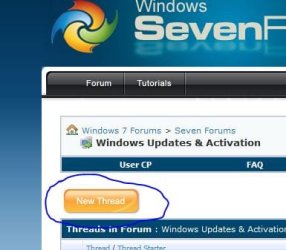
The best way to get your problem resolved is to start your own thread by going here Windows Updates & Activation - Windows 7 Forums and pressing the new thread button.:)
 

Attachments

  • new thread.JPG
    new thread.JPG
    34 KB · Views: 2

My Computer

Computer type
PC/Desktop
Computer Manufacturer/Model Number
Self Built
OS
Win 10 Pro x64
CPU
Intel I5-2500K @3.3GHz
Motherboard
Asrock P67 Extreme4
Memory
16GB G.Skill Ripjaws X (4x4GB)
Graphics Card(s)
EVGA GeForce 750 Ti SC 2GB
Sound Card
ASUS Xonar DG 5.1 Channels 24-bit 96KHz PCI Interface Sound
Monitor(s) Displays
auria eq2367
Screen Resolution
1920 x 1080
Hard Drives
250GB Samsung 850 EVO SSD
1TB WD Blue
1TB Hitachi
PSU
SeaSonic X 650W 80 Plus Gold
Case
Corsair Obsidian 750D
Cooling
Corsair H60, Three 140mm case fans
Keyboard
Logitech Wireless Keyboard K520
Mouse
Logitech Wireless Mouse M310
Internet Speed
Wave Broadband ~ 100 dn 5 up
Antivirus
Windows Defender, Malwarebytes Premium
Browser
Edge, IE11, Chrome
Other Info
Laptop specs: HP g7-1365dx /
CPU: AMD A6-3420M APU with Radeon(tm) HD Graphics /
RAM: Crucial 8Gb (2x4Gb) /
SSD: Crucial M4-CT128M4SSD2 ATA Device/ FW 000F /
GFX: AMD Radeon HD 6520G /
OS: Windows 10 Pro x64
spoke with an IT friend over the weekend. some time back [he does volume licensing... big shop with lots of desktop clients and portables] he had a devil of a time getting valid Windows 7 volume lists from Dell. Took quite a few heated conversations until he finally threatened to fire them, then they finally figured out what was amiss and got him good keys. I shan't defend Dell too vigorously but an issue like that MUST backwater into Microsoft

WindowsStar,
Just FYI, some of the early Dell keys were blacklisted by MS because they were used to hactivate Win7 by pirates. Its possible that the key your dvd is trying to install is one of those blacklisted keys. Theoretically that key should activate but fail MS validation. In your case, darn thing is not activating at all, so ya call Dell/MS.
 

My Computer

Computer Manufacturer/Model Number
HP DC7600, HP DC7600[2], HP DC7100, Samsung NC10
OS
Windows XP Pro SP3, Windows 7 Pro 32-bit, Windows 7 Ultimate 64bit, Windows XP Home SP3
CPU
Pentium 4 3.2GHz, Pentium 4 3.4GHz 64bit, Atom,
Motherboard
Dunno
Memory
4GB matched, 1GB, 2.5GB, 4.0 GB
Graphics Card(s)
Geforce 8400 GS and others
Sound Card
RealteK ALC260 and others
Monitor(s) Displays
Asus HD
Screen Resolution
1920x1080
Hard Drives
WD Caviar 640gb SATA
Cooling
We Be Cool
Back
Top