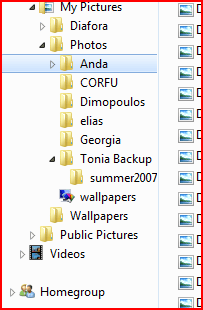
Active folder position while expanding folders

Kika

New member
Member
VIP
Local time
4:37 PM
Messages
113
Location
England
Hello :)

I've been using W7 now for couple of days and one thing I found really much disturbing with its explore.
In Vista, while scrolling down at left pane of explorer and double-clicking folder I want to expand, it will automatically move to the most top that folder, showing me the list of sub-folders so I can quickly click one I want see content of.
With Windows 7 the folder position goes most down :huh: Now that I find really stupid (or I'm stupid because don't know how to change? :p) as I need to scroll down all over the way again to see sub-folders.
I've changed all possible settings, but can't find the way to fix :(
Please, if anyone can tell me how to change that behaviour, before it drives me completely nuts, soo annoying.
 

My Computer

Computer Manufacturer/Model Number
IBM
OS
Windows 7 x64
CPU
Intel Core 2 T8100 @ 2.10GHz
Memory
3 GB SO-DIMM DDR2-800
Graphics Card(s)
Nvidia GeForce Go 7300
Sound Card
SteelSeries Siberia 7.1 3D
Screen Resolution
1680x1050
Mouse
Logitech MX
Have a look in Tutorials, I'm sure there is a solution for you there.
 

My Computer

Computer Manufacturer/Model Number
Home Brew
OS
Windows 7 Ultimate Vista Ultimate x64
CPU
Core 2 Duo E8500 3.16Ghz @ 3.8Ghz
Motherboard
eVGA 750i FTW
Memory
2x2Gigs Patriot PC2-6400 LL
Graphics Card(s)
Inno3D GeForce GTX260 216 SP
Monitor(s) Displays
ASUS VW222U 22" 2ms Response time
Screen Resolution
1680x1050
Hard Drives
SATA 150GB
SATA II 250GB
USB IDE 750GB Ext.
PSU
HYTEC 600W & Thermaltake 650W Toughpower Power Exp
Case
Thermaltake Armor LCS (Liquid Cooling System)
Cooling
Liquid Cooling System
Keyboard
Logitech G15 Gaming Keyboard
Mouse
Logitech G9 Gaming Mouse

My Computer

Computer type
PC/Desktop
Computer Manufacturer/Model Number
Self built custom
OS
64-bit Windows 11 Pro for Workstations
CPU
Intel i7-8700K OC'd to 5 GHz
Motherboard
ASUS ROG Maximus XI Formula Z390
Memory
64 GB (4x16GB) G.SKILL TridentZ RGB DDR4 3600 MHz
Graphics Card(s)
ASUS ROG-STRIX-GTX1080TI-O11G-GAMING
Sound Card
Integrated
Monitor(s) Displays
2 x Samsung Odyssey G7 27"
Screen Resolution
2560x1440
Hard Drives
1TB Samsung 990 PRO M.2,
4TB Samsung 990 PRO PRO M.2,
TerraMaster F8 SSD Plus NAS
PSU
Seasonic Prime Titanium 850W
Case
Thermaltake Core P3
Cooling
Corsair Hydro H115i
Keyboard
Logitech wireless K800
Mouse
Logitech MX Master 4
Internet Speed
2 Gb/s Download and 100 Mb/s Upload
Antivirus
Malwarebyte Anti-Malware Premium
Browser
Google Chrome
Other Info
Logitech Z625 speaker system,
Logitech BRIO 4K Pro webcam,
HP Color LaserJet Pro MFP M477fdn,
APC SMART-UPS RT 1000 XL - SURT1000XLI,
Galaxy S23 Plus phone
Thank you for replies :)
Those both boxes already were ticked. I made screenshots what I exactly mean. This is how it is with Vista:

As you see, the selected folder will appear at top, allowing quickly select sub folder from tree.
Now with 7 it jumps most down, hiding sub folders:

:(
 

My Computer

Computer Manufacturer/Model Number
IBM
OS
Windows 7 x64
CPU
Intel Core 2 T8100 @ 2.10GHz
Memory
3 GB SO-DIMM DDR2-800
Graphics Card(s)
Nvidia GeForce Go 7300
Sound Card
SteelSeries Siberia 7.1 3D
Screen Resolution
1680x1050
Mouse
Logitech MX
Try them unticked to see how it works instead.
 

My Computer

Computer type
PC/Desktop
Computer Manufacturer/Model Number
Self built custom
OS
64-bit Windows 11 Pro for Workstations
CPU
Intel i7-8700K OC'd to 5 GHz
Motherboard
ASUS ROG Maximus XI Formula Z390
Memory
64 GB (4x16GB) G.SKILL TridentZ RGB DDR4 3600 MHz
Graphics Card(s)
ASUS ROG-STRIX-GTX1080TI-O11G-GAMING
Sound Card
Integrated
Monitor(s) Displays
2 x Samsung Odyssey G7 27"
Screen Resolution
2560x1440
Hard Drives
1TB Samsung 990 PRO M.2,
4TB Samsung 990 PRO PRO M.2,
TerraMaster F8 SSD Plus NAS
PSU
Seasonic Prime Titanium 850W
Case
Thermaltake Core P3
Cooling
Corsair Hydro H115i
Keyboard
Logitech wireless K800
Mouse
Logitech MX Master 4
Internet Speed
2 Gb/s Download and 100 Mb/s Upload
Antivirus
Malwarebyte Anti-Malware Premium
Browser
Google Chrome
Other Info
Logitech Z625 speaker system,
Logitech BRIO 4K Pro webcam,
HP Color LaserJet Pro MFP M477fdn,
APC SMART-UPS RT 1000 XL - SURT1000XLI,
Galaxy S23 Plus phone
Yes, I have tried unticked, the behaviour won't change. Cant believe it doesn't annoy anyone else :P I hope someone comes up with registry hack for it, or hex-editing explorer or something. Any solution will be welcome.
Or if anyone knows another explorer that can replace default one, and looks most similar with vista/w7 explorer. Some I tried so far have good options but the look is like moving back to windows 95 :|
 

My Computer

Computer Manufacturer/Model Number
IBM
OS
Windows 7 x64
CPU
Intel Core 2 T8100 @ 2.10GHz
Memory
3 GB SO-DIMM DDR2-800
Graphics Card(s)
Nvidia GeForce Go 7300
Sound Card
SteelSeries Siberia 7.1 3D
Screen Resolution
1680x1050
Mouse
Logitech MX
The main reason such behavior does *not* annoy me is that I rarely encounter it - I have created additional libraries for my most often used folders, and navigate to them directly without having to traverse the folder tree. What you describe is annoying to me as well (somewhat), but I compensate by using that system less since it is so aggravating.

At worse case I am typing locations into the location bar....
 

My Computers

System One System Two

  • Computer type
    PC/Desktop
    Computer Manufacturer/Model Number
    The Beast Model A (homebrew)
    OS
    Windows 11 21H2 Current build
    CPU
    AMD Ryzen 9 3950X
    Motherboard
    MSI MEG X570 GODLIKE
    Memory
    4 * 32 GB - Corsair Vengeance 3600 MHz
    Graphics Card(s)
    EVGA GeForce RTX 3080 Ti XC3 ULTRA GAMING (12G-P5-3955-KR)
    Sound Card
    Realtek® ALC1220 Codec
    Monitor(s) Displays
    2x Eve Spectrum ES07D03 4K Gaming Monitor (Matte) | Eve Spec
    Screen Resolution
    3x 3840 x 2160
    Hard Drives
    3x Samsung 980 Pro NVMe PCIe 4 M.2 2 TB SSD (MZ-V8P2T0B/AM) } 3x Sabrent Rocket NVMe 4.0 1 TB SSD
    PSU
    PC Power & Cooling’s Silencer Series 1050 Watt, 80 Plus Plat
    Case
    Fractal Design Define 7 XL Dark ATX Full Tower Case
    Cooling
    SteelSeries Apex Pro Wired Gaming Keyboard
    Keyboard
    SteelSeries Apex Pro
    Mouse
    Logitech MX Master 3S | MX Master 3 for business
    Internet Speed
    AT&T LightSpeed Gigabit Duplex Ftth
    Antivirus
    Windows Defender + MB 3
    Browser
    Nightly (default) + Firefox (stable),Chrome, Edge
  • Computer type
    PC/Desktop
    System Manufacturer/Model Number
    Dell Latitude E5470
    OS
    ChromeOS Flex Dev Channel (current)
    CPU
    Intel(R) Core(TM) i5-6300U CPU @ 2.40GHz, 2501 Mhz, 2 Core(s), 4 Logical Processor(s)
    Motherboard
    Dell
    Memory
    16 GB
    Graphics Card(s)
    Intel(R) HD Graphics 520
    Sound Card
    Intel(R) HD Graphics 520 + RealTek Audio
    Monitor(s) Displays
    Dell laptop display 15"
    Screen Resolution
    1920 * 1080
    Hard Drives
    Toshiba 128GB M.2 22300 drive
    INTEL Cherryville 520 Series SSDSC2CW180A 180 GB SATA III SSD
    PSU
    Dell
    Case
    Dell
    Cooling
    Dell
    Keyboard
    Dell
    Mouse
    Logitech MX Master 3S (shared w. Sys 1) | Dell TouchPad
    Internet Speed
    AT&T LightSpeed Gigabit Duplex Ftth

My Computer

Computer type
PC/Desktop
Computer Manufacturer/Model Number
Self built custom
OS
64-bit Windows 11 Pro for Workstations
CPU
Intel i7-8700K OC'd to 5 GHz
Motherboard
ASUS ROG Maximus XI Formula Z390
Memory
64 GB (4x16GB) G.SKILL TridentZ RGB DDR4 3600 MHz
Graphics Card(s)
ASUS ROG-STRIX-GTX1080TI-O11G-GAMING
Sound Card
Integrated
Monitor(s) Displays
2 x Samsung Odyssey G7 27"
Screen Resolution
2560x1440
Hard Drives
1TB Samsung 990 PRO M.2,
4TB Samsung 990 PRO PRO M.2,
TerraMaster F8 SSD Plus NAS
PSU
Seasonic Prime Titanium 850W
Case
Thermaltake Core P3
Cooling
Corsair Hydro H115i
Keyboard
Logitech wireless K800
Mouse
Logitech MX Master 4
Internet Speed
2 Gb/s Download and 100 Mb/s Upload
Antivirus
Malwarebyte Anti-Malware Premium
Browser
Google Chrome
Other Info
Logitech Z625 speaker system,
Logitech BRIO 4K Pro webcam,
HP Color LaserJet Pro MFP M477fdn,
APC SMART-UPS RT 1000 XL - SURT1000XLI,
Galaxy S23 Plus phone
Thanks :) That makes things easier, yes. Even when doesn't solve the problem :(
 

My Computer

Computer Manufacturer/Model Number
IBM
OS
Windows 7 x64
CPU
Intel Core 2 T8100 @ 2.10GHz
Memory
3 GB SO-DIMM DDR2-800
Graphics Card(s)
Nvidia GeForce Go 7300
Sound Card
SteelSeries Siberia 7.1 3D
Screen Resolution
1680x1050
Mouse
Logitech MX
I think the solution to your problem is easy...

In WIN7, double-click is the problem that causes this behaviour.
If you single click the expand arrow on the left of the folder instead, it centers automatically the top folder so you can see all of its contents without having to scroll down. But if you double-click it, it does exactly what you're experiencing.So , just single click the expand arrow and you're there.

Tip: Make sure "Automatically expand to current folder" is not checked in Folder Options.

Regards
 

Attachments

  • not expanded.PNG
    not expanded.PNG
    5.5 KB · Views: 26
  • expanded.PNG
    expanded.PNG
    9 KB · Views: 38
  • not checked.jpg
    not checked.jpg
    31 KB · Views: 93
Last edited:

My Computer

Computer Manufacturer/Model Number
ENIAC
OS
Windows 7 RC 7100 32bit/64bit
CPU
Intel Core2Duo E4500 2.20 GHz
Motherboard
ASUS P5LD2-X/1333
Memory
2x1GB Kinsgston DDR2 800MHz
Graphics Card(s)
Nvidia 8500GT
Sound Card
Onboard High Definition Audio Device
Monitor(s) Displays
Sony Bravia 42"
Case
LINKW 2222
Cooling
Standard Intel
Keyboard
Some cheap one
Mouse
Microsoft Intellimouse something
Internet Speed
24MBps ADSL
Yeeee :D I want to kiss youuuu :p Can't believe was so easy, thank you so much! You just helped me to solve the most annoying problem for me in Win7 :)
 
Last edited:

My Computer

Computer Manufacturer/Model Number
IBM
OS
Windows 7 x64
CPU
Intel Core 2 T8100 @ 2.10GHz
Memory
3 GB SO-DIMM DDR2-800
Graphics Card(s)
Nvidia GeForce Go 7300
Sound Card
SteelSeries Siberia 7.1 3D
Screen Resolution
1680x1050
Mouse
Logitech MX
Hi i'm back here with this old problem as now i'm using RTM and this solution did not help at all more :(

Need some other explorer with possibility to edit mp3 files from Details Pane. Please let me know if exist such, hope someone can recommend me :( :(
 

My Computer

Computer Manufacturer/Model Number
IBM
OS
Windows 7 x64
CPU
Intel Core 2 T8100 @ 2.10GHz
Memory
3 GB SO-DIMM DDR2-800
Graphics Card(s)
Nvidia GeForce Go 7300
Sound Card
SteelSeries Siberia 7.1 3D
Screen Resolution
1680x1050
Mouse
Logitech MX
Back
Top