Active Window will "Deactivate" And Reqire a Mouse Click To Resume. ?

Jonnydark

New member
Local time
5:03 PM
Messages
1
Active Window will "Deactivate" And Reqire a Mouse Click To Resume. ?

I'm not sure what's going on... multiple times a day I'll be doing things in Windows 7... Email writing, Web Surfing, Doing art in Clip Studio Paint... And a "Error" ping will sound and I'll leave the active window. But nothing else happens. No error message. Nothing in the alerts menu. I close all my windows to see if there is anything hidden in the background and there is nothing. THERE! It just did it again! It usually happens when I'm typing.


What could be the problem?
 

My Computer My Computer

At a glance

Windows 7
Computer type
PC/Desktop
OS
Windows 7
Could be tricky to track down

It could be caused by some program generating a pop-up ad/message (or trying to generate one).

On my main PC, Avast AV does this (usually when I'm trying to type something into a doc or webpage).

Something similar happens on my media PC.
I'll be watching a video (full screen) and suddenly the window titlebar and video controls will appear and then disappear.
I'm not sure what is responsible in that case.

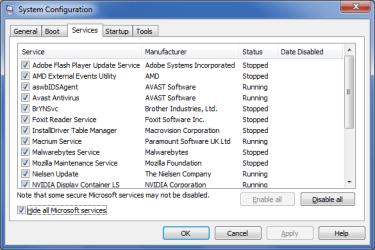
You could check your Services list:

  • Type msconfig in the Start Menu search box
  • Click on the Services tab
  • Check the "Hide all Microsoft services" checkbox
You could then:

  • Disable the non-Microsoft Services and see if the issue goes away
  • Re-enable the Services one at a time until the issue reappears
This may may help you identify the culprit.

Note:
Before you make any changes take a screenshot.
MSConfig - Services.png
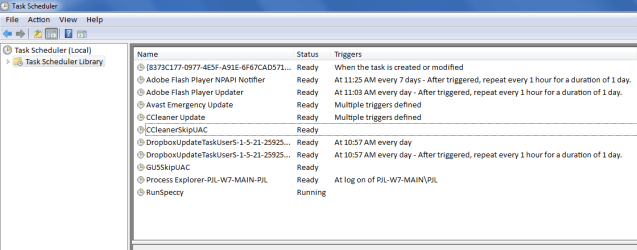
You could also check the Task Scheduler:

  • Type task in the Start Menu search box
  • Click on "Task Scheduler Library" in the left column
When you select a task, information will appear in the lower pane.
Check the tasks to see if there are any potential trouble makers.

You can disable/enable tasks by right clicking on them and choosing the required action from the context menu.

Note:
Before you make any changes take a screenshot.
Task Scheduler - Cropped.png
 

My Computer My Computer

At a glance

W7 Ultimate SP1, LM19.2 MATE, W10 Home 1703, ...AMD Phenom II x6 1100T, 3.3 GHz12GB DDR3 1333 G-Skill (4GB x 2), G-Skill (2G...NVIDIA GeForce GTX 660
Computer type
PC/Desktop
Computer Manufacturer/Model Number
n/a
OS
W7 Ultimate SP1, LM19.2 MATE, W10 Home 1703, W10 Pro 1703 VM, #All 64 bit
CPU
AMD Phenom II x6 1100T, 3.3 GHz
Motherboard
ASUS M4A88T-M/USB3 (AM3)
Memory
12GB DDR3 1333 G-Skill (4GB x 2), G-Skill (2GB x 2)
Graphics Card(s)
NVIDIA GeForce GTX 660
Sound Card
Realtek?
Monitor(s) Displays
Samsung S23B350
Screen Resolution
1920x1080
Hard Drives
WD Green 2TB (SATA), WD Green 3TB (SATA), WD Blue 4TB (SATA), WD Blue 6TB (SATA)
PSU
Cooler Master
Case
Antec GX300 Tower
Cooling
3x Antec TRICOOL 120mm Fans
Mouse
Wired Optical
Internet Speed
DSL
Antivirus
Avast
Browser
Pale Moon (64 bit)
Other Info
2018-12-27 Upgraded HDDs
2015-12-10 Upgraded case, graphics card, storage
2015-08-15 Upgraded motherboard & RAM
2015-07-15 Upgraded LM17.1 to LM17.2
Back
Top