Ad-Hoc Network buggy

Firefighter

New member
Member
Local time
9:31 PM
Messages
29
Hello,

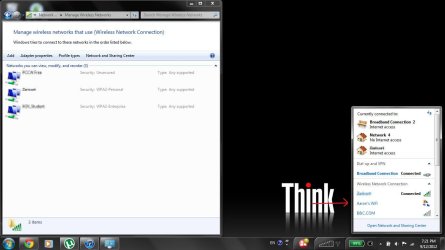
I created a Ad-Hoc Network for my Mac. When I finishd, I deleted the network via Manage Wireless Networks in Control Panel.

But it says it's deleted in the Netowork and Sharing Center. But when I go click the networking icon in the taskbar, I can still see my ad-hoc network!

How can I fix this? Thanks!
 

My Computer

Computer Manufacturer/Model Number
ThinkPad x61, ThinkPad T420i, ThinkPad Edge E430, ThinkPad x230t
OS
Windows 7 Professional 64Bit
CPU
Intel Core i7 3612QM (2.1Ghz)
Memory
4GB DDR3 1600
Graphics Card(s)
nVidia GT 630M
Sound Card
Dolby Home Theater V4
Monitor(s) Displays
LG 72' 3D Smart TV/ Thinkpad 1366x768
Screen Resolution
1920x1080/1366x768
Hard Drives
1 TB Hitachi/320GB Hitachi 7200 RPM
Internet Speed
1000MB Fibre
I believe you have to remove it from the wifi device specifically.
In the sharing center you're just kind of telling it 'don't use this, but keep it around'.
It needs to be removed off the wifi adapter.

Hopefully you understand what I'm saying I'm pre-coffee here this morning.
 

My Computer

Computer Manufacturer/Model Number
Insane hobo technologies. ;-)
OS
Windows 7 x64
CPU
Intel i7 2600k
Motherboard
Asrock z68 extreme 4 gen 3
Memory
G.skill Ripjaw 16gigs @ 1866
Graphics Card(s)
Nvidia gtx580 (evga)
Sound Card
Integrated HD audio + hdmi
Monitor(s) Displays
24" ASUS widescreen + 42" insignia
Screen Resolution
1080p (1920x1080)
Hard Drives
128 Samsung 830
256 Samsung 840
3 x 1tb storage drive (various)
1 western digital 1tb (eSATA)
1 Seagate 1tb (eSATA)
PSU
1 kilowatt SLI/Crossfire rated Silverstone modular
Case
NZXT Phantom + additional 220 fan
Cooling
Zalmann
Keyboard
Microsoft wireless 3000 (v2)
Mouse
MS - wireless 5000 (bluetrack)
Internet Speed
depends on if you ask me or my provider.
Other Info
The above information is provided as is, and the author assumes no responsibility for issues it may cause with your sanity or fanboyism.
I attached a screenshot to show you what's really going on. :)
 

Attachments

  • screenshot.jpg
    screenshot.jpg
    80.5 KB · Views: 20

My Computer

Computer Manufacturer/Model Number
ThinkPad x61, ThinkPad T420i, ThinkPad Edge E430, ThinkPad x230t
OS
Windows 7 Professional 64Bit
CPU
Intel Core i7 3612QM (2.1Ghz)
Memory
4GB DDR3 1600
Graphics Card(s)
nVidia GT 630M
Sound Card
Dolby Home Theater V4
Monitor(s) Displays
LG 72' 3D Smart TV/ Thinkpad 1366x768
Screen Resolution
1920x1080/1366x768
Hard Drives
1 TB Hitachi/320GB Hitachi 7200 RPM
Internet Speed
1000MB Fibre
I believe you have to remove it from the wifi device specifically.
In the sharing center you're just kind of telling it 'don't use this, but keep it around'.
It needs to be removed off the wifi adapter.

Hopefully you understand what I'm saying I'm pre-coffee here this morning.

Thanks Maguscreed. But I don't know how to access my device's control/options. Perhaps you could teach me?

Thanks!

Also my Wifi adapter is: Intel(R) WiFi Link 1000 BGN
 

My Computer

Computer Manufacturer/Model Number
ThinkPad x61, ThinkPad T420i, ThinkPad Edge E430, ThinkPad x230t
OS
Windows 7 Professional 64Bit
CPU
Intel Core i7 3612QM (2.1Ghz)
Memory
4GB DDR3 1600
Graphics Card(s)
nVidia GT 630M
Sound Card
Dolby Home Theater V4
Monitor(s) Displays
LG 72' 3D Smart TV/ Thinkpad 1366x768
Screen Resolution
1920x1080/1366x768
Hard Drives
1 TB Hitachi/320GB Hitachi 7200 RPM
Internet Speed
1000MB Fibre
should be under adapters on the left in the network window.
 

My Computer

Computer Manufacturer/Model Number
Insane hobo technologies. ;-)
OS
Windows 7 x64
CPU
Intel i7 2600k
Motherboard
Asrock z68 extreme 4 gen 3
Memory
G.skill Ripjaw 16gigs @ 1866
Graphics Card(s)
Nvidia gtx580 (evga)
Sound Card
Integrated HD audio + hdmi
Monitor(s) Displays
24" ASUS widescreen + 42" insignia
Screen Resolution
1080p (1920x1080)
Hard Drives
128 Samsung 830
256 Samsung 840
3 x 1tb storage drive (various)
1 western digital 1tb (eSATA)
1 Seagate 1tb (eSATA)
PSU
1 kilowatt SLI/Crossfire rated Silverstone modular
Case
NZXT Phantom + additional 220 fan
Cooling
Zalmann
Keyboard
Microsoft wireless 3000 (v2)
Mouse
MS - wireless 5000 (bluetrack)
Internet Speed
depends on if you ask me or my provider.
Other Info
The above information is provided as is, and the author assumes no responsibility for issues it may cause with your sanity or fanboyism.
nope couldn't find it. Just my normal gigabit and wireless-n adapters
 

My Computer

Computer Manufacturer/Model Number
ThinkPad x61, ThinkPad T420i, ThinkPad Edge E430, ThinkPad x230t
OS
Windows 7 Professional 64Bit
CPU
Intel Core i7 3612QM (2.1Ghz)
Memory
4GB DDR3 1600
Graphics Card(s)
nVidia GT 630M
Sound Card
Dolby Home Theater V4
Monitor(s) Displays
LG 72' 3D Smart TV/ Thinkpad 1366x768
Screen Resolution
1920x1080/1366x768
Hard Drives
1 TB Hitachi/320GB Hitachi 7200 RPM
Internet Speed
1000MB Fibre
Go into the Wifi network setting and Delete that Ad-Hock network.

Also stop using Ad-Hock as all you have to do is connect the Mac to your LAN through your router for the 2 computer to see and network together.
 

My Computer

OS
7 x64
Back
Top