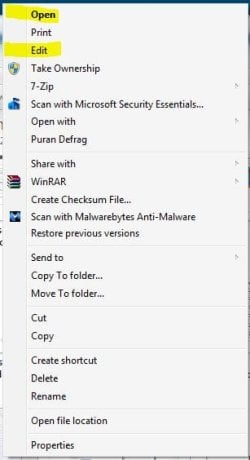
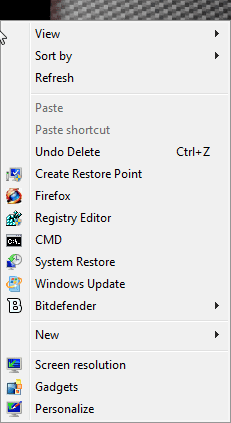
IN the context menu there is the open with and new that you can choose to open program's or create certain things like short cuts. I WANT TO ADD A ICON I MADE TO THE BEGINNING OF OPEN WITH AND NEW ON THE CONTEXT MENU . I TRIED TO ADD THE ICON for open BYE THIS KEY>>> (BUT NUTHING WORKED) KEY>> HKEY_CLASSES_ROOT\*\shellex\ContextMenuHandlers\Open With i added icon then put the icons location in the new made icon string but it did not work. P.S. IF YOU NEED A BETTER EXPLANATION JUST ASK ILL EXPLAIN BETTER
WHEN i click on a file or word pad there is the options to edit or open i would like to add icon's to these 2 options? Someone please help im sure im not the only on who would like to have these icons next to these option's!
Hell a reg script for both would be great brink.. think you can come up with on for each option or something to difficult for you, LOL JUST KIDDING ANY HELP WOULD BE GREAT THANKS
Windows 7 Ultimate 32-Bit & Windows 7 Ultimat...Intel Core i7 CPU 950 @ 3.07GHzOCZ 6GB (3 x 2GB) 240-Pin DDR3 SDRAM DDR3 160...ATI Radeon HD 5700 Series
Computer Manufacturer/Model Number
Custom Built
OS
Windows 7 Ultimate 32-Bit & Windows 7 Ultimate 64-Bit
The open with works fine i would like to put a icon b4 the open option. so the open option has a icon next to it b4 i open the option. Hope this explains a bit better on what i would like 2 do. again all i want is>>>>> TO ADD A ICONto The open option, P.S. hope this explain better what i would like to do to my open option in the context menu!! :sarc: HOPE YOU LIKE THE JOKE BELOW!
i can add icons to any context menu iteam but i can find the right open or edit spot in the registry to put the icon in maybe you can point me in the right direction.. Thanks for the quick response and the quick help just wish i knew what keys i needed to add the icon's to:*
Can you show a picture of what you're trying to do ?
My Computer
At a glance
Windows 7 Ultimate 32-Bit & Windows 7 Ultimat...Intel Core i7 CPU 950 @ 3.07GHzOCZ 6GB (3 x 2GB) 240-Pin DDR3 SDRAM DDR3 160...ATI Radeon HD 5700 Series
Computer Manufacturer/Model Number
Custom Built
OS
Windows 7 Ultimate 32-Bit & Windows 7 Ultimate 64-Bit
I have a real difficult one for anyone or you brink
I would like to have a Icon next to almost every part of my context menu. I did a bunch myself but can figure out the rest so here will be some pics and also the list below of the thing i would love to put context menu's next 2. THE LIST>>> 1, OPEN 2, EDIT 3, OPEN WITH, 4, SHARE WITH, 5, SEND TO, 6, CUT 7, COPY
8, CREATE SHORTCUT 9, DELETE 10, RENAME 11, PROPERTIES<<<<<<<< FIRST LIST GOOD LUCK IF IT WAS NOT HARD WHY NOT TRY AND DO IT, LOL( Below The Pic Will Be The Next List GOOD LUCK AGAIN LOL)
2ND LIST>>>1, VIEW 2, SORT BY, 3, REFRESH <<< HOPE YOU ALL CAN FIGURE THESE OUT GOOD LUCK! If You guy's fix this you guy's would be my savor. Please help me out if you all can!!