Add network folder to Library?

Golden

000
VIP
SF Team
Local time
8:23 AM
Messages
19,301
Location
South Australia
Hi,

I suspect I already know the answer to this, but its worth a shot....

I'm trying to add a network folder to my Music Library. Windows won't allow that since it sees the network folder as non-indexed. I can index this folder by making it available off-line, but that means storing a copy of the network folder on my local disk. This defeats the purpose of me adding the network folder to the Library in the first place (I may as well not store this folder on the network).

Does anyone know of a workaround for this?

Regards,
Golden
 

My Computer

Computer type
PC/Desktop
Computer Manufacturer/Model Number
Golden Mk. I.4
OS
Windows 10 Pro x64 ; Xubuntu x64
CPU
Intel i7 860 @ 2.80 GHz O/C'ed to 4.0GHz
Motherboard
Gigabyte P55A-UD3R Rev.1. Award BIOS F13
Memory
16GB Corsair Vengance DDR3 @ 661 MHz Dual Channel (9-9-9-24)
Graphics Card(s)
EVGA NVidia GTX 560 1024MB
Sound Card
Realtek Integrated
Monitor(s) Displays
Dual Samsung SyncMaster 2494HS
Screen Resolution
1920*1080 and 1920*1080
Hard Drives
1*Samsung 840 EVO 120GB SSD;
1*OCZ Vertex 2 60GB SSD;
2*Samsung F3 SpinPoint 1TB in RAID0;
1*Samsung F1 SpinPoint 1TB;
2*Western Digital 1TB External USB 3.0
1*Western Digital 500GB External USB 3.0
1*Seagate 500GB External USB 2.0
PSU
Thermaltake ToughPower QFan 750W
Case
Thermaltake Element S VK60001W2Z
Cooling
Corsair H60 Water Cooling, 2*230mm and 2*80mm case fans
Keyboard
Logitech G110
Mouse
Logitech MX518
Golden, a workaround is to include the networked folder in Windows Media Player Library, from there you can search by keyword, be it track title, album or year, whatever..

I was looking for an answer to the same not 3 days ago. It means you lose functionality of the windows index search and 'display by' in your library, but the search in WMP is pretty much instant and acurate...
 

My Computer

Computer Manufacturer/Model Number
Toshiba Satellite L500
OS
Windows 7 Home Premium x64 OEM --> RTM clean install
CPU
Intel T4400
Motherboard
? - laptop inbuilt ?
Memory
4Gb
Graphics Card(s)
? - Mobile Intel(R) 4 Series Express Chipset Family ?
Sound Card
Realtek
Monitor(s) Displays
? + extended to a 42" LG55PC plasma tele!
Screen Resolution
1366 * 768
Hard Drives
320Gb 5500rpm
PSU
?
Case
?
Cooling
?
Internet Speed
3Meg, when it works.
Other Info
A LOWLY LAPTOP!
Hi,

I suspect I already know the answer to this, but its worth a shot....

I'm trying to add a network folder to my Music Library. Windows won't allow that since it sees the network folder as non-indexed. I can index this folder by making it available off-line, but that means storing a copy of the network folder on my local disk. This defeats the purpose of me adding the network folder to the Library in the first place (I may as well not store this folder on the network).

Does anyone know of a workaround for this?

Regards,
Golden

Have you tried method two of the following tutorial?
how to include a network drive or folder in a library in windows 7
 

My Computer

Computer type
PC/Desktop
Computer Manufacturer/Model Number
Virtual Machine
OS
Windows 7 Professional 32-bit SP1
CPU
AMD A4/A6
Motherboard
Intel Corporation 440BX Desktop Reference Platform
Memory
3.00GB EDO
Graphics Card(s)
VMware SVGA 3D
Sound Card
High Definition Audio Device
Monitor(s) Displays
Generic Non-PnP Monitor on VMware SVGA 3D
Screen Resolution
1440x900
Hard Drives
1 x 60GB VMware Virtual SATA Hard Drive ATA Device
Antivirus
Kaspersky Total Security
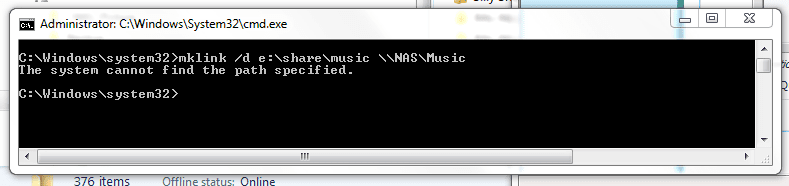
Thanks Djomlija. Method 2 looks promising. I tried it but am running into a path error:

Code:
C:\Windows\system32>mklink /d e:\share\music [URL="file://nas/Music"]\\NAS\Music[/URL]
The system cannot find the path specified.
C:\Windows\system32>

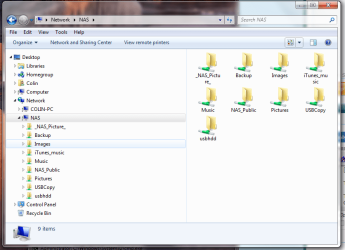
The network location is shown below. Any ideas where I might be going wrong?

Thanks,
Golden
 

Attachments

  • Capture.PNG
    Capture.PNG
    29.2 KB · Views: 101
  • Capture1.PNG
    Capture1.PNG
    189.7 KB · Views: 94

My Computer

Computer type
PC/Desktop
Computer Manufacturer/Model Number
Golden Mk. I.4
OS
Windows 10 Pro x64 ; Xubuntu x64
CPU
Intel i7 860 @ 2.80 GHz O/C'ed to 4.0GHz
Motherboard
Gigabyte P55A-UD3R Rev.1. Award BIOS F13
Memory
16GB Corsair Vengance DDR3 @ 661 MHz Dual Channel (9-9-9-24)
Graphics Card(s)
EVGA NVidia GTX 560 1024MB
Sound Card
Realtek Integrated
Monitor(s) Displays
Dual Samsung SyncMaster 2494HS
Screen Resolution
1920*1080 and 1920*1080
Hard Drives
1*Samsung 840 EVO 120GB SSD;
1*OCZ Vertex 2 60GB SSD;
2*Samsung F3 SpinPoint 1TB in RAID0;
1*Samsung F1 SpinPoint 1TB;
2*Western Digital 1TB External USB 3.0
1*Western Digital 500GB External USB 3.0
1*Seagate 500GB External USB 2.0
PSU
Thermaltake ToughPower QFan 750W
Case
Thermaltake Element S VK60001W2Z
Cooling
Corsair H60 Water Cooling, 2*230mm and 2*80mm case fans
Keyboard
Logitech G110
Mouse
Logitech MX518
I think you did what I did the first time I tried this.

After adding the e:\share\music to the Library, you then deleted e:\share\music and e:\share. You need to leave e:\share so the mklink will work.

I just did this for all the pics on my 2nd computer and it worked like a charm once I figured out this part.

Maybe limneos can be convinced to update the tutorial to make this clear?
 

My Computer

Computer type
PC/Desktop
Computer Manufacturer/Model Number
Lenovo IdeaCenter 450
OS
Windows 10 Pro X64
CPU
Intel Quad Core i7-4770 @ 3.4Ghz
Memory
16.0GB PC3-12800 DDR3 SDRAM 1600 MHz
Graphics Card(s)
Intel Integrated HD Graphics
Sound Card
Realtek HD Audio
Monitor(s) Displays
HP 22" LCD
Screen Resolution
1680 x 1050
Hard Drives
250GB Samsung EVO SATA-3 SSD
2TB Seagate ST2000DM001 SATA-2
1.5TB Seagate ST3150041AS SATA
Keyboard
Dell USB
Mouse
Lenovo USB
Internet Speed
Cable via Road Runner 3MB Upload, 30MB Download
Antivirus
Windows Defender, MBAM Pro, MBAE
Browser
Seamonkey
Other Info
UEFI/GPT
PLDS DVD-RW DH16AERSH
Yep - that works. Thanks.

I'll drop a correction in limneos original post so he sees it.
 

My Computer

Computer type
PC/Desktop
Computer Manufacturer/Model Number
Golden Mk. I.4
OS
Windows 10 Pro x64 ; Xubuntu x64
CPU
Intel i7 860 @ 2.80 GHz O/C'ed to 4.0GHz
Motherboard
Gigabyte P55A-UD3R Rev.1. Award BIOS F13
Memory
16GB Corsair Vengance DDR3 @ 661 MHz Dual Channel (9-9-9-24)
Graphics Card(s)
EVGA NVidia GTX 560 1024MB
Sound Card
Realtek Integrated
Monitor(s) Displays
Dual Samsung SyncMaster 2494HS
Screen Resolution
1920*1080 and 1920*1080
Hard Drives
1*Samsung 840 EVO 120GB SSD;
1*OCZ Vertex 2 60GB SSD;
2*Samsung F3 SpinPoint 1TB in RAID0;
1*Samsung F1 SpinPoint 1TB;
2*Western Digital 1TB External USB 3.0
1*Western Digital 500GB External USB 3.0
1*Seagate 500GB External USB 2.0
PSU
Thermaltake ToughPower QFan 750W
Case
Thermaltake Element S VK60001W2Z
Cooling
Corsair H60 Water Cooling, 2*230mm and 2*80mm case fans
Keyboard
Logitech G110
Mouse
Logitech MX518
Back
Top