"Add Network Place" missing

gkarasik

New member
Local time
12:57 PM
Messages
23
Location
Los Angeles
Hi,

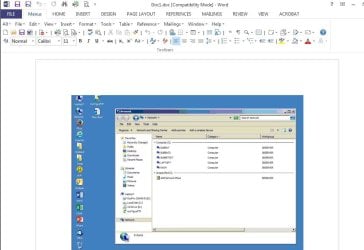
On one of my Win7 Enterprise PCs, the "Add Network Place" entry is missing when I double-click on the Network Neighborhood icon. Anyone have any thoughts?

GaryK
 

My Computers

System One System Two

  • Computer type
    PC/Desktop
    Computer Manufacturer/Model Number
    Dell Optiplex 780
    OS
    Windows 7 Enterprise 32-bit
    Hard Drives
    480g SSD
    Internet Speed
    1g
    Antivirus
    Trend Max Security
    Browser
    Brave
  • Antivirus
    Trend Max Security
Open Computer from shortcut or Explorer.

In right pane, do you get the option when right clicking?

I might have misunderstood though, is this what you are trying to get?
 

My Computer

Computer type
PC/Desktop
Computer Manufacturer/Model Number
Custom Build
OS
Windows 7 Ultimate x64 SP1
CPU
AMD Phenom 2 1090T
Motherboard
Gigabyte GA-890FXA-UD5
Memory
2x8GB Kingston HyperX Fury Black 1600Mhz Unganged
Graphics Card(s)
MSI GTX 970 Gaming 4G
Sound Card
Realtek On-Board HD 7.1 Audio / Logitech G35
Monitor(s) Displays
3xAcer GD245HQ
Screen Resolution
1920x1080
Hard Drives
Samsung 850 Pro 512GB SSD - OS /
WD Caviar Black SATA 3 - 1 TBx2 - Dynamic RAID 0 /
WD Caviar Green SATA 2 - 640GBx2 - Dynamic RAID 0 /
WD Caviar Green SATA 2 - 640GB - Internal Backup /
Seagate Barracude SATA 3 - 3TB - External Backup/ Sync
PSU
HighPower 1000W
Case
Cooler Master HAF 932
Cooling
Noctua NH-D14
Keyboard
Logitech G19
Mouse
Logitech G500
Internet Speed
100/4 Mbit Cable (100GB quota)
Antivirus
ZoneAlarm Extreme Security / MBAM Pro / MBAE Free / SAS Free
Browser
IE 11 - Firefox - Chrome
Other Info
Logitech F710/ G27/ G940/ Z5500 // TrackIR 5 // Nvidia 3D Surround Vision
Open Computer from shortcut or Explorer.

In right pane, do you get the option when right clicking?

I might have misunderstood though, is this what you are trying to get?

That option is missing in the right pane.
 

My Computers

System One System Two

  • Computer type
    PC/Desktop
    Computer Manufacturer/Model Number
    Dell Optiplex 780
    OS
    Windows 7 Enterprise 32-bit
    Hard Drives
    480g SSD
    Internet Speed
    1g
    Antivirus
    Trend Max Security
    Browser
    Brave
  • Antivirus
    Trend Max Security
You can check (may be better you check these values on a working PC in your environment):

HKEY_CURRENT_USER\System\CurrentControlSet\Control\Network\NetworkLocationWizard
- ShowCount value: 1

HKEY_LOCAL_MACHINE\SOFTWARE\Microsoft\Windows\CurrentVersion\WINEVT\Channels\Microsoft-Windows-NetworkLocationWizard/Operational
- Enabled value: 1
- Isolated value: 0

There is also:
HKEY_USERS\<User ID>\System\CurrentControlSet\Control\Network\NetworkLocationWizard
- Enabled value: 1

------------

Search resulted in windows - Remove or Disable "Add a Network Location" - Server Fault but I couldn't find the keys in my registry, Win7 Ult 64bit. You can check if these apply also.

See if these help.
 

My Computer

Computer type
PC/Desktop
Computer Manufacturer/Model Number
Custom Build
OS
Windows 7 Ultimate x64 SP1
CPU
AMD Phenom 2 1090T
Motherboard
Gigabyte GA-890FXA-UD5
Memory
2x8GB Kingston HyperX Fury Black 1600Mhz Unganged
Graphics Card(s)
MSI GTX 970 Gaming 4G
Sound Card
Realtek On-Board HD 7.1 Audio / Logitech G35
Monitor(s) Displays
3xAcer GD245HQ
Screen Resolution
1920x1080
Hard Drives
Samsung 850 Pro 512GB SSD - OS /
WD Caviar Black SATA 3 - 1 TBx2 - Dynamic RAID 0 /
WD Caviar Green SATA 2 - 640GBx2 - Dynamic RAID 0 /
WD Caviar Green SATA 2 - 640GB - Internal Backup /
Seagate Barracude SATA 3 - 3TB - External Backup/ Sync
PSU
HighPower 1000W
Case
Cooler Master HAF 932
Cooling
Noctua NH-D14
Keyboard
Logitech G19
Mouse
Logitech G500
Internet Speed
100/4 Mbit Cable (100GB quota)
Antivirus
ZoneAlarm Extreme Security / MBAM Pro / MBAE Free / SAS Free
Browser
IE 11 - Firefox - Chrome
Other Info
Logitech F710/ G27/ G940/ Z5500 // TrackIR 5 // Nvidia 3D Surround Vision
You can check (may be better you check these values on a working PC in your environment):

HKEY_CURRENT_USER\System\CurrentControlSet\Control\Network\NetworkLocationWizard
- ShowCount value: 1

HKEY_LOCAL_MACHINE\SOFTWARE\Microsoft\Windows\CurrentVersion\WINEVT\Channels\Microsoft-Windows-NetworkLocationWizard/Operational
- Enabled value: 1
- Isolated value: 0

There is also:
HKEY_USERS\<User ID>\System\CurrentControlSet\Control\Network\NetworkLocationWizard
- Enabled value: 1

------------

Search resulted in windows - Remove or Disable "Add a Network Location" - Server Fault but I couldn't find the keys in my registry, Win7 Ult 64bit. You can check if these apply also.

See if these help.

Thanks for taking time to respond.

I checked all these reg values on both working and non-working systems and changed the values on the non-working system to match those from the working system. I then restarted the non-working system. Still no entry for "Add Network Place" in the right pane after double-clicking Network Neighborhood.

I also checked "God Mode." Nothing there either.

GaryK
 
Last edited:

My Computers

System One System Two

  • Computer type
    PC/Desktop
    Computer Manufacturer/Model Number
    Dell Optiplex 780
    OS
    Windows 7 Enterprise 32-bit
    Hard Drives
    480g SSD
    Internet Speed
    1g
    Antivirus
    Trend Max Security
    Browser
    Brave
  • Antivirus
    Trend Max Security
I wonder if you are looking at the correct location :)

Network Neighborhood/Add Network Place are from XP era. I guess you are using those terms out of habit? (There is Network and Add Network Location now). You need to select Computer in explorer then right click empty space on the right pane.

add a network location.jpg

Just wanted to make sure.
 

My Computer

Computer type
PC/Desktop
Computer Manufacturer/Model Number
Custom Build
OS
Windows 7 Ultimate x64 SP1
CPU
AMD Phenom 2 1090T
Motherboard
Gigabyte GA-890FXA-UD5
Memory
2x8GB Kingston HyperX Fury Black 1600Mhz Unganged
Graphics Card(s)
MSI GTX 970 Gaming 4G
Sound Card
Realtek On-Board HD 7.1 Audio / Logitech G35
Monitor(s) Displays
3xAcer GD245HQ
Screen Resolution
1920x1080
Hard Drives
Samsung 850 Pro 512GB SSD - OS /
WD Caviar Black SATA 3 - 1 TBx2 - Dynamic RAID 0 /
WD Caviar Green SATA 2 - 640GBx2 - Dynamic RAID 0 /
WD Caviar Green SATA 2 - 640GB - Internal Backup /
Seagate Barracude SATA 3 - 3TB - External Backup/ Sync
PSU
HighPower 1000W
Case
Cooler Master HAF 932
Cooling
Noctua NH-D14
Keyboard
Logitech G19
Mouse
Logitech G500
Internet Speed
100/4 Mbit Cable (100GB quota)
Antivirus
ZoneAlarm Extreme Security / MBAM Pro / MBAE Free / SAS Free
Browser
IE 11 - Firefox - Chrome
Other Info
Logitech F710/ G27/ G940/ Z5500 // TrackIR 5 // Nvidia 3D Surround Vision
I wonder if you are looking at the correct location :)

Network Neighborhood/Add Network Place are from XP era. I guess you are using those terms out of habit? (There is Network and Add Network Location now). You need to select Computer in explorer then right click empty space on the right pane.

View attachment 360178

Just wanted to make sure.


When I double-click on Network Neighborhood, an Explorer window opens. In the right pane is "Add Network Place" (see attached).

GaryK
 

Attachments

  • AddNetPlace.jpg
    AddNetPlace.jpg
    55.9 KB · Views: 2

My Computers

System One System Two

  • Computer type
    PC/Desktop
    Computer Manufacturer/Model Number
    Dell Optiplex 780
    OS
    Windows 7 Enterprise 32-bit
    Hard Drives
    480g SSD
    Internet Speed
    1g
    Antivirus
    Trend Max Security
    Browser
    Brave
  • Antivirus
    Trend Max Security

My Computer

Computer type
PC/Desktop
Computer Manufacturer/Model Number
Custom Build
OS
Windows 7 Ultimate x64 SP1
CPU
AMD Phenom 2 1090T
Motherboard
Gigabyte GA-890FXA-UD5
Memory
2x8GB Kingston HyperX Fury Black 1600Mhz Unganged
Graphics Card(s)
MSI GTX 970 Gaming 4G
Sound Card
Realtek On-Board HD 7.1 Audio / Logitech G35
Monitor(s) Displays
3xAcer GD245HQ
Screen Resolution
1920x1080
Hard Drives
Samsung 850 Pro 512GB SSD - OS /
WD Caviar Black SATA 3 - 1 TBx2 - Dynamic RAID 0 /
WD Caviar Green SATA 2 - 640GBx2 - Dynamic RAID 0 /
WD Caviar Green SATA 2 - 640GB - Internal Backup /
Seagate Barracude SATA 3 - 3TB - External Backup/ Sync
PSU
HighPower 1000W
Case
Cooler Master HAF 932
Cooling
Noctua NH-D14
Keyboard
Logitech G19
Mouse
Logitech G500
Internet Speed
100/4 Mbit Cable (100GB quota)
Antivirus
ZoneAlarm Extreme Security / MBAM Pro / MBAE Free / SAS Free
Browser
IE 11 - Firefox - Chrome
Other Info
Logitech F710/ G27/ G940/ Z5500 // TrackIR 5 // Nvidia 3D Surround Vision

My Computers

System One System Two

  • Computer type
    PC/Desktop
    Computer Manufacturer/Model Number
    Dell Optiplex 780
    OS
    Windows 7 Enterprise 32-bit
    Hard Drives
    480g SSD
    Internet Speed
    1g
    Antivirus
    Trend Max Security
    Browser
    Brave
  • Antivirus
    Trend Max Security
Back
Top