JavaScript is disabled. For a better experience, please enable JavaScript in your browser before proceeding.
You are using an out of date browser. It may not display this or other websites correctly.
You should upgrade or use an
alternative browser .
add pdf file to adobe reader recent file list
Does someone know how to add as pdf file that was downloaded and viewed to the adobe reader recent file list. I tried to ask this question of adobe but Icouldn't sign in and I couldn't find the answer on Google.
Windows 7 Home Premium (x64) Service Pack 1 3.30 gigahertz Intel Core i3-2120 128 kilobyte primary memory cache enbedded Intel(R) HD Graphics HP Pavilion p7xt series) Windows 7 Home Premium (x64) Service Pack 1 3.30 gigahertz Intel Core i3-2120 PEGATRON CORPORATION 2AC2 2.00 128 kilobyte primary memory cache enbedded Intel(R) HD Graphics Realtek High Definition Audio DELL E193FP [Monitor] (19.1"vis 6052 Megabytes Usable Installed Memory ? desktop ?
New member
Guru
Gold Member
VIP
Open the file with Adobe PDF Reader. That should add it to the recent list.
Windows 10 Pro X64 Intel Quad Core i7-4770 @ 3.4Ghz 16.0GB PC3-12800 DDR3 SDRAM 1600 MHz Intel Integrated HD Graphics PC/Desktop Lenovo IdeaCenter 450 Windows 10 Pro X64 Intel Quad Core i7-4770 @ 3.4Ghz 16.0GB PC3-12800 DDR3 SDRAM 1600 MHz Intel Integrated HD Graphics Realtek HD Audio HP 22" LCD 1680 x 1050 250GB Samsung EVO SATA-3 SSD Dell USB Lenovo USB Cable via Road Runner 3MB Upload, 30MB Download Windows Defender, MBAM Pro, MBAE Seamonkey UEFI/GPT
New member
Member
VIP
Thread Starter
recent file list I must be doing something wrong because I can view the file with adobe reader but the file doesn't get added to my recent file list. The only way I see it again is if I download it again. HELP!
Windows 7 Home Premium (x64) Service Pack 1 3.30 gigahertz Intel Core i3-2120 128 kilobyte primary memory cache enbedded Intel(R) HD Graphics HP Pavilion p7xt series) Windows 7 Home Premium (x64) Service Pack 1 3.30 gigahertz Intel Core i3-2120 PEGATRON CORPORATION 2AC2 2.00 128 kilobyte primary memory cache enbedded Intel(R) HD Graphics Realtek High Definition Audio DELL E193FP [Monitor] (19.1"vis 6052 Megabytes Usable Installed Memory ? desktop ?
New member
Guru
Gold Member
VIP
Are you sure you are running it from HDD? Seems you are running it from a webpage? Tried downloading it and then opening?
Windows 7 Ultimate x64 SP1 AMD Phenom 2 1090T 2x8GB Kingston HyperX Fury Black 1600Mhz Unga... MSI GTX 970 Gaming 4G PC/Desktop Custom Build Windows 7 Ultimate x64 SP1 AMD Phenom 2 1090T Gigabyte GA-890FXA-UD5 2x8GB Kingston HyperX Fury Black 1600Mhz Unganged MSI GTX 970 Gaming 4G Realtek On-Board HD 7.1 Audio / Logitech G35 3xAcer GD245HQ 1920x1080 Samsung 850 Pro 512GB SSD - OS / HighPower 1000W Cooler Master HAF 932 Noctua NH-D14 Logitech G19 Logitech G500 100/4 Mbit Cable (100GB quota) ZoneAlarm Extreme Security / MBAM Pro / MBAE Free / SAS Free IE 11 - Firefox - Chrome Logitech F710/ G27/ G940/ Z5500 // TrackIR 5 // Nvidia 3D Surround Vision
New member
Guru
Gold Member
VIP
The default for most browsers is to view the pdf in the browser via an Add-on. If you do as GokAy says, save it then view with Adobe it should be added to the list.
Windows 10 Pro X64 Intel Quad Core i7-4770 @ 3.4Ghz 16.0GB PC3-12800 DDR3 SDRAM 1600 MHz Intel Integrated HD Graphics PC/Desktop Lenovo IdeaCenter 450 Windows 10 Pro X64 Intel Quad Core i7-4770 @ 3.4Ghz 16.0GB PC3-12800 DDR3 SDRAM 1600 MHz Intel Integrated HD Graphics Realtek HD Audio HP 22" LCD 1680 x 1050 250GB Samsung EVO SATA-3 SSD Dell USB Lenovo USB Cable via Road Runner 3MB Upload, 30MB Download Windows Defender, MBAM Pro, MBAE Seamonkey UEFI/GPT
New member
Member
VIP
Thread Starter
Thanksfor the help of Ztruker and gokay I am sorry that I am such a dummy!!! If I understand GokAy correctly if I DOWNLOAD a PDF file it will be added to my current file list. UnfortunatelyI don't know how to DOWNLOAD and currently use SAVE PDF files instead and thisDOESN'T PUT ON MY RECENT FILE LIST. Please tell me how to download instead ofsave a PDF file. Herm
Windows 7 Home Premium (x64) Service Pack 1 3.30 gigahertz Intel Core i3-2120 128 kilobyte primary memory cache enbedded Intel(R) HD Graphics HP Pavilion p7xt series) Windows 7 Home Premium (x64) Service Pack 1 3.30 gigahertz Intel Core i3-2120 PEGATRON CORPORATION 2AC2 2.00 128 kilobyte primary memory cache enbedded Intel(R) HD Graphics Realtek High Definition Audio DELL E193FP [Monitor] (19.1"vis 6052 Megabytes Usable Installed Memory ? desktop ?
New member
Guru
Gold Member
VIP
If you are saving, it should be in your computer. Try double click opening it.
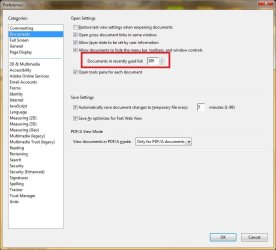
Is this setting correct?
Windows 7 Ultimate x64 SP1 AMD Phenom 2 1090T 2x8GB Kingston HyperX Fury Black 1600Mhz Unga... MSI GTX 970 Gaming 4G PC/Desktop Custom Build Windows 7 Ultimate x64 SP1 AMD Phenom 2 1090T Gigabyte GA-890FXA-UD5 2x8GB Kingston HyperX Fury Black 1600Mhz Unganged MSI GTX 970 Gaming 4G Realtek On-Board HD 7.1 Audio / Logitech G35 3xAcer GD245HQ 1920x1080 Samsung 850 Pro 512GB SSD - OS / HighPower 1000W Cooler Master HAF 932 Noctua NH-D14 Logitech G19 Logitech G500 100/4 Mbit Cable (100GB quota) ZoneAlarm Extreme Security / MBAM Pro / MBAE Free / SAS Free IE 11 - Firefox - Chrome Logitech F710/ G27/ G940/ Z5500 // TrackIR 5 // Nvidia 3D Surround Vision
New member
Member
VIP
Thread Starter
Yes but it is set to10 (which I read is the maxim number of files).
Windows 7 Home Premium (x64) Service Pack 1 3.30 gigahertz Intel Core i3-2120 128 kilobyte primary memory cache enbedded Intel(R) HD Graphics HP Pavilion p7xt series) Windows 7 Home Premium (x64) Service Pack 1 3.30 gigahertz Intel Core i3-2120 PEGATRON CORPORATION 2AC2 2.00 128 kilobyte primary memory cache enbedded Intel(R) HD Graphics Realtek High Definition Audio DELL E193FP [Monitor] (19.1"vis 6052 Megabytes Usable Installed Memory ? desktop ?
New member
Guru
Gold Member
VIP
Do you have a current version? Adobe Acrobat Reader DC (15.008.20082) is up-to-date in my PC.
Windows 7 Ultimate x64 SP1 AMD Phenom 2 1090T 2x8GB Kingston HyperX Fury Black 1600Mhz Unga... MSI GTX 970 Gaming 4G PC/Desktop Custom Build Windows 7 Ultimate x64 SP1 AMD Phenom 2 1090T Gigabyte GA-890FXA-UD5 2x8GB Kingston HyperX Fury Black 1600Mhz Unganged MSI GTX 970 Gaming 4G Realtek On-Board HD 7.1 Audio / Logitech G35 3xAcer GD245HQ 1920x1080 Samsung 850 Pro 512GB SSD - OS / HighPower 1000W Cooler Master HAF 932 Noctua NH-D14 Logitech G19 Logitech G500 100/4 Mbit Cable (100GB quota) ZoneAlarm Extreme Security / MBAM Pro / MBAE Free / SAS Free IE 11 - Firefox - Chrome Logitech F710/ G27/ G940/ Z5500 // TrackIR 5 // Nvidia 3D Surround Vision
New member
Member
VIP
Thread Starter
I am using Acrobat Reader XI (latest version) but since I don't use the cloud I see no reason to upgrade to DC yet. PLEASE JUST EXPLAIN HOWTO DOWNLOAD PDF FILE LIKE I ASKED!!!
Windows 7 Home Premium (x64) Service Pack 1 3.30 gigahertz Intel Core i3-2120 128 kilobyte primary memory cache enbedded Intel(R) HD Graphics HP Pavilion p7xt series) Windows 7 Home Premium (x64) Service Pack 1 3.30 gigahertz Intel Core i3-2120 PEGATRON CORPORATION 2AC2 2.00 128 kilobyte primary memory cache enbedded Intel(R) HD Graphics Realtek High Definition Audio DELL E193FP [Monitor] (19.1"vis 6052 Megabytes Usable Installed Memory ? desktop ?
New member
Guru
Gold Member
VIP
In web browser right click the pdf file (link) and select Save Target As or similar.
Windows 7 Ultimate x64 SP1 AMD Phenom 2 1090T 2x8GB Kingston HyperX Fury Black 1600Mhz Unga... MSI GTX 970 Gaming 4G PC/Desktop Custom Build Windows 7 Ultimate x64 SP1 AMD Phenom 2 1090T Gigabyte GA-890FXA-UD5 2x8GB Kingston HyperX Fury Black 1600Mhz Unganged MSI GTX 970 Gaming 4G Realtek On-Board HD 7.1 Audio / Logitech G35 3xAcer GD245HQ 1920x1080 Samsung 850 Pro 512GB SSD - OS / HighPower 1000W Cooler Master HAF 932 Noctua NH-D14 Logitech G19 Logitech G500 100/4 Mbit Cable (100GB quota) ZoneAlarm Extreme Security / MBAM Pro / MBAE Free / SAS Free IE 11 - Firefox - Chrome Logitech F710/ G27/ G940/ Z5500 // TrackIR 5 // Nvidia 3D Surround Vision
a.k.a. UNI
Guru
Gold Member
I am using Acrobat Reader XI (latest version) but since I don't use the cloud I see no reason to upgrade to DC yet. PLEASE JUST EXPLAIN HOWTO DOWNLOAD PDF FILE LIKE I ASKED!!!
Typing in all caps is considered rude.
Those helping you were just asking if you were downloading/viewing PDF files inside your browser window or if you were saving it to some location on your hard drive and then opening it from there. Sometimes viewing a PDF from inside a browser will not add it to the list of recently opened files in Adobe Reader.
What browser are you using?
Chrome has its own built in PDF reader. So, if you are using Chrome to download/view a PDF file, Adobe's PDF reader is not even involved.
Instructions on how to download a PDF file:
The instructions can differ from browser to browser. Let us know which browser you are using and maybe we can provide specific instructions. Below is some generic info.
Here is a link to a sample PDF:
http://help.adobe.com/en_US/reader/using/reader_X_help.pdf
Ignore what the PDF is about. This is just for testing.
Right click on that link and read your options from the context menu. Look for something that says Save or Save As.
Last edited: Jul 31, 2015
W7 Pro SP1 64bit i7 8GB Intel HD Graphics Laptop Employer provided Dell Latitude W7 Pro SP1 64bit i7 8GB Intel HD Graphics crappy SSD Employer mandated Symantec Endpoint Protection Pale Moon 64bit, IE11 64bit & Chrome 64bit
Senior Learner
Power User
VIP
I downloaded Reader Dc last week, but found it over-complicated. Stick with XI and follow the instructions given by Usernameissues.
Windows 7/64 HPremium. AMD FX-6300. Corsair (2x4) GB DDR3 CMXGX3M2A1337CL9. NVidia/Gigabyte GT730 (2GB) GDDR5. PC/Desktop bertison Windows 7/64 HPremium. AMD FX-6300. Asus M5A78L-M LE/USB3. Corsair (2x4) GB DDR3 CMXGX3M2A1337CL9. NVidia/Gigabyte GT730 (2GB) GDDR5. Onboard. Iiyama PLE2407HDS. 1920 x 1280 Desktop: 1TB. WD10EZEX-00BN5A0. Corsair 750M. Coolermaster N300. FRONT: (2X) 140mm. TOP: (1x) 120mm. REAR: (1x) 120mm. Logitech K290 Trust Optical Wired 15 Mb Down, 0.55 Up. Kaspersky Total Security 2017, Hitman Pro. Firefox. NETWORK:
New member
Member
VIP
Thread Starter
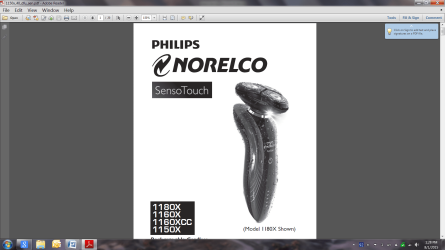
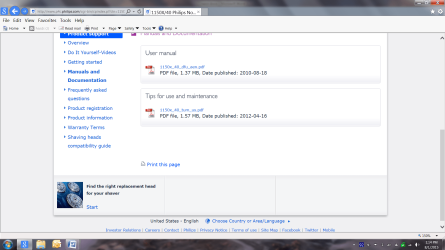
I am still confusedbecause when I select any pdf in my webbrower it automatically converts to a acrobat reader file when opened attached is are screenshots of what I see and they arenot added to my recent file list.
razor2.png
137.6 KB
· Views: 0
razorr.png
104 KB
· Views: 1
Windows 7 Home Premium (x64) Service Pack 1 3.30 gigahertz Intel Core i3-2120 128 kilobyte primary memory cache enbedded Intel(R) HD Graphics HP Pavilion p7xt series) Windows 7 Home Premium (x64) Service Pack 1 3.30 gigahertz Intel Core i3-2120 PEGATRON CORPORATION 2AC2 2.00 128 kilobyte primary memory cache enbedded Intel(R) HD Graphics Realtek High Definition Audio DELL E193FP [Monitor] (19.1"vis 6052 Megabytes Usable Installed Memory ? desktop ?
New member
Guru
Gold Member
VIP
Right click the pdf file and select "Save Target as" then save to a folder on PC, desktop, documents, anywhere really.
Windows 7 Ultimate x64 SP1 AMD Phenom 2 1090T 2x8GB Kingston HyperX Fury Black 1600Mhz Unga... MSI GTX 970 Gaming 4G PC/Desktop Custom Build Windows 7 Ultimate x64 SP1 AMD Phenom 2 1090T Gigabyte GA-890FXA-UD5 2x8GB Kingston HyperX Fury Black 1600Mhz Unganged MSI GTX 970 Gaming 4G Realtek On-Board HD 7.1 Audio / Logitech G35 3xAcer GD245HQ 1920x1080 Samsung 850 Pro 512GB SSD - OS / HighPower 1000W Cooler Master HAF 932 Noctua NH-D14 Logitech G19 Logitech G500 100/4 Mbit Cable (100GB quota) ZoneAlarm Extreme Security / MBAM Pro / MBAE Free / SAS Free IE 11 - Firefox - Chrome Logitech F710/ G27/ G940/ Z5500 // TrackIR 5 // Nvidia 3D Surround Vision