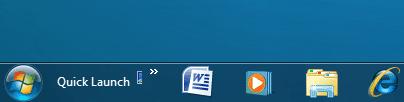
Add Quick Launch to Taskbar - Build 7000

Have you tried method one or two? You can drag and drop things to the taskbar pinning them there as well.
 

My Computer

Computer type
PC/Desktop
Computer Manufacturer/Model Number
Airbot 2.0
OS
Windows 7 Ultimate x64 SP1
CPU
Core i7 920 (D0) @ 4Ghz, *26c idle *65c full load on air
Motherboard
Asus P6X58D Premium - Sata 6Gb/s - USB 3.0
Memory
12GB DDR3 Corsair Dominator -CMD12GX3M6A1600C8 at 1600MHz
Graphics Card(s)
Zotac Geforce GTX 770
Sound Card
ASUS Xonar D2X
Monitor(s) Displays
1 LG 24" Flatron W2453V-PF 1 Samsung 24" P2450H both 2ms RT
Screen Resolution
1920x1080@60hz
Hard Drives
1 Samsung 250GB 840 Evo SSD
1 OCZ Vertex2 180GB SSD
1 TB Samsung Spinpoint F1 7200RPM 32MB cache
2 500GB WD Caviar Blacks 7200RPM 32MB cache (WD5001AALS)

Pioneer DVD Burner DVR-S18M
PSU
Corsair HX1000W
Case
Cooler Master HAF 932
Cooling
Case Fans *3 230mm, *1 140mm/CPU - *Tuniq Tower 120 Extreme
Keyboard
Logitech Wireless MK700
Mouse
Logitech Wireless MK700
Internet Speed
DL 15 Mbps UL 0.98 Mbps
Antivirus
None
Browser
Firefox Nightly
Other Info
Processor-7.7 *RAM- 7.9 *Graphics-7.9 *Gaming Graphics- 7.9 *SSD- 7.8 W.E.I final score= 7.7
*Phone- LG Nexus 5
Quick Launch Toolbar

All you have to do is create your own folder named Quick Launch, place your shortcuts in it and then go to your Taskbar and add new toolbar and browse for the folder you just created.

Once you have it on the Taskbar, unlock the Taskbar and move it to a position that your happy with and then right click the Toolbar and deselect show text and show title and there you have a fully functional Quick Launch Bar.

You can also follow the tutorial and apply the same option I have described to position and remove unwanted text.

2009-01-12_000833.jpg
 
Last edited:

My Computer

Computer Manufacturer/Model Number
Home Brew
OS
Windows 7 Ultimate Vista Ultimate x64
CPU
Core 2 Duo E8500 3.16Ghz @ 3.8Ghz
Motherboard
eVGA 750i FTW
Memory
2x2Gigs Patriot PC2-6400 LL
Graphics Card(s)
Inno3D GeForce GTX260 216 SP
Monitor(s) Displays
ASUS VW222U 22" 2ms Response time
Screen Resolution
1680x1050
Hard Drives
SATA 150GB
SATA II 250GB
USB IDE 750GB Ext.
PSU
HYTEC 600W & Thermaltake 650W Toughpower Power Exp
Case
Thermaltake Armor LCS (Liquid Cooling System)
Cooling
Liquid Cooling System
Keyboard
Logitech G15 Gaming Keyboard
Mouse
Logitech G9 Gaming Mouse

My Computer

OS
Windows 7 Profesional 64bit
CPU
AMD Phenom II X4 965 - 3.99 GHz
Motherboard
ASRock A780GXE
Memory
8GB DDR2 1066 Dual Channel
Graphics Card(s)
ATI Radeon HD 3650
Sound Card
Realtek ALC888 (on board)
Monitor(s) Displays
Acer 22" wide and Acer 17"
Screen Resolution
1680x1050 and 1280x1024
Hard Drives
Intel 80G SSD G2, WD1001FALS, WD1001FALS, WD1001FALS, Cavarlry 500GB external
PSU
Ultra LSP650 650w
Case
? something I had
Cooling
AeroFlow FX92
Keyboard
Logitech
Mouse
Logitech
Internet Speed
ATT DSL top level
Yeah, my bad.
 

My Computer

Computer type
PC/Desktop
Computer Manufacturer/Model Number
Airbot 2.0
OS
Windows 7 Ultimate x64 SP1
CPU
Core i7 920 (D0) @ 4Ghz, *26c idle *65c full load on air
Motherboard
Asus P6X58D Premium - Sata 6Gb/s - USB 3.0
Memory
12GB DDR3 Corsair Dominator -CMD12GX3M6A1600C8 at 1600MHz
Graphics Card(s)
Zotac Geforce GTX 770
Sound Card
ASUS Xonar D2X
Monitor(s) Displays
1 LG 24" Flatron W2453V-PF 1 Samsung 24" P2450H both 2ms RT
Screen Resolution
1920x1080@60hz
Hard Drives
1 Samsung 250GB 840 Evo SSD
1 OCZ Vertex2 180GB SSD
1 TB Samsung Spinpoint F1 7200RPM 32MB cache
2 500GB WD Caviar Blacks 7200RPM 32MB cache (WD5001AALS)

Pioneer DVD Burner DVR-S18M
PSU
Corsair HX1000W
Case
Cooler Master HAF 932
Cooling
Case Fans *3 230mm, *1 140mm/CPU - *Tuniq Tower 120 Extreme
Keyboard
Logitech Wireless MK700
Mouse
Logitech Wireless MK700
Internet Speed
DL 15 Mbps UL 0.98 Mbps
Antivirus
None
Browser
Firefox Nightly
Other Info
Processor-7.7 *RAM- 7.9 *Graphics-7.9 *Gaming Graphics- 7.9 *SSD- 7.8 W.E.I final score= 7.7
*Phone- LG Nexus 5
thanks guys, it really works - method three.
 

My Computer

OS
Windows 7
thanks guys, it really works - method three.

Why bother doing all this work when you can search in start button, location of program, drag to quick launch? What is the benefit?
 

My Computer

Computer Manufacturer/Model Number
Macbook Pro, Mac Pro (Hack), Windows 7
OS
Windows 7 /Windows Vista 32 Ultimate / OS X Leopard
nevermind. i got it.
 

Attachments

  • Untitled.png
    Untitled.png
    10.7 KB · Views: 51

My Computer

OS
Vista
Hello Ablib, and welcome to Seven Forums.

I'm not sure what you mean by this, but you click on the arrow to the right of the Quick Launch toolbar to open the menu to select your shortcut. If you want to add or remove a shortcut, then you can at the Quick Launch folder location.

Hope this helps,
Shawn
 

My Computer

Computer type
PC/Desktop
Computer Manufacturer/Model Number
Self built custom
OS
64-bit Windows 11 Pro for Workstations
CPU
Intel i7-8700K OC'd to 5 GHz
Motherboard
ASUS ROG Maximus XI Formula Z390
Memory
64 GB (4x16GB) G.SKILL TridentZ RGB DDR4 3600 MHz
Graphics Card(s)
ASUS ROG-STRIX-GTX1080TI-O11G-GAMING
Sound Card
Integrated
Monitor(s) Displays
2 x Samsung Odyssey G7 27"
Screen Resolution
2560x1440
Hard Drives
1TB Samsung 990 PRO M.2,
4TB Samsung 990 PRO PRO M.2,
TerraMaster F8 SSD Plus NAS
PSU
Seasonic Prime Titanium 850W
Case
Thermaltake Core P3
Cooling
Corsair Hydro H115i
Keyboard
Logitech wireless K800
Mouse
Logitech MX Master 4
Internet Speed
2 Gb/s Download and 100 Mb/s Upload
Antivirus
Malwarebyte Anti-Malware Premium
Browser
Google Chrome
Other Info
Logitech Z625 speaker system,
Logitech BRIO 4K Pro webcam,
HP Color LaserJet Pro MFP M477fdn,
APC SMART-UPS RT 1000 XL - SURT1000XLI,
Galaxy S23 Plus phone
Windows 7 - Restore Your Quick Launch like Vista or XP

1..on your Taskbar,right click,select "Toolbars" and select "New toolbars"
2..(a "New Toolbar-Choose a folder" will pop up)
3..copy and paste "C:\Users\phransys\AppData\Roaming\Microsoft\Internet Explorer\" on the browser and press "enter" on your keyboard.
4..select the Quick Launch folder(or create your own if there isnt and place your shortcuts in it) and click on "select folder"
5..Once you have it on the Taskbar, right click on the taskbar and unlock it.
6..move the Taskbar to a position that you are happy with.
7..then right click the Toolbar and deselect "show text" and "show title".
8..there you have a fully functional Quick Launch Bar.
 

My Computer

OS
Windows 7 ultimate - Final
Back
Top