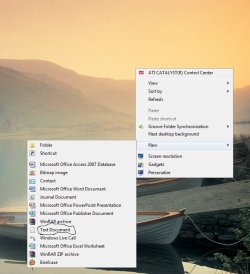
Add Text to the new menu?

jchase520

New member
Local time
12:40 AM
Messages
66
I'm not sure what happened, I know I have had the Txt option in my new menu when I right click on the desktop, some how it disappeared, which has forced me to use other programs I don't really want to.

How can I re-add that txt option to the new menu?
 
Last edited by a moderator:

My Computer My Computer

Computer Manufacturer/Model Number
Custom Built
OS
Windows 7 Ultimate 64 bit
CPU
Intel Q6600 Core 2 Quad 2.8 GHZ
Motherboard
Gigabyte EP45-DS3L
Memory
4 GBs DDR2 800 Mhz
Graphics Card(s)
Nvidia Geforce 8800 GTs
Sound Card
Asus D2x
Case
Antec 800
Cooling
Blue Orb 2 Heat Sink
I'm not sure what happened, I know I have had the Txt option in my new menu when I right click on the desktop, some how it disappeared, which has forced me to use other programs I don't really want to.

How can I re-add that txt option to the new menu?

It's there for mine.
Untitled.jpg

ZeshanA
 
I'm not sure what happened, I know I have had the Txt option in my new menu when I right click on the desktop, some how it disappeared, which has forced me to use other programs I don't really want to.

How can I re-add that txt option to the new menu?

Probably 3 ways to try and get it back.

go to search type in cmd
in cmd type in
sfc /scannow

It that does not work
take your windows dvd and place in in the drive. When you have to make the choice, chose upgrade. Its a repair at this juncture.
If that does not work just do a system restore, from a point that the computer operated properly
 

My Computer My Computer

Computer type
PC/Desktop
Computer Manufacturer/Model Number
Dell XPS 420
OS
Windows 10, Home Clean Install
CPU
Intel Core2 processsor Q8200(2.33Ghz 1333FSB) Quad Core Tech
Motherboard
Dell
Memory
6 gb
Graphics Card(s)
ATI Radeon 256MB HD3650
Sound Card
Intergrated 7.1 Channel Audio
Monitor(s) Displays
Dell SP2009W 20"
Hard Drives
640 GB Serial ATA Hard drive
Cooling
Fan
Keyboard
Dell USB Keyboard
Mouse
Dell Premium Optical USB
Internet Speed
DSL 2.85
I'm not sure what happened, I know I have had the Txt option in my new menu when I right click on the desktop, some how it disappeared, which has forced me to use other programs I don't really want to.

How can I re-add that txt option to the new menu?

Probably 3 ways to try and get it back.

go to search type in cmd
in cmd type in
sfc /scannow

It that does not work
take your windows dvd and place in in the drive. When you have to make the choice, chose upgrade. Its a repair at this juncture.
If that does not work just do a system restore, from a point that the computer operated properly

Richard :sarc:
:D

ZeshanA
 
The Scan worked thank you every one that posted ! b:D
 

My Computer My Computer

Computer Manufacturer/Model Number
Custom Built
OS
Windows 7 Ultimate 64 bit
CPU
Intel Q6600 Core 2 Quad 2.8 GHZ
Motherboard
Gigabyte EP45-DS3L
Memory
4 GBs DDR2 800 Mhz
Graphics Card(s)
Nvidia Geforce 8800 GTs
Sound Card
Asus D2x
Case
Antec 800
Cooling
Blue Orb 2 Heat Sink

My Computer My Computer

Computer type
PC/Desktop
Computer Manufacturer/Model Number
Dell XPS 420
OS
Windows 10, Home Clean Install
CPU
Intel Core2 processsor Q8200(2.33Ghz 1333FSB) Quad Core Tech
Motherboard
Dell
Memory
6 gb
Graphics Card(s)
ATI Radeon 256MB HD3650
Sound Card
Intergrated 7.1 Channel Audio
Monitor(s) Displays
Dell SP2009W 20"
Hard Drives
640 GB Serial ATA Hard drive
Cooling
Fan
Keyboard
Dell USB Keyboard
Mouse
Dell Premium Optical USB
Internet Speed
DSL 2.85
Back
Top