Solved Add User to Same Desktop?

remm

New member
Pro User
Local time
8:00 AM
Messages
373
Hello all... setup a W7 computer for 93yr old Mom to pay bills. I have never had to setup multiple users before so I forgot that when you add a user and switch to that user, you have no desktop or software or anything from the original setup.

What I want is to add a user (her as "Mom") to the existing desktop, but without admin priv's. Can't two users share a desktop if they choose to? (It's all her computer and files but I need to admin/maintain it for her, but when she's using it I want UAC enabled, standard user to keep the system safe for her.) And I also want her to be able to auto login for ease, so that's another reason her acct has to be standard.

Tried the Enabler program. Didn't work. Tried manually copying the admin profile (while not logged into it) and got 'you have to have permission ...' even though I was using an acct with admin p's.

What if I:

1. rename the Default user folder to Default.backup
2. boot from a Live Linux USB stick and copy my user profile folder... then rename the copy to Default.
3. Boot back into Windows and create a new user "Mom" (standard user) then log into her account....

... or will I have to create the user "Mom" w/ admin p's initially since the default user will have them... login once... log back into my acct and change the "Mom" account to standard user??

Anyone know? Thanks so much.
 

My Computer

OS
Win 7 Ultimate 64-bit
I am no expert. I'm trying increase my knowledge, so I'm going to chime in with a couple of questions.

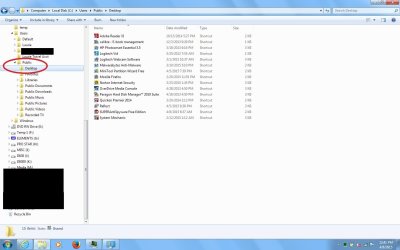
If you literally are referring to her "desktop" then could you make use of the "Public Desktop" hidden folder (C - Users - Public - show hidden folders) - for instance, if there are shortcuts you want her to be able to see and use that are already on your desktop? (You could of course customize what her desktop looks like in terms of background, icon sizes and so forth when you are logged in as her but that's pretty quick). I would think you would want her Start menu to be much simpler than yours - but again that might be quick to set up.

If I am not understanding or am being too simplistic, then I apologize in advance. I used the above to set up multiple user accounts (1 Admin per box, the rest Standard) on three of my laptops but your needs may be more complex than mine.

I'll stay tuned.
 

Attachments

  • Public Desktop.jpg
    Public Desktop.jpg
    192.4 KB · Views: 2

My Computer

Computer type
Laptop
Computer Manufacturer/Model Number
ProStar Model P157SM-A
OS
Windows 7 Professional 64 bit SP 1
CPU
Intel Core i7-4710 MQ
Motherboard
No info
Memory
16 GB
Graphics Card(s)
NVIDIA GeForce GTX 870M
Hard Drives
256 GB Samsung SSD
1TB 7200 RPM Hard Drive
Antivirus
Norton Internet Security
Browser
Internet Explorer and Mozilla Firefox
What I've done is create my usual two accounts. I use Windows Classic theme 'cause it easiest on the eyes. I simply copy my geek folder and my project folder from one account to another. From desktop direct over to users [user] desktop. And, I set Windows Classic theme to mirror both accounts as much as possible. I find it best not to meddle with Windows internal operations too much :)
 

My Computer

Computer type
PC/Desktop
Computer Manufacturer/Model Number
Antec desktop; Acer Aspire laptops
OS
Windows 7 Professional 64-bit
CPU
Desktop i5; Acers i5 & i7
Memory
desktop 16GB; 1 Acer 8GB & 1 Acer 16GB
Hard Drives
1TB split into 2 equal partitions [OS and data] usable by RJS
Internet Speed
AT&T DSL
Browser
FF, GChrome, msIE
Other Info
Windows 7 Firewall, Emsisoft AM/AV, MSE [scan-only], SpywareBlaster, Ruiware/BillP combine
@Laurie - Thanks so much for taking the time to reply. What I am saying is I setup the entire computer for her alone... all the installed sftw is tweaked/config'd for her, including the custom desktop theme, wallpaper, etc... Now I want her to use it with auto login and no admin p's + UAC disabled so she doesn't accidentally do something I'll have to fix.

So I want her to use the main profile I setup, but w/o admin priv's, and I don't want to have to recreate it all for her in a separate acct. I hope that's clearer?

What I've done is create my usual two accounts. I use Windows Classic theme 'cause it easiest on the eyes. I simply copy my geek folder and my project folder from one account to another. From desktop direct over to users [user] desktop. And, I set Windows Classic theme to mirror both accounts as much as possible. I find it best not to meddle with Windows internal operations too much :)

Thanks Roland but I don't quite follow... copying the 'geek' and 'project' folder over. ??

Let's call the user profile I made to set it all up, "Me." This profile has admin p's.

Now I want "Mom" (a second user) to have standard permissions, but to be able to use the "Me" profile/desktop/programs/everything.

Maybe I am asking something Windows doesn't do. Again, been using Windows since 3.11 but never had to set up multiple users cause they were just all my computers. I had Mom's computer setup with Ubuntu to pay bills, but the life of the OS ran out, and now her bank no longer supports the older version of the FF browser. So rather than completely wipe old Ubuntu for a new Ubuntu that will also expire eventually, I thought I would just install W7 on her machine.... but it's turned into a royal PITA.

No good deed goes unpunished. :)
 

My Computer

OS
Win 7 Ultimate 64-bit
@Laurie - Thanks so much for taking the time to reply. What I am saying is I setup the entire computer for her alone... all the installed sftw is tweaked/config'd for her, including the custom desktop theme, wallpaper, etc... Now I want her to use it with auto login and no admin p's + UAC disabled so she doesn't accidentally do something I'll have to fix.

So I want her to use the main profile I setup, but w/o admin priv's, and I don't want to have to recreate it all for her in a separate acct. I hope that's clearer?


No good deed goes unpunished. :)


Okay, I think I follow. You've set up Mom's account the way you want it, but you don't want it to have admin privileges or UAC, and you'd like it to be auto logon.

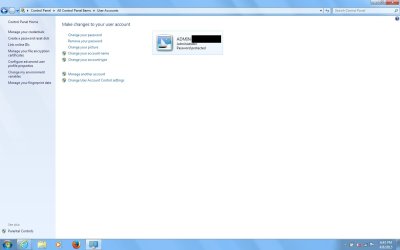
- It looks like you could just set up a second Admin account for yourself, and then change Mom's account type from Administrative to Standard while leaving everything else you've set up for her intact. (see screen shot)

-You can also disable UAC on her account.

CBlunt listed what you have to do in his post in a thread called "can I convert my administrators account standard user" (link below - you can search with that phrase if the link fails)

http://www.sevenforums.com/general-discussion/311660-can-i-convert-my-administrators-account-standard-user.html

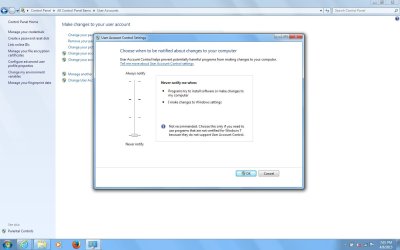
Start > Control Panel > User Accounts > Change User Account Control Settings > Set the toggle to the bottom one.

-The account management page in the screen shot below also offers an option where you can remove the password requirement for her account.

As a final thought, there may be some options in Parental Controls that would help you manage her user experience to be the most comfortable for her - and, yes, I guess you could say "pun intended" (but in a kind way) :)

HTH

PS I couldn't figure out how to completely "auto log" her into her account (where it boots directly into her desktop) while preserving an admin account for you but I know I saw a thread about it somewhere.

The steps above would let her click on her account name and icon on the screen that shows the available accounts, and the account would then open to the desktop without her having to use a password.
 

Attachments

  • Chg Acct Type.jpg
    Chg Acct Type.jpg
    113.3 KB · Views: 2
  • UAC setting.jpg
    UAC setting.jpg
    174.6 KB · Views: 3

My Computer

Computer type
Laptop
Computer Manufacturer/Model Number
ProStar Model P157SM-A
OS
Windows 7 Professional 64 bit SP 1
CPU
Intel Core i7-4710 MQ
Motherboard
No info
Memory
16 GB
Graphics Card(s)
NVIDIA GeForce GTX 870M
Hard Drives
256 GB Samsung SSD
1TB 7200 RPM Hard Drive
Antivirus
Norton Internet Security
Browser
Internet Explorer and Mozilla Firefox
Ok, let's pretend you have a folder on mom's desktop labeled "Banking" which contains 2-3-4 icons to let's say 2 banks, 2 credit cards, and the normal household utilities. Now, for this folder to be on mom's desktop and your admin desktop -- do this: From within your mom's account, you copy that folder from mom's desktop, tree-climb explorer[.exe] c-drive --> users --> [your admin acct] --> Desktop [which will be a folder].
 

My Computer

Computer type
PC/Desktop
Computer Manufacturer/Model Number
Antec desktop; Acer Aspire laptops
OS
Windows 7 Professional 64-bit
CPU
Desktop i5; Acers i5 & i7
Memory
desktop 16GB; 1 Acer 8GB & 1 Acer 16GB
Hard Drives
1TB split into 2 equal partitions [OS and data] usable by RJS
Internet Speed
AT&T DSL
Browser
FF, GChrome, msIE
Other Info
Windows 7 Firewall, Emsisoft AM/AV, MSE [scan-only], SpywareBlaster, Ruiware/BillP combine
@Roland, thanks but I think my setup and what I need is a little different from what you're explaining....

@Laurie, that looks like it might have worked, though I am confused by creating a second admin acct... wouldn't the same thing happen only it would be the new admin acct with a separate profile with none of the original desktop/sftw/etc ??? I wanted to leave my admin acct as is for the purpose of updating/maintaining her computer for her.

I was at this over 24 hrs and had to give up for lack of time.... I got an Ubuntu install going and came back here to say 'nevermind' but was too late. (I did check back several times but must have been just before these got posted. :() I did give you both rep for helping, and thanks.

I am bookmarking this thread in case I need this info later for some reason! And I'm sure it will help others, too.... I'm sorry I could not follow it through, though.
 

My Computer

OS
Win 7 Ultimate 64-bit
Or you put it in the Public Desktop folder, in which case I believe it will show up on the desktop of any new user account you create - at least that's what it did for the accounts I created on my laptop.
 

My Computer

Computer type
Laptop
Computer Manufacturer/Model Number
ProStar Model P157SM-A
OS
Windows 7 Professional 64 bit SP 1
CPU
Intel Core i7-4710 MQ
Motherboard
No info
Memory
16 GB
Graphics Card(s)
NVIDIA GeForce GTX 870M
Hard Drives
256 GB Samsung SSD
1TB 7200 RPM Hard Drive
Antivirus
Norton Internet Security
Browser
Internet Explorer and Mozilla Firefox
@Roland, thanks but I think my setup and what I need is a little different from what you're explaining....

@Laurie, that looks like it might have worked, though I am confused by creating a second admin acct... wouldn't the same thing happen only it would be the new admin acct with a separate profile with none of the original desktop/sftw/etc ??? I wanted to leave my admin acct as is for the purpose of updating/maintaining her computer for her.

I was at this over 24 hrs and had to give up for lack of time.... I got an Ubuntu install going and came back here to say 'nevermind' but was too late. (I did check back several times but must have been just before these got posted. :() I did give you both rep for helping, and thanks.

I am bookmarking this thread in case I need this info later for some reason! And I'm sure it will help others, too.... I'm sorry I could not follow it through, though.


If Ubuntu will work for you that's great!

-In Windows, I think you'd need to wind up with 2 log ins - one with admin privileges and one with standard.
-I think you could share Shortcuts by putting them in the Public Desktop folder, since on my laptop, those shortcuts show up on the desktops of each account I create
- There are also Public Documents folders and other Public folders that allow all users to see the same photos, access music files, and so forth
-.There may be advanced techniques to get you the rest of the way. Sorry I don't know them.

You're welcome - sorry it wasn't in time to be of more help.
 

My Computer

Computer type
Laptop
Computer Manufacturer/Model Number
ProStar Model P157SM-A
OS
Windows 7 Professional 64 bit SP 1
CPU
Intel Core i7-4710 MQ
Motherboard
No info
Memory
16 GB
Graphics Card(s)
NVIDIA GeForce GTX 870M
Hard Drives
256 GB Samsung SSD
1TB 7200 RPM Hard Drive
Antivirus
Norton Internet Security
Browser
Internet Explorer and Mozilla Firefox
You were a great help and timely. I backed up the W7 install and might just revert back to it tomorrow. I was just configuring Ubuntu and that's no joy either. (Have done it before and hate it... don't know Unix so it's always a huge PITA to tweak/config.) I need to get some rest... start in again tomorrow. Who know which way the wind will blow when I can feel wind again. :) Thanks again and if I revert I will certainly follow up to say if I got it working... Hope you all have a pleasant evening.
 

My Computer

OS
Win 7 Ultimate 64-bit
Reinstalled W7 last night.
Set up a second user "Mom" as standard.
Copied the main Admin Desktop to her Desktop
Copied the main Admin AppData to her AppData

This still leaves a lot of manual configuring to do (my W7 installs are as far from OOTB as you can get)...

But before I go further I have to say, this is not what I was hoping for... and maybe W7 doesn't do what I want, so I will ask once more and try to be as clear as possible and maybe someone can flat out tell me, "Windows won't do that."

My goal is ONE WINDOWS ENVIRONMENT with TWO USERS that have different priv's but use the same exact instance of Windows.

I understand why there are separate desktops so everyone can have their own software/files/etc and be private from each other. But I don't need that. I only need her to have reduced privileges using the same account I set up as Admin.

For years I have read that even if you are the only one using the computer you should setup a 2nd standard user for daily use for security purposes. I have never done it, (am always messing with stuff that requires admin) but if that's possible then it sounds like what I am asking for... only in my case, Mom would use the standard one. Here is what I mean (from How to Manage Users in Windows 7 | PCWorld )

paste: "The First User

When Windows first installs, it asks you for a user name and password, which it then uses to create your first account. This account joins the Administrators group, which has the highest set of privileges. From this account you can create and manage all other user accounts. When one person is the sole user of a computer, this first account is sometimes the only one ever created. However, even if you are the only user, a recommended practice is to create a second, standard account for daily use, so that you have it separate from your account with administrative privileges for managing the system. If you want to install software or make other system changes while logged in as a standard user, never fear: When you attempt to make the change, Windows will prompt you to authenticate your administrator account so that you won't need to log on with it." (emphasis added /end paste)


... that would imply to me that both accounts are using the same environment... am I wrong? This is what I want, as if Mom did anything accidentally that might change the system, a popup would ask for admin authentication, and if I needed to do something, I could enter my creds and do it. If not, she'd be locked out from accidentally doing something bad...but we would both be using the same environment.

Anyone KWIM? Is this possible? Thanks for reading and helping. Appreciate it!
 

My Computer

OS
Win 7 Ultimate 64-bit
I've never done this, but here's something you can try.
First, create a temporary profile for the account you're copying to. This gives you something to overwrite.

Search the start menu for "easy". Open "Windows Easy Transfer", tell it this is the "old" computer and use the "USB" option to export the original profile to the local hard drive. The wizard closes after exporting.

Restart "Windows Easy Transfer" on the same computer, but this time tell it this is the "new" computer. Pick the file you saved and select Advanced. Select the destination account and continue through the wizard.
Source: Windows 7: Trying to copy a user profile. The "Copy To" - Microsoft Community

If i understand it correctly,
After the transfer you might need to change Mom's account to standard,
and you would have two different accounts and desktops to maintain going forward.
 

My Computer

Computer type
PC/Desktop
Computer Manufacturer/Model Number
home built
OS
Multi-Boot W7_Pro_x64 W8.1_Pro_x64 W10_Pro_x64 +Linux_VMs +Chromium_VM
CPU
AMD Athlon II x4 620
Motherboard
Gigabyte GA-MA785G-UD3H
Memory
6GB GSkill DDR2 800
Graphics Card(s)
AMD 4670 GPU + AMD 4200 IGP
Sound Card
on board Realtek ALC889A
Monitor(s) Displays
RCA 40" LCD TV, Insignia 32" LCD TV, HP 15" LCD monitor
Screen Resolution
1680 x 1050
Hard Drives
OCZ Vertex 3 120GB,
Samsung F3 1TB (3),
Several others - WD, Seagate, Hitachi, ...
PSU
Corsair 500 W
Case
Rosewill mid tower
Cooling
CM 90mm rifle
Keyboard
Gyration wireless, Logitech wireless, Dell USB wired
Mouse
Gyration wireless, Logitech wireless, V7 USB wired
Internet Speed
Spectrum - 100Mbps D / 10Mbps U
Antivirus
Avast, MBAM3, EMET, WinPatrol
Browser
Pale Moon, Firefox, IE
Other Info
2 multi-boot PC's
Mainly HTPC/Office/Gen purpose (no gaming).
Trendnet USB KVM.
LG DVD burner/Blue Ray Player.
Tray system for removable SATA backup drives.

Not currently OCd, under-volted.
I use Hybrid sleep, rarely re-boot or shutdown.

Hauppauge HD-PVR, Avermedia PCIe TV Tuner, Hauppauge PCI TV Tuner.
If i understand it correctly,
After the transfer you might need to change Mom's account to standard,
and you would have two different accounts and desktops to maintain going forward.

Thanks DavidE, but two desktops is what I want to avoid. Is it not possible to have one desktop with 2 users and different priv's?
 

My Computer

OS
Win 7 Ultimate 64-bit
I don't know if that's possible.
 

My Computer

Computer type
PC/Desktop
Computer Manufacturer/Model Number
home built
OS
Multi-Boot W7_Pro_x64 W8.1_Pro_x64 W10_Pro_x64 +Linux_VMs +Chromium_VM
CPU
AMD Athlon II x4 620
Motherboard
Gigabyte GA-MA785G-UD3H
Memory
6GB GSkill DDR2 800
Graphics Card(s)
AMD 4670 GPU + AMD 4200 IGP
Sound Card
on board Realtek ALC889A
Monitor(s) Displays
RCA 40" LCD TV, Insignia 32" LCD TV, HP 15" LCD monitor
Screen Resolution
1680 x 1050
Hard Drives
OCZ Vertex 3 120GB,
Samsung F3 1TB (3),
Several others - WD, Seagate, Hitachi, ...
PSU
Corsair 500 W
Case
Rosewill mid tower
Cooling
CM 90mm rifle
Keyboard
Gyration wireless, Logitech wireless, Dell USB wired
Mouse
Gyration wireless, Logitech wireless, V7 USB wired
Internet Speed
Spectrum - 100Mbps D / 10Mbps U
Antivirus
Avast, MBAM3, EMET, WinPatrol
Browser
Pale Moon, Firefox, IE
Other Info
2 multi-boot PC's
Mainly HTPC/Office/Gen purpose (no gaming).
Trendnet USB KVM.
LG DVD burner/Blue Ray Player.
Tray system for removable SATA backup drives.

Not currently OCd, under-volted.
I use Hybrid sleep, rarely re-boot or shutdown.

Hauppauge HD-PVR, Avermedia PCIe TV Tuner, Hauppauge PCI TV Tuner.
Isn't that what the article I quoted refers to?? (snippet "If you want to install software or make other system changes while logged in as a standard user, never fear: When you attempt to make the change, Windows will prompt you to authenticate your administrator account so that you won't need to log on with it.") This implies (to my way of thinking) that the desktop does not change. Only the privleges change if admin creds are entered.
 

My Computer

OS
Win 7 Ultimate 64-bit
I don't see where that says 2 users will share the same desktop ?

I normally log in with a Standard account.
Anything I need to do that requires admin authority, i get prompted for my Admin password.
If I enter the admin PW, i can preform the "admin task", without logging in with my Admin account.

Each of my accounts still has an individual desktop.
 

My Computer

Computer type
PC/Desktop
Computer Manufacturer/Model Number
home built
OS
Multi-Boot W7_Pro_x64 W8.1_Pro_x64 W10_Pro_x64 +Linux_VMs +Chromium_VM
CPU
AMD Athlon II x4 620
Motherboard
Gigabyte GA-MA785G-UD3H
Memory
6GB GSkill DDR2 800
Graphics Card(s)
AMD 4670 GPU + AMD 4200 IGP
Sound Card
on board Realtek ALC889A
Monitor(s) Displays
RCA 40" LCD TV, Insignia 32" LCD TV, HP 15" LCD monitor
Screen Resolution
1680 x 1050
Hard Drives
OCZ Vertex 3 120GB,
Samsung F3 1TB (3),
Several others - WD, Seagate, Hitachi, ...
PSU
Corsair 500 W
Case
Rosewill mid tower
Cooling
CM 90mm rifle
Keyboard
Gyration wireless, Logitech wireless, Dell USB wired
Mouse
Gyration wireless, Logitech wireless, V7 USB wired
Internet Speed
Spectrum - 100Mbps D / 10Mbps U
Antivirus
Avast, MBAM3, EMET, WinPatrol
Browser
Pale Moon, Firefox, IE
Other Info
2 multi-boot PC's
Mainly HTPC/Office/Gen purpose (no gaming).
Trendnet USB KVM.
LG DVD burner/Blue Ray Player.
Tray system for removable SATA backup drives.

Not currently OCd, under-volted.
I use Hybrid sleep, rarely re-boot or shutdown.

Hauppauge HD-PVR, Avermedia PCIe TV Tuner, Hauppauge PCI TV Tuner.
I don't see where that says 2 users will share the same desktop ?

I normally log in with a Standard account.
Anything I need to do that requires admin authority, i get prompted for my Admin password.
If I enter the admin PW, i can preform the "admin task", without logging in with my Admin account.

How did you set that up? If you originally created your main account as Admin... then when you added a standard user, none of the admin desktop would have been available to you... ???

Each of my accounts still has an individual desktop.

OK, but then I guess I don't care as long as I could get the above to work, and obviously I am not understanding this.

Let's say Mom is signed in as Standard user.... now something comes up that needs Admin p's ... like let's say I sit down at her computer (she's logged in as standard user)... and I go to install some sftw for her... will I get prompted for my admin creds on her desktop??? If so, that's exactly what I want and that's fine!

What I want to avoid is having to log off her account, and into mine to administer HER stuff... cause let's say I need to install software for her... I don't want to have to install it on my admin account, then manually copy my folders again to her user folders...

But it sounds like what you're saying is I only have to copy everything over initially (like I already have)... and now I can even login as her... and do any admin thing I want on HER desktop, as Windows will just ask for my creds... is that right??

Sorry for being so obtuse! Just never had to deal with multiple users before.
 

My Computer

OS
Win 7 Ultimate 64-bit
Let's say Mom is signed in as Standard user.... now something comes up that needs Admin p's ... like let's say I sit down at her computer (she's logged in as standard user)... and I go to install some sftw for her... will I get prompted for my admin creds on her desktop??? If so, that's exactly what I want and that's fine!

Yes, you can run most things while logged in with her Standard account using YOUR admin PW and authority as needed.
For some things you would need to login with your Admin account, such as some Registry editing (if you ever do that).
I also prefer to login with my Admin account when I am updating security programs.

But normally, I am logged in as a Standard user and get prompted for my Admin PW as needed.
 

My Computer

Computer type
PC/Desktop
Computer Manufacturer/Model Number
home built
OS
Multi-Boot W7_Pro_x64 W8.1_Pro_x64 W10_Pro_x64 +Linux_VMs +Chromium_VM
CPU
AMD Athlon II x4 620
Motherboard
Gigabyte GA-MA785G-UD3H
Memory
6GB GSkill DDR2 800
Graphics Card(s)
AMD 4670 GPU + AMD 4200 IGP
Sound Card
on board Realtek ALC889A
Monitor(s) Displays
RCA 40" LCD TV, Insignia 32" LCD TV, HP 15" LCD monitor
Screen Resolution
1680 x 1050
Hard Drives
OCZ Vertex 3 120GB,
Samsung F3 1TB (3),
Several others - WD, Seagate, Hitachi, ...
PSU
Corsair 500 W
Case
Rosewill mid tower
Cooling
CM 90mm rifle
Keyboard
Gyration wireless, Logitech wireless, Dell USB wired
Mouse
Gyration wireless, Logitech wireless, V7 USB wired
Internet Speed
Spectrum - 100Mbps D / 10Mbps U
Antivirus
Avast, MBAM3, EMET, WinPatrol
Browser
Pale Moon, Firefox, IE
Other Info
2 multi-boot PC's
Mainly HTPC/Office/Gen purpose (no gaming).
Trendnet USB KVM.
LG DVD burner/Blue Ray Player.
Tray system for removable SATA backup drives.

Not currently OCd, under-volted.
I use Hybrid sleep, rarely re-boot or shutdown.

Hauppauge HD-PVR, Avermedia PCIe TV Tuner, Hauppauge PCI TV Tuner.
If you want to install software or make other system changes while logged in as a standard user, never fear: When you attempt to make the change, Windows will prompt you to authenticate your administrator account so that you won't need to log on with it." (emphasis added /end paste)

... that would imply to me that both accounts are using the same environment...

No. This new process that is created after entering the credentials for this other account will be running under this other account's environment.

E.g. Standard user, Joe, runs an application that requires administrative privileges. Joe enters the credentials for Mary, an admin account. This application, which relies heavily on the AppData folder, will then save all it's data to Mary's AppData folder (even if Joe was the actual starter of this application). If this application did not require administrative privileges, the application would have saved to Joe's AppData folder.

Every user has their own environment. New user equals new environment. I'd say that that is the definition of a user account under Windows. This behaviour cannot be altered.

Is it not possible to have one desktop with 2 users and different priv's?
It is possible to set up two separate user accounts and have them share one desktop by taking advantage of symbolic links.


But what you really should be doing, Remm, is setting up both a standard user account and an admin user account. You and (your) Mom should only use this standard user account. When an application calls for elevation, Windows will prompt for administrative credentials to which only you will know, Remm.
 

My Computer

Computer type
PC/Desktop
OS
Windows 10, Windows 8.1 Pro, Windows 7 Professional, OS X El Capitan
Thanks to both DavidE and Pyrohly....

So if I understand correctly, as long as I am logged into Mom's account, if I install sftw for her and get prompted for my creds, the sftw WILL get installed into her desktop, not mine. (Or if mine too, that's fine. As long as it gets installed on her's without my having to manually copy my admin user folders over every time I change something.)

I think (I hope) I am beginning to understand.
 

My Computer

OS
Win 7 Ultimate 64-bit
Back
Top