Added language

s00

New member
Member
VIP
Local time
2:48 AM
Messages
220
Location
SISTAN
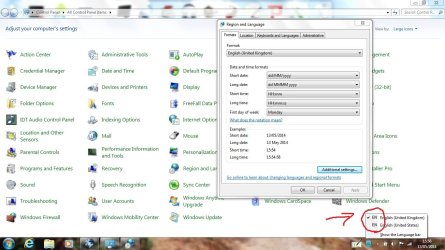
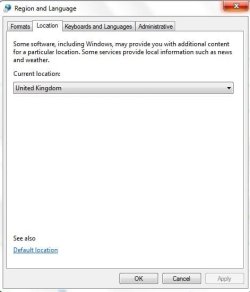
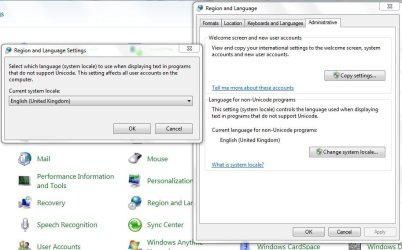
Additional language was added

Untitled.jpg
Capture6.JPG
Capture7.JPG
Capture8.JPG

why????
how delete Additional language??
 

My Computer

Computer Manufacturer/Model Number
dell 1558
OS
windows 7 home preminm x64
CPU
i7
Motherboard
dell
Memory
DDR3 4G
Graphics Card(s)
ATI HD 5470 1G
Monitor(s) Displays
15.6 LED
Hard Drives
Hitachi 500G

My Computer

Computer type
PC/Desktop
Computer Manufacturer/Model Number
Custom Built
OS
Windows 7 Professional x64
CPU
Intel i5 quad processor
Motherboard
DP67BG
Memory
16 GB
Graphics Card(s)
Radeon HD 5770
Sound Card
Realtek High Definition Audio
Monitor(s) Displays
Samsung SyncMaster
Screen Resolution
1920X1080
Hard Drives
WD 2TB (SATA Internal)
WD 1TB (USB External)
PSU
Corsair GS800
Case
Tower (Generic)
Cooling
3 Internal Fans
Keyboard
MS Wireless
Mouse
MS Optical Wired
Internet Speed
54 mbps
Antivirus
Emsisoft
Browser
IE-Version 9, Palemoon-Version 24.2.0

That is how to uninstall / remove unwanted and unnecessary display languages (language packs) and has nothing to do with what OP is asking. For uninstalling unnecessary language packs we have an excellent tutorial available here at the Seven Forums, but as I mentioned this does not apply to OP's issue: http://www.sevenforums.com/tutorials/87313-display-language-packs-install-uninstall.html

The OP's issue:
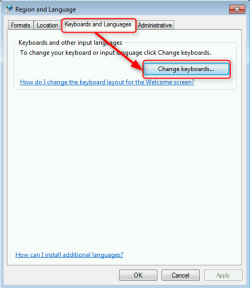
Input language (keyboard layout) has nothing to do with display language. Unnecessary input languages can be added and removed from Control Panel > Region and Language > Keyboards and Languages tab > Change keyboards:

2014-05-13_14h03_39.png

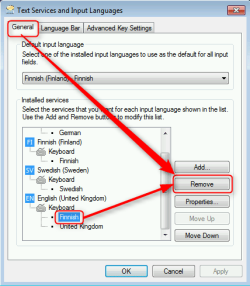
On General tab, select unnecessary input language, click Remove:

2014-05-13_13h58_28.png

Notice that a default input language cannot be removed. To remove it you need first change the default. Complete tutorial for adding and removing input languages: http://www.sevenforums.com/tutorials/86204-keyboard-input-language-add-remove.html

Kari
 
Last edited:

My Computer

Computer type
Laptop
Computer Manufacturer/Model Number
HP ENVY 17-1150eg
OS
Windows 10 Pro x64 EN-GB
CPU
1.6 GHz Intel Core i7-720QM Processor
Memory
6 GB
Graphics Card(s)
ATI Mobility Radeon HD 5850 Graphics
Sound Card
Beats sound system with integrated subwoofer
Monitor(s) Displays
17" laptop display, 22" LED and 32" Full HD TV through HDMI
Screen Resolution
1600*900 (1), 1920*1080 (2&3)
Hard Drives
Internal: 2 x 500 GB SATA Hard Disk Drive 7200 rpm
External: 2TB for backups, 3TB USB3 network drive for media
Cooling
As Envy runs a bit warm, I have it on a Cooler Master pad
Keyboard
Logitech diNovo Media Desktop Laser (bluetooth)
Mouse
Logitech Performance Mouse MX
Internet Speed
50/10 Mbps VDSL
Antivirus
Windows Defender 4.3.9431.0
Browser
Maxthon 3.5.2., IE11
Thank you for pointing out the error in my post. I appreciate the information you provided and the clarification.
 

My Computer

Computer type
PC/Desktop
Computer Manufacturer/Model Number
Custom Built
OS
Windows 7 Professional x64
CPU
Intel i5 quad processor
Motherboard
DP67BG
Memory
16 GB
Graphics Card(s)
Radeon HD 5770
Sound Card
Realtek High Definition Audio
Monitor(s) Displays
Samsung SyncMaster
Screen Resolution
1920X1080
Hard Drives
WD 2TB (SATA Internal)
WD 1TB (USB External)
PSU
Corsair GS800
Case
Tower (Generic)
Cooling
3 Internal Fans
Keyboard
MS Wireless
Mouse
MS Optical Wired
Internet Speed
54 mbps
Antivirus
Emsisoft
Browser
IE-Version 9, Palemoon-Version 24.2.0
My problem isnot how to add or remove language.
But deleting the language selected is not at all(post 1).
According to the first post Selected Language English UK for system but in
The language bar also appears English US.
How do I remove a language that does not exist???????????????
 

My Computer

Computer Manufacturer/Model Number
dell 1558
OS
windows 7 home preminm x64
CPU
i7
Motherboard
dell
Memory
DDR3 4G
Graphics Card(s)
ATI HD 5470 1G
Monitor(s) Displays
15.6 LED
Hard Drives
Hitachi 500G
Sounds as if the language of install media and chosen input language do not match, although basically the same language but different country versions. I guess you have used US English Windows 7 install media, I've seen this happen when the install media used is different version of the same language than the chosen input language.

For me this sometimes happens when I install a Swedish (Sweden) Windows selecting Swedish (Finland) input language; somehow the system assumes that of course you want to keep the input language for installed Windows language, not realizing that the manually set input language is the same, just another version.

The same with English UK, US, AUS and whatnot versions.

You could try manually add that stubborn English (US) and set it default, reboot, remove English (UK), reboot again. Now your language bar should only show English (US). If this works, add a new input language (not any English version, use French or something else), set it default and remove English (US), reboot, add English (UK), set it default, reboot, remove French or whatever you used earlier, and reboot. Now you should have only English (UK) showing in language bar.

Kari

 

My Computer

Computer type
Laptop
Computer Manufacturer/Model Number
HP ENVY 17-1150eg
OS
Windows 10 Pro x64 EN-GB
CPU
1.6 GHz Intel Core i7-720QM Processor
Memory
6 GB
Graphics Card(s)
ATI Mobility Radeon HD 5850 Graphics
Sound Card
Beats sound system with integrated subwoofer
Monitor(s) Displays
17" laptop display, 22" LED and 32" Full HD TV through HDMI
Screen Resolution
1600*900 (1), 1920*1080 (2&3)
Hard Drives
Internal: 2 x 500 GB SATA Hard Disk Drive 7200 rpm
External: 2TB for backups, 3TB USB3 network drive for media
Cooling
As Envy runs a bit warm, I have it on a Cooler Master pad
Keyboard
Logitech diNovo Media Desktop Laser (bluetooth)
Mouse
Logitech Performance Mouse MX
Internet Speed
50/10 Mbps VDSL
Antivirus
Windows Defender 4.3.9431.0
Browser
Maxthon 3.5.2., IE11
Back
Top