
Addiction?

IMAyNeed

New member
Power User
Local time
11:02 PM
Messages
501
My Logitech M570 Trackball started to have problems on the left button after some hot chocolate spilled on it.

logitechm570-review2.jpg


Then I started to use my Logitech Trackman Marble.

910-000806-R-unit.jpg


I thought it would be allright since I had used that Trackman Marble a long time before I got the M570.

Things weren't as I expected. I couldn't get used to the USB Cable as I had to move the Trackman wherever I moved my notebook. There was no wheel. It was really hard. I was telling myself that I wouldn't have time to use the computer in a week or two so I thought I would be ok without buying another wireless trackball. It wasn't possible. After a couple of days, with spending a part of a very important money, I bought another M570. I couldn't find another choice. There were good mice maybe but I am so used to stable base. Actually, at the store, or even at the internet I haven't seen any other choice of a wireless trackball as M570 so I got myself a second M570. Logitech Customer Service can be pretty nice actually sometimes, you can get the same or newer item even after a couple of years or more without paying extra; but I knew that I needed that trackball today. I went to the store on a Sunday (I don't drive and public transportation is so much less on Sundays and I am out of the city) and I bought it. After I got it, I opened the box and told the 'trackball' that "I missed you so much!" several times. I realized that I told the same words to a girlfriend who came from Europe for Christmas and New Year.
 

My Computer

Computer Manufacturer/Model Number
ASUS G72 Notebook
OS
Windows 7 Ultimate 64-bit
CPU
Intel® Core™2 Duo mobile processor P8700 2.53 GHz
Memory
6GB DDRII
Graphics Card(s)
NVIDIA GeForce GTX 260M
Sound Card
EAX Advanced HD 4.0 + Logitech Wireless Headset G930
Monitor(s) Displays
17.3" LED-backlit LCD high-definition plus widescreen
Screen Resolution
1600 x 900
Hard Drives
2 x Seagate Momentus 500 GB 5400.6 SATA 3Gb/s
Cooling
Targus
Mouse
Logitech Wireless Trackball M570
Internet Speed
3 to 6 Mbps Download / .5 to 1 Mbps Upload
Other Info
Clear Modem with Wi-fi*
Comodo Internet Security Premium
I have 2 similar ones, but without the 2 extra buttons on the left. What do those do. I could not operate without it both on the desktop and on the laptops. They are both wired, but that does not bother me.

On the desktop I still have a mouse where I covered the optical eye for my left hand. I am used to operate the clickers with the left hand because I used keyboards with scrollballs for years. But now I needed a backlit keyboard and those do not come with a scrollball.
 

My Computer

Computer Manufacturer/Model Number
HP, Dell, Gateway, Toshiba - 4 laptops and 2 desktops
OS
Vista, Windows7, Mint Mate, Zorin, Windows 8
CPU
from 1.6GHz Duo to i7
Monitor(s) Displays
2x HP w2207
Hard Drives
5x HDD, 7x SSD, 12x Externals
Keyboard
with trackball - no mices
Mouse
Trackball mice
Internet Speed
DSL 6000
You can configure those two buttons with Logitech software. I am using as back and forward.
The wire bothers me because I am usually moving the notebook side to side.
It helps when there is no wire so when I put the notebook on the chair or coffee table, I don't have to move the trackball.

Backlit keyboard is another addiction of mine now. If a notebook does not have it, I wouldn't buy it. I remember not buying a Sony because of that.

Scrollball is a good option, but I am moving my computer (and its accessories) more than a couple times a year so desktop is not a good option for me at this point.

There are much more choices for mice than the trackballs.
 

My Computer

Computer Manufacturer/Model Number
ASUS G72 Notebook
OS
Windows 7 Ultimate 64-bit
CPU
Intel® Core™2 Duo mobile processor P8700 2.53 GHz
Memory
6GB DDRII
Graphics Card(s)
NVIDIA GeForce GTX 260M
Sound Card
EAX Advanced HD 4.0 + Logitech Wireless Headset G930
Monitor(s) Displays
17.3" LED-backlit LCD high-definition plus widescreen
Screen Resolution
1600 x 900
Hard Drives
2 x Seagate Momentus 500 GB 5400.6 SATA 3Gb/s
Cooling
Targus
Mouse
Logitech Wireless Trackball M570
Internet Speed
3 to 6 Mbps Download / .5 to 1 Mbps Upload
Other Info
Clear Modem with Wi-fi*
Comodo Internet Security Premium
I had a Sony laptop with a backlit keyboard. It was a very nice laptop with a HD screen, an i7, a good 1GB graphics card and all the bells and whistles. I really liked it - except their BIOS microprogram was really retarded. You could no run live Linux CDs because it would freeze the cursor, there was no way to set the boot sequence. It had an eSata port, but no way to boot from eSata because of the retarded BIOS. And there was also no way to set the Sata to AHCI - maybe it was set that way by default, but nobody at Sony knew.

So I returned it and got my money back (after I wrote a letter to the Sony CEO) and got a Toshiba that was $500 cheaper and is nearly as good. I am only missing the eSata port and the HD screen. It does, however, have a USB3 port. But the keyboard is backlit and you can make the various settings in the BIOS whilst in the Sony you had to hack the registry in order to get the keyboard to stay lit.
 

My Computer

Computer Manufacturer/Model Number
HP, Dell, Gateway, Toshiba - 4 laptops and 2 desktops
OS
Vista, Windows7, Mint Mate, Zorin, Windows 8
CPU
from 1.6GHz Duo to i7
Monitor(s) Displays
2x HP w2207
Hard Drives
5x HDD, 7x SSD, 12x Externals
Keyboard
with trackball - no mices
Mouse
Trackball mice
Internet Speed
DSL 6000
I know what you mean about Sony. I heard similar complaints.
The Sony I was talking about was on sale at a good price at that time, therefore I considered it.
 

My Computer

Computer Manufacturer/Model Number
ASUS G72 Notebook
OS
Windows 7 Ultimate 64-bit
CPU
Intel® Core™2 Duo mobile processor P8700 2.53 GHz
Memory
6GB DDRII
Graphics Card(s)
NVIDIA GeForce GTX 260M
Sound Card
EAX Advanced HD 4.0 + Logitech Wireless Headset G930
Monitor(s) Displays
17.3" LED-backlit LCD high-definition plus widescreen
Screen Resolution
1600 x 900
Hard Drives
2 x Seagate Momentus 500 GB 5400.6 SATA 3Gb/s
Cooling
Targus
Mouse
Logitech Wireless Trackball M570
Internet Speed
3 to 6 Mbps Download / .5 to 1 Mbps Upload
Other Info
Clear Modem with Wi-fi*
Comodo Internet Security Premium
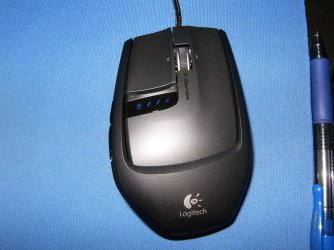
All this may be true but no mouse is complete if the wheel can't freewheel. Once you choose either ratcheted style or freewheel and you scroll top to bottom and back of a huge document with one spin......you're hooked.
 

Attachments

  • HPIM1289.JPG
    HPIM1289.JPG
    754.5 KB · Views: 268

My Computer

Computer type
PC/Desktop
Computer Manufacturer/Model Number
A blend of brains, brawn and dumb luck.
OS
Windows 7 Ultimate 64
CPU
i7 3770k OC'd 4.6 @ 1.17v, also FX 8120 & i5 miniITX
Motherboard
MSI P67A-GD80 b3
Memory
32 gb G.Skill Sniper DDR3 10-12-12-31 @ 2133
Graphics Card(s)
XFX Radeon 7870 2GB DDR5
Sound Card
Sound Blaster Z Series Card
Monitor(s) Displays
(2) LG LED 23" 1920 x 1080 2ms Monitors via mini d-port
Screen Resolution
1680 X 1050 p
Hard Drives
Samsung 256 gb 830 SSD sata III
(1) 1 tb WD Black
(2) 1 tb Hitachi deskmates/sata II
(2) 1 tb WD green/sata II
(2) 3 tb Seagate Barracuda
(1) 120 gb OCZ Vertex SS
(1) Drobo 5N w/5 Seagate 3tb
PSU
EVGA modular 1000G2 80% gold rating & APC 1200 RS
Case
CoolerMaster Storm Styker
Cooling
7 case fans 140mm & 120mm, NZXT Kraken X60
Keyboard
(2) Logitech Illuminated Keyboards (1) usb (1) wireless
Mouse
Logitech G700 & T-BC21 - nano nx for the laptop
Internet Speed
Basic 120mbps down
Antivirus
Trend Micro Titanium Max Security & Malwarebytes Premium
Browser
Chrome and IE 10
Other Info
5 Noctua case fans + 3 Noctua in p/p on NZXT cooler
Integrated hot swap drive bays for 2.5" Drives
(2) Lite-on dvd/cd/Blu Ray optical 22X
Integrated fan controller and led on/off
HP Officejet Pro 8630 all-n-one
Hot-swappable 3.5" hard drive bay
Netgear Nighthawk router
Asus USB 3 & sata 6 PCIe card
Vantec IDE to sata adptr./Ultra sata adptr
Lenovo L420 i5 lappy with m sata
Drobo 5N advanced NAS
If you are addicted to trackballs which have a stable base, it is hard to use a mouse for a long periods again.
As I mentioned before, mice have much more options than trackballs.
Today, I was at the store, and if those mice at the store had a stable base such a trackball, I would have bought one to try, but as a trackball, the option was M570 only.
 

My Computer

Computer Manufacturer/Model Number
ASUS G72 Notebook
OS
Windows 7 Ultimate 64-bit
CPU
Intel® Core™2 Duo mobile processor P8700 2.53 GHz
Memory
6GB DDRII
Graphics Card(s)
NVIDIA GeForce GTX 260M
Sound Card
EAX Advanced HD 4.0 + Logitech Wireless Headset G930
Monitor(s) Displays
17.3" LED-backlit LCD high-definition plus widescreen
Screen Resolution
1600 x 900
Hard Drives
2 x Seagate Momentus 500 GB 5400.6 SATA 3Gb/s
Cooling
Targus
Mouse
Logitech Wireless Trackball M570
Internet Speed
3 to 6 Mbps Download / .5 to 1 Mbps Upload
Other Info
Clear Modem with Wi-fi*
Comodo Internet Security Premium
IMAyNeed,

I'm curious, because I'm using Logitech Cordless Wheel Trackman mice on both of my PCs. For the most part, I like them very much, at least more so than wired mice. It looks as though the M570 is an updated version of them. At least as far as the programmable buttons go, but I'm wondering if you have ever used the older version like mine? The part that I like least about them is that they only hold 1 AA battery, so the time between battery changes is not as long as I would like, and worse is the fact that the battery warning doesn't work, so you don't know the charge state, until it goes dead, which unless you have an extra battery standing by, you have to wait for the battery to recharge. Does the M570 share these problems?
 

My Computer

Computer Manufacturer/Model Number
DIY
OS
W7x64 Pro, SuSe 12.1/** W7 x64 Pro, XP MCE
CPU
Phenom II 1090T w/Noctua NH-D14 /**4400+ X2 w/CM Hyper TX 3
Motherboard
ASRock 890FX Deluxe 4/**A8N-SLI
Memory
2 x 2GB Patriot PGS34g1600LLKA/**4x1GB Corsair VS
Graphics Card(s)
EVGA GTX460 SC/**EVGA 8800GTS
Sound Card
Asus Xonar D2X/**Xonar D1
Monitor(s) Displays
Acer X233H, Dell E152FPc /**LG M237-WD
Screen Resolution
1920x1080 & 1024x768/**1980x1080
Hard Drives
WDC 2TB, 1.5TB, 1TB, 500GB,Seagate 500GB , Maxtor 80GB /**500GB Seagate & WDC 1TB Black
PSU
CM RS600 w/ APC BX1000G/**Antec 500 TP w/ APC BX1000
Case
HAF922/**Antec 1040IIB
Cooling
3x200mm, 1x140 and 1x120mm/**5x80mm fans
Keyboard
Logitech Media USB/**Saitek Eclipse
Mouse
Cordless Trackman Wheel/**Ditto
Internet Speed
3.3Mbps
Other Info
SB 560 5.1 w/ Sennheiser RS140/**Creative T20 speakers, Dvico FusionHDTV7 Gold RT, Cisco E3000, HP 5510V AIO, Linksys E3000, Belkin F5U237 hub and **F5D8055 adapter
(** = 2nd rig)
I haven't used the older version. M570's hold 1 AA battery too. The time advertised for battery change is 18 months. At the worst, it will go at least 9 months. At least, my first one did. M570's doesn't charge the battery in anyway. You have to put another battery or recharge the battery in your own battery charger. The long time for M570's can come from its wireless technology. I believe the cordless trackman was using the optical technology or radio technology. Therefore, maybe it was using more energy than wireless. I am not sure. As you said, M570's are an updated model, with 2 extra buttons and using wireless instead of optical. And also instead of a big receiver, there is just a small USB plug, which you can also use for other Logitech products if you have. There is also a battery warning, which shows how many days it will last. On my first day, it is showing 548 days. Therefore, M570 does not have those problems.
 

My Computer

Computer Manufacturer/Model Number
ASUS G72 Notebook
OS
Windows 7 Ultimate 64-bit
CPU
Intel® Core™2 Duo mobile processor P8700 2.53 GHz
Memory
6GB DDRII
Graphics Card(s)
NVIDIA GeForce GTX 260M
Sound Card
EAX Advanced HD 4.0 + Logitech Wireless Headset G930
Monitor(s) Displays
17.3" LED-backlit LCD high-definition plus widescreen
Screen Resolution
1600 x 900
Hard Drives
2 x Seagate Momentus 500 GB 5400.6 SATA 3Gb/s
Cooling
Targus
Mouse
Logitech Wireless Trackball M570
Internet Speed
3 to 6 Mbps Download / .5 to 1 Mbps Upload
Other Info
Clear Modem with Wi-fi*
Comodo Internet Security Premium
Yes, I do have to recharge my batteries separately, which really isn't so bad with 15 minute rechargeables, but even that can be very annoying when they die in the middle of some functions. That day counter sounds very good, so I now know what my next upgrade will be. Thanks.
 

My Computer

Computer Manufacturer/Model Number
DIY
OS
W7x64 Pro, SuSe 12.1/** W7 x64 Pro, XP MCE
CPU
Phenom II 1090T w/Noctua NH-D14 /**4400+ X2 w/CM Hyper TX 3
Motherboard
ASRock 890FX Deluxe 4/**A8N-SLI
Memory
2 x 2GB Patriot PGS34g1600LLKA/**4x1GB Corsair VS
Graphics Card(s)
EVGA GTX460 SC/**EVGA 8800GTS
Sound Card
Asus Xonar D2X/**Xonar D1
Monitor(s) Displays
Acer X233H, Dell E152FPc /**LG M237-WD
Screen Resolution
1920x1080 & 1024x768/**1980x1080
Hard Drives
WDC 2TB, 1.5TB, 1TB, 500GB,Seagate 500GB , Maxtor 80GB /**500GB Seagate & WDC 1TB Black
PSU
CM RS600 w/ APC BX1000G/**Antec 500 TP w/ APC BX1000
Case
HAF922/**Antec 1040IIB
Cooling
3x200mm, 1x140 and 1x120mm/**5x80mm fans
Keyboard
Logitech Media USB/**Saitek Eclipse
Mouse
Cordless Trackman Wheel/**Ditto
Internet Speed
3.3Mbps
Other Info
SB 560 5.1 w/ Sennheiser RS140/**Creative T20 speakers, Dvico FusionHDTV7 Gold RT, Cisco E3000, HP 5510V AIO, Linksys E3000, Belkin F5U237 hub and **F5D8055 adapter
(** = 2nd rig)
All this may be true but no mouse is complete if the wheel can't freewheel. Once you choose either ratcheted style or freewheel and you scroll top to bottom and back of a huge document with one spin......you're hooked.
For making a 'big' scroll down I use the spacebar. And to get to the top I use the 'Home' button. Works well for me. But I never had a freewheel mouse. So I cannot compare.
 

My Computer

Computer Manufacturer/Model Number
HP, Dell, Gateway, Toshiba - 4 laptops and 2 desktops
OS
Vista, Windows7, Mint Mate, Zorin, Windows 8
CPU
from 1.6GHz Duo to i7
Monitor(s) Displays
2x HP w2207
Hard Drives
5x HDD, 7x SSD, 12x Externals
Keyboard
with trackball - no mices
Mouse
Trackball mice
Internet Speed
DSL 6000
Yes, I do have to recharge my batteries separately, which really isn't so bad with 15 minute rechargeables, but even that can be very annoying when they die in the middle of some functions. That day counter sounds very good, so I now know what my next upgrade will be. Thanks.

You are welcome.
 

My Computer

Computer Manufacturer/Model Number
ASUS G72 Notebook
OS
Windows 7 Ultimate 64-bit
CPU
Intel® Core™2 Duo mobile processor P8700 2.53 GHz
Memory
6GB DDRII
Graphics Card(s)
NVIDIA GeForce GTX 260M
Sound Card
EAX Advanced HD 4.0 + Logitech Wireless Headset G930
Monitor(s) Displays
17.3" LED-backlit LCD high-definition plus widescreen
Screen Resolution
1600 x 900
Hard Drives
2 x Seagate Momentus 500 GB 5400.6 SATA 3Gb/s
Cooling
Targus
Mouse
Logitech Wireless Trackball M570
Internet Speed
3 to 6 Mbps Download / .5 to 1 Mbps Upload
Other Info
Clear Modem with Wi-fi*
Comodo Internet Security Premium
Back
Top