Adding a Clip Art

Starhunter

New member
Local time
5:59 AM
Messages
31
Location
Egypt, New Cairo
hello
i need to add a clip art to some of my mp3s in wmp 12
how can i do so please..
 

My Computer

OS
Windows 7 beta
CPU
Intel Core 2 Due E8200 6M 2.66 GHz
Motherboard
GigaByte GA-EP35-DS3R
Memory
2*2GB DDRII (1066) APOGEE GT
Graphics Card(s)
Chaintech GEFORCE 9600GT 512Mb DDR3
Sound Card
Realtek HD
Monitor(s) Displays
DELL
Screen Resolution
1024 x 768 @ 75Hz
Hard Drives
WD 320Gb SATA
PSU
HEC 400W
Case
Gamma
Cooling
Air Cooling
Keyboard
Gamma
Mouse
Gamma
Internet Speed
DSL 256 kbs
Other Info
4.1 Creative Sound System
Samsung DVD R/W DL
You can add album art through the WMP 12 interface. Simply open Windows Media Player and located the file you want to add art to and drag and drop the artwork file from your hard drive onto the album art square next to the file.

Alternatively you can right-click the album art square and go to "Find Album Info" and Media Player will attempt to locate information including album art for your file.
 

My Computer

OS
windows 7
thanks alot
but actually the art shows up in WMP but it doesn't appear as a thumbnail in it's own floder, still appears mp3 icon without an art...
 

My Computer

OS
Windows 7 beta
CPU
Intel Core 2 Due E8200 6M 2.66 GHz
Motherboard
GigaByte GA-EP35-DS3R
Memory
2*2GB DDRII (1066) APOGEE GT
Graphics Card(s)
Chaintech GEFORCE 9600GT 512Mb DDR3
Sound Card
Realtek HD
Monitor(s) Displays
DELL
Screen Resolution
1024 x 768 @ 75Hz
Hard Drives
WD 320Gb SATA
PSU
HEC 400W
Case
Gamma
Cooling
Air Cooling
Keyboard
Gamma
Mouse
Gamma
Internet Speed
DSL 256 kbs
Other Info
4.1 Creative Sound System
Samsung DVD R/W DL
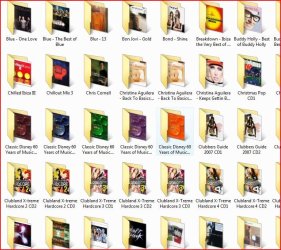
Try right-clicking inside your music folder inside windows explorer and clicking "customize.."

Then set the contents of that folder to Music and include all subfolders.
 

My Computer

OS
windows 7
You mean like this?

like this, you mean?

(ps it's Englishman)
 

Attachments

  • album art (1).JPG
    album art (1).JPG
    99.2 KB · Views: 2,880

My Computer

OS
Windows Se7en Ultimate x64
CPU
AMD Athlon Phenom II 550 (Dual Core at the moment)
Motherboard
DFI LPJR790GX-M2RS
Memory
4GB OCZ reaper DDR2 PC8500 1066
Graphics Card(s)
CrosssFire 2 x Sapphire RADEON HD3650 (512 MB GDDR3)
Sound Card
Built-in
Monitor(s) Displays
Samsung LE-40B551 40 in. HDTV, HP w2007v, Elo Touchscreen
Screen Resolution
1920 x 1080 pixels
Hard Drives
OCZ Agility Series 30GB SATA II 2.5" Solid State Drive
Samsung Spinpoint F3 1TB SATA II
Samsung Spinpoint F1 500GB SATA II
Western Digital Caviar 500GB SATA II
PSU
OCZ 600W StealthXStream
Case
Antec P180 Mini
Cooling
Scythe Ninja Copper Cooler 5th Anniversary Limited Edition
Keyboard
Cordless Desktop® EX 90
Mouse
Cordless Desktop® EX 90
Internet Speed
Hamster-in-a-wheel
Other Info
WinTV-NOVA-T PCI
Altec Lansing ACS56
ok i've tried to customize the folder but it still a regular mp3 icon with no art

Bellerophon
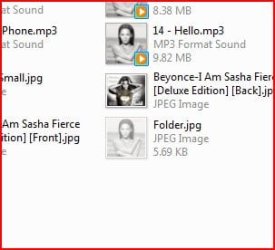
no i'm talking about the icon of the mp3 file itself, although it appears with an art in WMP but it appears without it inside windows explorer.
and thanks for the Englishman tip
 

Attachments

  • fgd.png
    fgd.png
    2.5 KB · Views: 12,000

My Computer

OS
Windows 7 beta
CPU
Intel Core 2 Due E8200 6M 2.66 GHz
Motherboard
GigaByte GA-EP35-DS3R
Memory
2*2GB DDRII (1066) APOGEE GT
Graphics Card(s)
Chaintech GEFORCE 9600GT 512Mb DDR3
Sound Card
Realtek HD
Monitor(s) Displays
DELL
Screen Resolution
1024 x 768 @ 75Hz
Hard Drives
WD 320Gb SATA
PSU
HEC 400W
Case
Gamma
Cooling
Air Cooling
Keyboard
Gamma
Mouse
Gamma
Internet Speed
DSL 256 kbs
Other Info
4.1 Creative Sound System
Samsung DVD R/W DL
Like this?

Like this...
 

Attachments

  • album art (2).JPG
    album art (2).JPG
    19.6 KB · Views: 28

My Computer

OS
Windows Se7en Ultimate x64
CPU
AMD Athlon Phenom II 550 (Dual Core at the moment)
Motherboard
DFI LPJR790GX-M2RS
Memory
4GB OCZ reaper DDR2 PC8500 1066
Graphics Card(s)
CrosssFire 2 x Sapphire RADEON HD3650 (512 MB GDDR3)
Sound Card
Built-in
Monitor(s) Displays
Samsung LE-40B551 40 in. HDTV, HP w2007v, Elo Touchscreen
Screen Resolution
1920 x 1080 pixels
Hard Drives
OCZ Agility Series 30GB SATA II 2.5" Solid State Drive
Samsung Spinpoint F3 1TB SATA II
Samsung Spinpoint F1 500GB SATA II
Western Digital Caviar 500GB SATA II
PSU
OCZ 600W StealthXStream
Case
Antec P180 Mini
Cooling
Scythe Ninja Copper Cooler 5th Anniversary Limited Edition
Keyboard
Cordless Desktop® EX 90
Mouse
Cordless Desktop® EX 90
Internet Speed
Hamster-in-a-wheel
Other Info
WinTV-NOVA-T PCI
Altec Lansing ACS56
ok, try this. Launch Windows Media Player then right-click at the top or bottom areas to bring up the menu. Then navigate to "Tools > Apply Media Information Changes". I think it should save the info from WMP to the files at that point.
 

My Computer

OS
windows 7
ok i did what you told me
but the thumbnails appeared on some files and some did not
take a look
 

Attachments

  • pp.png
    pp.png
    21.3 KB · Views: 368

My Computer

OS
Windows 7 beta
CPU
Intel Core 2 Due E8200 6M 2.66 GHz
Motherboard
GigaByte GA-EP35-DS3R
Memory
2*2GB DDRII (1066) APOGEE GT
Graphics Card(s)
Chaintech GEFORCE 9600GT 512Mb DDR3
Sound Card
Realtek HD
Monitor(s) Displays
DELL
Screen Resolution
1024 x 768 @ 75Hz
Hard Drives
WD 320Gb SATA
PSU
HEC 400W
Case
Gamma
Cooling
Air Cooling
Keyboard
Gamma
Mouse
Gamma
Internet Speed
DSL 256 kbs
Other Info
4.1 Creative Sound System
Samsung DVD R/W DL
Did you sort this?

ok i did what you told me
but the thumbnails appeared on some files and some did not
take a look

Was just wondering whether or not you sorted this?

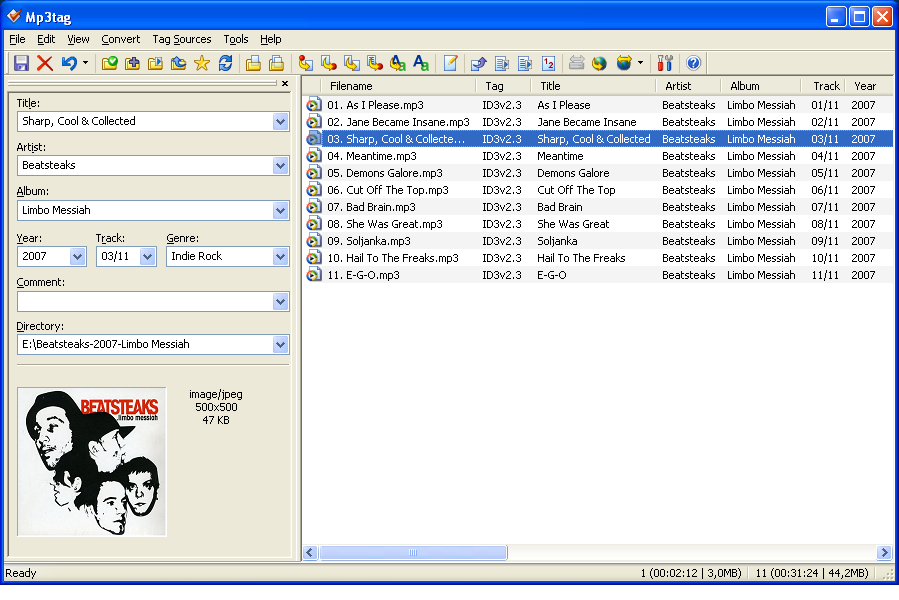
If you are in to tagging then I use a very good bit of software called mp3tag you can download it here. This will sort your problem out.

It looks like the songs without the album art have not recognised the album art save/associtaion, try associating this again either through wmp (looking at wmp12 not sure how you now do this in Win7, used to be advanced tag editor?!) or you can use the mp3tag bit of software.

logo4.gif


sht_main.png

more general info here


Last edited:

My Computer

OS
Windows Se7en Ultimate x64
CPU
AMD Athlon Phenom II 550 (Dual Core at the moment)
Motherboard
DFI LPJR790GX-M2RS
Memory
4GB OCZ reaper DDR2 PC8500 1066
Graphics Card(s)
CrosssFire 2 x Sapphire RADEON HD3650 (512 MB GDDR3)
Sound Card
Built-in
Monitor(s) Displays
Samsung LE-40B551 40 in. HDTV, HP w2007v, Elo Touchscreen
Screen Resolution
1920 x 1080 pixels
Hard Drives
OCZ Agility Series 30GB SATA II 2.5" Solid State Drive
Samsung Spinpoint F3 1TB SATA II
Samsung Spinpoint F1 500GB SATA II
Western Digital Caviar 500GB SATA II
PSU
OCZ 600W StealthXStream
Case
Antec P180 Mini
Cooling
Scythe Ninja Copper Cooler 5th Anniversary Limited Edition
Keyboard
Cordless Desktop® EX 90
Mouse
Cordless Desktop® EX 90
Internet Speed
Hamster-in-a-wheel
Other Info
WinTV-NOVA-T PCI
Altec Lansing ACS56
ok thanks. i'll give it a try and post back.
 

My Computer

OS
Windows 7 beta
CPU
Intel Core 2 Due E8200 6M 2.66 GHz
Motherboard
GigaByte GA-EP35-DS3R
Memory
2*2GB DDRII (1066) APOGEE GT
Graphics Card(s)
Chaintech GEFORCE 9600GT 512Mb DDR3
Sound Card
Realtek HD
Monitor(s) Displays
DELL
Screen Resolution
1024 x 768 @ 75Hz
Hard Drives
WD 320Gb SATA
PSU
HEC 400W
Case
Gamma
Cooling
Air Cooling
Keyboard
Gamma
Mouse
Gamma
Internet Speed
DSL 256 kbs
Other Info
4.1 Creative Sound System
Samsung DVD R/W DL
Amazing...
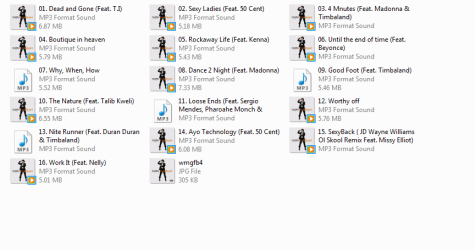
it works just fine, thanks man.
 

My Computer

OS
Windows 7 beta
CPU
Intel Core 2 Due E8200 6M 2.66 GHz
Motherboard
GigaByte GA-EP35-DS3R
Memory
2*2GB DDRII (1066) APOGEE GT
Graphics Card(s)
Chaintech GEFORCE 9600GT 512Mb DDR3
Sound Card
Realtek HD
Monitor(s) Displays
DELL
Screen Resolution
1024 x 768 @ 75Hz
Hard Drives
WD 320Gb SATA
PSU
HEC 400W
Case
Gamma
Cooling
Air Cooling
Keyboard
Gamma
Mouse
Gamma
Internet Speed
DSL 256 kbs
Other Info
4.1 Creative Sound System
Samsung DVD R/W DL
Back
Top