adding a file make folder show to how to stop that

wrbf

New member
i am new to windows 7 and trying to "learn" it...i save and write lots of word files, document files etc...each time i write/save a file, it shows its folder to. I need to know how to just show the file i did. other windows didn't do this. I know you can make folders to hold your files. any help would be appreciated.
 

My Computer

OS
windows 7

My Computer

Computer Manufacturer/Model Number
Hewlett packard/p6512uk
OS
Microsoft Windows 7 Home Premium 64-bit 7600
CPU
IIx4 amd athelon 635 processor
Motherboard
FOXCONN 2AA9
Memory
2x2gb
Graphics Card(s)
ati radeon HD 5450
Sound Card
(1) Realtek High Definition Audio (2) AMD High Definition
Monitor(s) Displays
samsung lcd tv 32"
Screen Resolution
1360x 768
Hard Drives
(1) WDC WD10 01FAES-60Z2A0 SATA Disk Device (2) Maxtor OneTouch USB Device (3) ST310003 33AS USB Device (4) WD My Book 1111 USB Device
PSU
?
Cooling
air!
Keyboard
wireless hp
Mouse
wireless Hp,optical
Internet Speed
1.10mb/s
Antivirus
MSE
Browser
Firefox
here is screenshot

you see the 8 items here...
i downloaded these from the web and it put the file and also the files folder. i dont need to see that folder for the file...
items 1-3 or the folders for the files i downloaded. they contain the makings of the file...
item 4 is a file downloaded. i only want to see these
item 5 is a text i wrote
item 6 is a document i wrote
item 7 a downloaded file its this i want to see
item 8 downloaded file and this i want to see...
hope this helps u understand

so its when web saved pages dl that i get these folders also...is there a way not to? Thanks
 

Attachments

  • shot.jpg
    shot.jpg
    169.3 KB · Views: 18

My Computer

OS
windows 7
just to clarify, each time you create or save a file it creates a folder also,is this what you mean?
 

My Computer

Computer Manufacturer/Model Number
Hewlett packard/p6512uk
OS
Microsoft Windows 7 Home Premium 64-bit 7600
CPU
IIx4 amd athelon 635 processor
Motherboard
FOXCONN 2AA9
Memory
2x2gb
Graphics Card(s)
ati radeon HD 5450
Sound Card
(1) Realtek High Definition Audio (2) AMD High Definition
Monitor(s) Displays
samsung lcd tv 32"
Screen Resolution
1360x 768
Hard Drives
(1) WDC WD10 01FAES-60Z2A0 SATA Disk Device (2) Maxtor OneTouch USB Device (3) ST310003 33AS USB Device (4) WD My Book 1111 USB Device
PSU
?
Cooling
air!
Keyboard
wireless hp
Mouse
wireless Hp,optical
Internet Speed
1.10mb/s
Antivirus
MSE
Browser
Firefox
yes thats what i mean...gosh that was hard to explain..lol...so is there a way for it not to show the folder for the file
 

My Computer

OS
windows 7

My Computer

Computer Manufacturer/Model Number
Hewlett packard/p6512uk
OS
Microsoft Windows 7 Home Premium 64-bit 7600
CPU
IIx4 amd athelon 635 processor
Motherboard
FOXCONN 2AA9
Memory
2x2gb
Graphics Card(s)
ati radeon HD 5450
Sound Card
(1) Realtek High Definition Audio (2) AMD High Definition
Monitor(s) Displays
samsung lcd tv 32"
Screen Resolution
1360x 768
Hard Drives
(1) WDC WD10 01FAES-60Z2A0 SATA Disk Device (2) Maxtor OneTouch USB Device (3) ST310003 33AS USB Device (4) WD My Book 1111 USB Device
PSU
?
Cooling
air!
Keyboard
wireless hp
Mouse
wireless Hp,optical
Internet Speed
1.10mb/s
Antivirus
MSE
Browser
Firefox
While in Explorer press/release the alt key to get the menu bar to appear at the top. Select Tools, then Folder options. Click the View tab, and browse the list to see if there are selections that allow you to change the way you can manage/view downloaded (saved) webpages.

It was there in XP and I thought it was there in w7 but I don't see it. It could be that I'm on a Home Premium machine right now rather than a Pro or Ultimate. Betcha there's a registry setting for it somewhere.

The settings would let you manage/view webpages as a single entity in Explorer (where you would only see the main file itself) or you could set it such that you would see them and manage them as your screenshot shows.

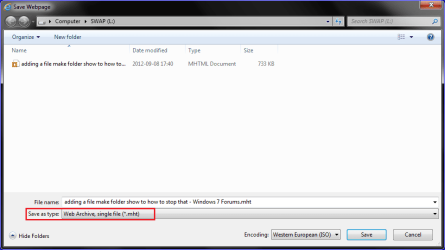
When you save webpages there is an option that allows you to force it to save as a single file:

!!Capture.PNG

I don't think you always get a fully intact webpage saved though. Experiment with it to see if it saves the data that's relevant to you.
 
Last edited:

My Computer

OS
Windows 7 Ultimate x64
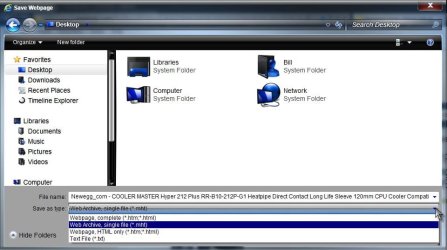
How are you saving the page? With IE? While on the page choose File> Save as> the dropdown for save as type will give you options:

Page.jpg

Saving Web Pages

A Guy
 

My Computer

Computer type
PC/Desktop
OS
Windows 10 Home x64
CPU
INTEL Core i5-750 Quad-Core 3.37GHz
Motherboard
ASUS P7P55D
Memory
HyperX Fury Black Series 8GB (2 x 4GB) 1866Mhz
Graphics Card(s)
EVGA GeForce GTX 750 Superclocked 1GB 128-Bit GDDR5
Monitor(s) Displays
LG 32MA68HY 32" IPS
Screen Resolution
1920 x 1080
Hard Drives
Samsung 840 Evo 120GB, SEAGATE 500GB Barracuda® 7200.12, SATA 3 Gb/s, 7200 RPM, 16MB cache
PSU
ANTEC TruePower New TP-550, 80 PLUS, 550W
Case
ANTEC Three Hundred Illusion
Cooling
COOLER MASTER Hyper 212 Plus, 4 x 120mm 1 x 140mm Noctua's
Internet Speed
85 + Mbps
Antivirus
Avast
Browser
Vivaldi
Seems apparent that these options are not included in w7. I remembered them from XP, and see it on some XP machines I've got, but based on what I'm reading about it it didn't really come with XP either. Apparently it was added to XP via an Office install.

Anyway, I found a regfile that can be imported that allows you to change the settings. But it only partially works. It can make/break the association between the main file and the folder, but it won't hide the folder that you don't like.

Gonna play around with it a little more. If I get it working in w7 I'll post it for you...
 

My Computer

OS
Windows 7 Ultimate x64
Back
Top