Solved adding a monitor to a laptop

Ridgerunner

New member
Local time
6:04 AM
Messages
31
Have a freshly manufacturer refurbished Latitude E6410 laptop running Win7 Ultimate, 64 bit, SP1. Can't get it to detect a free standing Dell monitor or a Samsung flat screen TV using the PS2 or USB ports. I do this all the time with my other Win 7 and XP machines. Does this thing not have a good enough graphics card for this or what's the issue? Should be simple but just won't detect it in display settings as other Win 7 machines do.
 

My Computer My Computer

At a glance

win 7 64bit
OS
win 7 64bit
Hello Ridgerunner mate I would be inclined to use the VGA output as it will give you much better graphics - if your monitors have the same connection - see pic

The resolution on that machine I see is better than usual so why not use a better connector??:)
 

Attachments

  • DELL.PNG
    DELL.PNG
    74.1 KB · Views: 0

My Computer My Computer

At a glance

Desk1 7 Home Prem / Desk2 10 Pro / Main lap A...Desk1 i5 3750K / Laptop i7 GTX 860M / Desk2 i...Desk1 8GB (1866) / Desk2 16GB (1333) / Laptop...Desk 1& 2NVidia GTX 650 & Laptops on board Intel
Computer type
PC/Desktop
Computer Manufacturer/Model Number
Own build (new) Desk1 / Asus ROG Win 7 / Desk2 1st build
OS
Desk1 7 Home Prem / Desk2 10 Pro / Main lap Asus ROG 10 Pro 2 laptop Toshiba 7 Pro Asus P2520 7 & 10
CPU
Desk1 i5 3750K / Laptop i7 GTX 860M / Desk2 i5 2500
Motherboard
Desk1 Asus P877-V / Desk2 Gigabyte H67 UD3H / Laptop ?
Memory
Desk1 8GB (1866) / Desk2 16GB (1333) / Laptop 8Gb DDR3
Graphics Card(s)
Desk 1& 2NVidia GTX 650 & Laptops on board Intel
Sound Card
Desk 1 & 2 -XONAR DG Realtek High Def audio Laptop
Monitor(s) Displays
Desk 1 Benq HD 2450 / Desk2 Philips 24" / Laptop 17.5"
Screen Resolution
1920x1080 D1 & D2 & Laptop 1
Hard Drives
Desk1 Samsung 120GB 830 SSD
Asus ROG 256GB 850 Pro SSD
Desk2 Samsung 840 256 SSD
Toshiba 120GB EVO
PSU
Desk 1 Corsair HX 1050/ Laptop ? / Desk 2 Corsair HX 650
Case
Desk 1 Cooler HAF XM ? Toshiba laptop / Desk2 Coolermaster
Cooling
Fans on all Desk1 -2 Desk2 - all Coolermasters 5 Laptop ?
Keyboard
Desk 1 MS Sidewinder X6 Desk 2 MS Sidewinder X 4
Mouse
Desk 1&2 - Gigabyte MS 900 gamer - laptop - Logitec wireless
Internet Speed
ADSL2+
Other Info
One other Desktop (tester) and spare Toshba laptop both with SSD's
Running Kaspersky 2016 ISS on all machines config'd identically
Logitec audio stereo systems on each machine (x3)
Canon MG5250MFC
Router/modem TP-Link running WPA2SK
That's the one I used. The computer won't recognize it. Tried two different cords, two different monitors. No luck. Just won't detect it.

update: I just got out my Latitude D610 and it handles a second monitor just fine. Recognizes it right off. I can't seem to drag a program page onto the second monitor for some reason but it definitely works.

update 2: Sorry for misunderstanding the difference between a ps2 and a VGA port. I've come to the conclusion that this laptop just hasn't a graphic adapter that will handle a second monitor. Why in Blazes Dell did that is beyond me.
 
Last edited:

My Computer My Computer

At a glance

win 7 64bit
OS
win 7 64bit

My Computer My Computer

At a glance

Desk1 7 Home Prem / Desk2 10 Pro / Main lap A...Desk1 i5 3750K / Laptop i7 GTX 860M / Desk2 i...Desk1 8GB (1866) / Desk2 16GB (1333) / Laptop...Desk 1& 2NVidia GTX 650 & Laptops on board Intel
Computer type
PC/Desktop
Computer Manufacturer/Model Number
Own build (new) Desk1 / Asus ROG Win 7 / Desk2 1st build
OS
Desk1 7 Home Prem / Desk2 10 Pro / Main lap Asus ROG 10 Pro 2 laptop Toshiba 7 Pro Asus P2520 7 & 10
CPU
Desk1 i5 3750K / Laptop i7 GTX 860M / Desk2 i5 2500
Motherboard
Desk1 Asus P877-V / Desk2 Gigabyte H67 UD3H / Laptop ?
Memory
Desk1 8GB (1866) / Desk2 16GB (1333) / Laptop 8Gb DDR3
Graphics Card(s)
Desk 1& 2NVidia GTX 650 & Laptops on board Intel
Sound Card
Desk 1 & 2 -XONAR DG Realtek High Def audio Laptop
Monitor(s) Displays
Desk 1 Benq HD 2450 / Desk2 Philips 24" / Laptop 17.5"
Screen Resolution
1920x1080 D1 & D2 & Laptop 1
Hard Drives
Desk1 Samsung 120GB 830 SSD
Asus ROG 256GB 850 Pro SSD
Desk2 Samsung 840 256 SSD
Toshiba 120GB EVO
PSU
Desk 1 Corsair HX 1050/ Laptop ? / Desk 2 Corsair HX 650
Case
Desk 1 Cooler HAF XM ? Toshiba laptop / Desk2 Coolermaster
Cooling
Fans on all Desk1 -2 Desk2 - all Coolermasters 5 Laptop ?
Keyboard
Desk 1 MS Sidewinder X6 Desk 2 MS Sidewinder X 4
Mouse
Desk 1&2 - Gigabyte MS 900 gamer - laptop - Logitec wireless
Internet Speed
ADSL2+
Other Info
One other Desktop (tester) and spare Toshba laptop both with SSD's
Running Kaspersky 2016 ISS on all machines config'd identically
Logitec audio stereo systems on each machine (x3)
Canon MG5250MFC
Router/modem TP-Link running WPA2SK
Why in Blazes Dell did that is beyond me.
It's a Dell, Dude! That kid got fired for smoking pot and lost .5 Million dollar contract.
I think everyone at Dell is smoking now as stocks drop as does the quality. :cool:
 

My Computer My Computer

At a glance

Windows 7
Computer type
Laptop
OS
Windows 7
Thanks for the reply and help "Confusion Therapist". It's not there on the E6410 - It isn't recognized when you go into "change display settings" and nothing happens when you select the "detect" button. In the Device manager under "monitor" there's only one shown; On the D610 it shows four. I tried the older D610 Latitude with XP just to see if it would work on that and it does but may need one settings change to allow dragging something between monitors - "extend display" maybe. I've done some looking and it seems to get extra monitors to work on the E6410 you have to use either some aftermarket port replicator or a Dell docking station common to users of the E6410 that has that feature. No one talks of adding a second monitor to a bare E6410. I think maybe the graphics card, which is well known to be anemic and is permanently attached to the mother board and not replaceable or upgradable as some are, has only one plug in or something like that. The computer was just not meant to handle a second monitor without some additional hardware help. Seems a bit silly when an older XP machine in the same model line will handle the extra monitor just fine.
 

My Computer My Computer

At a glance

win 7 64bit
OS
win 7 64bit
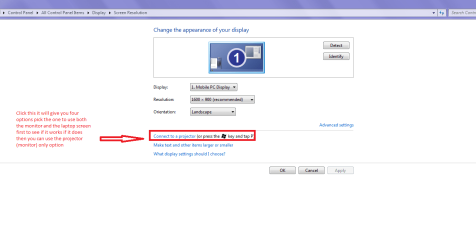
Now did you go into Display in the Control Panel see my pic for what you need to do to get any combo of screens going.
 

Attachments

  • RES 1.PNG
    RES 1.PNG
    22.8 KB · Views: 0

My Computer My Computer

At a glance

Desk1 7 Home Prem / Desk2 10 Pro / Main lap A...Desk1 i5 3750K / Laptop i7 GTX 860M / Desk2 i...Desk1 8GB (1866) / Desk2 16GB (1333) / Laptop...Desk 1& 2NVidia GTX 650 & Laptops on board Intel
Computer type
PC/Desktop
Computer Manufacturer/Model Number
Own build (new) Desk1 / Asus ROG Win 7 / Desk2 1st build
OS
Desk1 7 Home Prem / Desk2 10 Pro / Main lap Asus ROG 10 Pro 2 laptop Toshiba 7 Pro Asus P2520 7 & 10
CPU
Desk1 i5 3750K / Laptop i7 GTX 860M / Desk2 i5 2500
Motherboard
Desk1 Asus P877-V / Desk2 Gigabyte H67 UD3H / Laptop ?
Memory
Desk1 8GB (1866) / Desk2 16GB (1333) / Laptop 8Gb DDR3
Graphics Card(s)
Desk 1& 2NVidia GTX 650 & Laptops on board Intel
Sound Card
Desk 1 & 2 -XONAR DG Realtek High Def audio Laptop
Monitor(s) Displays
Desk 1 Benq HD 2450 / Desk2 Philips 24" / Laptop 17.5"
Screen Resolution
1920x1080 D1 & D2 & Laptop 1
Hard Drives
Desk1 Samsung 120GB 830 SSD
Asus ROG 256GB 850 Pro SSD
Desk2 Samsung 840 256 SSD
Toshiba 120GB EVO
PSU
Desk 1 Corsair HX 1050/ Laptop ? / Desk 2 Corsair HX 650
Case
Desk 1 Cooler HAF XM ? Toshiba laptop / Desk2 Coolermaster
Cooling
Fans on all Desk1 -2 Desk2 - all Coolermasters 5 Laptop ?
Keyboard
Desk 1 MS Sidewinder X6 Desk 2 MS Sidewinder X 4
Mouse
Desk 1&2 - Gigabyte MS 900 gamer - laptop - Logitec wireless
Internet Speed
ADSL2+
Other Info
One other Desktop (tester) and spare Toshba laptop both with SSD's
Running Kaspersky 2016 ISS on all machines config'd identically
Logitec audio stereo systems on each machine (x3)
Canon MG5250MFC
Router/modem TP-Link running WPA2SK
For whatever reason I do not get that option on that screen on this machine. I get the two below it but not that one. I don't get the "orientation" change option either.
 

My Computer My Computer

At a glance

win 7 64bit
OS
win 7 64bit
Hum what version of Windows are you running because I think the Starter version is the only one that I know of that is weak on features?


Have you done a sfc yet? maybe worth a try.

http://www.sevenforums.com/tutorials/1538-sfc-scannow-command-system-file-checker.html
then this

http://www.sevenforums.com/tutorials/433-disk-check.html< if necessary include the /f and /r in the command line as per Option2 >in safe mode if need be


Edit Maybe it is worth going here Drivers & Downloads | Dell Australia auto detect your machine and check for a driver for the graphics as I cannot for the life of me think there is not a driver for the port they have installed on that machine . I couldn't do that myself for obvious reasons or I would send the driver for you.

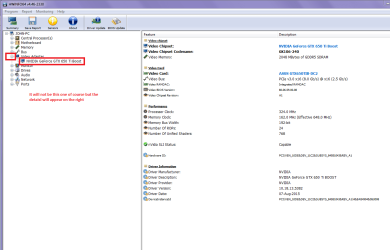
If you want you could run this and find the exact device you need the driver for

Using HW Info
PART A:
You can test the volts on the PSU with HW Info
HWiNFO, HWiNFO32/64 - Download <download the right bit version and close the right hand window select Sensorsand scroll down to the power section where you will see what the volts aredoing see my pic. Now the section you want will be labelled - fpr example Asusboards usually have "Nuvoton" and Gigabyte boards "ITE" inany case the section you want will have Vbatt or VBAT in it (dead give away)
The original right hand window shows the machine running and is handy for thatbut for looking at the components in some detail close it and use the main lefthand side panel
FOR OTHER COMPONENTS
PART B:
Open each small square with + in it on the section the components are in andthen click on the individual component/s (it will highlight in blue) - in theright hand side will appear all sorts of details including brands speeds andother essential info that particular device. See pic for example.


Use PART B:
 

Attachments

  • RES 3.PNG
    RES 3.PNG
    37.3 KB · Views: 0

My Computer My Computer

At a glance

Desk1 7 Home Prem / Desk2 10 Pro / Main lap A...Desk1 i5 3750K / Laptop i7 GTX 860M / Desk2 i...Desk1 8GB (1866) / Desk2 16GB (1333) / Laptop...Desk 1& 2NVidia GTX 650 & Laptops on board Intel
Computer type
PC/Desktop
Computer Manufacturer/Model Number
Own build (new) Desk1 / Asus ROG Win 7 / Desk2 1st build
OS
Desk1 7 Home Prem / Desk2 10 Pro / Main lap Asus ROG 10 Pro 2 laptop Toshiba 7 Pro Asus P2520 7 & 10
CPU
Desk1 i5 3750K / Laptop i7 GTX 860M / Desk2 i5 2500
Motherboard
Desk1 Asus P877-V / Desk2 Gigabyte H67 UD3H / Laptop ?
Memory
Desk1 8GB (1866) / Desk2 16GB (1333) / Laptop 8Gb DDR3
Graphics Card(s)
Desk 1& 2NVidia GTX 650 & Laptops on board Intel
Sound Card
Desk 1 & 2 -XONAR DG Realtek High Def audio Laptop
Monitor(s) Displays
Desk 1 Benq HD 2450 / Desk2 Philips 24" / Laptop 17.5"
Screen Resolution
1920x1080 D1 & D2 & Laptop 1
Hard Drives
Desk1 Samsung 120GB 830 SSD
Asus ROG 256GB 850 Pro SSD
Desk2 Samsung 840 256 SSD
Toshiba 120GB EVO
PSU
Desk 1 Corsair HX 1050/ Laptop ? / Desk 2 Corsair HX 650
Case
Desk 1 Cooler HAF XM ? Toshiba laptop / Desk2 Coolermaster
Cooling
Fans on all Desk1 -2 Desk2 - all Coolermasters 5 Laptop ?
Keyboard
Desk 1 MS Sidewinder X6 Desk 2 MS Sidewinder X 4
Mouse
Desk 1&2 - Gigabyte MS 900 gamer - laptop - Logitec wireless
Internet Speed
ADSL2+
Other Info
One other Desktop (tester) and spare Toshba laptop both with SSD's
Running Kaspersky 2016 ISS on all machines config'd identically
Logitec audio stereo systems on each machine (x3)
Canon MG5250MFC
Router/modem TP-Link running WPA2SK
Win 7 Ultimate, 64bit SP1. New HD. Has 8gb RAM. Intel(R) Core(TM) i5 CPU M520 @ 2.40 Ghz. "Standard VGA graphics adapter" shown under Display Adapters in the Device Manager. Under Ports(COM and LPT1) it has 1.) ECP printer port (COM and LPT1) and 2.) Intel(R) Active Management Technology - SOL(COM 3).

Has a sticker under the battery saying it's an "authorized" or Certified something version of Windows. All very official supposedly. I've found another feature on this machine that may not work properly. It has a smart card reader in the front that will not read the memory card out of my Canon S100 digital camera. Not sure if the SD? card from the camera is a "smart card" or if it isn't if it should still read it. If they're not the same could be that it's not made to read this card.
 
Last edited:

My Computer My Computer

At a glance

win 7 64bit
OS
win 7 64bit
You should check to see if all the drivers have been installed, go to this page Product Support | Dell US either use the Detect Drivers button or Find it myself tab and use your Service tag number I noticed under the chipset drivers there was one for the memory card reader.

Jerry
 

My Computer My Computer

At a glance

Win 7 Pro x64 / Win 10 ProIntel(R) Core(TM) i7-3630QM CPU @ 2.40GHz12 GB(1) Intel(R) HD Graphics 4000 (2) NVIDIA GeFo...
Computer type
Laptop
Computer Manufacturer/Model Number
Sager NP9170
OS
Win 7 Pro x64 / Win 10 Pro
CPU
Intel(R) Core(TM) i7-3630QM CPU @ 2.40GHz
Motherboard
CLEVO P170EM
Memory
12 GB
Graphics Card(s)
(1) Intel(R) HD Graphics 4000 (2) NVIDIA GeForce GTX 675M
Sound Card
(1) Realtek High Definition Audio (2) Intel(R) Display Aud
Monitor(s) Displays
17.3
Screen Resolution
1920x1080
Hard Drives
(1) Samsung 860 EVO 500GB(OS) (1) Samsung 860 EVO 500GB(Data)
Keyboard
Backlite
Antivirus
MSE, Malwarebytes Pro
Browser
Firefox
Other Info
DESKTOP: Custom-built.
OS: Win 10 Pro x64.
CASE: Rosewill R5.
CPU: Intel I5 4670K CPU @ 3.40GHz.
CPU COOLER: Cool Master Hyper 212 EVO.
MOTHERBOARD: Asus Z87-A.
MEMORY: Kingston HyperX 2x4 GB.
GPU: Nvidia Geforce 650 TI.
PSU: Corsair TX750.
DRIVES: (1) Samsung 840 120 GB SSD (2) Western Digital blue 500 GB 7200 RPM.
Well, that did it. Now I have the proper display and options under Resolution and have the second monitor up and going just as it should be. I am impressed indeed. I could not have done this without this help. The seller of this machine clearly installed Win 7 but didn't do any updates. When I went onto Dell Support it found 10 driver updates, all of which I installed. Then I ran it again and it, I think may have found updates to my updates, which I ran with also. I may even run it again just to make sure. It took over 3 hours on my slow connection to make it all happen and I am a happy guy. My smart card reader is behaving properly and now reads my Canon SD card just fine also, and very fast, and that reader is something that I need a lot.
Many many Thanks to everyone. I'm sure I'll be back and I'm going to pass this information onto someone I know who needs it also.
 
Last edited:

My Computer My Computer

At a glance

win 7 64bit
OS
win 7 64bit
Good to hear that it has got fixed mate sorry I couldn't access the Dell site for drivers all I could find was that page where it said self detect the machine:( The Dell site like a few others now (Asus comes to mind) have become such a convoluted affair one really needs to hang on to any disk that comes with a product as I do now.

Anyway happy computing and this may be of other help to you http://www.sevenforums.com/tutorials/11728-optimize-windows-7-a.html
 

My Computer My Computer

At a glance

Desk1 7 Home Prem / Desk2 10 Pro / Main lap A...Desk1 i5 3750K / Laptop i7 GTX 860M / Desk2 i...Desk1 8GB (1866) / Desk2 16GB (1333) / Laptop...Desk 1& 2NVidia GTX 650 & Laptops on board Intel
Computer type
PC/Desktop
Computer Manufacturer/Model Number
Own build (new) Desk1 / Asus ROG Win 7 / Desk2 1st build
OS
Desk1 7 Home Prem / Desk2 10 Pro / Main lap Asus ROG 10 Pro 2 laptop Toshiba 7 Pro Asus P2520 7 & 10
CPU
Desk1 i5 3750K / Laptop i7 GTX 860M / Desk2 i5 2500
Motherboard
Desk1 Asus P877-V / Desk2 Gigabyte H67 UD3H / Laptop ?
Memory
Desk1 8GB (1866) / Desk2 16GB (1333) / Laptop 8Gb DDR3
Graphics Card(s)
Desk 1& 2NVidia GTX 650 & Laptops on board Intel
Sound Card
Desk 1 & 2 -XONAR DG Realtek High Def audio Laptop
Monitor(s) Displays
Desk 1 Benq HD 2450 / Desk2 Philips 24" / Laptop 17.5"
Screen Resolution
1920x1080 D1 & D2 & Laptop 1
Hard Drives
Desk1 Samsung 120GB 830 SSD
Asus ROG 256GB 850 Pro SSD
Desk2 Samsung 840 256 SSD
Toshiba 120GB EVO
PSU
Desk 1 Corsair HX 1050/ Laptop ? / Desk 2 Corsair HX 650
Case
Desk 1 Cooler HAF XM ? Toshiba laptop / Desk2 Coolermaster
Cooling
Fans on all Desk1 -2 Desk2 - all Coolermasters 5 Laptop ?
Keyboard
Desk 1 MS Sidewinder X6 Desk 2 MS Sidewinder X 4
Mouse
Desk 1&2 - Gigabyte MS 900 gamer - laptop - Logitec wireless
Internet Speed
ADSL2+
Other Info
One other Desktop (tester) and spare Toshba laptop both with SSD's
Running Kaspersky 2016 ISS on all machines config'd identically
Logitec audio stereo systems on each machine (x3)
Canon MG5250MFC
Router/modem TP-Link running WPA2SK
That's a very interesting series of things you can to do to Win7 to speed it. Some of those I've already done and some I'll try for sure.
The only thing funny happening to this machine I just updated is that I can't drag an excel page over to the second monitor. Pretty odd since I can drag any other program over. Unfortunately, it's excel spreadsheets that I most often need to keep on the second monitor. Regardless, I'm elated that the monitor and the card reader both work now. The whole driver update procedure was pretty well automated and worked very smoothly.
 

My Computer My Computer

At a glance

win 7 64bit
OS
win 7 64bit
It's good to hear you got it going.

Jerry
 

My Computer My Computer

At a glance

Win 7 Pro x64 / Win 10 ProIntel(R) Core(TM) i7-3630QM CPU @ 2.40GHz12 GB(1) Intel(R) HD Graphics 4000 (2) NVIDIA GeFo...
Computer type
Laptop
Computer Manufacturer/Model Number
Sager NP9170
OS
Win 7 Pro x64 / Win 10 Pro
CPU
Intel(R) Core(TM) i7-3630QM CPU @ 2.40GHz
Motherboard
CLEVO P170EM
Memory
12 GB
Graphics Card(s)
(1) Intel(R) HD Graphics 4000 (2) NVIDIA GeForce GTX 675M
Sound Card
(1) Realtek High Definition Audio (2) Intel(R) Display Aud
Monitor(s) Displays
17.3
Screen Resolution
1920x1080
Hard Drives
(1) Samsung 860 EVO 500GB(OS) (1) Samsung 860 EVO 500GB(Data)
Keyboard
Backlite
Antivirus
MSE, Malwarebytes Pro
Browser
Firefox
Other Info
DESKTOP: Custom-built.
OS: Win 10 Pro x64.
CASE: Rosewill R5.
CPU: Intel I5 4670K CPU @ 3.40GHz.
CPU COOLER: Cool Master Hyper 212 EVO.
MOTHERBOARD: Asus Z87-A.
MEMORY: Kingston HyperX 2x4 GB.
GPU: Nvidia Geforce 650 TI.
PSU: Corsair TX750.
DRIVES: (1) Samsung 840 120 GB SSD (2) Western Digital blue 500 GB 7200 RPM.
And many thanks back to you Bongo for the help. Somehow in the updating drivers I ended up with better screen resolution also, which is really nice. The entire updating process produced nothing but positive results. This particular laptop, the LE6410 is a very nice thin, fast, rugged(metal framed if you can believe it) and compact traveling computer with a 9hr battery life using the larger battery. Has to be the last well made laptop line made by Dell. And for $219 it's a far better deal than a new one if you don't need a real powerhouse and a touch screen and all the BS they come with now. This thing even has a fingerprint reader! Go figure.
 

My Computer My Computer

At a glance

win 7 64bit
OS
win 7 64bit
Wow. Now I'm really happy. This machine wouldn't even try to install Google Earth before the driver update and now it installs it just fine. Before it told me my graphics card wasn't good enough.
 

My Computer My Computer

At a glance

win 7 64bit
OS
win 7 64bit
He he strange things happen at sea they tell me and also in Windows ;)
 

My Computer My Computer

At a glance

Desk1 7 Home Prem / Desk2 10 Pro / Main lap A...Desk1 i5 3750K / Laptop i7 GTX 860M / Desk2 i...Desk1 8GB (1866) / Desk2 16GB (1333) / Laptop...Desk 1& 2NVidia GTX 650 & Laptops on board Intel
Computer type
PC/Desktop
Computer Manufacturer/Model Number
Own build (new) Desk1 / Asus ROG Win 7 / Desk2 1st build
OS
Desk1 7 Home Prem / Desk2 10 Pro / Main lap Asus ROG 10 Pro 2 laptop Toshiba 7 Pro Asus P2520 7 & 10
CPU
Desk1 i5 3750K / Laptop i7 GTX 860M / Desk2 i5 2500
Motherboard
Desk1 Asus P877-V / Desk2 Gigabyte H67 UD3H / Laptop ?
Memory
Desk1 8GB (1866) / Desk2 16GB (1333) / Laptop 8Gb DDR3
Graphics Card(s)
Desk 1& 2NVidia GTX 650 & Laptops on board Intel
Sound Card
Desk 1 & 2 -XONAR DG Realtek High Def audio Laptop
Monitor(s) Displays
Desk 1 Benq HD 2450 / Desk2 Philips 24" / Laptop 17.5"
Screen Resolution
1920x1080 D1 & D2 & Laptop 1
Hard Drives
Desk1 Samsung 120GB 830 SSD
Asus ROG 256GB 850 Pro SSD
Desk2 Samsung 840 256 SSD
Toshiba 120GB EVO
PSU
Desk 1 Corsair HX 1050/ Laptop ? / Desk 2 Corsair HX 650
Case
Desk 1 Cooler HAF XM ? Toshiba laptop / Desk2 Coolermaster
Cooling
Fans on all Desk1 -2 Desk2 - all Coolermasters 5 Laptop ?
Keyboard
Desk 1 MS Sidewinder X6 Desk 2 MS Sidewinder X 4
Mouse
Desk 1&2 - Gigabyte MS 900 gamer - laptop - Logitec wireless
Internet Speed
ADSL2+
Other Info
One other Desktop (tester) and spare Toshba laptop both with SSD's
Running Kaspersky 2016 ISS on all machines config'd identically
Logitec audio stereo systems on each machine (x3)
Canon MG5250MFC
Router/modem TP-Link running WPA2SK
Back
Top