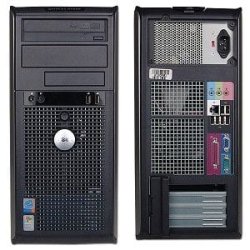
hello i have a quick question... i have a dell Optiplex gx620 tower... my question is i wanna add a 2nd fan, but not sure what way the air flow should go... with this pc there is a fan on the cpu and it blows air out the front of the case... if i add a fan to the back of the case what way should i have air going in the case or out of the case??? i put a picture in this post to show you the case of this PC>..
Microsoft Security Essentials and Malwarebytes Premium
Browser
Pale Moon
Other Info
All fans PWM; speeds at idle: CPU circa 500 rpm; intake circa 600 rpm; exhaust circa 600 rpm; CPU temps 27 idle and 47 C load in a warm room (27 C/81 F) when running Intel Extreme Tuning Utility stress test.
Monster212,
Many Dells are set up with one exhaust fan which creates a natural cool air intake from the front they also like to place plastic housings which will also direct and channel the cool air to the CPU fan and it's fins. First off open your case and blow out all dust and clean the fan blades and fins on all fans. Then you will need to take some clear pictures of the front of the case so we can see what kind of space you have for an optional fan if any. Take lots of pictures so we can get a good idea of what is going on with this system. The manufacturers do pay close attention to air flow and I suspect what you have is dirt/dust build up or just a bad temp reading as 68-70c is crazy hot. Also take a picture of the mobo and the power connectors that are loose and don't have anything attached to them. Adding a high quality fan will for sure increase air flow and aid in cooling.
My Computer
Computer type
PC/Desktop
Computer Manufacturer/Model Number
A blend of brains, brawn and dumb luck.
OS
Windows 7 Ultimate 64
CPU
i7 3770k OC'd 4.6 @ 1.17v, also FX 8120 & i5 miniITX
Motherboard
MSI P67A-GD80 b3
Memory
32 gb G.Skill Sniper DDR3 10-12-12-31 @ 2133
Graphics Card(s)
XFX Radeon 7870 2GB DDR5
Sound Card
Sound Blaster Z Series Card
Monitor(s) Displays
(2) LG LED 23" 1920 x 1080 2ms Monitors via mini d-port
Screen Resolution
1680 X 1050 p
Hard Drives
Samsung 256 gb 830 SSD sata III
(1) 1 tb WD Black
(2) 1 tb Hitachi deskmates/sata II
(2) 1 tb WD green/sata II
(2) 3 tb Seagate Barracuda
(1) 120 gb OCZ Vertex SS
(1) Drobo 5N w/5 Seagate 3tb
PSU
EVGA modular 1000G2 80% gold rating & APC 1200 RS
Case
CoolerMaster Storm Styker
Cooling
7 case fans 140mm & 120mm, NZXT Kraken X60
Keyboard
(2) Logitech Illuminated Keyboards (1) usb (1) wireless
Mouse
Logitech G700 & T-BC21 - nano nx for the laptop
Internet Speed
Basic 120mbps down
Antivirus
Trend Micro Titanium Max Security & Malwarebytes Premium
Browser
Chrome and IE 10
Other Info
5 Noctua case fans + 3 Noctua in p/p on NZXT cooler
Integrated hot swap drive bays for 2.5" Drives
(2) Lite-on dvd/cd/Blu Ray optical 22X
Integrated fan controller and led on/off
HP Officejet Pro 8630 all-n-one
Hot-swappable 3.5" hard drive bay
Netgear Nighthawk router
Asus USB 3 & sata 6 PCIe card
Vantec IDE to sata adptr./Ultra sata adptr
Lenovo L420 i5 lappy with m sata
Drobo 5N advanced NAS
Monster212,
First off open your case and blow out all dust and clean the fan blades and fins on all fans. *
The manufacturers do pay close attention to air flow and I suspect what you have is dirt/dust build up or just a bad temp reading as 68-70c is crazy hot.
A second fan for the Intake>Exhaust will aid in cooling, but if you've got dust accumulated, particularly on the CPU heastsink fan - cleaning this will have an immediate effect on temps.
*NB Don't remove the heatsink unless you have some replacement thermal paste.
It's generally not a good idea to remove and re-attach CPU coolers without replacing the TIM paste because of the chance of introducing containments, or 'air bubbles' etc upon re-attachment which will limit the HSF effectiveness.
My Computer
Computer type
PC/Desktop
Computer Manufacturer/Model Number
Systems by SmartEyeball
OS
8 Pro x64
CPU
i7 3770K 4.6GHz
Motherboard
ASUS P8Z77 WS
Memory
16GB G.Skill Trident X 2666mhz
Graphics Card(s)
x2 EVGA 780 Ti Superclocked SLI
Sound Card
SB X-FI Surround 5.1 PRO USB / ATH-AD900 Headphones
Monitor(s) Displays
x3 Dell U2410 / 58" Samsung
Screen Resolution
5760*1200/ 1920*1200
Hard Drives
2x Intel 520 240GB (RAID 0) * 2x WD Caviar Blacks 2TB (RAID 0) * 2TB WD Caviar Black * Sony Optirac DVD
Thermaltake Theron (Highly Recommended) + Razer Imperator
Antivirus
MSE
Browser
IE, FF, WaterFox
Other Info
GT Extreme V2 Sim Racing Cockpit + 40" LCD and K/B Mouse stand ▼
Fanatec CSR Elite Wheel + Clubsport V1 Pedals + CSR shifter/7G-H ▼Saitek X52 Pro ▼ TrackIR 5 Pro
Buttkicker v2 Seat Rumbler with Dedicated 5.1 and Sub Woofer attached to frame ▼
=
Bloody Big Grin
ok every thanks for the tips and ideas i will take pictures today and post them ... also i did open it up and blow all the dust out made no difference ,.... will update my first post with pictures once i take them today..
Just my 2 cents.
This is normal because all cases I've seen have their power supplys blowing hot air out the back so you don't want to be sucking that hot air back into the case.
My Computer
Computer Manufacturer/Model Number
Self built
OS
Windows 7 Ultimate x64
CPU
Intel Pentium Dual Core E5200 2.5GHz (3.77GHz OC)
Motherboard
Asus P5Q-E
Memory
Corsair 4GB DDR2 (4x1GB CM2X1024-6400C4)
Graphics Card(s)
Palit GeForce GTS 250 (1024MB)
Sound Card
On Board (ADI AD2000B 8ch HD)
Monitor(s) Displays
Samsung 32in LCD TV
Screen Resolution
1360x768
Hard Drives
2 x 1TB Samsung 103SJ (Raid0)
2 x External 500GB Samsung 502IJ (NexStar 3 HD Enclosures)
If you decide to add more fan, make sure to do it evenly.
If you add one out, then you have to also add one in.
Because if you just add one out on the back, then the PSU will suffer from diminished air flow which is needed to cool down few heat sink inside the PSU.