
My understanding is that Windows 7 uses a DLNA server to host media to other devices on the network.
Has anyone found a way to alter the pre-defined categories that Windows organizes the shared media into? I'm not sure if this would be a library setting or a server setting.
I have a Sony SMP-N100 and it streams recorded TV well from my media center box, running W7 x64. The issue I have with the sony device is finding what I want to watch. The Sony device is pretty limited in filtering and sorting. It would be wonderful if there was an option to view by date recorded rather than the few that Microsoft has setup (All TV, Series, Genre, and Folder). When you go to one of the categories the Sony device only shows the episode name. So in 'All TV' category it's kinda pointless...
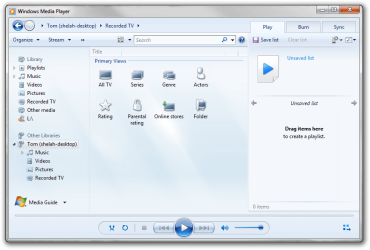
I included a screen shot of how media player shows the DLNA categories for Recorded TV.
Thanks for any help!
Has anyone found a way to alter the pre-defined categories that Windows organizes the shared media into? I'm not sure if this would be a library setting or a server setting.
I have a Sony SMP-N100 and it streams recorded TV well from my media center box, running W7 x64. The issue I have with the sony device is finding what I want to watch. The Sony device is pretty limited in filtering and sorting. It would be wonderful if there was an option to view by date recorded rather than the few that Microsoft has setup (All TV, Series, Genre, and Folder). When you go to one of the categories the Sony device only shows the episode name. So in 'All TV' category it's kinda pointless...
I included a screen shot of how media player shows the DLNA categories for Recorded TV.
Thanks for any help!
Attachments
My Computer
- OS
- Windows 7 Ultimate x64