Solved Adding files to containing Folder

johntkucz

New member
Member
VIP
Local time
4:27 AM
Messages
126
This is a small nuance but when it pops up a dozen or some times, it's almost unbearable.

In almost every other operating system I've used there's a simple and easy way to add a file to a containing folder

in other wordsl

/folder1/folder2/filea

I want to add file to /folder1/

In windows the only way I know of doing this is start_key+e and navigate to the containing folder. Or "open in new window".

I consider it quite pathetic if there's no way WITHIN ONE WINDOW (not opening additionally windows) of addign a file/folder to a containing (../../) folder and woudl appreciate if someone would share how to do that.

Thanks.
 

My Computer

Computer Manufacturer/Model Number
self-built
OS
windows 7 pro
CPU
6100 3.3ghz zambezi amd
Motherboard
asus m5a97
Memory
8gb_kingston_ddr3_1333_pc310600
Graphics Card(s)
gigabyte_geforce_440gt_1gb
Monitor(s) Displays
asus_vs247hp and dell_19"
Hard Drives
7200 rpm barracuda seagate 2tb
PSU
antec_500w_green
Case
rosewill_future_gaming_case
Keyboard
i-rocks scissor-switch white keyboard
Mouse
mouse for life kengsington
Internet Speed
~400kb/s down DSL
Other Info
I'm VERY interested in building my own rig flatscreens and running ubuntu and windows home premium or prof. I've tripled-booted (mac os rubbish, ubuntu great!, and windows solid). Designing hardware rig: this forum might be a good resource!

Some of these parts are to a rig that is in the process of being built!
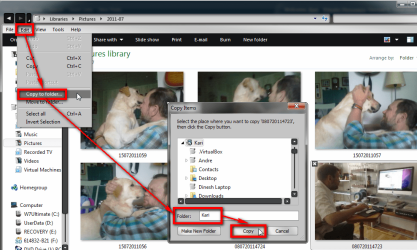
There's no need to open additional Explorer windows to copy or move files. Simply go to Edit menu, select Copy to folder or Move to folder, choose folder where you want to copy or move your files and click OK.

If your Explorer is not showing the menus, go to Control Panel > Folder Options and select Always show menus.

Copy_to_folder_1.png

You can also simply drag files to the left pane of the Explorer and drop it to wharever folder you want to.

Kari
 
Last edited:

My Computer

Computer type
Laptop
Computer Manufacturer/Model Number
HP ENVY 17-1150eg
OS
Windows 10 Pro x64 EN-GB
CPU
1.6 GHz Intel Core i7-720QM Processor
Memory
6 GB
Graphics Card(s)
ATI Mobility Radeon HD 5850 Graphics
Sound Card
Beats sound system with integrated subwoofer
Monitor(s) Displays
17" laptop display, 22" LED and 32" Full HD TV through HDMI
Screen Resolution
1600*900 (1), 1920*1080 (2&3)
Hard Drives
Internal: 2 x 500 GB SATA Hard Disk Drive 7200 rpm
External: 2TB for backups, 3TB USB3 network drive for media
Cooling
As Envy runs a bit warm, I have it on a Cooler Master pad
Keyboard
Logitech diNovo Media Desktop Laser (bluetooth)
Mouse
Logitech Performance Mouse MX
Internet Speed
50/10 Mbps VDSL
Antivirus
Windows Defender 4.3.9431.0
Browser
Maxthon 3.5.2., IE11
What exactly do you mean by "adding files"? Do you want tot create a new file or copy (or move) and existing file? If you want to copy (or move) then Kari has described how you can do it. Personally I simply drag and drop. It's true though that sometimes it's easier to drag and drop between two explorer windows rather than from the left pane to the right. On the other hand if the destination folder is full of subfolders, then it's easier to drag and drop to the left pane (by that we mean the "navigation pane" of windows explorer).

If, on the other hand, you want to create a new file, then you do it in whatever program you're using and then you can simply use the "save as" menu option that allows you to choose destination folder and file name.

Finally, if you want to do all of this within the Command Prompt (or DOS box), then you can do that as well by using explicit paths in file names. May be cumbersome if you have lots of folders though.

If that does not help, then please let us know what exactly do you want to achieve.
 

My Computer

Computer Manufacturer/Model Number
Dell Inspiron 530
OS
Windows 7 Ultimate (x64)
CPU
Q6600
Memory
8 GB
Graphics Card(s)
ATI Radeon HD 2600 XT
Monitor(s) Displays
Samsung Syncmaster P2450
Screen Resolution
1920x1080
Hard Drives
Samsung HD103UJ
Samsung HD501LJ
Internet Speed
25 Mb/s
There's no need to open additional Explorer windows to copy or move files. Simply go to Edit menu, select Copy to folder or Move to folder, choose folder where you want to copy or move your files and click OK.

If your Explorer is not showing the menus, go to Control Panel > Folder Options and select Always show menus.

View attachment 180585

You can also simply drag files to the left pane of the Explorer and drop it to wharever folder you want to.

Kari

Hey kari. brilliant that copy folder move folder command will make organizing my work and files easier. I'm an angry young man and your response was helpful!! Nice changing avatar too!
 

My Computer

Computer Manufacturer/Model Number
self-built
OS
windows 7 pro
CPU
6100 3.3ghz zambezi amd
Motherboard
asus m5a97
Memory
8gb_kingston_ddr3_1333_pc310600
Graphics Card(s)
gigabyte_geforce_440gt_1gb
Monitor(s) Displays
asus_vs247hp and dell_19"
Hard Drives
7200 rpm barracuda seagate 2tb
PSU
antec_500w_green
Case
rosewill_future_gaming_case
Keyboard
i-rocks scissor-switch white keyboard
Mouse
mouse for life kengsington
Internet Speed
~400kb/s down DSL
Other Info
I'm VERY interested in building my own rig flatscreens and running ubuntu and windows home premium or prof. I've tripled-booted (mac os rubbish, ubuntu great!, and windows solid). Designing hardware rig: this forum might be a good resource!

Some of these parts are to a rig that is in the process of being built!
There's no need to open additional Explorer windows to copy or move files. Simply go to Edit menu, select Copy to folder or Move to folder, choose folder where you want to copy or move your files and click OK.

If your Explorer is not showing the menus, go to Control Panel > Folder Options and select Always show menus.

View attachment 180585

You can also simply drag files to the left pane of the Explorer and drop it to wharever folder you want to.

Kari

Hey kari. brilliant that copy folder move folder command will make organizing my work and files easier. I'm an angry young man and your response was helpful!! Nice changing avatar too!


hhmm okay, scratch that. it wasn't very helpful..

I'm in

directory/a/b/c/d

in director d. There's folder MYFOLDER I want to move MYFOLDER to directory/a/b/ (for example). It's not listed on the right hand pane and I shouldn't have to burrow from root when I'm already in the current folder (nested). I'm looking at the target folder in the top window navigation. Why can't I just drag and drop it in directory b in the top navigation window (Microsoft idiotically should have made that possible). Still and angry young man.
 

My Computer

Computer Manufacturer/Model Number
self-built
OS
windows 7 pro
CPU
6100 3.3ghz zambezi amd
Motherboard
asus m5a97
Memory
8gb_kingston_ddr3_1333_pc310600
Graphics Card(s)
gigabyte_geforce_440gt_1gb
Monitor(s) Displays
asus_vs247hp and dell_19"
Hard Drives
7200 rpm barracuda seagate 2tb
PSU
antec_500w_green
Case
rosewill_future_gaming_case
Keyboard
i-rocks scissor-switch white keyboard
Mouse
mouse for life kengsington
Internet Speed
~400kb/s down DSL
Other Info
I'm VERY interested in building my own rig flatscreens and running ubuntu and windows home premium or prof. I've tripled-booted (mac os rubbish, ubuntu great!, and windows solid). Designing hardware rig: this forum might be a good resource!

Some of these parts are to a rig that is in the process of being built!
i'm not quite sure what you mean, but this may help: in explorer, press alt key to bring up file menu >> tools >> folder options >> navigation pane >> auto expand to containing folder.

you should now be able to see all parent folders on the left-hand side, and can drag and drop away to your heart's content. :)

or maybe i've completely misunderstood what you're wanting to do. :o (i've had a long day...don't get even angrier at me ;))
 

My Computer

Computer Manufacturer/Model Number
mickey megabyte 1234
OS
ultimate 64 sp1
CPU
i5 2500K [email protected]
Motherboard
MSI P67A-GD53
Memory
8 gigs GSkill Ripjaws 1600
Graphics Card(s)
amd hd6950
Sound Card
creative x-fi gamer
Monitor(s) Displays
samsung 24"
Screen Resolution
1920x1080
Hard Drives
ocz vertex 2e 60 gig, samsung f3 1tb, buffalo 2tb ext
PSU
antec 550
Case
antec three hundred
Cooling
i'm a cooling fan
Keyboard
saitek eclipse ii
Mouse
logitech g3
Internet Speed
about 4 Mbps
Other Info
i love win7
oh wait a tick. I can just right click, Cut the folder, click on the upper level directory and paste it! solved! Thanks to myself and a little hint from kari.

Also I described the problem with exceptional clarity. It's perfectly astounding you didn't understand what I was trying to do.


directory_a/directory_b

in directory_b there is a folder or file FOLDERORFILE

I want to move FOLDERORFILE into directory_a (../) that's all I wanted to do.

What exactly do you mean by "adding files"?

It's not a philosophy class. It's irritating and idiotic that you couldn't figure out the simple outcome.


In any event thanks for hints that reminded me of the Cut/Paste folder (something that's different from other operating systems) method.
 

My Computer

Computer Manufacturer/Model Number
self-built
OS
windows 7 pro
CPU
6100 3.3ghz zambezi amd
Motherboard
asus m5a97
Memory
8gb_kingston_ddr3_1333_pc310600
Graphics Card(s)
gigabyte_geforce_440gt_1gb
Monitor(s) Displays
asus_vs247hp and dell_19"
Hard Drives
7200 rpm barracuda seagate 2tb
PSU
antec_500w_green
Case
rosewill_future_gaming_case
Keyboard
i-rocks scissor-switch white keyboard
Mouse
mouse for life kengsington
Internet Speed
~400kb/s down DSL
Other Info
I'm VERY interested in building my own rig flatscreens and running ubuntu and windows home premium or prof. I've tripled-booted (mac os rubbish, ubuntu great!, and windows solid). Designing hardware rig: this forum might be a good resource!

Some of these parts are to a rig that is in the process of being built!
i'm not quite sure what you mean, but this may help: in explorer, press alt key to bring up file menu >> tools >> folder options >> navigation pane >> auto expand to containing folder.

you should now be able to see all parent folders on the left-hand side, and can drag and drop away to your heart's content. :)

or maybe i've completely misunderstood what you're wanting to do. :o (i've had a long day...don't get even angrier at me ;))

I've had a long day, too, which was the source of my initial you-directed anger. Don't tell me whom not to get angry at!!! grr... but that said, you were trying to understand and offer help. So thanks. It just pissed me off and am too exhausted/vexed to discern what help you were trying to do etc.

The main thing is

Cut/Paste solves this thread and

Code:
[QUOTE]"Finally, if you want to do all of this within the Command Prompt (or DOS box), then you can do that as well by using explicit paths in file names. May be cumbersome if you have lots of folders though."  [/QUOTE]

is on to something because actually, when using DOSBox many months ago I preferred that! I like cli more than gui often.

That's a whole different can of worms. CLI does seem more peaceful though.

I think you reminded me of that and I didn't want to get entangled in "what did you mean? what was your perspective interpretation outlook of the question" and all this stuff because, understandably. Moving a folder or file into the upper level directory is a freakishly simple and common task and the fact that I was getting a "what do you mean by that" shattered any sense of equanimity and I found preposterously vexing. OKAY it wasn't that bad. HAHA. I know you were trying to help, our communication methods were slightly incompatible. If it makes you feel better; occasionally thigns that peopel say that irritate me are either a)idiotic and warrant anger or b)opening up something I hadn't thought of (which is overwhelming, but eventually very illuminating). This is way to complex and deep for a simple "move folder/file to '..' " question thread but if it was "b" that's okay.

whatever. I can't focus on this thread any more. Thanks.

I just didn't want some philosophical inquiry to a question seemingly so simple.

I may delve into more CLI cmd or DOSBox and other OSes that seems refreshing at times.
 

My Computer

Computer Manufacturer/Model Number
self-built
OS
windows 7 pro
CPU
6100 3.3ghz zambezi amd
Motherboard
asus m5a97
Memory
8gb_kingston_ddr3_1333_pc310600
Graphics Card(s)
gigabyte_geforce_440gt_1gb
Monitor(s) Displays
asus_vs247hp and dell_19"
Hard Drives
7200 rpm barracuda seagate 2tb
PSU
antec_500w_green
Case
rosewill_future_gaming_case
Keyboard
i-rocks scissor-switch white keyboard
Mouse
mouse for life kengsington
Internet Speed
~400kb/s down DSL
Other Info
I'm VERY interested in building my own rig flatscreens and running ubuntu and windows home premium or prof. I've tripled-booted (mac os rubbish, ubuntu great!, and windows solid). Designing hardware rig: this forum might be a good resource!

Some of these parts are to a rig that is in the process of being built!
hey unifex. I can't be all concerned about someone getting uspet about somethign I said because of being already too peeved and exhausted myself. I recognize you were trying to be helpful. the way you made a simple question seem philsophical, disturbed me and was frustrating.

however the responses helped find a solution. so..good. thanks.

also you offered these responses for free (some are helpful; some aren't) meh. w/e. Thanks.
 

My Computer

Computer Manufacturer/Model Number
self-built
OS
windows 7 pro
CPU
6100 3.3ghz zambezi amd
Motherboard
asus m5a97
Memory
8gb_kingston_ddr3_1333_pc310600
Graphics Card(s)
gigabyte_geforce_440gt_1gb
Monitor(s) Displays
asus_vs247hp and dell_19"
Hard Drives
7200 rpm barracuda seagate 2tb
PSU
antec_500w_green
Case
rosewill_future_gaming_case
Keyboard
i-rocks scissor-switch white keyboard
Mouse
mouse for life kengsington
Internet Speed
~400kb/s down DSL
Other Info
I'm VERY interested in building my own rig flatscreens and running ubuntu and windows home premium or prof. I've tripled-booted (mac os rubbish, ubuntu great!, and windows solid). Designing hardware rig: this forum might be a good resource!

Some of these parts are to a rig that is in the process of being built!
Keyboard + Mouse Combos

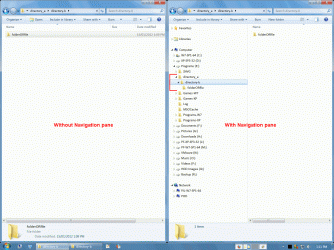
What Windows Explorer view are you using?

Click on picture for animation.
Windows Explorer.gif

Keyboard + Mouse (2 Buttons + Wheel) Combos

Copy Object
Ctrl + drag (left mouse button)
Move Object
Shift + drag (left mouse button)
Create Link/Shortcut to Object
Alt + drag (left mouse button)
Zoom (in & out)
Ctrl + Scroll Wheel
Scroll (left & right)
Alt + Scroll Wheel
OR
Shift + Scroll Wheel
This action depends on the program you are using (e.g. IIRC, Photoshop uses Alt and GIMP uses Shift).
Auto-Scroll (up & down, left & right)
Scroll Wheel Button
Some programs allow auto-scrolling (e.g. Word, IE, Firefox).
This places a marker on the page.
The distance and location that you move the mouse pointer (relative to the marker) controls the speed and scroll direction.
You can also use drag (right mouse button), which will give you a menu of options (when you release it) including "Cancel".


This only applies to Windows (in Linux, the GUI uses the mouse differently).
 

My Computer

Computer type
PC/Desktop
Computer Manufacturer/Model Number
n/a
OS
W7 Ultimate SP1, LM19.2 MATE, W10 Home 1703, W10 Pro 1703 VM, #All 64 bit
CPU
AMD Phenom II x6 1100T, 3.3 GHz
Motherboard
ASUS M4A88T-M/USB3 (AM3)
Memory
12GB DDR3 1333 G-Skill (4GB x 2), G-Skill (2GB x 2)
Graphics Card(s)
NVIDIA GeForce GTX 660
Sound Card
Realtek?
Monitor(s) Displays
Samsung S23B350
Screen Resolution
1920x1080
Hard Drives
WD Green 2TB (SATA), WD Green 3TB (SATA), WD Blue 4TB (SATA), WD Blue 6TB (SATA)
PSU
Cooler Master
Case
Antec GX300 Tower
Cooling
3x Antec TRICOOL 120mm Fans
Mouse
Wired Optical
Internet Speed
DSL
Antivirus
Avast
Browser
Pale Moon (64 bit)
Other Info
2018-12-27 Upgraded HDDs
2015-12-10 Upgraded case, graphics card, storage
2015-08-15 Upgraded motherboard & RAM
2015-07-15 Upgraded LM17.1 to LM17.2
Also I described the problem with exceptional clarity. It's perfectly astounding you didn't understand what I was trying to do.


It's not a philosophy class. It's irritating and idiotic that you couldn't figure out the simple outcome.
Shame on you johntkucz . What a prick!
The simple outcome wasn't so simple if you had to post to a forum to learn to cut and paste.:mad:
 

My Computer

Computer type
Laptop
Computer Manufacturer/Model Number
Dell
OS
Windows 8.1 64 bit
CPU
Intel Core i7-4500U 1.8 GHz
Motherboard
Intel Lynx Point-LP
Memory
16384 MB, 2x 8 GB DDR3L-1600, 2 slots
Graphics Card(s)
NVIDIA GeForce GT 750M - 2048 MB, Core: 940 - 1058 MHz, Memo
Hard Drives
Samsung SSD SM841 256GB MZ7PD256HAFV, 1 TB, 2.5 inches, 7 millimeters
Antivirus
Avast
Browser
IE10
Back
Top