Adding HDD with data leads to pause on Starting Windows page?

current

New member
Local time
11:10 PM
Messages
9
Hi all,

if I try to install a HDD that has data on then a startup pause occurs for about 20 seconds on the Starting Windows page. The only way Ive found to 'get around' this is to format a drive on that machine and then windows starts ok again. Obviously this is far from ideal and any help resolving this welcomed.

Win 7 ultimate 64
I5 3570k
Gigabyte Z77X-D3H
8gb Corsair Vengeance RAM
OCZ vertex 3 120gb SSD OS drive
Sandisk Extreme 120gb
WD 2x 2tb drives
Seagate 3tb drive

Latest updates and bios on OS and components.
 

My Computer My Computer

At a glance

Win7 64 ultimatei5 3750K8 GB corsairaTI fanless
Computer type
PC/Desktop
Computer Manufacturer/Model Number
custom build
OS
Win7 64 ultimate
CPU
i5 3750K
Motherboard
Gigabyte _ga-z77x-d3h_
Memory
8 GB corsair
Graphics Card(s)
aTI fanless
What you want to get rid of potential interfering code in the data HD boot sector is Diskpart Clean Command and not a mere format.

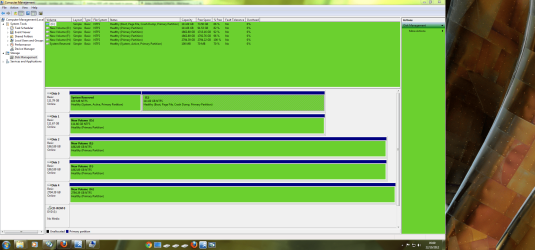
You can also post back a screenshot of the maximized DIsk Mgmt drive map and listings, using SNipping tool in Start Menu, so we can take a peek.
 
Thanks for the reply but I think we have crossed wires.
The drives I try to add - that is ANY new or previously used ones, but NOT ones with OS/boot on just music etc. - require a format to 'solve' the windows pausing situation?
 

My Computer My Computer

At a glance

Win7 64 ultimatei5 3750K8 GB corsairaTI fanless
Computer type
PC/Desktop
Computer Manufacturer/Model Number
custom build
OS
Win7 64 ultimate
CPU
i5 3750K
Motherboard
Gigabyte _ga-z77x-d3h_
Memory
8 GB corsair
Graphics Card(s)
aTI fanless
What that often means is there is conflicting boot code on the boot sector of the second HD which is interfering with the booting of the OS HD.

To solve this you may need to wipe the HD with Clean Command, not just format it. Formatting doesn't do the job needed.

There might be other hardware related causes, too.
 
None of the drives have boot sectors - all just data no OS. Uploaded disk management snap...
 

Attachments

  • Capture.PNG
    Capture.PNG
    297.3 KB · Views: 9

My Computer My Computer

At a glance

Win7 64 ultimatei5 3750K8 GB corsairaTI fanless
Computer type
PC/Desktop
Computer Manufacturer/Model Number
custom build
OS
Win7 64 ultimate
CPU
i5 3750K
Motherboard
Gigabyte _ga-z77x-d3h_
Memory
8 GB corsair
Graphics Card(s)
aTI fanless
Every HD has a boot sector. If it had an OS at one time it can have bad code remaining which causes it to interfere with another HD's ability to boot, even the BIOS to post.

The problem can also be hardware related, having to do with the cables or connections, or the physical condition of the HD.
 
Thanks for cont. replies.
None of the drives had OS on at any time. I've tried other storage drives with just data from another pc (fairly new ones) and I get the same results. In fact, as I recall, I part magiced current installed ones, so shouldnlt be conflicts for other drives added?
Also tried moving drives to dif inputs and same result - whether it was on the intel bank or marvel. Physically moving the drives has the same result.
 

My Computer My Computer

At a glance

Win7 64 ultimatei5 3750K8 GB corsairaTI fanless
Computer type
PC/Desktop
Computer Manufacturer/Model Number
custom build
OS
Win7 64 ultimate
CPU
i5 3750K
Motherboard
Gigabyte _ga-z77x-d3h_
Memory
8 GB corsair
Graphics Card(s)
aTI fanless
Are you hot swapping the drives?
 

My Computer My Computer

At a glance

Win 7 Ultimate 64 bitIntel i7-3930KKingston HyperX Genesis 32GB Kit (8x4GB Modul...MSI R7850 Twin Frozr 2GD5/OC Radeon HD 7850 2...
Computer type
PC/Desktop
Computer Manufacturer/Model Number
Custom Build
OS
Win 7 Ultimate 64 bit
CPU
Intel i7-3930K
Motherboard
ASUS P9X79 WS
Memory
Kingston HyperX Genesis 32GB Kit (8x4GB Modules) 1600MHz DDR
Graphics Card(s)
MSI R7850 Twin Frozr 2GD5/OC Radeon HD 7850 2GB 256-bit GDDR
Sound Card
Asus Xonar Essence STX
Monitor(s) Displays
3x Asus VG248QE 24", Vizio 32" TV
Screen Resolution
1920 x 1080, ?
Hard Drives
Samsung 128GB 840 Pro SSD (1),
Samsung 4TB 850 EVO SSDs (4)
Samsung 4TB 850 EVO SSDs (16) external backup drives used in 2.5" hot swap bays in the computer.
PSU
Corsair HX750w
Case
Antec Two Hundred v2 (modified)
Cooling
Cooler Master GeminII S524 120mm (fan replaced with a 140mm)
Keyboard
Logitech G510s
Mouse
Logitech M525 (two in use)
Internet Speed
=< 32Mbps down, 8Mbps up
Antivirus
AVAST!, MBAM, SAS, Spybot S&D (all but MBAM free) Glary Util
Browser
IE11
Other Info
LSI 9211-8i HBA card (8 SATA III ports), 2.5" & 3.5" Hot Swap Bays, HooToo HT-CR001 PCI-E to USB 3.0 Internal Hub + 6 Slot Card Reader, and LG Model CH12LS28 BD-ROM Optical Drive. Also, ScanSnap S1500 ADF duplexing scanner, Canon 9000F flat bed scanner, Corsair SP2500 2.1 speakers, Samsung CLP 415nw laser color printer, Cyberpower PP2200SW UPS
It is possible that those HDDs are in stop status and need time to startup when you refer to a folder/file on them.

I have this problem with a couple of internal HDDs that contain only data (my OS is on a SSD). My tower is sitting on my desk and I can hear the HDDs starting.

Check yours whether you hear some startup sounds (sounds like a jet at the airport that is being cranked up).
 

My Computer My Computer

At a glance

Vista, Windows7, Mint Mate, Zorin, Windows 8from 1.6GHz Duo to i7
Computer Manufacturer/Model Number
HP, Dell, Gateway, Toshiba - 4 laptops and 2 desktops
OS
Vista, Windows7, Mint Mate, Zorin, Windows 8
CPU
from 1.6GHz Duo to i7
Monitor(s) Displays
2x HP w2207
Hard Drives
5x HDD, 7x SSD, 12x Externals
Keyboard
with trackball - no mices
Mouse
Trackball mice
Internet Speed
DSL 6000
Thanks for replying.
No hot swapping.
Not a startup issue.
The machine is always off when I install a hdd and when started system up I always go to bios to check it's visible. But always same result; bios and/or Win' screen sits for 20 sec's before getting to welcome screen.
Tried putting HDDs in another machine to make sure not dodgy drive.
Maddening stuff.
 

My Computer My Computer

At a glance

Win7 64 ultimatei5 3750K8 GB corsairaTI fanless
Computer type
PC/Desktop
Computer Manufacturer/Model Number
custom build
OS
Win7 64 ultimate
CPU
i5 3750K
Motherboard
Gigabyte _ga-z77x-d3h_
Memory
8 GB corsair
Graphics Card(s)
aTI fanless
I think the BIOS delay is pretty normal. The BIOS checks all devices to make sure that they are operational - that takes some time if you have a lot of devices. My BIOS phase on this system (a Dell 530) is longer than the Win7 boot time - go figure. I noticed that only after I installed the OCZ Vertex. Maybe that is the culprit.
 

My Computer My Computer

At a glance

Vista, Windows7, Mint Mate, Zorin, Windows 8from 1.6GHz Duo to i7
Computer Manufacturer/Model Number
HP, Dell, Gateway, Toshiba - 4 laptops and 2 desktops
OS
Vista, Windows7, Mint Mate, Zorin, Windows 8
CPU
from 1.6GHz Duo to i7
Monitor(s) Displays
2x HP w2207
Hard Drives
5x HDD, 7x SSD, 12x Externals
Keyboard
with trackball - no mices
Mouse
Trackball mice
Internet Speed
DSL 6000
Hi,
whs - bios usually whizzes by and so does Win screen.
gregrocker - DM screenshot posted on my 3rd post.
 

My Computer My Computer

At a glance

Win7 64 ultimatei5 3750K8 GB corsairaTI fanless
Computer type
PC/Desktop
Computer Manufacturer/Model Number
custom build
OS
Win7 64 ultimate
CPU
i5 3750K
Motherboard
Gigabyte _ga-z77x-d3h_
Memory
8 GB corsair
Graphics Card(s)
aTI fanless
Back
Top