Adding memory to computer.

TheBairn

New member
Local time
1:53 PM
Messages
6
Location
United Kingdom
My computer is HP Pressario CQ5115uk, with Windows 7 Home premium 64 bit. Installed are 2x2mb DDR2 SDram 240 pins Kingston memory modules, (Kingston apparently no longer stock this memory module), leaving two spare memory sockets.
As my computer is at present showing signs of slower running, would adding a further 2x2mb DDR2 SDram 240 pins (Crucial) improve my computer performance?
 

My Computer

Computer type
PC/Desktop
Computer Manufacturer/Model Number
Compac Presario
OS
Windows Vista
CPU
Intel Core2
Motherboard
Intel
Memory
8G
Graphics Card(s)
Intel G33
Sound Card
Realtek Family Controller
Monitor(s) Displays
DGM
Hard Drives
WDC WD500
PSU
5
Case
Desktop
Cooling
Fan
Keyboard
Compac
Mouse
Microsoft
Antivirus
MSE
Browser
IE9
Not unless you have a good reason to believe that you are using all of your current 4 GB when your PC is running slow. It may be slow for reasons unrelated to RAM.
 

My Computer

Computer type
PC/Desktop
Computer Manufacturer/Model Number
Ignatz Special; 4 speed manual gearbox; factory air conditioning; one of one
OS
Windows 7 Home Premium SP1, 64-bit
CPU
Intel Skylake i5-6600K, not overclocked
Motherboard
AsRock Z170M Extreme 4, micro ATX
Memory
8 GB HyperX DDR4-2666 (2 x 4 GB)
Graphics Card(s)
none; graphics are integrated on CPU
Sound Card
onboard: Realtek ALC1150; external: USB Behringer UF0-202
Monitor(s) Displays
Dell S2340M 23 inch IPS
Screen Resolution
1600 x 900
Hard Drives
System: Crucial MX100 series SSD, 128 GB;
Data: Samsung Spinpoint 103SJ, 1 TB;
Backup: WD Caviar Green WD30EZRX-00D8PB0, 3 TB
PSU
Rosewill SilentNight 500 watt fanless, semi-modular
Case
Antec Solo II
Cooling
Noctua NH-U12S; Noctua F12 intake, Noctua S12A exhaust
Keyboard
Microsoft 200 6JH-00001 USB
Mouse
Dell or Microsoft optical wired; USB
Antivirus
Microsoft Security Essentials and Malwarebytes Premium
Browser
Pale Moon
Other Info
All fans PWM; speeds at idle: CPU circa 500 rpm; intake circa 600 rpm; exhaust circa 600 rpm; CPU temps 27 idle and 47 C load in a warm room (27 C/81 F) when running Intel Extreme Tuning Utility stress test.
When you say the system is slow...what tasks are you performing when you feel it is slowing down?
 

My Computer

OS
Windows 7 Ultimate x64 SP1
CPU
Intel Core i7-2600
Motherboard
Gigabyte GA-P67A-UD3P-B3
Memory
12 GB Patriot Extreme DDR3-1333
Graphics Card(s)
Nvidia GTX 470
Monitor(s) Displays
Dell UltraSharp 2209WA
Hard Drives
OCZ Agility3 240 GB, WD5001AALS, WD7501AALS
PSU
OCZ ModStream 700W
Case
CoolerMaster HAF 912 Advanced
Cooling
CoolerMaster Hyper 212 Plus
If I perform two software at the one time. Downloading a software file and running an installed program - installed program appears to momentarly stop.
 

My Computer

Computer type
PC/Desktop
Computer Manufacturer/Model Number
Compac Presario
OS
Windows Vista
CPU
Intel Core2
Motherboard
Intel
Memory
8G
Graphics Card(s)
Intel G33
Sound Card
Realtek Family Controller
Monitor(s) Displays
DGM
Hard Drives
WDC WD500
PSU
5
Case
Desktop
Cooling
Fan
Keyboard
Compac
Mouse
Microsoft
Antivirus
MSE
Browser
IE9
Adding memory is never a bad idea. Go to crucial.com and let their site do a scan of your sysem. They will then recommend memory for you.
 

My Computer

Computer Manufacturer/Model Number
MSI
OS
Windows 7 Professional 64bit
CPU
Intel Celeron 2.4 GH
Memory
4 GB
Graphics Card(s)
NVidia GeForce 9800GT
Sound Card
ATI HDMI Audio
Monitor(s) Displays
Acer S231HL Dual Monitors
Hard Drives
Hitachi 300GB ATA
Maxtor 300GB USB
Cooling
Standard
Keyboard
Logitech wireless
Mouse
Logitech wireless
Internet Speed
Cable
If I perform two software at the one time. Downloading a software file and running an installed program - installed program appears to momentarly stop.

Do that.

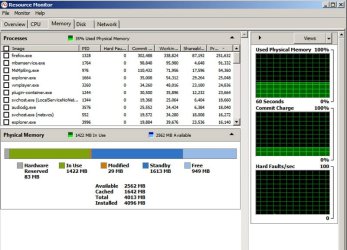
When it momentarily stops, open Task Manager and then Resource Monitor

Look at the colored line in Resource Monitor, as shown in the picture below.

How much RAM is shown as "standby"?

How much RAM is shown as "free"?

The sum of those two numbers is the "available" RAM.

Unless the Available RAM is very small, more RAM will not help.
 

Attachments

  • Untitled-1.jpg
    Untitled-1.jpg
    92.9 KB · Views: 5

My Computer

Computer type
PC/Desktop
Computer Manufacturer/Model Number
Ignatz Special; 4 speed manual gearbox; factory air conditioning; one of one
OS
Windows 7 Home Premium SP1, 64-bit
CPU
Intel Skylake i5-6600K, not overclocked
Motherboard
AsRock Z170M Extreme 4, micro ATX
Memory
8 GB HyperX DDR4-2666 (2 x 4 GB)
Graphics Card(s)
none; graphics are integrated on CPU
Sound Card
onboard: Realtek ALC1150; external: USB Behringer UF0-202
Monitor(s) Displays
Dell S2340M 23 inch IPS
Screen Resolution
1600 x 900
Hard Drives
System: Crucial MX100 series SSD, 128 GB;
Data: Samsung Spinpoint 103SJ, 1 TB;
Backup: WD Caviar Green WD30EZRX-00D8PB0, 3 TB
PSU
Rosewill SilentNight 500 watt fanless, semi-modular
Case
Antec Solo II
Cooling
Noctua NH-U12S; Noctua F12 intake, Noctua S12A exhaust
Keyboard
Microsoft 200 6JH-00001 USB
Mouse
Dell or Microsoft optical wired; USB
Antivirus
Microsoft Security Essentials and Malwarebytes Premium
Browser
Pale Moon
Other Info
All fans PWM; speeds at idle: CPU circa 500 rpm; intake circa 600 rpm; exhaust circa 600 rpm; CPU temps 27 idle and 47 C load in a warm room (27 C/81 F) when running Intel Extreme Tuning Utility stress test.
Back
Top