- Local time
- 5:40 AM
- Messages
- 89
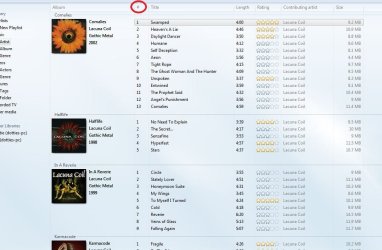
Is there a way to add to WMP version12 a folder containing two dozen sequenced MP3 audio files comprised of voice only. WMP seems to sort and categorize on the "title name" of each file instead of the "file name" which would keep them in ordered sequence?
I tried ripping these files off a CD which I created, but the "ripping" feature would not launch. When I tried moving the folder (containing the voice files) to the My Music folder, it spread the various voice files around to different genre's. Even when I put them on a playlist, they still find their way randomly distributed among various genre music titles. I can't get WMP to sort on file name instead of title name.
Is there a way to achieve this without converting the file to .cda, burning to a CD, then ripping them?
Thanx.
I tried ripping these files off a CD which I created, but the "ripping" feature would not launch. When I tried moving the folder (containing the voice files) to the My Music folder, it spread the various voice files around to different genre's. Even when I put them on a playlist, they still find their way randomly distributed among various genre music titles. I can't get WMP to sort on file name instead of title name.
Is there a way to achieve this without converting the file to .cda, burning to a CD, then ripping them?
Thanx.
My Computer
- Computer type
- PC/Desktop
- Computer Manufacturer/Model Number
- Homemade with cube tower
- OS
- Windows 7 Ultimate x64
- CPU
- 2x - Xeon E5-2687W
- Motherboard
- ASUS Z9PE-D8 WS
- Memory
- 128GB Kingston - (2ea kits – 4x16GB)
- Graphics Card(s)
- Gigabyte GTX-680 & EVGA GTX-Titan
- Sound Card
- Realtek ALC898 8-chan audio
- Monitor(s) Displays
- 2ea - Samsung T260HD 25.5-Inch LCD HDTV / Monitors
- Screen Resolution
- 1920x1200
- Hard Drives
- 8 ea. Crucial & Samsung EVO 2TB SSDs; misc 4ea. 8TB external Seagate spinners.
- PSU
- Corsair AX-1200
- Case
- Lian-Li cube custom
- Cooling
- 2x Dynatron R-17 - CPU Air sinks (160watts TDP)
- Keyboard
- HP slimline wireless
- Mouse
- Microsoft ARC
- Internet Speed
- Faster than a speeding bullet.
- Antivirus
- Norton Security 360 - 2020