Solved Adding new addresses to a Windows Live Account?

willythecat

New member
Member
Local time
10:24 PM
Messages
54
Location
SW France
Without obviously giving any personal details away, l currently have two email accounts set up.
My main ISP account lets call it [email protected], and a second account with windows live, so let's call that one [email protected] (aka outlook).
Now the question is, if l login to the Windows account (def) how do l, or can l even, download email from my ISP's (abc) account?
Does that make sense?
 

My Computer My Computer

At a glance

32bit Windows 7 UltimateAMD Athlon II X2 250 dual core4 x 1GB dual channel DDR3 @587MHz (7-7-7-20) ...Built in ATI graphics
Computer Manufacturer/Model Number
Home Built System
OS
32bit Windows 7 Ultimate
CPU
AMD Athlon II X2 250 dual core
Motherboard
MSI 760GM-E51
Memory
4 x 1GB dual channel DDR3 @587MHz (7-7-7-20) Crucial Ram
Graphics Card(s)
Built in ATI graphics
Sound Card
Sound Maker Value 5.1
Monitor(s) Displays
Acer P224W
Screen Resolution
1680 x 1050
Hard Drives
2 x 500gb Samsung HD502HJ Sata
PSU
Heden 480W ATX V2.2
Case
ATX Tower
Cooling
n/a
Keyboard
Logitech hard wired Qwerty Keyboard
Mouse
Microsoft Basic Optical hard wired
Internet Speed
ADSL Av.download - 2.10Mb/s Av.upload - 0.14Mb/s
Other Info
Matshita DVD-ROM SR-8584A
TSSTcorp CDDVDW SH-S202N
Without obviously giving any personal details away, l currently have two email accounts set up.
My main ISP account lets call it [email protected], and a second account with windows live, so let's call that one [email protected] (aka outlook).
Now the question is, if l login to the Windows account (def) how do l, or can l even, download email from my ISP's (abc) account?
Does that make sense?

yes
if you are using windows live mail, even logged into WLM you can download mail to your other account
I have 5 accounts using WLM
You need to set a new account for each one of them
Once you set it up you just click on the Send/Receive Icon at the top of the program and it will bring in mail to each account
 

My Computer My Computer

At a glance

Windows 7 Pro 32/64 bit and Windows 10 Pro 32...4gigsAMD Radeon HD and Nvidia
Computer type
PC/Desktop
Computer Manufacturer/Model Number
Dell Computers
OS
Windows 7 Pro 32/64 bit and Windows 10 Pro 32 Bit/64bit
Memory
4gigs
Graphics Card(s)
AMD Radeon HD and Nvidia
Monitor(s) Displays
Samsung 24". INC 19". Dell 22 ". Dell 17" & 19"
Hi willythecat,
if you store all your contacts in your hotmail account then use it to 'sign-in' on Windows Live mail, you will be able to use them in any account you add to WLM for sending / receiving. If using more than one account, any of them can be set as default.
 

My Computer My Computer

At a glance

Win7 H.Prem. 32bit+SP1
Computer Manufacturer/Model Number
Look in my Signature.
OS
Win7 H.Prem. 32bit+SP1
One easy way to do this is to set your Hotmail account (or Outlook.com as it is today called) to pick your ISP mail.
  • Sign in to your Hotmail account web interface
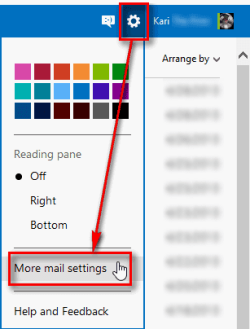
  • Click the Settings icon, select More mail settings
    2013-04-29_100729.png
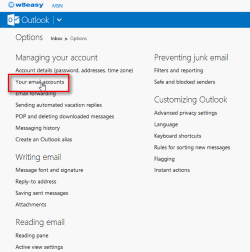
  • Click Your email accounts
    2013-04-29_101459.png
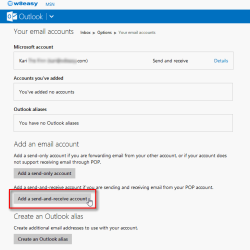
  • Click Add a send-and-receive account
    2013-04-29_101550.png
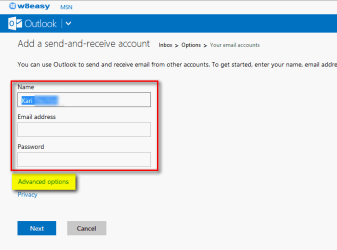
  • If your ISP supports IMAP simply enter your name, ISP email address and password, click Next. If the ISP does not support IMAP click Advanced options to add POP3 and SMTP information
    2013-04-29_101825.png
  • Follow instructions on screen
When correctly set up, your Hotmail picks up the messages from your ISP account. You can also select which account, Hotmail or ISP, your messages are sent from.

Kari
 

My Computer My Computer

At a glance

Windows 10 Pro x64 EN-GB1.6 GHz Intel Core i7-720QM Processor6 GBATI Mobility Radeon HD 5850 Graphics
Computer type
Laptop
Computer Manufacturer/Model Number
HP ENVY 17-1150eg
OS
Windows 10 Pro x64 EN-GB
CPU
1.6 GHz Intel Core i7-720QM Processor
Memory
6 GB
Graphics Card(s)
ATI Mobility Radeon HD 5850 Graphics
Sound Card
Beats sound system with integrated subwoofer
Monitor(s) Displays
17" laptop display, 22" LED and 32" Full HD TV through HDMI
Screen Resolution
1600*900 (1), 1920*1080 (2&3)
Hard Drives
Internal: 2 x 500 GB SATA Hard Disk Drive 7200 rpm
External: 2TB for backups, 3TB USB3 network drive for media
Cooling
As Envy runs a bit warm, I have it on a Cooler Master pad
Keyboard
Logitech diNovo Media Desktop Laser (bluetooth)
Mouse
Logitech Performance Mouse MX
Internet Speed
50/10 Mbps VDSL
Antivirus
Windows Defender 4.3.9431.0
Browser
Maxthon 3.5.2., IE11
Thanks everyone, you are all really helpful.
Answered my question to a "T"!
Regards
 

My Computer My Computer

At a glance

32bit Windows 7 UltimateAMD Athlon II X2 250 dual core4 x 1GB dual channel DDR3 @587MHz (7-7-7-20) ...Built in ATI graphics
Computer Manufacturer/Model Number
Home Built System
OS
32bit Windows 7 Ultimate
CPU
AMD Athlon II X2 250 dual core
Motherboard
MSI 760GM-E51
Memory
4 x 1GB dual channel DDR3 @587MHz (7-7-7-20) Crucial Ram
Graphics Card(s)
Built in ATI graphics
Sound Card
Sound Maker Value 5.1
Monitor(s) Displays
Acer P224W
Screen Resolution
1680 x 1050
Hard Drives
2 x 500gb Samsung HD502HJ Sata
PSU
Heden 480W ATX V2.2
Case
ATX Tower
Cooling
n/a
Keyboard
Logitech hard wired Qwerty Keyboard
Mouse
Microsoft Basic Optical hard wired
Internet Speed
ADSL Av.download - 2.10Mb/s Av.upload - 0.14Mb/s
Other Info
Matshita DVD-ROM SR-8584A
TSSTcorp CDDVDW SH-S202N
Back
Top