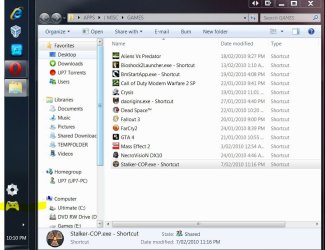
adding sub-folders to games folder

bkt

New member
Local time
3:21 PM
Messages
1
Is it possible to add sub-folders to the games folder? What I want to do is have a folder for Role Playing games, a folder for strategy games, a folder for first person shooter games, board games, arcade games, simulation games, etc, etc.
I have alot of games, and currently, when I open the games folder, I have to look through dozens of icons to find what I want, not to mention the games that are not even in the games folder.
I just would like to be able to right click within the games folder, make a new folder, and then drag my games into the appropriate folders to sort them out. You can do it in other areas of the system using windows explorer, so why the heck can't you do it in the games folder?
 

My Computer

OS
windows 7
I'm not too sure if there is a better method, as I don't use the Games Explorer window.

But there are possible methods to achieve a similar outcome:

A) Create a main folder and then create your sub-folders within the Main folder. Then copy shortcuts of the the executables into your sub-folders and pin the Main folder to the Taskbar:

ie When I click on the 360 controller icon, it just opens an explorer window with all the shortcuts to my games.

idea.JPG

B) Same method as above with the folders / shortcuts, but copy and paste the Sub folders directly into the Games Explorer window.


It's not as elegant and loses the 'extras' that the Games Explorer window provides, but achieves the same result.
 

My Computer

Computer type
PC/Desktop
Computer Manufacturer/Model Number
Systems by SmartEyeball
OS
8 Pro x64
CPU
i7 3770K 4.6GHz
Motherboard
ASUS P8Z77 WS
Memory
16GB G.Skill Trident X 2666mhz
Graphics Card(s)
x2 EVGA 780 Ti Superclocked SLI
Sound Card
SB X-FI Surround 5.1 PRO USB / ATH-AD900 Headphones
Monitor(s) Displays
x3 Dell U2410 / 58" Samsung
Screen Resolution
5760*1200/ 1920*1200
Hard Drives
2x Intel 520 240GB (RAID 0) * 2x WD Caviar Blacks 2TB (RAID 0) * 2TB WD Caviar Black * Sony Optirac DVD
PSU
Silverstone Strider Evolution 1200W
Case
Thermaltake Level 10 GT Snow Edition
Cooling
Noctua NH-D14
Keyboard
Topre Realforce // Ducky Shine MX Black // Filco Ninja TKL
Mouse
Thermaltake Theron (Highly Recommended) + Razer Imperator
Antivirus
MSE
Browser
IE, FF, WaterFox
Other Info
GT Extreme V2 Sim Racing Cockpit + 40" LCD and K/B Mouse stand ▼
Fanatec CSR Elite Wheel + Clubsport V1 Pedals + CSR shifter/7G-H ▼Saitek X52 Pro ▼ TrackIR 5 Pro
Buttkicker v2 Seat Rumbler with Dedicated 5.1 and Sub Woofer attached to frame ▼
=
Bloody Big Grin
smartey - every time I try to pin a short cut folder to the task bar it just merges with the explorer icon thats already there. How do you get it separate. Also where did u get the 360 controller icon form?
 

My Computer

OS
Windows 7 Ultimate X64
CPU
Intel Core i7 920
Motherboard
Gigabyte GA-EX58-UD5
Memory
6GB Corsair Dominator DRR3 1600MHz
Graphics Card(s)
Saphire HD4850 Toxic Edition
Monitor(s) Displays
Samsung SM2493HW
Screen Resolution
1920x1200
Hard Drives
Samsung Spinpoint 1TB HD103UJ
PSU
Coolermaster Real Power M1000
Case
Antec P182
Cooling
Stock Intel CPU cooler, 3 x 120mm Case fans
Keyboard
Logitech G15
Mouse
Logitech G500
Internet Speed
Not what was advertised!
smartey - every time I try to pin a short cut folder to the task bar it just merges with the explorer icon thats already there. How do you get it separate. Also where did u get the 360 controller icon form?

Oops, I forgot that part :o

I actually created a 'blank' toolbar to achieve the 'pinning' and the spacing.

♦ The way I did it was to create a folder in my users\Documents directory and then created a few folders called Blank ToolBar1/Blank ToolBar2/Blank ToolBar3 etc (the others I use for spacing)

ie C:\Users\USERNAME\Documents\Blank Toolbar 3


♦ Next r-click the Taskbar, uncheck 'lock the taskbar' and go to Toolbars > New Toolbar and then add the toolbar/s. This will add a folder with adjustable areas.


♦ Now r-click on the new toolbar and untick Show Title / Show text to make it invisible.


Then I created a folder on my desktop, named it , added the icon and created a shortcut to the folder and placed the shortcut in the appropriate Blank Toolbar.


I found that creating subfolders directly in the Blank Toolbar folder causes the icons to appear small. Creating the folder elsewhere and using the shortcut makes them appear as large icons.


As for the icon, I can't remember where I got it or if I modified it in Photoshop.

Either way, here it is:

View attachment xbox360controller2.zip
 

My Computer

Computer type
PC/Desktop
Computer Manufacturer/Model Number
Systems by SmartEyeball
OS
8 Pro x64
CPU
i7 3770K 4.6GHz
Motherboard
ASUS P8Z77 WS
Memory
16GB G.Skill Trident X 2666mhz
Graphics Card(s)
x2 EVGA 780 Ti Superclocked SLI
Sound Card
SB X-FI Surround 5.1 PRO USB / ATH-AD900 Headphones
Monitor(s) Displays
x3 Dell U2410 / 58" Samsung
Screen Resolution
5760*1200/ 1920*1200
Hard Drives
2x Intel 520 240GB (RAID 0) * 2x WD Caviar Blacks 2TB (RAID 0) * 2TB WD Caviar Black * Sony Optirac DVD
PSU
Silverstone Strider Evolution 1200W
Case
Thermaltake Level 10 GT Snow Edition
Cooling
Noctua NH-D14
Keyboard
Topre Realforce // Ducky Shine MX Black // Filco Ninja TKL
Mouse
Thermaltake Theron (Highly Recommended) + Razer Imperator
Antivirus
MSE
Browser
IE, FF, WaterFox
Other Info
GT Extreme V2 Sim Racing Cockpit + 40" LCD and K/B Mouse stand ▼
Fanatec CSR Elite Wheel + Clubsport V1 Pedals + CSR shifter/7G-H ▼Saitek X52 Pro ▼ TrackIR 5 Pro
Buttkicker v2 Seat Rumbler with Dedicated 5.1 and Sub Woofer attached to frame ▼
=
Bloody Big Grin
  • Like
Reactions: jav
Thanks a lot smartey. Got it working. Just wish the I could make the icon appear on the left :( but thats just me being pedantic.
 

My Computer

OS
Windows 7 Ultimate X64
CPU
Intel Core i7 920
Motherboard
Gigabyte GA-EX58-UD5
Memory
6GB Corsair Dominator DRR3 1600MHz
Graphics Card(s)
Saphire HD4850 Toxic Edition
Monitor(s) Displays
Samsung SM2493HW
Screen Resolution
1920x1200
Hard Drives
Samsung Spinpoint 1TB HD103UJ
PSU
Coolermaster Real Power M1000
Case
Antec P182
Cooling
Stock Intel CPU cooler, 3 x 120mm Case fans
Keyboard
Logitech G15
Mouse
Logitech G500
Internet Speed
Not what was advertised!
Icon on the left? That's why I use a few spacers. (ie blanks)

Just grab the dotted line and keep dragging and moving until it 'slips into place'.
 

My Computer

Computer type
PC/Desktop
Computer Manufacturer/Model Number
Systems by SmartEyeball
OS
8 Pro x64
CPU
i7 3770K 4.6GHz
Motherboard
ASUS P8Z77 WS
Memory
16GB G.Skill Trident X 2666mhz
Graphics Card(s)
x2 EVGA 780 Ti Superclocked SLI
Sound Card
SB X-FI Surround 5.1 PRO USB / ATH-AD900 Headphones
Monitor(s) Displays
x3 Dell U2410 / 58" Samsung
Screen Resolution
5760*1200/ 1920*1200
Hard Drives
2x Intel 520 240GB (RAID 0) * 2x WD Caviar Blacks 2TB (RAID 0) * 2TB WD Caviar Black * Sony Optirac DVD
PSU
Silverstone Strider Evolution 1200W
Case
Thermaltake Level 10 GT Snow Edition
Cooling
Noctua NH-D14
Keyboard
Topre Realforce // Ducky Shine MX Black // Filco Ninja TKL
Mouse
Thermaltake Theron (Highly Recommended) + Razer Imperator
Antivirus
MSE
Browser
IE, FF, WaterFox
Other Info
GT Extreme V2 Sim Racing Cockpit + 40" LCD and K/B Mouse stand ▼
Fanatec CSR Elite Wheel + Clubsport V1 Pedals + CSR shifter/7G-H ▼Saitek X52 Pro ▼ TrackIR 5 Pro
Buttkicker v2 Seat Rumbler with Dedicated 5.1 and Sub Woofer attached to frame ▼
=
Bloody Big Grin
Yeah I did that but I want it right up to my right most icon on the left if u get me :confused: but if i move all the way over then any new programs that I open go onto a second line on the taskbar. Anyway as it happens I decided I didnt mind games explorer after all.
 

My Computer

OS
Windows 7 Ultimate X64
CPU
Intel Core i7 920
Motherboard
Gigabyte GA-EX58-UD5
Memory
6GB Corsair Dominator DRR3 1600MHz
Graphics Card(s)
Saphire HD4850 Toxic Edition
Monitor(s) Displays
Samsung SM2493HW
Screen Resolution
1920x1200
Hard Drives
Samsung Spinpoint 1TB HD103UJ
PSU
Coolermaster Real Power M1000
Case
Antec P182
Cooling
Stock Intel CPU cooler, 3 x 120mm Case fans
Keyboard
Logitech G15
Mouse
Logitech G500
Internet Speed
Not what was advertised!
Is it possible to add sub-folders to the games folder? What I want to do is have a folder for Role Playing games, a folder for strategy games, a folder for first person shooter games, board games, arcade games, simulation games, etc, etc.
I have alot of games, and currently, when I open the games folder, I have to look through dozens of icons to find what I want, not to mention the games that are not even in the games folder.
I just would like to be able to right click within the games folder, make a new folder, and then drag my games into the appropriate folders to sort them out. You can do it in other areas of the system using windows explorer, so why the heck can't you do it in the games folder?

Hi bkt and welcome to the forums.

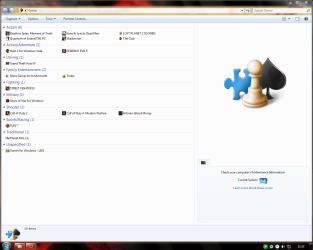
Sorry but addin' sub-folders to Game Explorer isn't possible, although you can group your games by genres and change your view to small icons if u have many games.

Something like this :
001.png

If you interested let me know and i tell you how... ;)
 

My Computer

Computer type
PC/Desktop
OS
Windows 7 Ultimate x64
CPU
Intel Core i5-2500K @4.5Ghz
Motherboard
Asus Maximus V GENE
Memory
x2 Kingston KHX1600C9D3/4G
Graphics Card(s)
NVIDIA GeForce GTS 250 - 1024MB
Sound Card
SupremeFX III built-in 8-Channel High Definition Audio
Monitor(s) Displays
Samsung Syncmaster P2270
Screen Resolution
1920x1080
Hard Drives
x1 Seagate Barracuda ST3160811AS
x2 Seagate Barracuda ST380817AS
PSU
Corsair TX750
Case
Cooler Master HAF 922 Side Window Model
Cooling
Stock Intel Cooler + Tuniq TX2
Keyboard
Dell SK-8135
Mouse
Logitech G5
Internet Speed
2 Mbps
Other Info
x2 Xbox 360 Wireless Controller for Windows
Logitech Z-5550
Sennheiser HD555
Is this offer still valid?
How do you assign Genres to the Games you added yourself?
I guess this would take care of some of the problems some people (including myself) are having out there...
 

My Computer

Computer type
PC/Desktop
Computer Manufacturer/Model Number
Custom
OS
Windows 7 Ultimate x64 (Home)/ Win 7 Enterprise 32 Bit (Work)
CPU
Phenom Black II x4 3.2GHz
Motherboard
Gigabyte 880GA-UD3H
Memory
16GB
Graphics Card(s)
Onboard
Sound Card
Onboard
Monitor(s) Displays
2x 22" Asus
Screen Resolution
1680 x 1050 (16:10)
Hard Drives
1x 120GB Samsung SSD (for C Drive)
1x 55GB Adata SSD (for personal data and mail)
2x 2TB Seagate (after 2 1/2 years one is on the brink of dying!), (Backup, Pictures and Music)
1x 2TB Hitachi (External, 2nd Backup)
1x 2TB Samsung (TV recording)
PSU
Fanless 95+
Cooling
only CPU fan left :-)
Antivirus
Avira
Browser
Opera 12.54 (don't like the new one...but have it also)
Back
Top