Adjust Office size?

awenthol

Pretending to be a Poser
Power User
Local time
4:55 PM
Messages
147
This is going to be an odd question...is there a way to adjust the size of the Office apps (all of them are as attached) WITHOUT modifying my DPI? Attached is what I'm talking about. I would like the bars to properly sized...I don't have this issue with any other programs/apps on my computer...(actually, all the others are slightly undersized, yet)
 

Attachments
  • office.jpg
    office.jpg
    88.5 KB · Views: 14

My Computer

Computer Manufacturer/Model Number
Sony VPCZ1390X CTO
OS
7 Pro x64
CPU
Intel Core i7-640M
Motherboard
Sony/Intel
Memory
8GB
Graphics Card(s)
GT330M
Monitor(s) Displays
Built-in 13" + 24" LG Flatron
Screen Resolution
1920x1080, 1920x1080
Hard Drives
Internal-2x128GB SSD (Raid 0), 500GB WD Caviar Green
External- 3TB WD
Keyboard
Logitech Illuminated
Mouse
Logitech Performance MX
Internet Speed
7 MB -- Sprint Overdrive on 4G
Other Info
Sprint EVO 3D (Synergy 2.3.4)
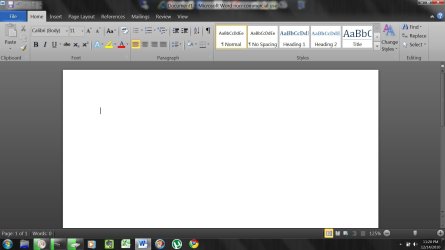
I'm not sure what your issue is, awenthol, sorry. This is the way Word looks on my end (entirely normal - yours appears to be the same as mine, well, other than your screen resolution and the 125% zoom level and rulers being turned off):

ScreenShot00224.jpg
 

My Computer

Computer Manufacturer/Model Number
Toshiba L355D
OS
Windows 7 Ultimate x64 SP1
CPU
Core2 Duo
Motherboard
Intel
Memory
4 GB
Graphics Card(s)
GM965 on-board
Sound Card
RealTek on-board
Monitor(s) Displays
19"+17"(laptop)
Screen Resolution
1440x900 (x 2)
Hard Drives
500GB Ext. 200GB Internal
PSU
N/A
Case
N/A
Cooling
N/A
I meant, everything is GINORMOUS. I have very little screen real estate to work with if I leave all the toolbars on.

Is there a way to make the toolbars smaller without changing the DPI? A similar scaling that will modify ONLY the Office applications?

Outlook is the worst...with the huge toolbars on the top and sides, there's literally no room to do anything.
 

My Computer

Computer Manufacturer/Model Number
Sony VPCZ1390X CTO
OS
7 Pro x64
CPU
Intel Core i7-640M
Motherboard
Sony/Intel
Memory
8GB
Graphics Card(s)
GT330M
Monitor(s) Displays
Built-in 13" + 24" LG Flatron
Screen Resolution
1920x1080, 1920x1080
Hard Drives
Internal-2x128GB SSD (Raid 0), 500GB WD Caviar Green
External- 3TB WD
Keyboard
Logitech Illuminated
Mouse
Logitech Performance MX
Internet Speed
7 MB -- Sprint Overdrive on 4G
Other Info
Sprint EVO 3D (Synergy 2.3.4)
Also, to add, I have tried using "XP style scaling" on the DPI. It adjusts other programs but Office is still way to big...
 

My Computer

Computer Manufacturer/Model Number
Sony VPCZ1390X CTO
OS
7 Pro x64
CPU
Intel Core i7-640M
Motherboard
Sony/Intel
Memory
8GB
Graphics Card(s)
GT330M
Monitor(s) Displays
Built-in 13" + 24" LG Flatron
Screen Resolution
1920x1080, 1920x1080
Hard Drives
Internal-2x128GB SSD (Raid 0), 500GB WD Caviar Green
External- 3TB WD
Keyboard
Logitech Illuminated
Mouse
Logitech Performance MX
Internet Speed
7 MB -- Sprint Overdrive on 4G
Other Info
Sprint EVO 3D (Synergy 2.3.4)
You can minimize the ribbon - if that helps. Right click just above the ribbon. You can also make your "paper sheet" smaller - in the View tab.
 
Last edited:

My Computer

Computer Manufacturer/Model Number
HP, Dell, Gateway, Toshiba - 4 laptops and 2 desktops
OS
Vista, Windows7, Mint Mate, Zorin, Windows 8
CPU
from 1.6GHz Duo to i7
Monitor(s) Displays
2x HP w2207
Hard Drives
5x HDD, 7x SSD, 12x Externals
Keyboard
with trackball - no mices
Mouse
Trackball mice
Internet Speed
DSL 6000
Also, to add, I have tried using "XP style scaling" on the DPI. It adjusts other programs but Office is still way to big...
I don't think it has anything to do with "DPI," awenthal. It looks to be an issue regarding your screen resolution.

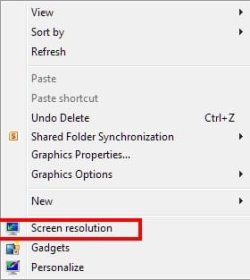
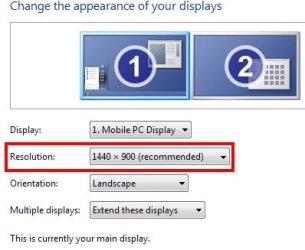
Right click the Desktop and follow along below:

ScreenShot00229.jpg

ScreenShot00228.jpg

Naturally, there are many ways to get to the Screen Resolution settings dialog. The above is but one example and, of course, unless you have two monitors, your dialog will appear slightly different.

What is your current screen resolution?
 

My Computer

Computer Manufacturer/Model Number
Toshiba L355D
OS
Windows 7 Ultimate x64 SP1
CPU
Core2 Duo
Motherboard
Intel
Memory
4 GB
Graphics Card(s)
GM965 on-board
Sound Card
RealTek on-board
Monitor(s) Displays
19"+17"(laptop)
Screen Resolution
1440x900 (x 2)
Hard Drives
500GB Ext. 200GB Internal
PSU
N/A
Case
N/A
Cooling
N/A
What is your current screen resolution?

Currently 1920x1080...the highest I can go. My only other "standard" resolution is 1600x900, and that isn't any better.
 

My Computer

Computer Manufacturer/Model Number
Sony VPCZ1390X CTO
OS
7 Pro x64
CPU
Intel Core i7-640M
Motherboard
Sony/Intel
Memory
8GB
Graphics Card(s)
GT330M
Monitor(s) Displays
Built-in 13" + 24" LG Flatron
Screen Resolution
1920x1080, 1920x1080
Hard Drives
Internal-2x128GB SSD (Raid 0), 500GB WD Caviar Green
External- 3TB WD
Keyboard
Logitech Illuminated
Mouse
Logitech Performance MX
Internet Speed
7 MB -- Sprint Overdrive on 4G
Other Info
Sprint EVO 3D (Synergy 2.3.4)
What is your current screen resolution?

Currently 1920x1080...the highest I can go. My only other "standard" resolution is 1600x900, and that isn't any better.
The picture you posted intially certainly doesn't reflect that resolution. It's not DPI, unless you've already played with it too much. Take it back to default.

Something else is at play here and, I must say, it's beyond me as I've never encountered such an issue at the resolution you have.
 

My Computer

Computer Manufacturer/Model Number
Toshiba L355D
OS
Windows 7 Ultimate x64 SP1
CPU
Core2 Duo
Motherboard
Intel
Memory
4 GB
Graphics Card(s)
GM965 on-board
Sound Card
RealTek on-board
Monitor(s) Displays
19"+17"(laptop)
Screen Resolution
1440x900 (x 2)
Hard Drives
500GB Ext. 200GB Internal
PSU
N/A
Case
N/A
Cooling
N/A
What is your current screen resolution?

Currently 1920x1080...the highest I can go. My only other "standard" resolution is 1600x900, and that isn't any better.
The picture you posted intially certainly doesn't reflect that resolution. It's not DPI, unless you've already played with it too much. Take it back to default.

Something else is at play here and, I must say, it's beyond me as I've never encountered such an issue at the resolution you have.

Holy crap...you indirectly solved my problems!!!

You got me thinking about all the crap I've "played with," which reminded me that I had to turn the font WAYYY up to use "Sony Sketch" as my system fonts.. apparently Office does not honor the system font.

Upon returning the font to a "normal" size, the bars went back to normal! THANKS A MILLION!! :D
 

My Computer

Computer Manufacturer/Model Number
Sony VPCZ1390X CTO
OS
7 Pro x64
CPU
Intel Core i7-640M
Motherboard
Sony/Intel
Memory
8GB
Graphics Card(s)
GT330M
Monitor(s) Displays
Built-in 13" + 24" LG Flatron
Screen Resolution
1920x1080, 1920x1080
Hard Drives
Internal-2x128GB SSD (Raid 0), 500GB WD Caviar Green
External- 3TB WD
Keyboard
Logitech Illuminated
Mouse
Logitech Performance MX
Internet Speed
7 MB -- Sprint Overdrive on 4G
Other Info
Sprint EVO 3D (Synergy 2.3.4)
:D

Even if I helped indirectly, awenthol, I'm glad to be of service. :)
 

My Computer

Computer Manufacturer/Model Number
Toshiba L355D
OS
Windows 7 Ultimate x64 SP1
CPU
Core2 Duo
Motherboard
Intel
Memory
4 GB
Graphics Card(s)
GM965 on-board
Sound Card
RealTek on-board
Monitor(s) Displays
19"+17"(laptop)
Screen Resolution
1440x900 (x 2)
Hard Drives
500GB Ext. 200GB Internal
PSU
N/A
Case
N/A
Cooling
N/A
Back
Top