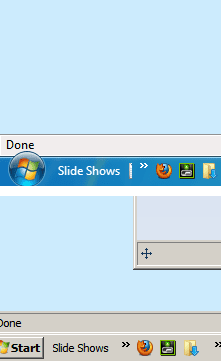
adjust padding/spacing in taskbar/superbar

demck85

New member
I've been trying to figure out how to adjust the spacing in the taskbar. I want to get rid of the little bit of icon showing when I add folders to the toolbar. They're all pushed together as far as I can get the, but still a little bit show once locked back. Unlocked it looks perfect, but I shouldn't nor do I want to leave it unlocked all the time. Any registry mod or tips would be great. I've attached pic and outlined what I'm talking about.
 

Attachments

  • taskbar issue.jpg
    taskbar issue.jpg
    5.2 KB · Views: 27

My Computer

OS
Win 7 Pro 64-bit
I don't know how to make the spacing even smaller, but here is how to remove the text:

Right lick on taskbar in area of that toolbar > Uncheck option "Show Titles" or "Show Text"
 

My Computer

Computer Manufacturer/Model Number
Apple Macbook Pro (April 2009)
OS
W7 Ult. x64 | OS X
CPU
Intel Mobile Core 2 Duo 2.93Ghz [T9800 Penryn]
Motherboard
NVIDIA nForce 730i Rev. B1 [Mac-F2268EC8 (U2E1)]
Memory
4096MB Samsung DDR3 Dual Channel [PC3-8500F 1066Mhz]
Graphics Card(s)
NVIDIA GeForce 9600M GT 512MB [G96M Rev. C1]
Sound Card
SB X-Fi Surround 5.1 USB | Onboard Realtek (Disabled)
Monitor(s) Displays
Acer x223wbd 22" | Apple Anti-Glare 17" (Disabled)
Screen Resolution
{Current} 1440x900 {Acer} 1680x1050 {Apple} 1920x1200
Hard Drives
{Internal}
Seagate Momentus 320GB 2.5" 7200RPM [ST9320421AS]

{Externals}
LaCie 320GB USB 2.0 HDD [301284UR]
LaCie 750GB USB 2.0 FW400 eSATA HDD [301314U]
LaCie 1TB USB 2.0 HDD [301304UR]
PSU
Magsafe
Case
Aluminum/Unibody (MBP52)
Cooling
2 x 6000 RPM Fans
Keyboard
Logitech G-15v2 [PN 920-000379]
Mouse
Logitech G-9 [PN 910-000338]
Internet Speed
12Mbps/2.5Mbps w/ 24Mbps Speed Boost [Comcast]
Other Info
Logitech X-540 Speakers [PN 970223-0122]
Sennheiser PC-151 Headset
Not sure if this will help, but:
   Warning
Before attempting registry edits, backup your registry

How to Change the Windows 7 Taskbar Button Length or Width Size My Digital Life

Also, apparently this program might be able to accomplish your task:

Ave's Vista Style Builder

Reference: Neowin.net - Where unprofessional journalism looks better

BTW, If you don't mind, switch to a non aero version. In that version there's no bleed.
tb2.png

You still get all of the new functions if you want them, minus preview i think.
 
Last edited:

My Computer

Computer Manufacturer/Model Number
Apple Macbook Pro (April 2009)
OS
W7 Ult. x64 | OS X
CPU
Intel Mobile Core 2 Duo 2.93Ghz [T9800 Penryn]
Motherboard
NVIDIA nForce 730i Rev. B1 [Mac-F2268EC8 (U2E1)]
Memory
4096MB Samsung DDR3 Dual Channel [PC3-8500F 1066Mhz]
Graphics Card(s)
NVIDIA GeForce 9600M GT 512MB [G96M Rev. C1]
Sound Card
SB X-Fi Surround 5.1 USB | Onboard Realtek (Disabled)
Monitor(s) Displays
Acer x223wbd 22" | Apple Anti-Glare 17" (Disabled)
Screen Resolution
{Current} 1440x900 {Acer} 1680x1050 {Apple} 1920x1200
Hard Drives
{Internal}
Seagate Momentus 320GB 2.5" 7200RPM [ST9320421AS]

{Externals}
LaCie 320GB USB 2.0 HDD [301284UR]
LaCie 750GB USB 2.0 FW400 eSATA HDD [301314U]
LaCie 1TB USB 2.0 HDD [301304UR]
PSU
Magsafe
Case
Aluminum/Unibody (MBP52)
Cooling
2 x 6000 RPM Fans
Keyboard
Logitech G-15v2 [PN 920-000379]
Mouse
Logitech G-9 [PN 910-000338]
Internet Speed
12Mbps/2.5Mbps w/ 24Mbps Speed Boost [Comcast]
Other Info
Logitech X-540 Speakers [PN 970223-0122]
Sennheiser PC-151 Headset
tried the regedit...didn't work with the folders add to the taskbar

I guess maybe a different theme could fix that issue...that and make the taskbar look cooler
 

My Computer

OS
Win 7 Pro 64-bit
Back
Top