
Adjust ram timings?

Nevakonaza

New member
Local time
7:03 AM
Messages
64
Location
England
So currently i have my Q6600 overclocked to 3.52Ghz.ram is at 933Ghz with these timings..all stable.
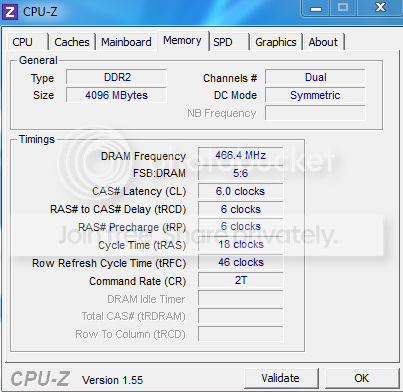
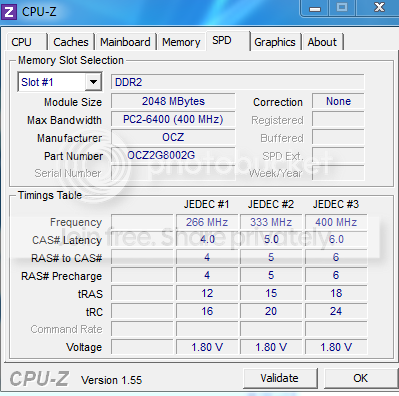
1sav.png


sav2.png


Should i go for a lower ram speed but try and lower the timings? and wouldi get better performance with lower timings over higher ram speed?

My ram is OCZ Vista Gold series PC6400 (2X2Gb sticks)

TIA :D
 

My Computer

Computer Manufacturer/Model Number
Home Build System
OS
7 Home Premium X64
CPU
Intel Q6600 @ 3.5Ghz
Motherboard
Asus P5Q SE (Intel P45)
Memory
4GB OCZ Gold Series DDR2 @932Mhz
Graphics Card(s)
HD4890 1GB GDDR5
Sound Card
Asus Xonar D1
Monitor(s) Displays
Belinea 0.Display 22" Widescreen
Screen Resolution
1680 x 1050
Hard Drives
60Gb OCZ Vertex 2E Solid State Drive
250Gb Seagate Barracuda (Storage)
500Gb Western Digital Green (Storage)

Both 7200Rpm Sata2.
PSU
OCZ StealthXstream 600W Modular.
Case
Coolermaster 690 (Windows + Interior modded)
Cooling
Tuniq Tower 120 Extreme + 4 120mm case fans.
Keyboard
Microsoft Digital Media Keyboard 3000
Mouse
Logitech G5
Internet Speed
20Mb Virgin Media Unlimited.
What FSB and CPU multi are using?

390*9 or close to?

If so, going with a 1:1 ratio will put you at 780Mhz RAM speed.
But you should be able to get 5-5-5-15 Timings.

Looks as if your RAM is Rated at
800MHz DDR2
CL 5-5-5-18
So this may be the best route.

Quickest way to compare is run a quick memory assesment. CMD Prompt and type : winsat mem
Youll get a general idea of the bandwidth.


TBH, there will likely be no noticeable real world difference.
Only in a benchmark.

But I also understand the desire to tweak and get the most you can :)

Try both settings and see what your system likes the best with the things you do the most often.
Every setup has a different "happy spot"
 

My Computer

Computer Manufacturer/Model Number
Custom (Self Build)
OS
Windows 7 Home Premium 64bit
CPU
Intel Core i7 2700k
Motherboard
eVGA P67 SLI
Memory
8GB Mushkin Redline Ridgebacks @1866
Graphics Card(s)
EVGA GTX570 SC
Sound Card
XiFi Titanium HD
Monitor(s) Displays
LG W2453V
Screen Resolution
1920x1080
Hard Drives
Intel 320 80GB -- Intel X25-V 40GB --WD Black 1TB x2 -- WD Blue 640GB
PSU
Seasonic x750
Case
Corsair 600T SE White
Cooling
eVGA Superclocked CPU Cooler
Keyboard
Saitek Cyborg
Antivirus
Kaspersky
Browser
IE
Other Info
LG BD/DVD
Hey thanks for replying :)

Not sure on my exact fsb and multi as its been overclocked a long time...il check tommorow as im about to go to work now but il try those timings you mentioned and see what happens,think the ram will be okay at 2.2v?...thats what its at now i think.

Btw just noticed you also have a HD4890...how you like yours?

I have mine overclocked to:

910Mhz core
1010mhz Memory

Not touched the voltage yet to go higher,i dont think there really is any need to OC higher :P
 

My Computer

Computer Manufacturer/Model Number
Home Build System
OS
7 Home Premium X64
CPU
Intel Q6600 @ 3.5Ghz
Motherboard
Asus P5Q SE (Intel P45)
Memory
4GB OCZ Gold Series DDR2 @932Mhz
Graphics Card(s)
HD4890 1GB GDDR5
Sound Card
Asus Xonar D1
Monitor(s) Displays
Belinea 0.Display 22" Widescreen
Screen Resolution
1680 x 1050
Hard Drives
60Gb OCZ Vertex 2E Solid State Drive
250Gb Seagate Barracuda (Storage)
500Gb Western Digital Green (Storage)

Both 7200Rpm Sata2.
PSU
OCZ StealthXstream 600W Modular.
Case
Coolermaster 690 (Windows + Interior modded)
Cooling
Tuniq Tower 120 Extreme + 4 120mm case fans.
Keyboard
Microsoft Digital Media Keyboard 3000
Mouse
Logitech G5
Internet Speed
20Mb Virgin Media Unlimited.
Love my 4890. I only wish it had DX11 support. :(


I looked at the specs on that RAM and it looked like it was rated at 1.8V. But i could very well have been looking at the wrong one.

If thats the actual specs, I wouldnt run it that high personally.

I would set it to run the best you can at whatever the top end of recommended voltage is.
Even if that means running at the 5-5-5-15 timings at 780Mhz or so at 1.8V if thats its rating.

RAM is the easiest piece of hardware to ruin by overvolting etc.
 

My Computer

Computer Manufacturer/Model Number
Custom (Self Build)
OS
Windows 7 Home Premium 64bit
CPU
Intel Core i7 2700k
Motherboard
eVGA P67 SLI
Memory
8GB Mushkin Redline Ridgebacks @1866
Graphics Card(s)
EVGA GTX570 SC
Sound Card
XiFi Titanium HD
Monitor(s) Displays
LG W2453V
Screen Resolution
1920x1080
Hard Drives
Intel 320 80GB -- Intel X25-V 40GB --WD Black 1TB x2 -- WD Blue 640GB
PSU
Seasonic x750
Case
Corsair 600T SE White
Cooling
eVGA Superclocked CPU Cooler
Keyboard
Saitek Cyborg
Antivirus
Kaspersky
Browser
IE
Other Info
LG BD/DVD
If you're OC to 3.52gig on a Q6600 with that RAM you're doing darn good. Have you run any bench tests - Prime 95? What are your load temps? According to your system specs you're running on air? (Tuniq Tower 120 Extreme)

I've heard (read) very few people hit 3.52gig with a Q6600, even with a GO processor, on air. That's quite a feat there. Would be interested to see some screenshots.

Thanks.
 

My Computer

Computer type
PC/Desktop
Computer Manufacturer/Model Number
Custom built by me.
OS
Windows 10 Pro
CPU
Intel Core i7-4770K (3.5Ghz)
Motherboard
Gigabyte G1 Sniper 5 (F10 Bios)
Memory
32 gig Corsair Dominator Platinum (4x8Gig)
Graphics Card(s)
Sapphire Tri-X R9 Fury
Sound Card
Soundblaster ZXR
Monitor(s) Displays
NEC PA242W 24" LCD Monitor
Screen Resolution
1920 x 1200
Hard Drives
Primary - Samsung 850 Pro (512gig), Samsung 840 Pro (256gig), 2TB WD Caviar Black.
PSU
EVGA Supernova 1000 G2
Case
Cooler Master HAF X
Cooling
Corsair H100i with Corsair Air Series SP120 Quiet Fans
Keyboard
Logitech Wireless Wave
Mouse
Logitech Performance MX
Internet Speed
High Speed Cable
Antivirus
Norton Security
Browser
IE11
Other Info
Memory Timings - 1866MHz @ 9-9-9-27-1T @ 1.5 volts
Back
Top