Firefox browsers are constantly writing large amounts of data to SSD drives, sometimes at higher values than the ones recommended by their vendors for daily writes.
According to the tech experts from ServeTheHome, a Firefox browser in its default configuration can write between 10GB and 30GB per day to SSD drives, depending on the number of opened tabs and windows.
The main two reasons behind these heavy-duty SSD write operations are the recovery.js and cookie.* files.
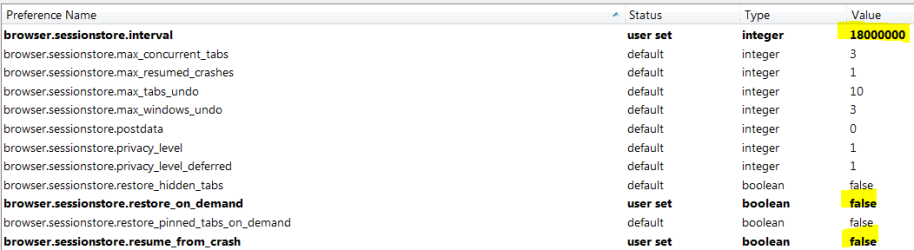
Adjust This Setting Before Firefox Wears Down Your SSD Drive - MSFNSergei Bobik of ServeTheHome , who discovered this issue, says there’s a way to limit some of the write operations for the recovery.js file by tweaking one of Firefox’s settings.
My Computer
- Computer type
- PC/Desktop
- Computer Manufacturer/Model Number
- Dell Hell oh Well
- OS
- Win 7 32 Home Premium, Win 7 64 Pro, Win 8.1, Win 10
- CPU
- Intel Core 2 Duo 2.93GHz
- Memory
- Not much with my ADHD
- Graphics Card(s)
- ATI Radeon HD 4350
- Monitor(s) Displays
- 24" HDTV/Monitor
- Screen Resolution
- Blurry after a Scotch or 2
- Hard Drives
- 1 HDD 250 GB, 1 HDD 1 TB, 3 - 1 TB Externals
- Case
- Don't get on my case...man :D
- Cooling
- I have an Air Conditioner & Diet Pepsi
- Keyboard
- Saitek Cyborg
- Mouse
- 10 yr old MS optical mouse that still works
- Internet Speed
- Never fast enough
- Antivirus
- Various
- Browser
- Various