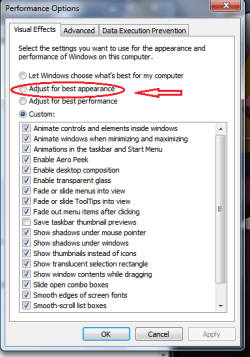
adjusted visual effects for best performance, now can't go to normal

obby

New member
Member
Local time
10:56 AM
Messages
32
hey everyone,
I have a samsung notebook, i adjusted the appearance of windows "for best performance", but now the problem is that i can't switch back to normal visual windows. i try to change to "let windows choose what's best for my computer" but after appplying and clicking ok, nothing happens. the appearance of windows remains the same way. what could be the problem with my system?
 

My Computer My Computer

At a glance

windows starter 32 bitAMD E-450 APUAMD Radeon HD
Computer Manufacturer/Model Number
samsung RV515L-AO3NG
OS
windows starter 32 bit
CPU
AMD E-450 APU
Graphics Card(s)
AMD Radeon HD
Sound Card
AMD High Definition Audio Device
Monitor(s) Displays
Generic PnP monitor
Hard Drives
Samsung HM321HI ATA Device
What theme do you have selected?
 

My Computer My Computer

At a glance

W7 Pro SP1 64biti78GBIntel HD Graphics
Computer type
Laptop
Computer Manufacturer/Model Number
Employer provided Dell Latitude
OS
W7 Pro SP1 64bit
CPU
i7
Memory
8GB
Graphics Card(s)
Intel HD Graphics
Hard Drives
crappy SSD
Antivirus
Employer mandated Symantec Endpoint Protection
Browser
Pale Moon 64bit, IE11 64bit & Chrome 64bit
Instead of leting windows choose, try adjusting visual effects for best appearance. The one I circled tick that one.
 

Attachments

  • 311111.png
    311111.png
    18.2 KB · Views: 7

My Computer My Computer

At a glance

Windows 10 64bitAMD Phenom II X4 925 (Deneb)(2.8GHz) OC 3.4GHzCorsair Vengeance DDR3 4GBX2 (8192MB)XFX HD 6870 1GB (OC)- 940MHz core, mem 1150MHz
Computer type
PC/Desktop
Computer Manufacturer/Model Number
custom build
OS
Windows 10 64bit
CPU
AMD Phenom II X4 925 (Deneb)(2.8GHz) OC 3.4GHz
Motherboard
M5A78L-MLX Plus
Memory
Corsair Vengeance DDR3 4GBX2 (8192MB)
Graphics Card(s)
XFX HD 6870 1GB (OC)- 940MHz core, mem 1150MHz
Monitor(s) Displays
Vizio 26' 1920x1080 / Acer 1336x768
Screen Resolution
1920x1080 60Hz /1336x768
Hard Drives
Kingston Digital 60GB SSDNow V300/500gb HDD Western Digital 7200rpm (/WD 160GB HDD 7200rpm
PSU
CORSAIR CX600 600w
Case
AZZA Orion 202 EVO
Cooling
cooler master hyper TX3 cpu cooler
Keyboard
Razer DeathStalker
Mouse
Logitech Optical Gaming Mouse G400
Antivirus
Defualt on win 10
Browser
Firefox
Other Info
cpu is overclocked in bios
works now, but...

Both methods didn't work, "let windows choose what's best for your computer" and "adjust for best appearance"....nothing happened, the appearance remained the same. but today i tried and it worked! and now my question is, what could have caused it not to work yesterday, anything that i might have unknowingly changed? or what could have been the problem?
 

My Computer My Computer

At a glance

windows starter 32 bitAMD E-450 APUAMD Radeon HD
Computer Manufacturer/Model Number
samsung RV515L-AO3NG
OS
windows starter 32 bit
CPU
AMD E-450 APU
Graphics Card(s)
AMD Radeon HD
Sound Card
AMD High Definition Audio Device
Monitor(s) Displays
Generic PnP monitor
Hard Drives
Samsung HM321HI ATA Device
Back
Top