Hi All,
Windows 7 Professional 64bit
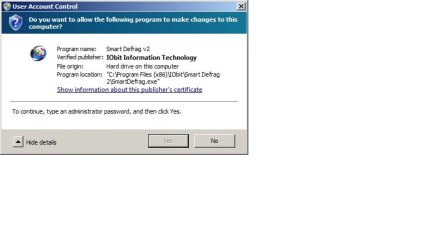
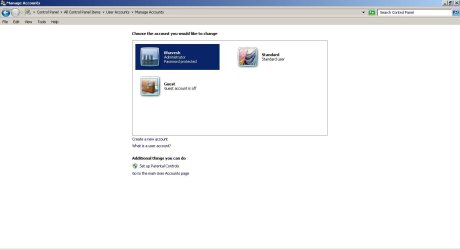
I have used the guide on how to enable and hide the in-built admin account and was successful however I found that after making the account I used to set up Windows 7 from admin to standard user and then disabling the in-built admin account the UAC setting would not correctly work, as it wanted admin privileges but it was not giving me the option to enter the admin password. The ok button would be greyed out.
Has anyone come across this before and if so what is the solution.
Windows 7 Professional 64bit
I have used the guide on how to enable and hide the in-built admin account and was successful however I found that after making the account I used to set up Windows 7 from admin to standard user and then disabling the in-built admin account the UAC setting would not correctly work, as it wanted admin privileges but it was not giving me the option to enter the admin password. The ok button would be greyed out.
Has anyone come across this before and if so what is the solution.
My Computer
- Computer type
- PC/Desktop
- Computer Manufacturer/Model Number
- Dell XPS L502x
- OS
- Professional 64 Bit SP1
- CPU
- Intel Core i7
- Memory
- 8GB
- Graphics Card(s)
- NVIDIA 1GB
- Antivirus
- Norton 360
- Browser
- Google Chrome