Admin has no privileges, cannot create user account

msalton1

New member
Member
VIP
Local time
1:06 PM
Messages
325
I have an admin acct that doesn't seem to have privileges. One issue is that I'm unable to create a user acct (specified acct name not valid, cannot contain the following characters: |[]”:;|<>+=,?*)
The new user name contains no such characters.

So I enabled the hidden admin acct, which seems to have privileges, but gets the same error when trying to create a new acct.

various virus, malware and rootkit detection utilities don't find anything. Outside of the admin issues and account creation, the system runs fine.

This system is a Dell XPS 410, upgraded to win 7 Pro x64 SP1 from XP (before I obtained it).

Any ideas appreciated.

Thanks!
 
Last edited:

My Computer

Computer type
PC/Desktop
Computer Manufacturer/Model Number
custom
OS
windows 7 Pro 64 Bit
CPU
i5 4670K
Motherboard
Asus Max Hero 1150 socket
Memory
16GB DDR3@933mhz
Graphics Card(s)
Radeon R9 390 8192mb
Monitor(s) Displays
Dell U2415 x3
Screen Resolution
1920 (5760) x 1200 x3
Hard Drives
System: Kingston 128GB SSD

Installing to Samsung 860 EVO 500GB
WD Black 2 TB & 1 TB
PSU
Corsair CX750M
Cooling
Hyper 312
Internet Speed
50mbps
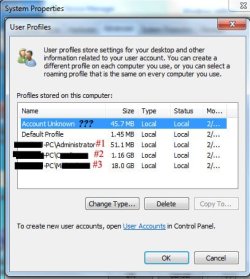
I'm checking into profile issues...System Properties\Advanced|User Profile settings shows the users in the below image.

All seems well except for the Account Unknown. I guess #1 is the hidden admin account, #'s 2 & 3 are the named user accts.

There was an account named updatususer. Research shows that this is an nvidea update service account. I removed it from the admin account (still can't create a new user).

in a cmd window, 'net user' returns only users #2 & #3. User #3 is the local admin account without privileges.

Any ideas as to what the Account Unknown user could be (if it's even pertinent to the issue)? I thought it might be the guest account, but it's not turned on.

MPCusers.jpg
 
Last edited:

My Computer

Computer type
PC/Desktop
Computer Manufacturer/Model Number
custom
OS
windows 7 Pro 64 Bit
CPU
i5 4670K
Motherboard
Asus Max Hero 1150 socket
Memory
16GB DDR3@933mhz
Graphics Card(s)
Radeon R9 390 8192mb
Monitor(s) Displays
Dell U2415 x3
Screen Resolution
1920 (5760) x 1200 x3
Hard Drives
System: Kingston 128GB SSD

Installing to Samsung 860 EVO 500GB
WD Black 2 TB & 1 TB
PSU
Corsair CX750M
Cooling
Hyper 312
Internet Speed
50mbps
Have you run a full scan with Malwarebytes and checked System Files integrity from Troubleshooting Steps for Windows 7 ?

I wouldn't waste any more time but instead invest it in getting a perfect Clean Reinstall Windows 7 which will stay that way as long as you stick with the tools and methods given in the tutorial which has been used by over a million consumers without a single complaint or issue returned with. You'll certainly avoid the kind of corruption that you have now, which normally comes with tweaking and tools that don't work well with Win7.

Otherwise if you're particularly fond of your cripple then you can try a Repair Install.
 
Hi, thanks for the response. Yes, I've run extensive diagnostics and virus/malware/rootkit checks. When I got the machine, the drive had serious errors, which chkdsk fixed, but performance was in the dumper and CDI registered caution. Replacing the HD, removing unwanted programs, services, etc. brought it back to pretty impressive performance. In fact, this machine runs great in all aspects, aside from the admin privileges issue (baffling that even the hidden admin can't create a new acct, even from safe mode). As for reinstalling the OS, it's activated, but I can't retrieve the product key, so I'd have to buy a new license, and I'd like to avoid that (the product key concerned me...the guy is looking for it. He's a computer illiterate and had some tech shop do the upgrade...he's checking on the key).
 

My Computer

Computer type
PC/Desktop
Computer Manufacturer/Model Number
custom
OS
windows 7 Pro 64 Bit
CPU
i5 4670K
Motherboard
Asus Max Hero 1150 socket
Memory
16GB DDR3@933mhz
Graphics Card(s)
Radeon R9 390 8192mb
Monitor(s) Displays
Dell U2415 x3
Screen Resolution
1920 (5760) x 1200 x3
Hard Drives
System: Kingston 128GB SSD

Installing to Samsung 860 EVO 500GB
WD Black 2 TB & 1 TB
PSU
Corsair CX750M
Cooling
Hyper 312
Internet Speed
50mbps
Will do. Appreciate the direction.
 

My Computer

Computer type
PC/Desktop
Computer Manufacturer/Model Number
custom
OS
windows 7 Pro 64 Bit
CPU
i5 4670K
Motherboard
Asus Max Hero 1150 socket
Memory
16GB DDR3@933mhz
Graphics Card(s)
Radeon R9 390 8192mb
Monitor(s) Displays
Dell U2415 x3
Screen Resolution
1920 (5760) x 1200 x3
Hard Drives
System: Kingston 128GB SSD

Installing to Samsung 860 EVO 500GB
WD Black 2 TB & 1 TB
PSU
Corsair CX750M
Cooling
Hyper 312
Internet Speed
50mbps
How did you transfer Win7 to the new hard drive? Are you sure there is no COA sticker on the PC anywhere (bottom or under battery in laptop, on tower back or side)?
 
There is a COA sticker from XP MC 2005. I imaged the drive and restored it to the new HD. But produkey returns: "Key cannot be found".
 

My Computer

Computer type
PC/Desktop
Computer Manufacturer/Model Number
custom
OS
windows 7 Pro 64 Bit
CPU
i5 4670K
Motherboard
Asus Max Hero 1150 socket
Memory
16GB DDR3@933mhz
Graphics Card(s)
Radeon R9 390 8192mb
Monitor(s) Displays
Dell U2415 x3
Screen Resolution
1920 (5760) x 1200 x3
Hard Drives
System: Kingston 128GB SSD

Installing to Samsung 860 EVO 500GB
WD Black 2 TB & 1 TB
PSU
Corsair CX750M
Cooling
Hyper 312
Internet Speed
50mbps
I will. I'm imaging the partition ATM. Odd. I was checking out EV in an attempt to see what was logged when I tried to create a new user...suddenly, I can. I have no idea why. Still having some privilege issues though. Permissions. I hope I don't inconvenience you with the wait. This partition can take about 45 mins to image. I don't have to have this resolved tonight, and I appreciate your willingness to work with me - thanks. I'll post the results as soon as I finish.
 

My Computer

Computer type
PC/Desktop
Computer Manufacturer/Model Number
custom
OS
windows 7 Pro 64 Bit
CPU
i5 4670K
Motherboard
Asus Max Hero 1150 socket
Memory
16GB DDR3@933mhz
Graphics Card(s)
Radeon R9 390 8192mb
Monitor(s) Displays
Dell U2415 x3
Screen Resolution
1920 (5760) x 1200 x3
Hard Drives
System: Kingston 128GB SSD

Installing to Samsung 860 EVO 500GB
WD Black 2 TB & 1 TB
PSU
Corsair CX750M
Cooling
Hyper 312
Internet Speed
50mbps
I can still create as many users as I like, but a definite permission issue here.

Code:
Diagnostic Report (1.9.0027.0):
-----------------------------------------
Windows Validation Data-->

Validation Code: 0
Cached Online Validation Code: 0x0
Windows Product Key: *****-*****-*****-*****-VMKB8
Windows Product Key Hash: h2JKhF6FpTL5HLxaH/s/fDzA1Gg=
Windows Product ID: 55041-033-2906747-86236
Windows Product ID Type: 6
Windows License Type: Volume MAK
Windows OS version: 6.1.7601.2.00010100.1.0.048
ID: {1FA692D0-EAB8-4798-BECB-94DE99F11163}(1)
Is Admin: Yes
TestCab: 0x0
LegitcheckControl ActiveX: N/A, hr = 0x80070002
Signed By: N/A, hr = 0x80070002
Product Name: Windows 7 Professional
Architecture: 0x00000009
Build lab: 7601.win7sp1_gdr.150113-1808
TTS Error: 
Validation Diagnostic: 
Resolution Status: N/A

Vista WgaER Data-->
ThreatID(s): N/A, hr = 0x80070002
Version: N/A, hr = 0x80070002

Windows XP Notifications Data-->
Cached Result: N/A, hr = 0x80070002
File Exists: No
Version: N/A, hr = 0x80070002
WgaTray.exe Signed By: N/A, hr = 0x80070002
WgaLogon.dll Signed By: N/A, hr = 0x80070002

OGA Notifications Data-->
Cached Result: N/A, hr = 0x80070002
Version: N/A, hr = 0x80070002
OGAExec.exe Signed By: N/A, hr = 0x80070002
OGAAddin.dll Signed By: N/A, hr = 0x80070002

OGA Data-->
Office Status: 109 N/A
OGA Version: N/A, 0x80070002
Signed By: N/A, hr = 0x80070002
Office Diagnostics: B4D0AA8B-604-645_025D1FF3-364-80041010_025D1FF3-229-80041010_025D1FF3-230-1_025D1FF3-517-80040154_025D1FF3-237-80040154_025D1FF3-238-2_025D1FF3-244-80070002_025D1FF3-258-3

Browser Data-->
Proxy settings: N/A
User Agent: Mozilla/4.0 (compatible; MSIE; Win32)
Default Browser: C:\Users\Michael\AppData\Local\Google\Chrome\Application\chrome.exe
Download signed ActiveX controls: Prompt
Download unsigned ActiveX controls: Disabled
Run ActiveX controls and plug-ins: Allowed
Initialize and script ActiveX controls not marked as safe: Disabled
Allow scripting of Internet Explorer Webbrowser control: Disabled
Active scripting: Allowed
Script ActiveX controls marked as safe for scripting: Allowed

File Scan Data-->

Other data-->
Office Details: <GenuineResults><MachineData><UGUID>{1FA692D0-EAB8-4798-BECB-94DE99F11163}</UGUID><Version>1.9.0027.0</Version><OS>6.1.7601.2.00010100.1.0.048</OS><Architecture>x64</Architecture><PKey>*****-*****-*****-*****-BBBBB</PKey><PID>55041-033-2906747-86236</PID><PIDType>6</PIDType><SID>S-1-5-21-1884912282-262114275-1005203524</SID><SYSTEM><Manufacturer>Dell Inc.                </Manufacturer><Model>Dell DXP061                  </Model></SYSTEM><BIOS><Manufacturer>Dell Inc.                </Manufacturer><Version>2.5.3 </Version><SMBIOSVersion major="2" minor="3"/><Date>20071122000000.000000+000</Date></BIOS><HWID>E5393507018400FA</HWID><UserLCID>0409</UserLCID><SystemLCID>0409</SystemLCID><TimeZone>Central Standard Time(GMT-06:00)</TimeZone><iJoin>0</iJoin><SBID><stat>3</stat><msppid></msppid><name></name><model></model></SBID><OEM><OEMID>DELL  </OEMID><OEMTableID>B8K    </OEMTableID></OEM><GANotification/></MachineData><Software><Office><Result>109</Result><Products/><Applications/></Office></Software></GenuineResults>  

Spsys.log Content: 0x80070002

Licensing Data-->
Software licensing service version: 6.1.7601.17514

Name: Windows(R) 7, Professional edition
Description: Windows Operating System - Windows(R) 7, VOLUME_MAK channel
Activation ID: 9abf5984-9c16-46f2-ad1e-7fe15931a8dd
Application ID: 55c92734-d682-4d71-983e-d6ec3f16059f
Extended PID: 55041-00172-033-290674-03-1033-7600.0000-3552010
Installation ID: 016184213445285681454420322815540995792572652325092936
Processor Certificate URL: http://go.microsoft.com/fwlink/?LinkID=88338
Machine Certificate URL: http://go.microsoft.com/fwlink/?LinkID=88339
Use License URL: http://go.microsoft.com/fwlink/?LinkID=88341
Product Key Certificate URL: http://go.microsoft.com/fwlink/?LinkID=88340
Partial Product Key: VMKB8
License Status: Licensed
Remaining Windows rearm count: 4
Trusted time: 2/16/2015 11:07:01 PM

Windows Activation Technologies-->
HrOffline: 0x00000000
HrOnline: 0x00000000
HealthStatus: 0x0000000000000000
Event Time Stamp: 9:6:2014 00:31
ActiveX: Registered, Version: 7.1.7600.16395
Admin Service: Registered, Version: 7.1.7600.16395
HealthStatus Bitmask Output:


HWID Data-->
HWID Hash Current: KgAAAAEAAAABAAEAAQABAAAAAQABAAEA6GGGI2xE5JxcwcqOWmU8eyqF

OEM Activation 1.0 Data-->
N/A

OEM Activation 2.0 Data-->
BIOS valid for OA 2.0: yes
Windows marker version: 0x0
OEMID and OEMTableID Consistent: yes
BIOS Information: 
  ACPI Table Name    OEMID Value    OEMTableID Value
  APIC            DELL          B8K    
  FACP            DELL          B8K    
  HPET            DELL          B8K    
  BOOT            DELL          B8K    
  MCFG            DELL          B8K    
  SSDT            DELL        st_ex
  DUMY            DELL          B8K    
  SLIC            DELL          B8K

 

My Computer

Computer type
PC/Desktop
Computer Manufacturer/Model Number
custom
OS
windows 7 Pro 64 Bit
CPU
i5 4670K
Motherboard
Asus Max Hero 1150 socket
Memory
16GB DDR3@933mhz
Graphics Card(s)
Radeon R9 390 8192mb
Monitor(s) Displays
Dell U2415 x3
Screen Resolution
1920 (5760) x 1200 x3
Hard Drives
System: Kingston 128GB SSD

Installing to Samsung 860 EVO 500GB
WD Black 2 TB & 1 TB
PSU
Corsair CX750M
Cooling
Hyper 312
Internet Speed
50mbps
The install uses a Volume License Key which should be associated with an organization or business and administered by it's IT Admin. In this case it is likely counterfeit.

I would contact the person who sold it to you and ask how you can reactivate with a valid Product Key, as they likely sold you stolen or counterfeit goods. It's possible they will make it good, but I wouldn't hold my breath.

Otherwise if I were in this position now, what I would do is shrink C by enough to Clean Install Windows 10 Technical Preview which even though it is is only pre-beta is remarkably stable enough that I have not been back to Windows 7 since I installed it in early October. This will configure a Dual Boot menu so you can go back and forth between OS's with no problem.

As you acclimate to 10 you can move your files over from Win7, although I would leave Win7 until the final verison of Windows 10 is released sometime next year. You will be in on the ground floor, able to influence the final product due to an excellent feedback program, get a free Upgrade from Win7 as well as other offers like earned us here free copies during Win7 beta.

Since this is the most definitely the future and already a better OS than Win7, I have no hesitation under these circumstance to encourage yous to try it before you pay to buy a copy of Win7 which will be replaced by a worthy successor by this time next year.
 
Thanks for the license key info. I'll have to straighten that out. As far as win10, I liked 9879, but wasn't impressed with 9926. I may have to re-visit. At any rate, thanks for your help. Much appreciated.
 

My Computer

Computer type
PC/Desktop
Computer Manufacturer/Model Number
custom
OS
windows 7 Pro 64 Bit
CPU
i5 4670K
Motherboard
Asus Max Hero 1150 socket
Memory
16GB DDR3@933mhz
Graphics Card(s)
Radeon R9 390 8192mb
Monitor(s) Displays
Dell U2415 x3
Screen Resolution
1920 (5760) x 1200 x3
Hard Drives
System: Kingston 128GB SSD

Installing to Samsung 860 EVO 500GB
WD Black 2 TB & 1 TB
PSU
Corsair CX750M
Cooling
Hyper 312
Internet Speed
50mbps
Back
Top